
Einführung
This manual provides comprehensive instructions for the assembly, operation, maintenance, and troubleshooting of your FLEXISPOT EN2 Whole-Piece Standing Desk. Please read this manual thoroughly before use to ensure safe and efficient operation.

Image: The FLEXISPOT EN2 Whole-Piece Standing Desk, showcasing its spacious white desktop, gray frame, and integrated clamp power strip. The desk is set up with multiple devices, highlighting its functionality.
Sicherheitswarnungen
Wichtige Sicherheitshinweise:
- This desk has a maximum weight recommendation of 154 pounds (70 kg). Exceeding this weight limit could lead to damage or failure of the desk.
- The desk should be securely anchored to the wall if the combined weight of the desktop and objects placed on it exceeds 110 pounds (50 kg) to prevent tipping over.
- Always use caution when assembling the desk, and ensure all parts are securely fastened before use.
- Children should not be allowed to climb or play on the desk, as it poses a risk of injury.
- Regularly inspect the desk for any signs of wear, damage, or instability, and address any issues promptly to maintain safety.
Produkteigenschaften
- Removable Desktop Power Outlet: Equipped with 3 power outlets and 2 USB charging ports (5V/2A) for convenient device charging. Can be clipped to the back or side of the desk. Includes a cable management device for a tidy workspace.
- Ampder ganze Schreibtisch: Features a 1-inch eco-friendly desktop providing generous space for computer setups, documents, and accessories. Note: Desktop dimensions may vary slightly by 0 to 1 inch due to hand measurements.
- 4 Memory Buttons: A 6-button digital controller allows easy switching between sitting and standing positions with 4 programmable memory presets. The motorized system adjusts smoothly from 28.1 inches to 45.7 inches with a quiet motor operating at less than 50 dB.
- Langlebige Konstruktion: Rigorously tested frame for performance, durability, and safety. Constructed from premium wood planks and a sturdy industrial-grade steel frame, supporting up to 176 pounds.

Image: Visual comparison illustrating the enhanced stability of a smooth, single-piece desktop compared to a less stable uneven two-piece design.
Einrichtung und Montage
Your FLEXISPOT EN2 desk will arrive in two separate packages, which may be shipped separately. Assembly is designed to be straightforward, but an electric drill (not included) may be required for certain steps, such as attaching the crossbeam or cable tray.
- Ensure all components from both packages are present before beginning assembly.
- Follow the provided user guide carefully for step-by-step instructions. Pay close attention to the crossbeam adjustment in Step 2; ensure screws are only loose enough to extend the crossbar to the maximum sign, and tighten them only in Step 8 after the base is attached to the table.
- Use a battery-powered drill for self-tapping screws for predrilled holes for table legs and for the center holes on the crossbeam or cable tray.

Image: Illustration showing two separate packages for the desk, one containing the desktop and the other the desk frame, indicating they may arrive at different times.
Bedienungsanleitung
Höhenverstellung
The FLEXISPOT EN2 features a motorized height adjustment system controlled by a 6-button digital panel. The desk can be smoothly adjusted from a minimum height of 28.1 inches to a maximum height of 45.7 inches.
- Verwenden Sie die Nach oben (^) Und Unten (v) Die Schreibtischhöhe lässt sich über die Pfeiltasten am Bedienfeld manuell einstellen. Die aktuelle Höhe wird auf dem LED-Display angezeigt.
- The motor operates quietly (less than 50 dB) for minimal disruption.
Speichervoreinstellungen
The control panel includes four programmable memory presets (1, 2, 3, 4) to quickly switch between your preferred sitting and standing heights.
- Stellen Sie den Schreibtisch mithilfe der Auf-/Ab-Pfeile auf die gewünschte Höhe ein.
- Drücken Sie die "S" button (Set) once. The LED display will flash.
- Drücken Sie sofort eine der Zifferntasten (1, 2, 3 oder 4), um die aktuelle Höhe in dieser Voreinstellung zu speichern.
- To recall a saved height, simply press the corresponding number button. The desk will automatically move to the stored position.
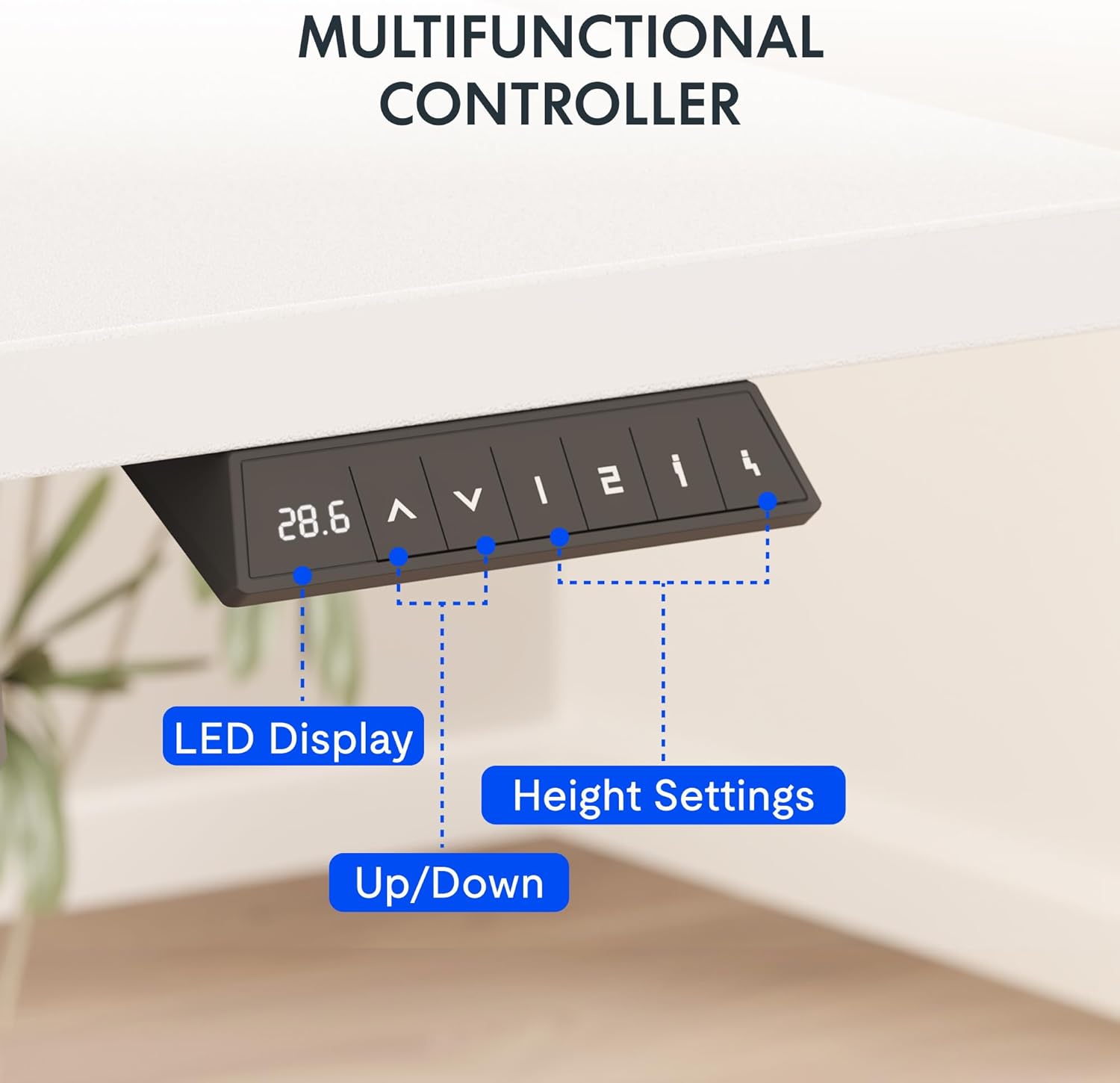
Bild: Eine detaillierte view of the desk's control panel, showing the LED display, up/down adjustment buttons, and four programmable memory preset buttons.
Integrierte Steckdose
The removable desktop power outlet provides convenient access to power for your electronic devices. It includes 3 AC outlets and 2 USB charging ports (5V/2A).
- The power outlet can be clipped to the back or side of your desk.
- Use the USB ports for charging smaller devices like smartphones and tablets.
- The power outlet is designed for general electronic devices and may not support laptop charging.
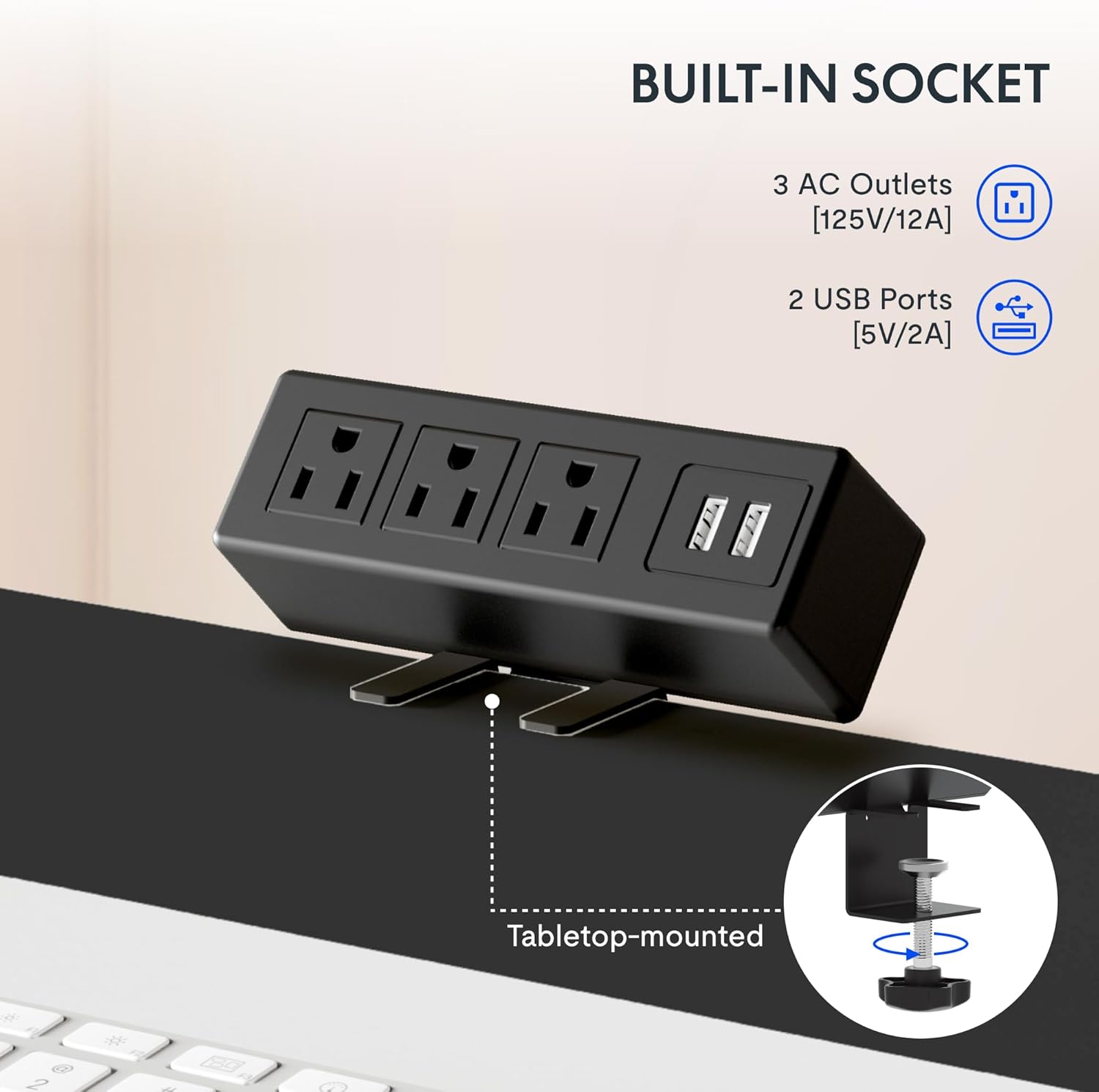
Image: A close-up of the integrated power strip, featuring three AC outlets and two USB ports, designed to clamp onto the desk edge for easy access.
Wartung
To ensure the longevity and optimal performance of your FLEXISPOT EN2 Standing Desk, follow these maintenance guidelines:
- Reinigung: Wischen Sie die Tischplatte und den Rahmen mit einem weichen, fusselfreien Tuch ab.amp Verwenden Sie kein scheuerndes Reinigungsmittel oder aggressive Chemikalien, die die Oberfläche beschädigen könnten.
- Inspektion: Überprüfen Sie regelmäßig alle Schrauben und Bolzen auf festen Sitz. Ziehen Sie sie gegebenenfalls nach.
- Kabelmanagement: Utilize the provided cable management solutions to keep cords organized and prevent them from getting caught during height adjustments.
- Gewichtsbeschränkung: Adhere strictly to the maximum weight recommendation of 176 pounds to prevent motor strain or structural damage.
Fehlerbehebung
If you encounter any issues with your FLEXISPOT EN2 Standing Desk, refer to the following common troubleshooting tips:
- Desk Not Moving / Error Code "r5t": If the desk is unresponsive or displays an error code like "r5t", a system reset may be required.
- Ziehen Sie den Stecker des Schreibtisches aus der Steckdose.
- Warten Sie mindestens 10-15 Sekunden.
- Schließen Sie den Schreibtisch wieder an die Steckdose an.
- Press and hold the "Down (v)" button until the desk reaches its lowest position and slightly rises, then releases. This typically initiates a reset.
- Wenn das Problem weiterhin besteht, wenden Sie sich an den Kundendienst.
- Ungleichmäßige Bewegung: Ensure the desk is placed on a level surface and that all leg components are securely fastened.
- Geräusche während der Justierung: A slight motor hum is normal. Excessive or unusual noises may indicate an issue; ensure no cables or objects are obstructing the lifting columns.
Technische Daten
| Besonderheit | Detail |
|---|---|
| Marke | FLEXISPOT |
| Modellname | EN 2-Norm |
| Größe (Aktuelles Produkt) | 60x24 Zoll |
| Farbe | Gray Frame + White Top |
| Stil | Lässig |
| Grundmaterial | Legierter Stahl |
| Top-Materialtyp | Holz |
| Besondere Merkmale | Adjustable, Electric, Ergonomic, Integrated Power Strip |
| Mindesthöhe | 28.1 Zoll |
| Maximale Höhe | 45.7 Zoll |
| Maximalgewichtsempfehlung | 176 Pfund |
| Motorgeräuschpegel | Weniger als 50 dB |
| Erforderliche Montage | Ja |
Garantie und Support
FLEXISPOT bietet Ihnen eine umfassende Garantieabdeckung für Ihre Sicherheit:
- 5 Jahr Garantie: Deckt Rahmen, Motoren und andere mechanische Geräte ab.
- 2 Jahr Garantie: Beinhaltet Steuerungen, Schalter und Elektronik.
For customer support or warranty claims, please refer to the contact information provided with your product packaging or visit the official FLEXISPOT webWebsite.
Offizielle Produktvideos
FLEXISPOT EN2 Whole-Piece Standing Desk Overview
Video: Ein Beamter überview of the FLEXISPOT EN2 Whole-Piece Standing Desk, demonstrating its features and functionality.
FLEXISPOT Standing Desk Features
Video: A promotional video from FLEXISPOT showcasing various features of their standing desks, including smooth height adjustment and sturdy design.
FlexiSpot Standing Desk - Healthier Lifestyle
Video: An official FlexiSpot video emphasizing the benefits of using a standing desk for a healthier lifestyle and improved work ergonomics.