
1. Einleitung
Thank you for choosing the XTUGA AM6 4/6-Channel Audio Mixer. This professional mixing console is designed for a variety of audio applications, including home music production, live webcasting, and karaoke (K-song). It features Bluetooth connectivity, USB recording capabilities, 48V phantom power for condenser microphones, and integrated effects. Please read this manual thoroughly to understand the mixer's functions and ensure optimal performance.
2. Packungsinhalt
Bitte prüfen Sie das Paket auf folgende Artikel:
- 1 x XTUGA AM6 Audio Mixer
- 1 x USB-Kabel
- 1 x Netzteil/Ladegerät
- 1 x Benutzerhandbuch
3. Produktmerkmale
The XTUGA AM6 mixer offers a range of features to enhance your audio experience:
- 4-Channel/6-Channel Mixing Console: Features two mono channels and one stereo tape channel.
- USB-Aufnahme und -Wiedergabe: Direct recording to USB or computer, and playback of MP3, FLAC, etc.
- Bluetooth-Konnektivität: Wireless connection for mobile devices within 4-8 meters (without obstruction).
- 48V Phantomspeisung: Integrated phantom power for condenser microphones.
- Built-in Effects Processor: Includes Delay and Repeat effects.
- Sound Card Function: Acts as an external sound card when connected to a computer via USB.
- Geräuscharmes Design: Ensures clear audio on all microphone inputs.
- Einstellbare Bedienelemente: Gain, 2-band EQ (high/low), signal level, main output, headphone volume, and effect parameters.
- Dedicated Headphone Output: With independent volume control for monitoring.
- Mehrere Eingabeoptionen: Supports 6.5mm phone type and RCA type connectors for line-level instruments.
- Kompakt und tragbar: Can be powered directly via PC USB, mobile power bank, or AC/DC adapter.
4. Einrichtung
4.1 Stromanschluss
Connect the provided power adapter to the mixer's power input and then to a suitable power outlet. Alternatively, the mixer can be powered via a USB connection to a computer or a mobile power bank.
4.2 Eingangsverbindungen
Connect your audio sources to the appropriate input channels:
- Mikrofone: Use XLR (card head) or 6.5mm jack connectors for microphone inputs. For condenser microphones requiring phantom power, ensure the 48V phantom power is activated (see Section 5.2).
- Line-Level-Instrumente: Use 6.5mm phone type or RCA type connectors for instruments like electronic keyboards or other audio equipment.

4.3 Ausgangsanschlüsse
- Hauptausgang: Connect the main output (L/R) to your ampVerstärker, Aktivlautsprecher oder Aufnahmeschnittstelle.
- Kopfhörerausgang: Connect your headphones to the dedicated headphone jack for monitoring. Adjust the headphone volume using its dedicated control.
5. Bedienungsanleitung
5.1 Grundlagen der Audiomischung
Each input channel features controls for gain, high/low EQ, and signal level. Adjust these to achieve the desired sound for each input. Use the main output level control to set the overall volume.
5.2 48V Phantomspeisung
To use condenser microphones, activate the 48V phantom power. Locate the 48V switch on the mixer and press it. Ensure condenser microphones are connected before activating phantom power to prevent damage to other equipment.

5.3 Bluetooth-Verbindung
So verbinden Sie ein Mobilgerät via Bluetooth:
- Stellen Sie sicher, dass der Mixer eingeschaltet ist.
- Switch the MP3 function to BT (Bluetooth) mode. The display will indicate Bluetooth pairing mode.
- On your mobile device, search for available Bluetooth devices and select "XTUGA AM6" (or similar name).
- Once connected, you can stream audio wirelessly from your device to the mixer.

5.4 USB-Aufnahme und -Wiedergabe
5.4.1 Aufzeichnung auf dem Computer
The mixer can function as a sound card for your computer:
- Verbinden Sie den Mixer mit Ihrem Computer mithilfe des mitgelieferten USB-Kabels.
- Switch the mixer's MP3 function to PC mode. The display will show "PC".
- On your computer, select the mixer as the audio input/output device in your recording software (e.g., GoldWave).
- You can now record audio from the mixer to your computer and play background music from your computer through the mixer.


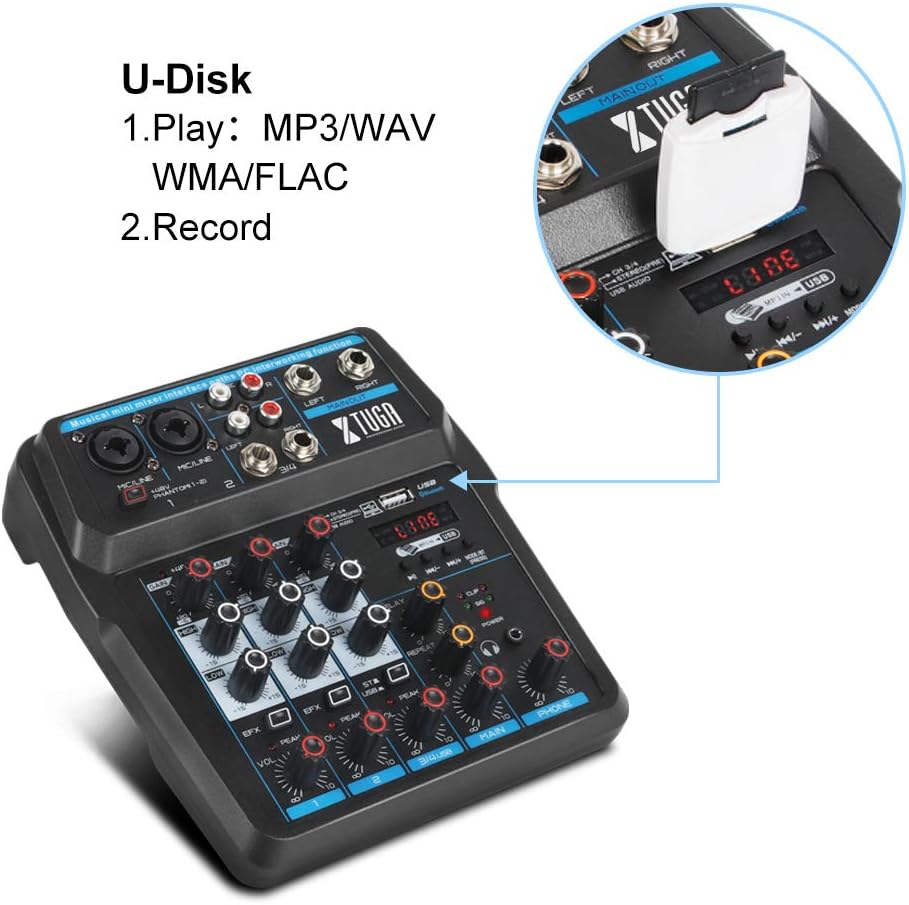
5.4.2 U-Disk (USB Drive) Playback and Recording
Insert a USB flash drive into the USB port on the mixer:
- Wiedergabe: The mixer can play MP3, WAV, WMA, FLAC, and other audio formats directly from the U-Disk. Use the MP3 function keys to control playback.
- Aufnahme: You can also record directly to the U-Disk. Refer to the mixer's display and controls for recording functions.
5.5 Effektprozessor
The mixer includes built-in Delay and Repeat effects. Use the dedicated controls to adjust the effect parameters, such as echo repeat frequency and time interval, to achieve your desired sound.
6. Wartung
To ensure the longevity and optimal performance of your XTUGA AM6 mixer:
- Reinigung: Reinigen Sie die Oberfläche des Mischers mit einem weichen, trockenen Tuch. Vermeiden Sie die Verwendung von flüssigen Reinigern oder Lösungsmitteln.
- Lagerung: Bewahren Sie den Mixer an einem kühlen, trockenen Ort fern von direkter Sonneneinstrahlung, extremen Temperaturen und hoher Luftfeuchtigkeit auf.
- Handhabung: Behandeln Sie den Mixer vorsichtig. Vermeiden Sie es, ihn fallen zu lassen oder starken Stößen auszusetzen.
- Belüftung: Sorgen Sie für ausreichende Belüftung rund um den Mixer, um eine Überhitzung zu vermeiden.
7. Fehlerbehebung
If you encounter issues with your XTUGA AM6 mixer, refer to the following common problems and solutions:
- Kein Strom: Ensure the power adapter is securely connected and the power outlet is functional. Try a different USB power source if using USB power.
- Keine Tonausgabe: Check all cable connections (inputs, main output, headphones). Verify that gain controls, channel levels, and the main output level are turned up. Ensure the correct input source is selected (e.g., LINE, BT, PC, USB).
- Mikrofon funktioniert nicht: For condenser microphones, ensure 48V phantom power is activated. Check microphone cable connections. Verify microphone gain and channel level.
- Probleme mit der Bluetooth-Verbindung: Ensure the mixer is in BT mode and discoverable. Turn off and on Bluetooth on your mobile device. Ensure no other devices are connected to the mixer via Bluetooth.
- Probleme bei der USB-Aufnahme/Wiedergabe: Ensure the mixer is in PC or USB mode as appropriate. Check USB cable connection to the computer or U-Disk insertion. Verify computer audio settings if recording to PC.
- Verzerrter Klang: Reduce input gain or channel levels to prevent clipping (indicated by peak LEDs). Check cable quality.
If the problem persists, please contact XTUGA customer support for further assistance.
8. Spezifikationen
| Besonderheit | Spezifikation |
|---|---|
| Marke | XTUGA |
| Modell | AM4 |
| Anzahl der Kanäle | 4 (also described as 4/6-channel) |
| Konnektivitätstechnologie | Aux-Anschluss, Bluetooth, USB |
| Stromquelle | Kabelgebundene Elektrik |
| Bandtage | 48 Volt (für Phantomspeisung) |
| Herstellerteilenummer | AM |
| UPC | 784124158778 |
9. Garantie und Support
XTUGA products are designed for reliability and performance. For warranty information, technical support, or service inquiries, please refer to the warranty card included with your product or visit the official XTUGA webBewahren Sie Ihren Kaufbeleg als Kaufnachweis für eventuelle Garantieansprüche auf.