
1. Einleitung
Thank you for choosing the Tbest CCD HD IP68 Reversing Camera. This manual provides detailed instructions for the installation, operation, and maintenance of your new reversing camera system. Please read this manual thoroughly before installation and use to ensure proper function and safety. This camera is designed to enhance your vehicle's safety by providing a clear view des Bereichs hinter Ihrem Auto beim Rückwärtsfahren.
2. Produktüberschreitungview
2.1 Hauptmerkmale
- High-Definition CCD Sensor: Provides clear and sharp images.
- Wasserdichtigkeitsklasse IP68: Gewährleistet Langlebigkeit und zuverlässige Leistung unter verschiedenen Wetterbedingungen.
- 170-Grad-Weitwinkelobjektiv: Bietet ein weites Feld von view um tote Winkel zu minimieren.
- Nachtsichtfähigkeit: Operates effectively in low-light conditions.
- Integrated License Plate Light Design: Replaces the original license plate light for a seamless, factory-like installation.
- Parkrichtlinien: Assists with precise parking maneuvers.
- Universal RCA Connector: Compatible with most aftermarket car displays and head units.
2.2 Packungsinhalt
- 1 x Tbest CCD HD Reversing Camera
- 1 x Video Cable (approx. 6 meters / 19.7 feet)
- 1 x Stromkabel
- 1 x Benutzerhandbuch (dieses Dokument)

This image displays the complete set of cables provided with the camera, including the video cable (approximately 6 meters long) and the power cable.
3. Sicherheitshinweise
Bitte beachten Sie folgende Sicherheitsvorkehrungen:
- Vor der Durchführung jeglicher elektrischer Arbeiten muss immer die Fahrzeugbatterie abgeklemmt werden.
- Stellen Sie sicher, dass alle Kabel ordnungsgemäß isoliert und befestigt sind, um Kurzschlüsse oder Beschädigungen zu vermeiden.
- Den Fahrer nicht behindern. view oder die Fahrzeugsteuerung während der Installation beeinträchtigen.
- This camera is an aid for reversing and parking; it does not replace the driver's responsibility to check surroundings manually.
- Ziehen Sie einen Fachmann zu Rate, wenn Sie sich bei irgendeinem Teil des Installationsprozesses unsicher sind.
4. Einrichtung und Installation
The Tbest Reversing Camera is designed for specific vehicle models, integrating into the license plate light housing. Compatible vehicles include Renault Fluence (2019-2014), Renault Duster (2009-2014), Dacia Duster (2010-2014), Renault Megane 3 (2008-2016), and Nissan Terrano (2010-2014).
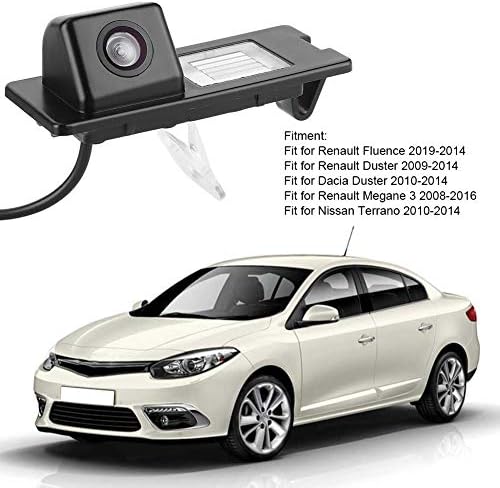
The camera unit is shown next to a list detailing compatible vehicle models, including Renault Fluence, Duster, and Megane, and Nissan Terrano.
4.1 Installationsschritte
- Fahrzeug vorbereiten: Ensure the vehicle is turned off and the parking brake is engaged. Disconnect the negative terminal of the car battery to prevent electrical shorts.
- Remove Original License Plate Light: Carefully remove the existing license plate light housing from your vehicle's rear. This usually involves unfastening screws or clips.
- Install the Camera Unit: Insert the Tbest reversing camera unit into the vacant license plate light slot. Ensure it fits securely and the camera lens is facing outwards and downwards for optimal viewing-Winkel.
- Strom anschließen: Connect the camera's power cable (red and black wires) to the vehicle's reverse light power supply. The red wire connects to the positive (+) lead of the reverse light, and the black wire connects to a ground (-) point. This ensures the camera activates automatically when reverse gear is engaged.
- Verlegung des Videokabels: Run the video cable (RCA connector) from the camera unit through the vehicle's interior to the location of your car's display screen (e.g., infotainment system, rearview mirror monitor). Ensure the cable is routed safely, away from moving parts or heat sources, and secured to prevent damage.
- Anschluss an das Display: Plug the RCA video cable into the video input port of your car's display unit.
- Testen Sie das System: Reconnect the car battery. Turn on the vehicle and engage reverse gear. The camera image should appear on your display screen. Adjust the camera's position slightly if needed to optimize the view.
- Sichere Verkabelung: Once tested and confirmed working, secure all wiring with cable ties or electrical tape to prevent rattling or damage.

The camera is shown integrated into a vehicle's rear license plate light housing, with the corresponding view on the car's display screen, complete with dynamic parking guidelines.
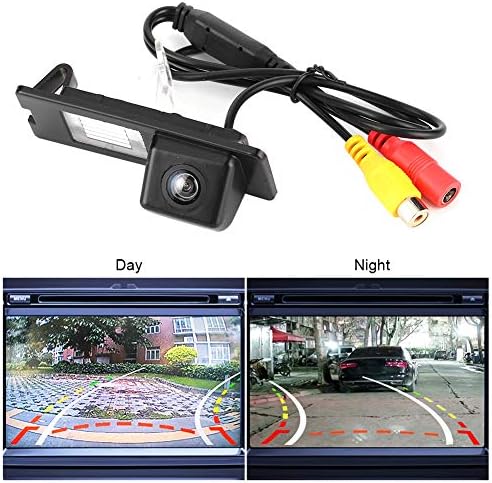
The camera unit is pictured with its RCA video and power cables. Below, two screens demonstrate the camera's performance in both bright daylight and low-light night conditions.
5. Bedienungsanleitung
Once properly installed, the Tbest Reversing Camera operates automatically:
- Automatische Aktivierung: When you shift your vehicle into reverse gear, the camera will automatically power on and transmit its video feed to your connected display screen.
- Parkrichtlinien: The display will show dynamic parking guidelines overlaid on the camera's view, assisting you in judging distances and positioning your vehicle.
- Weitwinkel View: Utilize the 170-degree wide-angle view to observe obstacles and surroundings that may not be visible in your rearview Spiegel.
- Nachtsicht: The camera's low-light capability ensures a clear view even in dark conditions.
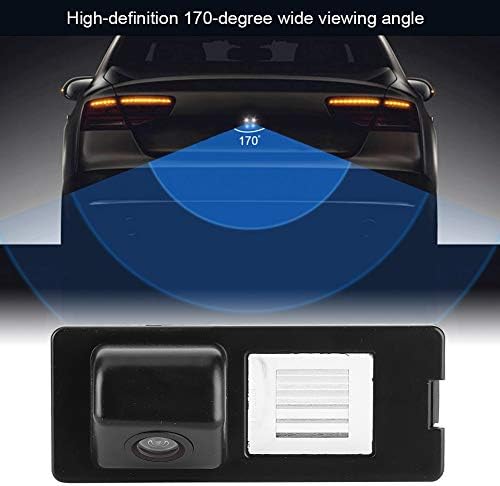
This diagram visually represents the camera's 170-degree wide viewing angle, highlighting the broad area it covers behind the vehicle for enhanced safety.
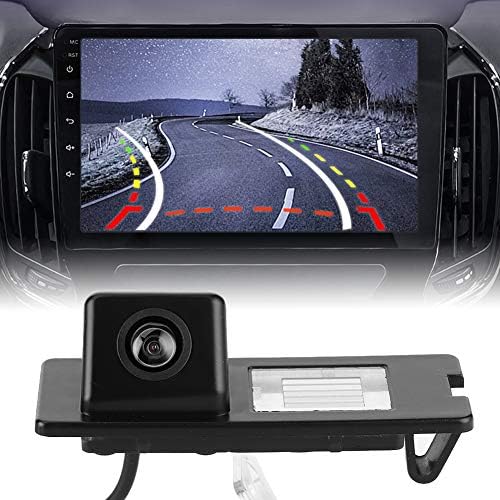
This image displays the Tbest reversing camera unit alongside a car's infotainment screen, illustrating the camera's output with parking guidelines.
6. Wartung
To ensure the longevity and optimal performance of your Tbest Reversing Camera, follow these maintenance guidelines:
- Regelmäßige Reinigung: Reinigen Sie das Kameraobjektiv regelmäßig mit einem weichen Tuch.amp Tuch zum Entfernen von Schmutz, Staub oder Wasserflecken, die die Sicht behindern könnten viewVermeiden Sie scheuernde Reinigungsmittel.
- Verkabelung prüfen: Occasionally check the wiring for any signs of wear, fraying, or loose connections. Secure any loose wires.
- Vermeiden Sie aggressive Chemikalien: Do not use strong chemical cleaners or solvents on the camera unit, as they may damage the housing or lens.
- Temperaturextreme: While designed for automotive use, prolonged exposure to extreme temperatures (hot or cold) can affect electronic components.

A detailed close-up of the camera unit, showing its compact design and lens.
7. Fehlerbehebung
If you encounter issues with your reversing camera, refer to the following troubleshooting guide:
- Kein Bild wird angezeigt:
- Prüfen Sie, ob das Fahrzeug im Rückwärtsgang ist.
- Verify all power and video cable connections are secure and correctly plugged in.
- Stellen Sie sicher, dass das Anzeigegerät auf den richtigen Videoeingangskanal eingestellt ist.
- Check the camera's power supply by testing the reverse light circuit with a multimeter.
- Flackerndes oder verzerrtes Bild:
- Überprüfen Sie die Videokabel auf Beschädigungen oder lose Verbindungen.
- Stellen Sie sicher, dass die Stromversorgung der Kamera ordnungsgemäß geerdet ist.
- Check for electromagnetic interference from other vehicle electronics.
- Poor Image Quality (Blurry/Dark):
- Reinigen Sie die Kameralinse gründlich.
- Ensure there is sufficient ambient light for optimal night vision performance.
- Vergewissern Sie sich, dass die Kamera fest montiert ist und nicht vibriert.
- Falsche Parkplatzmarkierungen:
- Parking lines are typically fixed and cannot be adjusted. Ensure the camera is mounted straight.
If the problem persists after following these steps, please contact Tbest customer support.
8. Spezifikationen
| Besonderheit | Spezifikation |
|---|---|
| Marke | Tbest |
| Kompatible Geräte | Renault Fluence, Duster, Megane |
| Installationstyp | Surface Mount (License Plate Light Housing) |
| Bandtage | 12 Volt |
| Optische Sensorik | CCD |
| Objektivtyp | Weitwinkel |
| Real View Winkel | 170 Grad |
| Steckertyp | Cinch |
| Größe des optischen Sensors | 1/3 Zoll |
| Fachgebiet View | 170 Grad |
| Beleuchtung (Lux) | 0.2 |
| Screen Capture Resolution | 720p |
| Effective Capture Resolution | 720 Pixel |
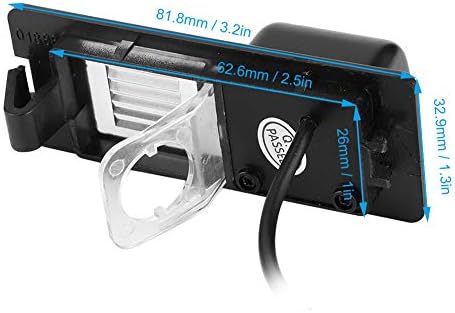
This image provides precise measurements of the camera unit, including its length, width, and height, in both millimeters and inches.
9. Garantie und Support
Tbest products are manufactured to high-quality standards. This product comes with a standard manufacturer's warranty. Please refer to the warranty card included with your purchase or visit the official Tbest webAuf der Webseite finden Sie die detaillierten Garantiebedingungen.
For technical support, troubleshooting assistance, or warranty claims, please contact Tbest customer service through the retailer where you purchased the product or via the contact information provided on the official Tbest webWebsite.