
1. Einleitung
This manual provides detailed instructions for the installation, operation, maintenance, and troubleshooting of your Palit GeForce RTX 3060 Ti Dual OC graphics card. Please read this manual thoroughly before installing and using the product to ensure proper functionality and to prevent damage.
The Palit GeForce RTX 3060 Ti Dual OC is a high-performance graphics card designed for gaming and demanding graphical applications. It features 8GB of GDDR6 memory, a dual-fan cooling system, and supports PCI Express 4.0.
2. Sicherheitshinweise
Observe the following safety guidelines to prevent injury and damage to your equipment:
- Trennen Sie vor dem Einbau oder Ausbau von Komponenten immer die Stromversorgung Ihres Computers.
- Tragen Sie ein Antistatik-Armband oder berühren Sie häufig einen geerdeten Metallgegenstand, um statische Elektrizität abzuleiten, bevor Sie die Grafikkarte handhaben. Statische Entladungen können elektronische Bauteile beschädigen.
- Handle the graphics card by its edges. Avoid touching the gold-plated PCI Express connector or other components on the board.
- Ensure your computer case has adequate ventilation to prevent overheating.
- Die Grafikkarte darf weder Feuchtigkeit noch extremen Temperaturen ausgesetzt werden.
- Keep the graphics card away from children.
3. Packungsinhalt
Prüfen Sie, ob alle Artikel in Ihrer Produktverpackung enthalten sind:
- Palit GeForce RTX 3060 Ti Dual OC Graphics Card
- Kurzinstallationsanleitung (dieses Dokument)
- Driver CD (or instructions for online download)
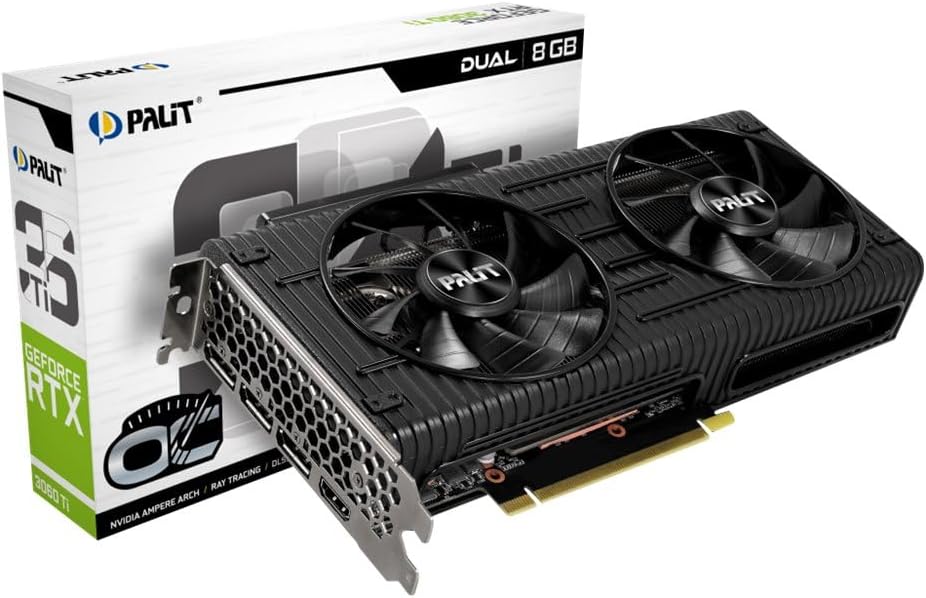
Image: The Palit GeForce RTX 3060 Ti Dual OC graphics card shown alongside its retail packaging.
4. Einrichtung
4.1. Systemanforderungen
Vor der Installation stellen Sie bitte sicher, dass Ihr System die folgenden Mindestanforderungen erfüllt:
- PCI Express-kompatibles Motherboard mit einem x16-Grafiksteckplatz.
- Minimum 600W power supply with one 8-pin PCIe power connector.
- Microsoft Windows 10 64-bit or Linux 64-bit operating system.
- 8 GB Systemspeicher (16 GB empfohlen).
- Internet connection for driver download and updates.
4.2. Physische Installation
Follow these steps to install the graphics card into your computer:
- Schalten Sie Ihren Computer aus und trennen Sie das Netzkabel von der Steckdose.
- Open your computer case. Refer to your computer case manual for specific instructions.
- Locate an available PCI Express x16 slot on your motherboard. Remove any expansion slot covers that block the slot.
- Carefully align the graphics card with the PCI Express x16 slot. Press down firmly until the card is securely seated in the slot.
- Secure the graphics card to the computer case with the screw from the expansion slot cover.
- Connect the 8-pin PCIe power connector from your power supply to the corresponding port on the graphics card. Ensure a secure connection.
- Schließen Sie das Computergehäuse und schließen Sie das Netzkabel wieder an.

Bild: Eine Draufsicht view of the Palit GeForce RTX 3060 Ti graphics card, highlighting its dual cooling fans and the heatsink assembly.
4.3. Treiberinstallation
After physical installation, you must install the graphics drivers:
- Schalten Sie Ihren Computer ein.
- If an internet connection is available, Windows may automatically install a basic display driver. For optimal performance, download the latest drivers from the official NVIDIA webSeite? ˅ (www.nvidia.com/drivers) or the Palit webSeite? ˅ (www.palit.com/download).
- Run the downloaded driver installer and follow the on-screen instructions.
- Starten Sie Ihren Computer neu, nachdem die Treiberinstallation abgeschlossen ist.
5. Betrieb
5.1. Anschließen von Displays
The Palit GeForce RTX 3060 Ti Dual OC graphics card features multiple display outputs:
- 3 x DisplayPort
- 1 x HDMI
Connect your monitor(s) to the available ports on the graphics card. Ensure your display cables are securely connected to both the graphics card and your monitor.

Bild: Ein schräger view of the graphics card, highlighting the DisplayPort and HDMI output connectors on the rear I/O bracket.
5.2. Softwarekonfiguration
After driver installation, you can access the NVIDIA Control Panel or Palit ThunderMaster utility for advanced settings. These tools allow you to:
- Adjust display resolutions and refresh rates.
- Configure multi-monitor setups.
- Optimize 3D settings for games and applications.
- Monitor GPU temperature and fan speed (ThunderMaster).
- Perform overclocking (ThunderMaster, use with caution).
6. Wartung
Durch sachgemäße Wartung werden die Langlebigkeit und Leistungsfähigkeit Ihrer Grafikkarte sichergestellt:
- Reinigung: Periodically clean dust from the fans and heatsink using compressed air. Ensure the computer is powered off and unplugged before cleaning. Hold the fan blades gently to prevent them from spinning rapidly during cleaning, which can damage the bearings.
- Treiber-Updates: Regularly check for and install the latest graphics drivers from NVIDIA to ensure optimal performance, stability, and access to new features.
- Temperaturüberwachung: Use monitoring software (e.g., Palit ThunderMaster, MSI Afterburner) to keep an eye on GPU temperatures, especially during heavy loads. Ensure temperatures remain within safe operating limits.
7. Fehlerbehebung
Sollten Sie auf Probleme stoßen, konsultieren Sie bitte die folgenden häufigen Probleme und Lösungen:
| Problem | Mögliche Lösung |
|---|---|
| No display output after installation. |
|
| System crashes or freezes during use. |
|
| Poor performance in games or applications. |
|
| Die Lüfter drehen sich nicht. | Many modern graphics cards feature a 0dB fan mode, where fans only spin up when the GPU reaches a certain temperature (e.g., 50°C). This is normal behavior for silent operation under light loads. If fans do not spin under heavy load and temperatures are high, check power connections and driver installation. |
8. Technische Daten
Key specifications for the Palit GeForce RTX 3060 Ti Dual OC graphics card:
| Besonderheit | Spezifikation |
|---|---|
| Grafik-Coprozessor | NVIDIA GeForce RTX 3060 Ti |
| Graphics Ram Size | 8 GB GDDR6 |
| Boost-Takt | 1695 MHz |
| Videoausgangsschnittstelle | 3x DisplayPort, 1x HDMI |
| Schnittstelle | PCI Express 4.0 |
| Technische Daten | 9.72 x 4.72 x 1.57 Zoll (24.7 x 12.0 x 4.0 cm) |
| Artikelgewicht | 7 Unzen (198 Gramm) |
| Modellnummer | NE6306TS19P2-190AD |
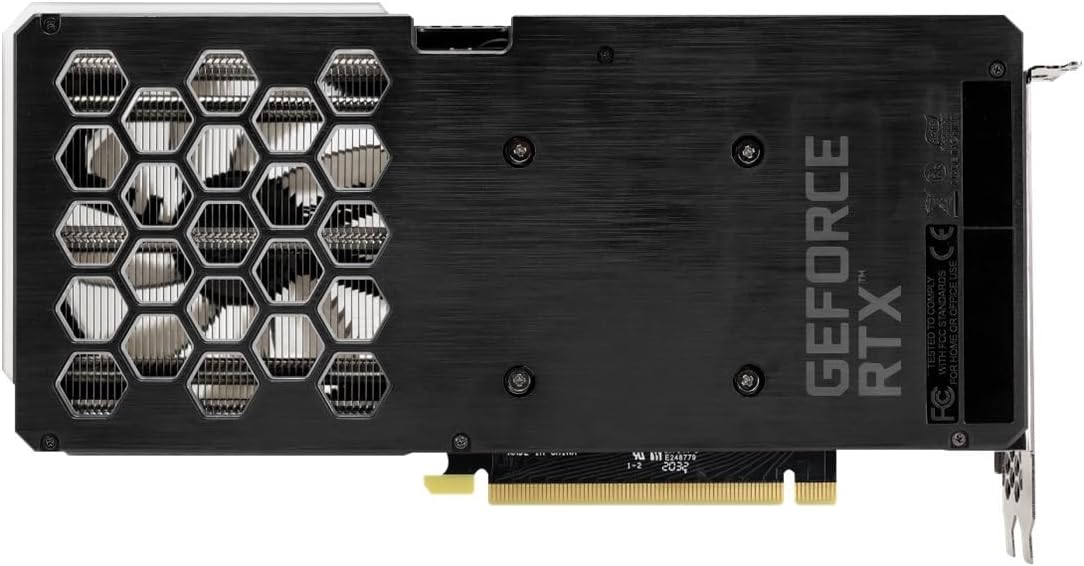
Image: The backplate of the Palit GeForce RTX 3060 Ti graphics card, showing its design and ventilation.
9. Garantie und Support
9.1. Garantieinformationen
This Palit GeForce RTX 3060 Ti Dual OC graphics card is backed by Palit's 2-year manufacturer's warranty. This warranty covers defects in materials and workmanship under normal use. For full warranty terms and conditions, please refer to the official Palit website or contact Palit customer support.
9.2. Kundendienst
If you require technical assistance or have questions regarding your product, please visit the official Palit webWebsite mit Supportressourcen, FAQs und Kontaktinformationen:
- Palit Official WebWebsite: www.palit.com
- Support-Seite: Look for a 'Support' or 'Contact Us' section on the webWebsite.
When contacting support, please have your product model number (NE6306TS19P2-190AD) and purchase information readily available.