
Einführung
This manual provides essential instructions for the proper use and maintenance of your Vikefon Type C Charging and Data Cable. This 1-meter cable is designed for efficient charging and high-speed data transfer between your Type C enabled devices and compatible power sources or computers.

Image: The Vikefon Type C Charging and Data Cable, featuring a standard USB-A connector on one end and a reversible USB-C connector on the other.
Produkteigenschaften
- USB Connector Quality: Ensures reliable charging and high-speed data transmission.
- Leistungsabgabe: Supports up to 5V, 3 Amp zum schnellen Laden.
- Universelle Kompatibilität: Fully compatible with all Type C mobile devices for fast charging and syncing.
- Reversible USB Type-C Connector: Allows for quick and easy connections in any orientation.
- Langlebiges Design: Features intricate nylon braiding for enhanced durability and longevity, outlasting standard cables.
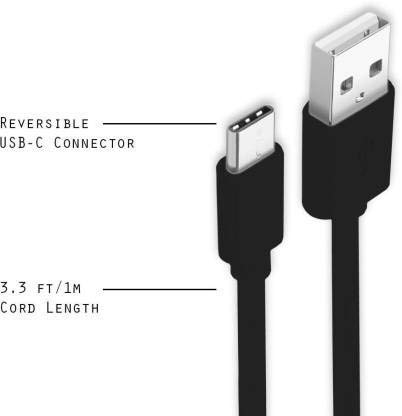
Image: A diagram illustrating the reversible nature of the USB-C connector and the cable's 1-meter (3.3 ft) cord length.
Aufstellen
- Konnektoren identifizieren: The cable has a standard USB-A connector on one end and a smaller, oval-shaped USB Type-C connector on the other.
- Anschluss an Stromquelle/Computer: Insert the USB-A end of the cable into a compatible USB port on a wall adapter, power bank, car charger, or computer.
- Mit Gerät verbinden: Insert the USB Type-C end into the charging/data port of your smartphone, tablet, or other Type C enabled device. The USB Type-C connector is reversible, so it can be inserted in either orientation.
- Verbindung überprüfen: Ensure both ends are securely connected. Your device should indicate that it is charging or connected for data transfer.
Bedienungsanleitung
Aufladen Ihres Geräts
- Connect the USB-A end of the cable to a compatible USB power adapter (e.g., wall charger, car charger, power bank).
- Connect the USB Type-C end to your device's charging port.
- Ensure the power adapter is plugged into a live power outlet. Your device should begin charging.
Datenübertragung
- Connect the USB-A end of the cable to a USB port on your computer.
- Connect the USB Type-C end to your device.
- On your device, you may receive a prompt asking to allow data access or to select a USB connection mode (e.g., "File Transfer," "MTP"). Select the appropriate option to enable data transfer.
- Your device should appear as a removable drive or media device on your computer, allowing you to transfer files.
Wartung
- Richtige Handhabung: Always grasp the connector head when plugging or unplugging the cable. Avoid pulling directly on the cable itself to prevent damage to the internal wires.
- Vermeiden Sie Bücken: Do not excessively bend or crimp the cable, especially near the connectors, as this can cause internal wire breakage.
- Lagerung: Store the cable in a clean, dry place away from extreme temperatures and direct sunlight. Avoid tangling the cable.
- Reinigung: If necessary, gently wipe the cable and connectors with a dry, soft cloth. Do not use liquids or abrasive cleaners.

Bild: Eine Nahaufnahme view highlighting the durable metal heads of the Vikefon Type C cable connectors, designed for anti-oxidation and corrosion resistance.
Fehlerbehebung
- Gerät wird nicht geladen:
- Stellen Sie sicher, dass beide Enden des Kabels fest angeschlossen sind.
- Vergewissern Sie sich, dass das Netzteil ordnungsgemäß funktioniert und an eine funktionierende Steckdose angeschlossen ist.
- Versuchen Sie es mit einem anderen Netzteil oder USB-Anschluss.
- Überprüfen Sie den Ladeanschluss Ihres Geräts auf Fremdkörper oder Beschädigungen.
- Langsamer Ladevorgang:
- Ensure you are using a power adapter that supports fast charging (e.g., 3A output).
- Schließen Sie alle unnötigen Hintergrundanwendungen auf Ihrem Gerät.
- Keine Datenübertragung:
- Confirm the cable is properly connected to both your device and computer.
- On your device, check the notification panel for USB options and select "File Transfer" oder "MTP".
- Versuchen Sie, eine Verbindung zu einem anderen USB-Anschluss an Ihrem Computer herzustellen.
- Starten Sie sowohl Ihr Gerät als auch Ihren Computer neu.
Technische Daten
| Besonderheit | Detail |
|---|---|
| Marke | Vikefon |
| Modellname | Typ C |
| Modellnummer | Typ C 0129 |
| Steckertyp | USB Type C (Male-to-Male) |
| Kabeltyp | USB |
| Kompatible Geräte | Laptop, PC, Smartphone (e.g., Xiaomi Redmi 8A, Poco M2, Poco M2 Pro, Samsung, Motorola, Lenovo, Lava, Sony, HTC, LG, Karbonn, Maxx) |
| Besondere Merkmale | Charging Wire, Durable, High Data Transfer Rate, High Quality, Long Length |
| Datenübertragungsrate | Up to 0.48 Gigabits Per Second (480 Mbps) |
| Konnektivitätstechnologie | USB |
| Spezifikation erfüllt | ISO |
| Farbe | Schwarz |
| Gegenstandsform | Runden |
| Outer Material Type | Rubber (with Nylon Braiding) |
| Kabellänge | 1 Meter |
Garantie und Support
Specific warranty details for the Vikefon Type C Charging and Data Cable are not provided in this manual. For information regarding warranty coverage, returns, or technical support, please refer to the product packaging or contact the manufacturer directly through their official channels.