
Einführung
This manual provides detailed instructions for the installation, operation, and maintenance of your EKEN V7 HD 1080P Smart WiFi Video Doorbell. Please read this manual thoroughly before using the product to ensure proper functionality and safety. Keep this manual for future reference.
Packungsinhalt
Bitte prüfen Sie, ob alle unten aufgeführten Artikel in Ihrem Paket enthalten sind. Sollten Artikel fehlen oder beschädigt sein, kontaktieren Sie bitte unseren Kundenservice.

Image: The EKEN V7 Video Doorbell, two blue rechargeable batteries, and a dual-slot battery charger. These are the primary components included in the package.
- EKEN V7 HD 1080P Smart WiFi Video Doorbell
- Rechargeable Batteries (2 pcs)
- Ladegerät
- Montagehalterung
- Befestigungsschrauben und Wandanker
- Benutzerhandbuch (dieses Dokument)
Produkt überview
The EKEN V7 Video Doorbell is a smart security device designed to provide real-time video monitoring and two-way audio communication with visitors at your door. It features 1080P Full HD resolution, night vision, and a wide-angle lens for comprehensive coverage.

Bild: Vorderseite view of the EKEN V7 Video Doorbell, showing the camera lens, motion sensor, and illuminated doorbell button.
Hauptmerkmale:
- 1080P Full HD-Video: Clear video streaming and recording.
- 166° Wide-angle Lens: Breites Feld von view to cover your entryway.
- Nachtsicht: Infrared LEDs for clear visibility in low-light conditions.
- Zweiwege-Audio: Speak and listen to visitors remotely via the mobile app.
- PIR-Bewegungserkennung: Alerts you to movement at your door.
- Wetterbeständig: Entwickelt, um verschiedenen Wetterbedingungen standzuhalten.
- 2.4G WiFi-Konnektivität: Verbindet sich mit Ihrem Heimnetzwerk für den Fernzugriff.
- Lange Akkulaufzeit: Efficient power consumption for extended use.
- Cloud-Speicher: Optional cloud service for video recording storage.

Image: An infographic highlighting the key features of the EKEN V7 Video Doorbell, such as 1080P Full HD, PIR Motion Detection, Night Vision, 166° Wide-angle Camera Lens, Long Battery Life, and 7 Days Free Cloud Service.

Image: A visual representation comparing the doorbell's view during the day (color) and at night (monochrome infrared), demonstrating the 166-degree wide-angle lens.
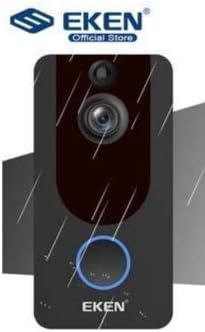
Image: The EKEN V7 Video Doorbell depicted with rain effects, illustrating its weather-resistant design suitable for outdoor installation.
Aufstellen
1. Aufladen der Akkus
- Insert the two rechargeable batteries into the provided battery charger.
- Schließen Sie das Ladegerät an eine Stromquelle an.
- Allow the batteries to charge fully before first use. The indicator light on the charger will change when charging is complete.
2. Installing the Doorbell
- Wählen Sie einen geeigneten Standort in der Nähe Ihrer Tür, um eine klare Sicht zu gewährleisten. view und ein gutes WLAN-Signal.
- Verwenden Sie die Montagehalterung als Schablone, um die Bohrlöcher an der Wand zu markieren.
- Bohren Sie Löcher und setzen Sie bei Bedarf Dübel ein.
- Befestigen Sie die Montagehalterung mit den mitgelieferten Schrauben an der Wand.
- Insert the charged batteries into the doorbell unit.
- Befestigen Sie die Türklingeleinheit an der Montagehalterung und achten Sie darauf, dass sie sicher einrastet.
3. WLAN-Verbindung herstellen und App einrichten
- Download the official EKEN doorbell app from your smartphone's app store (iOS or Android).
- Öffnen Sie die App und erstellen Sie ein Konto oder melden Sie sich an.
- Follow the in-app instructions to add your new doorbell device. This typically involves scanning a QR code on the doorbell or manually entering its ID.
- Connect the doorbell to your 2.4GHz Wi-Fi network. Ensure your phone is also connected to the same 2.4GHz network during setup.
- Sobald die Verbindung hergestellt ist, können Sie view live video, receive notifications, and adjust settings through the app.
Bedienungsanleitung
Live View und Zwei-Wege-Audio
- Open the EKEN app on your smartphone.
- Select your doorbell from the device list to access the live video feed.
- To speak to a visitor, tap the microphone icon in the app. To listen, ensure the speaker icon is enabled.

Image: A user communicating with a delivery person at their door using the EKEN V7 Video Doorbell's two-way audio feature through the mobile application.
Bewegungserkennungsalarme
- When motion is detected, the doorbell will send a push notification to your smartphone.
- Tippen Sie auf die Benachrichtigung, um view die Live-Übertragung oder die aufgezeichnete Veranstaltung.
- Adjust motion sensitivity settings within the app to minimize false alerts.
Videoaufzeichnung und -wiedergabe
- The doorbell automatically records video when motion is detected or the doorbell button is pressed.
- Recorded videos are stored in the cloud (subscription may be required after initial free period) or on a local SD card (if supported and installed).
- Access and playback recorded events through the app's history or event log.

Image: The EKEN V7 Video Doorbell shown next to a smartphone displaying a live 1080P Full HD video feed, illustrating remote monitoring capabilities.
Wartung
- Reinigung: Wischen Sie die Kameralinse und die Oberfläche der Türklingel vorsichtig mit einem weichen, fusselfreien Tuch ab.amp Mit einem Tuch abwischen. Vermeiden Sie scheuernde Reiniger oder Lösungsmittel.
- Batteriemanagement: Recharge batteries when the app indicates low power. For optimal performance, consider having a spare set of charged batteries.
- Firmware-Updates: Regularly check the app for available firmware updates for your doorbell. Updates can improve performance and add new features.
- Wi-Fi-Verbindung: Ensure your Wi-Fi router is functioning correctly and the doorbell has a strong signal for uninterrupted operation.
Fehlerbehebung
- Türklingel verbindet sich nicht mit dem WLAN:
- Ensure your Wi-Fi network is 2.4GHz. The doorbell does not support 5GHz networks. Check Wi-Fi password and signal strength. Try resetting the doorbell and your router.
- Keine Bewegungserkennungsalarme:
- Verify that motion detection is enabled in the app settings. Adjust sensitivity levels. Ensure the doorbell's view ist nicht behindert.
- Schlechte Videoqualität oder Verzögerungen:
- Check your Wi-Fi signal strength at the doorbell's location. Move the router closer or consider a Wi-Fi extender. Ensure your internet connection is stable.
- Zwei-Wege-Audio funktioniert nicht:
- Check microphone and speaker permissions for the app on your smartphone. Ensure the doorbell's microphone and speaker are not obstructed.
- Türklingel schaltet sich nicht ein:
- Ensure batteries are fully charged and correctly inserted. If using wired power, check connections.
Technische Daten
| Besonderheit | Detail |
|---|---|
| Marke | EKEN |
| Modell | V7 |
| Auflösung der Videoaufzeichnung | 1080p Full HD |
| Fotosensor-Technologie | CMOS |
| Konnektivitätstechnologie | WLAN (nur 2.4 GHz) |
| Besondere Merkmale | Night Vision, Two-Way Audio, PIR Motion Detection, Weather Resistant |
| Bildstabilisierung | NEIN |
| Herstellerreferenz | Ia-112 |
| ASIN | B08PMXWFF3 |
| Erstes verfügbares Datum | 17. Dezember 2020 |
Garantie und Support
For warranty information and technical support, please refer to the official EKEN website or contact their customer service directly. Details regarding specific warranty periods and support channels are typically provided with your purchase documentation or on the manufacturer's webWebsite.
Garantierte Software-Updates bis: Unbekannt.