
Naztech 15350
Naztech Xpods PRO True Wireless Noise Cancelling Earbuds
Modell: 15350
Marke: Naztech
Einführung
The Naztech Xpods PRO are advanced true wireless noise-cancelling earbuds designed for an immersive audio experience and clear communication. Featuring HD sound, touch controls, and IPX4 water resistance, these earbuds are suitable for various activities, including sports and daily use. They come with a wireless charging case for extended playtime and convenient recharging.

Image: Naztech Xpods PRO earbuds, charging case, and product packaging, highlighting key features like 25 hours play time and touch controls.
Aufstellen
Lieferumfang
- Kabelloses Ladecase
- USB-C-Ladekabel
- 6 Sets of Silicone Ear Tips (3 sizes, 2 colors)
Aufladen der Ohrhörer und des Gehäuses
Before first use, fully charge the Xpods PRO and their charging case. The case can be charged via the included USB-C cable or a Qi-compatible wireless charging pad.
- USB-C-Aufladung: Verbinden Sie das USB-C-Kabel mit dem Ladeanschluss am Gehäuse und mit einer Stromquelle.
- Kabelloses Laden: Legen Sie das Ladecase auf ein Qi-kompatibles kabelloses Ladepad. Achten Sie darauf, dass das Case zum Laden richtig ausgerichtet ist.
A 10-minute quick charge provides approximately 1 hour of playback. A full charge offers up to 5 hours of playtime for the earbuds, with the charging case providing an additional 20 hours, totaling 25 hours of playtime.
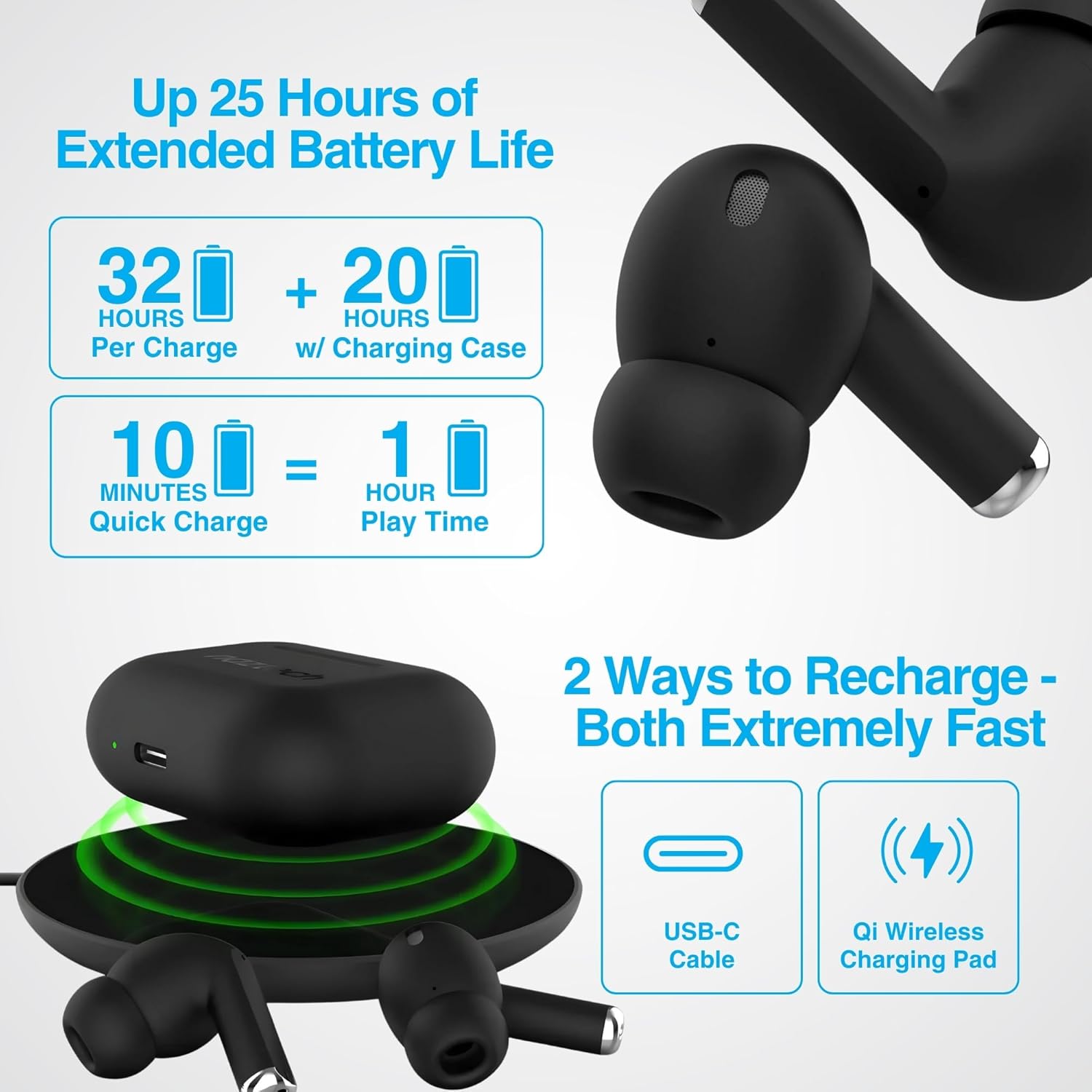
Image: Illustration showing USB-C and Qi wireless charging options for the Naztech Xpods PRO case, along with battery life indicators.
Koppeln mit Ihrem Gerät
- Stellen Sie sicher, dass die Ohrhörer aufgeladen sind.
- Öffnen Sie das Ladeetui. Die Ohrhörer wechseln automatisch in den Kopplungsmodus.
- Gehen Sie auf Ihrem Gerät (Smartphone, Tablet usw.) zu den Bluetooth-Einstellungen und aktivieren Sie Bluetooth.
- Select "NAZTECH Xpods PRO" from the list of available devices.
- Sobald die Verbindung hergestellt ist, hören Sie eine akustische Bestätigung, und die Ohrhörer sind einsatzbereit.
The Xpods PRO feature Bluetooth 5.0 for stable connectivity up to 33 feet (10 meters) and auto-pair technology for seamless re-connection with previously paired devices.

Image: A smartphone screen showing the "NAZTECH Xpods PRO" listed in Bluetooth settings, demonstrating universal compatibility with various devices.
Bedienungsanleitung
Touch-Bedienelemente
The Xpods PRO feature intuitive touch sensor controls on each earbud for easy management of audio playback and calls.
| Aktion | Kontrolle |
|---|---|
| Musik abspielen/pausieren | Tippen Sie einmal auf einen der Ohrhörer |
| Nächster Titel | Doppeltippen Sie auf den rechten Ohrhörer |
| Vorheriger Titel | Doppeltippen Sie auf den linken Ohrhörer |
| Anruf annehmen/beenden | Tippen Sie einmal auf einen der Ohrhörer |
| Anruf ablehnen | Halten Sie einen der Ohrhörer 2 Sekunden lang gedrückt |
| Sprachassistent aktivieren | Dreimaliges Tippen auf einen der Ohrhörer |

Image: Diagram illustrating the touch control functions on the Naztech Xpods PRO earbuds.
Tragen der Ohrhörer
For optimal sound quality and a secure fit, choose the silicone ear tips that best suit your ear canal. The Xpods PRO come with 6 sets of silicone ear tips in 3 sizes and 2 colors to ensure a comfortable and noise-isolating fit.

Image: Naztech Xpods PRO earbuds shown with various silicone ear tip sizes, emphasizing customizable fit.
Geräuschunterdrückung
The Xpods PRO feature Passive Noise Cancellation through their closed-system design, which helps to immerse you in music by preserving low-frequency bass richness and reducing ambient noise. Dual microphones with advanced voice capture technology filter out wind and background noise for clear conversations.

Image: A person using Naztech Xpods PRO, illustrating the clear call quality and passive noise cancellation features.
Wartung
Reinigung
To maintain optimal performance and hygiene, regularly clean your Xpods PRO earbuds and charging case. Use a soft, dry, lint-free cloth to wipe down the surfaces. For ear tips, you may gently wipe them with a slightly damp Das Tuch sollte vollständig trocknen, bevor es wieder angebracht wird.
Avoid using abrasive materials, solvents, or harsh chemicals, as these can damage the product.
Wasserbeständigkeit (IPX4)
The Naztech Xpods PRO are rated IPX4 water-resistant, meaning they are protected against splashing water from any direction. This makes them suitable for workouts and light rain. However, they are not designed for submersion in water or exposure to pressurized water jets. Do not use them while swimming or showering.

Image: A person wiping sweat from their face, indicating the IPX4 water-resistant rating of the Naztech Xpods PRO for active use.
Lagerung
When not in use, store your Xpods PRO in their charging case to protect them from dust, dirt, and physical damage. Store the case and earbuds in a cool, dry place away from extreme temperatures and direct sunlight.
Fehlerbehebung
If you encounter issues with your Naztech Xpods PRO, refer to the following common solutions:
Ohrhörer verbinden sich nicht oder lassen sich nicht koppeln
- Batterie prüfen: Stellen Sie sicher, dass sowohl die Ohrhörer als auch das Ladecase ausreichend geladen sind.
- Reparatur: Turn off Bluetooth on your device, place earbuds back in the case, close and reopen the case. Then, re-enable Bluetooth on your device and try pairing again.
- Gerät vergessen: On your device's Bluetooth settings, "forget" or "unpair" the "NAZTECH Xpods PRO" and then attempt to pair from scratch.
- Distanz: Ensure your device is within the 33ft (10m) Bluetooth range.
- Interferenz: Entfernen Sie sich von anderen drahtlosen Geräten, die Störungen verursachen könnten.
Sound Quality Issues (e.g., Static, Low Volume)
- Saubere Ohrhörer: Ensure the mesh filters and ear tips are clean and free of debris.
- Passform der Ohrstöpsel: Experiment with different sized silicone ear tips to ensure a proper seal in your ear canal, which significantly impacts sound quality and bass response.
- Quellqualität: Stellen Sie sicher, dass die Audioquelle (Musik) file(Streaming-Dienst) ist von hoher Qualität.
- Gerätelautstärke: Überprüfen Sie die Lautstärke sowohl an Ihrem angeschlossenen Gerät als auch an den Ohrhörern.
Ladeprobleme
- Kabelprüfung: Ensure the USB-C cable is securely connected to both the case and the power source. Try a different USB-C cable and power adapter if available.
- Kabelloses Pad: If using wireless charging, ensure the case is correctly positioned on the charging pad and the pad is powered on.
- Platzierung der Ohrhörer: Ensure the earbuds are correctly seated in the charging case, making proper contact with the charging pins.
Technische Daten
| Besonderheit | Detail |
|---|---|
| Modellname | NAZTECH Xpods PRO |
| Artikelmodellnummer | 15350 |
| Konnektivitätstechnologie | Kabellos (Bluetooth 5.0) |
| Drahtlose Reichweite | Bis zu 33 m |
| Steuerungstyp | Touch (Mediensteuerung) |
| Lärmschutz | Passive Geräuschunterdrückung |
| Wasserbeständigkeit | IPX4 |
| Gesamtspielzeit | Bis zu 25 Stunden (mit Ladeetui) |
| Earbud Playtime (per charge) | Bis zu 5 Stunden |
| Schnelles Aufladen | 10 Minuten Ladezeit für 1 Stunde Wiedergabe |
| Ladeschnittstelle | USB-C, Qi-Wireless-Charging |
| Im Lieferumfang enthaltene Komponenten | USB-C Charging Cable, 6 Sets of Silicone Ear Tips, Wireless Charging Case |
| Material | Plastik |
| Technische Daten | 2.39 x 1.81 x 0.91 Zoll |
| Artikelgewicht | 4.4 Unzen |
Garantie und Support
Naztech products are designed for quality and performance. While specific warranty details are not provided in this manual, Naztech generally backs its products with warranties. For detailed warranty information, product support, or technical assistance, please visit the official Naztech webWebsite oder wenden Sie sich direkt an den Kundendienst.
Weitere Informationen und Unterstützungsangebote finden Sie unter: Naztech Store on Amazon oder ihr Beamter webWebsite.
Ask a question about this manual
Ask about setup, troubleshooting, compatibility, parts, safety, or missing instructions. Manuals+ will review the question and use this page’s manual context to help answer it.