
Einführung
Vielen Dank für Ihren Einkauf.asing the Studebaker Sound Station Portable Stereo Boombox, Model SB2140R. This versatile audio system combines classic design with modern functionality, offering multiple ways to enjoy your music. Please read this manual thoroughly before operating the unit to ensure proper use and to maximize your listening experience.

Abbildung 1: Vorderseite view of the Studebaker Sound Station Portable Stereo Boombox.
Wichtige Sicherheitsinformationen
Um das Risiko von Stromschlägen, Bränden oder Verletzungen zu verringern, beachten Sie beim Gebrauch dieses Produkts stets die grundlegenden Sicherheitsvorkehrungen. Bewahren Sie diese Anleitung zum späteren Nachschlagen auf.
- Setzen Sie dieses Gerät weder Regen noch Feuchtigkeit aus.
- Blockieren Sie keine Belüftungsöffnungen.
- Installieren Sie das Gerät nicht in der Nähe von Wärmequellen wie Heizkörpern, Heizregistern, Öfen oder anderen Geräten (einschließlich ampKonverter (Lüfter), die Wärme erzeugen.
- Schützen Sie das Netzkabel vor Beschädigungen durch Treten oder Einklemmen.
- Verwenden Sie nur vom Hersteller angegebene Zusatzgeräte/Zubehör.
- Trennen Sie das Gerät bei Gewitter oder längerer Nichtbenutzung vom Stromnetz.
Hauptmerkmale
- Bluetooth-Konnektivität: Stream audio wirelessly from compatible devices or transmit to Bluetooth headphones.
- CD-Spieler: Front-loading CD/MP3 player for your compact disc collection.
- Kassettenrecorder: Play and record cassette tapes from various sources including built-in microphone, radio, CD, USB, or auxiliary input.
- AM/FM-Stereo-Radio: Genießen Sie Ihre Lieblingsradiosender mit klarem Empfang.
- USB-Anschluss: Zur Wiedergabe von Audio files von einem Flash-Laufwerk.
- Hilfseingangsbuchse: Schließen Sie externe Audiogeräte an.
- Kopfhöreranschluss: Zum privaten Hören.
- Eingebaute Stereolautsprecher: Delivers 5W x 2 RMS output power.
- VU-Meter: Two functional VU meters for visual audio level indication.
- Lichteffekt: Speaker and tweeter lights synchronize with music.
- Energieoptionen: AC/DC power with a built-in rechargeable battery for portability.
Aufstellen
Stromversorgung des Geräts
The Sound Station can be powered by either AC power or its built-in rechargeable battery.
- Wechselstromversorgung: Connect the supplied AC adapter to the DC IN jack on the back of the unit and plug the other end into a standard AC wall outlet.
- Wiederaufladbarer Akku: The unit features a built-in rechargeable battery. To charge, connect the AC adapter as described above. The CHARGE indicator will illuminate. A full charge typically takes several hours. Once charged, the unit can be operated portably.
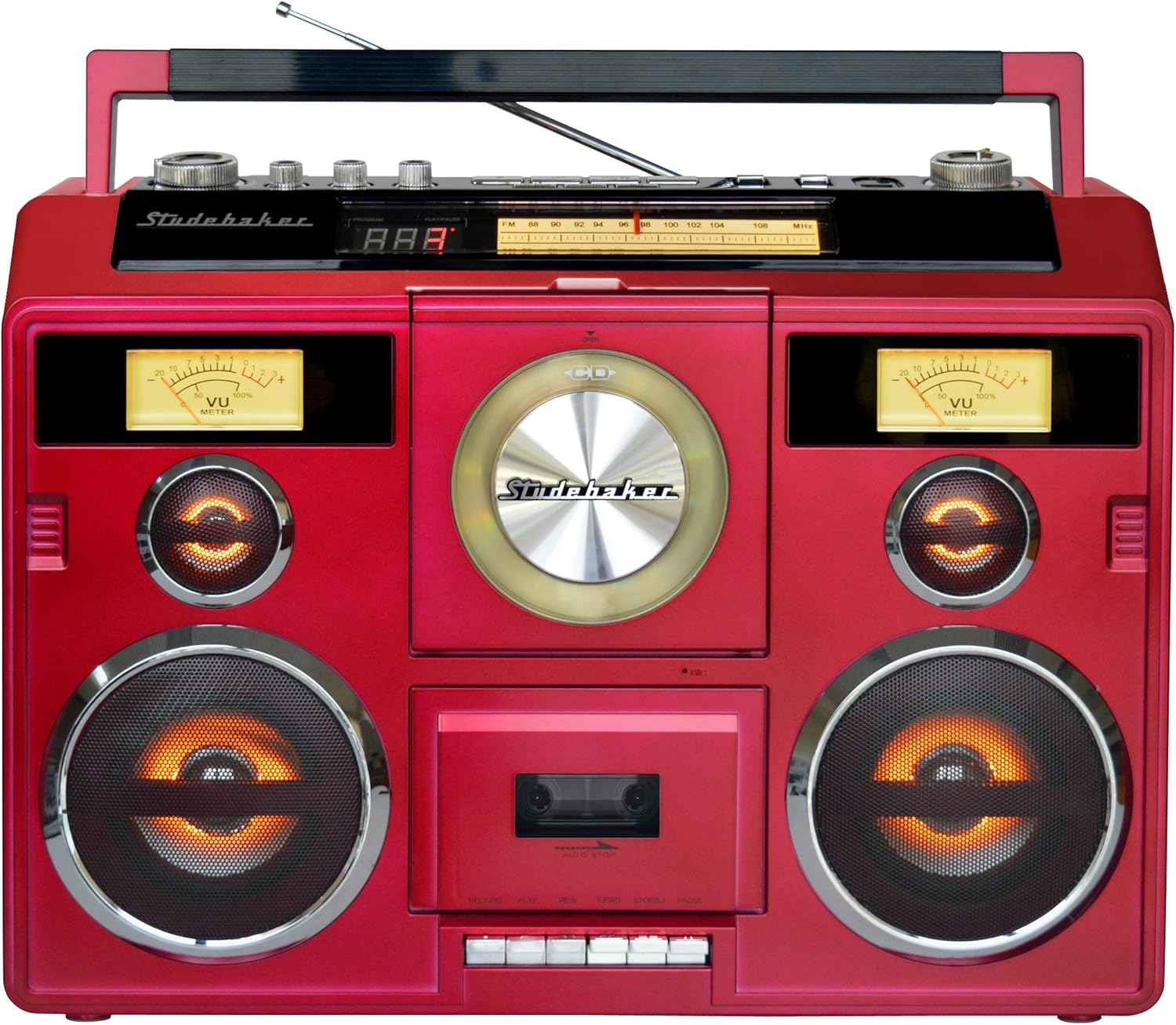
Abbildung 2: Schräg view of the boombox, highlighting the portable design.
Antenna Setup for Radio
For optimal FM reception, extend the telescopic antenna fully. For AM reception, the unit has a built-in ferrite bar antenna, which is directional. You may need to rotate the unit for the best AM signal.
Bedienungsanleitung
Allgemeine Kontrollen
- Master-Lautstärke: Rotate the MASTER VOLUME knob to adjust the overall sound level.
- Treble/Bass/Balance: Use the TREBLE, BASS, and BALANCE knobs to fine-tune the audio output to your preference.
- Funktionsschalter: Use the FUNCTION switch to select between POWER OFF, TAPE, CD/USB/AUX, and RADIO modes.
- Lichtshow: Press the LIGHT SHOW button to activate or deactivate the speaker and tweeter light effects.
Video 1: Ein überview of the Sound Station Boombox features, including CD, cassette, radio, and Bluetooth functionality.
CD-Player-Betrieb
- Set the FUNCTION switch to CD/USB/AUX.
- Open the CD compartment door by pressing the OPEN/CLOSE button.
- Legen Sie eine CD mit der beschrifteten Seite nach oben auf die Mittelspindel.
- Close the CD compartment door. The display will show the total number of tracks.
- Drücken Sie die PLAY/PAUSE-Taste, um die Wiedergabe zu starten.
- Use the SKIP FORWARD/BACKWARD buttons to navigate tracks.
- Drücken Sie die STOP-Taste, um die Wiedergabe zu stoppen.
Kassettenrekorder-Betrieb
- Set the FUNCTION switch to TAPE.
- Öffnen Sie die Klappe des Kassettenfachs.
- Legen Sie eine Musikkassette so ein, dass das freiliegende Band nach unten zeigt.
- Schließen Sie die Klappe des Kassettenfachs.
- Wiedergabe: Drücken Sie die PLAY-Taste, um die Wiedergabe zu starten.
- Aufnahme: To record from the radio, CD, USB, or AUX, select the desired source first. Then, press the RECORD button on the cassette deck. To record from the built-in microphone, simply press the RECORD button in TAPE mode.
- Use the FAST FORWARD (FFWD) and REWIND (REW) buttons to navigate the tape.
- Press the STOP/EJECT button to stop playback/recording and eject the tape.
AM/FM-Radiobetrieb
- Stellen Sie den FUNKTIONS-Schalter auf RADIO.
- Select the desired band (AM, FM, or FM ST) using the BAND switch.
- Rotate the TUNING knob to find your desired radio station.
- Adjust the telescopic antenna for FM or reposition the unit for AM to improve reception.
Bluetooth-Konnektivität
The unit supports both Bluetooth Receive (in) and Transmit (out).
- Bluetooth Receive (Streaming to Boombox):
- Set the FUNCTION switch to CD/USB/AUX.
- Press the BLUETOOTH PAIR button. The Bluetooth indicator will flash.
- On your Bluetooth-enabled device (e.g., smartphone), search for "SB2140R" and pair.
- Once paired, the indicator will glow solid, and you can stream audio to the boombox.
- Bluetooth Transmit (Streaming from Boombox to Headphones):
- Ensure your Bluetooth headphones are in pairing mode.
- Press the BLUETOOTH OUT button on the boombox. The indicator will flash.
- The boombox will search for and connect to your headphones. Once connected, audio from the boombox (CD, Tape, Radio, USB, AUX) will play through your headphones.
Video 2: A detailed demonstration of the portable stereo boombox, highlighting its various functions and connectivity options.
USB-Wiedergabe
- Set the FUNCTION switch to CD/USB/AUX.
- Stecken Sie einen USB-Stick in den USB-Anschluss.
- Das Gerät erkennt automatisch kompatible Audiodateien und beginnt mit der Wiedergabe. files (z. B. MP3).
- Use the playback control buttons (PLAY/PAUSE, SKIP FORWARD/BACKWARD, STOP) to manage your music.
Zusatzeingang
- Set the FUNCTION switch to CD/USB/AUX.
- Schließen Sie ein externes Audiogerät (z. B. Smartphone, MP3-Player) mit einem 3.5-mm-Audiokabel (nicht im Lieferumfang enthalten) an die AUX IN-Buchse an.
- Steuern Sie die Wiedergabe von Ihrem externen Gerät.
Wartung
Reinigen des Geräts
Wischen Sie die Außenseite des Geräts mit einem weichen,amp cloth. Do not use abrasive cleaners or solvents. For the CD lens, use a specialized CD lens cleaner. For the cassette deck, regularly clean the tape heads and pinch rollers with a cotton swab lightly dampmit Isopropylalkohol gereinigt.
Batteriepflege
To prolong the life of the built-in rechargeable battery, avoid fully discharging it frequently. Recharge the unit regularly, even if not in constant use. If storing the unit for an extended period, ensure the battery is partially charged (around 50%) and recharge every few months.
Fehlerbehebung
- Kein Strom: Ensure the AC adapter is securely connected or the internal battery is charged.
- Kein Ton: Check the volume level. Ensure the correct function mode (CD, TAPE, RADIO, USB, AUX, Bluetooth) is selected. If using headphones, ensure they are properly connected or paired.
- CD wird nicht abgespielt: Ensure the CD is clean and free of scratches. Make sure the CD is inserted correctly with the label side up.
- Schlechter Radioempfang: Extend the FM telescopic antenna fully. For AM, rotate the unit for better signal. Try moving the unit to a different location.
- Probleme mit der Bluetooth-Kopplung: Ensure the unit is in Bluetooth pairing mode (indicator flashing). Make sure your external device's Bluetooth is enabled and within range. Try unpairing and re-pairing the device.
- Cassette Playback/Recording Issues: Ensure the tape is inserted correctly. Clean the tape heads. Check if the tape is tangled or damaged.
- Speaker Lights Buzzing: Some users have reported a slight buzzing when speaker lights are active. If this is disruptive, you may choose to deactivate the light show feature.
Technische Daten
| Modellnummer | SB2140R |
| Produktabmessungen (L x B x H) | 19.3 x 6.26 x 13.8 Zoll |
| Artikelgewicht | 11.79 Pfund |
| Stromquelle | AC/DC (Built-in rechargeable battery) |
| Lautsprecherausgangsleistung | 5 W x 2 RMS |
| Konnektivität | Bluetooth, AUX, USB |
| Radiobänder | AM/FM-Stereo |
Garantie und Support
For warranty information or technical support, please refer to the documentation included with your purchase or visit the official Studebaker webBewahren Sie Ihren Kaufbeleg für eventuelle Garantieansprüche auf.