
1. Zu Endeview
The Depusheng HT7 is a versatile 7-channel portable audio mixer designed for various applications, including small performances, bands, conferences, home use, karaoke, and computer recording. It features integrated wireless Bluetooth connectivity, a DSP reverb effect, 3-band equalization, a USB interface for U-disk playback and recording, and 48V phantom power for condenser microphones.

Abbildung 1.1: Depusheng HT7 Mixer highlighting key features: 1. Built-in wireless Bluetooth, 2. Built-in DSP reverb effect, 3. USB playback function, 4. 48V phantom power supply, 5. LED display.
2. Sicherheitshinweise
- Lesen Sie alle Anweisungen sorgfältig durch, bevor Sie das Gerät in Betrieb nehmen.
- Halten Sie den Mixer von Wasser, Feuchtigkeit und extremen Temperaturen fern.
- Öffnen Sie nicht das casing; alle Wartungsarbeiten sind qualifiziertem Personal zu überlassen.
- Verwenden Sie ausschließlich das mitgelieferte Netzteil, um Schäden zu vermeiden.
- Sorgen Sie für eine ausreichende Belüftung rund um das Gerät, um eine Überhitzung zu vermeiden.
- Stellen Sie keine schweren Gegenstände auf den Mixer.
3. Produktkomponenten und Bedienelemente
3.1. Rear Panel and USB Interface

Abbildung 3.1: Rear panel and USB interface. Features include the USB MP3 player/computer connection, external power input jack, and power switch. Connect external devices for audio playback.
3.2. Main Output and Digital MP3 Player Section

Abbildung 3.2: Main output section and digital MP3 player controls. This includes Left/Right channel total output interfaces, monitor headphone output, stereo input, the digital display, USB interface, menu button, play/pause button, next song/volume increase, last song/volume down, and AUX SEND.
3.3. Hauptsteuerungsbereich
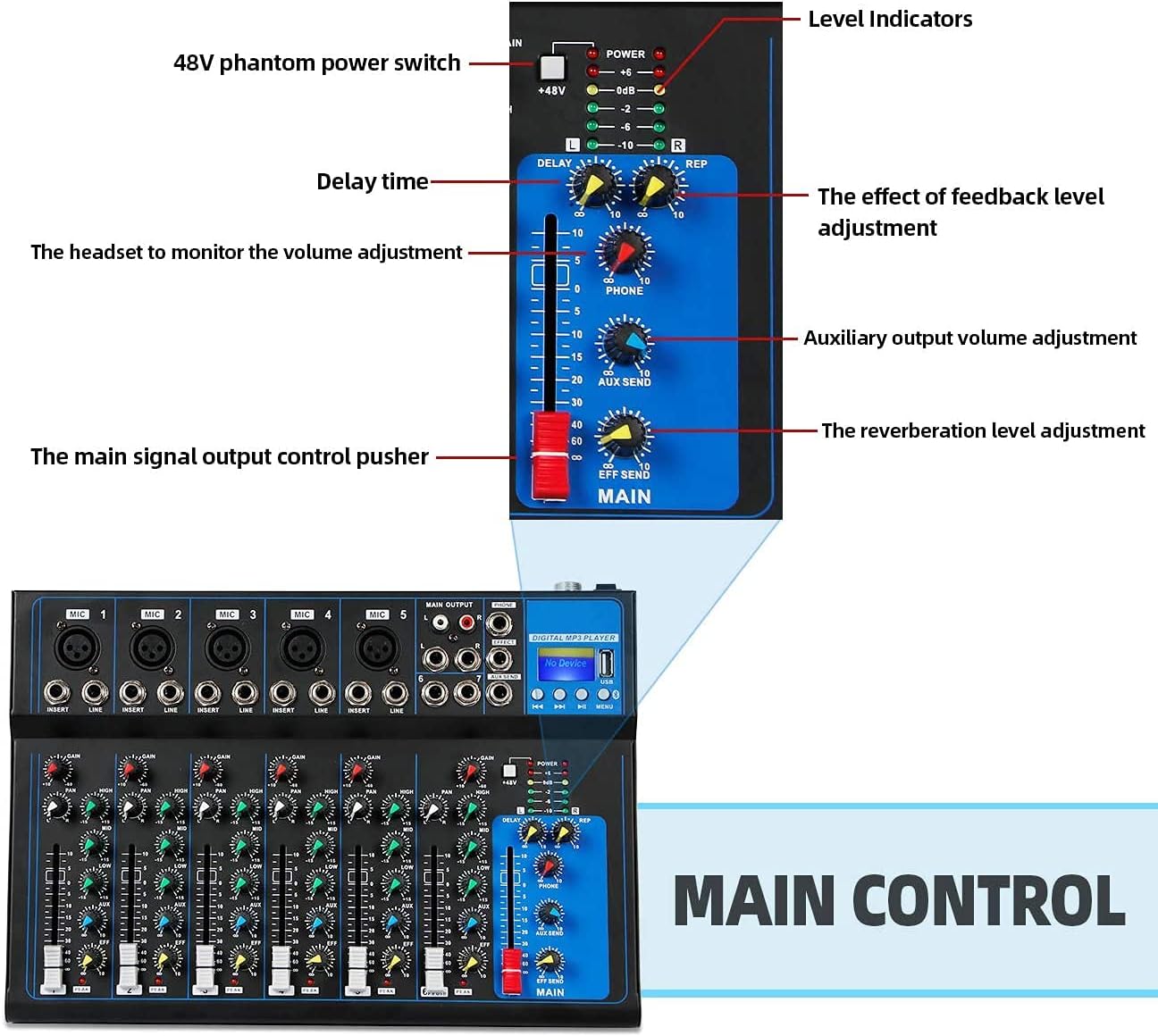
Abbildung 3.3: Main control section. Features include the 48V phantom power switch, level indicators, delay time control, feedback level adjustment, headset monitor volume adjustment, auxiliary output volume adjustment, main signal output control fader, and reverberation level adjustment.
3.4. Kanaleingangssteuerung

Abbildung 3.4: Individual channel input controls. Each channel features a microphone input, channel mixed input, line input, gain adjustment, pan control, three-band equalization (HIGH, MID, LOW), AUX output control, reverberation effect control, and a channel volume control fader.
4. Einrichtung
4.1. Stromanschluss
- Connect the provided power adapter to the external power input jack on the rear panel of the mixer.
- Plug the power adapter into a suitable electrical outlet (220V AC).
- Ensure the power switch is in the OFF position before connecting or disconnecting any cables.
4.2. Anschließen von Mikrofonen und Instrumenten
- For microphones, connect XLR cables to the Microphone Input jacks (MIC 1-5).
- If using condenser microphones, activate the 48V phantom power switch on the main control section.
- For instruments or line-level devices, connect 1/4" TS/TRS cables to the Line Input jacks on each channel.
- For stereo input, use channels 6 and 7 (stereo input).
4.3. Anschließen an externe Geräte
- Referenten: Connect your main speakers to the Left/Right channel total output interfaces (MAIN OUTPUT) using 6.35MM or RCA cables.
- Kopfhörer: Connect your monitor headphones to the Monitor Headphone Output jack (PHONE).
- External Effects/Monitors: Use the AUX SEND output for connecting to external effects processors or monitor speakers.
5. Bedienungsanleitung
5.1. Grundlegende Bedienung
- Einschalten: After all connections are made, switch the power button to ON.
- Kanalpegel anpassen: Use the channel volume control faders for each input to set individual channel levels.
- Verstärkungseinstellung: Use the GAIN knob on each channel to adjust the input sensitivity for optimal signal strength without clipping.
- Ausgleich: Use the HIGH, MID, and LOW knobs on each channel to adjust the treble, mid-range, and bass frequencies.
- Pan-Steuerung: The PAN knob adjusts the stereo positioning of the channel's signal.
- Halleffekte: Use the REVERB EFFECT control on each channel and the main reverberation level adjustment to apply and control the built-in DSP reverb.
- Hauptausgangspegel: Use the main signal output control fader to adjust the overall output volume.
5.2. Bluetooth-Konnektivität
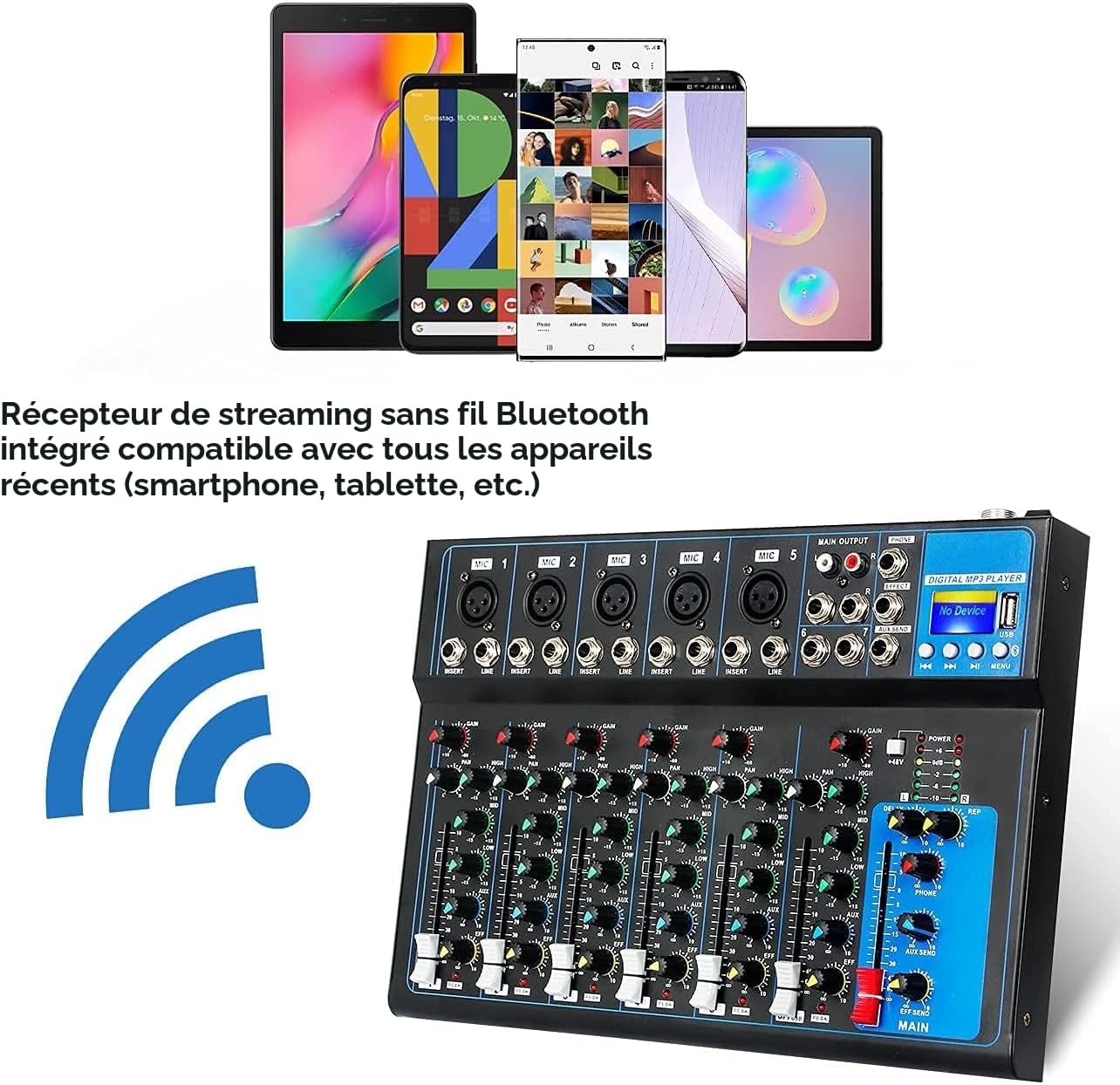
Abbildung 5.1: The mixer supports integrated wireless Bluetooth streaming, compatible with smartphones, tablets, and other recent devices.
- Press the "MENU" button on the digital MP3 player section to switch to "BLUE Bluetooth Mode".
- On your mobile phone or other Bluetooth device, activate Bluetooth and search for "NK-F8A".
- Select "NK-F8A" to connect.
- If there is no sound after connecting, ensure the volume knob for the digital player is turned up.
- Adjust the treble, mid, and bass, and accompaniment as desired.
- Notiz: Do not switch to other modes during Bluetooth use. Bluetooth can remain connected for a long time (meaning you only need to connect once per startup).
5.3. USB-Wiedergabe und -Aufnahme
- USB-Wiedergabe: Insert a U-disk (USB drive) with MP3 files into the USB interface. The mixer will automatically detect and play the audio files. Use the play/pause, next, and previous buttons on the digital MP3 player section to control playback.
- Aufnahme:
- Long press the rightmost button on the digital MP3 player section to enter recording mode.
- Press the play button to start recording.
- Once recording is complete, long press the play button again to exit or save the recording.
- Das aufgezeichnete file will be saved as the last song on the U-disk. Sub-channel recordings are also saved to the U-disk.
6. Wartung
- Reinigung: Reinigen Sie die Oberfläche des Mischers mit einem weichen, trockenen Tuch. Verwenden Sie keine flüssigen Reiniger oder Sprays.
- Lagerung: Store the mixer in a cool, dry place away from direct sunlight and extreme temperatures. When not in use for extended periods, disconnect the power adapter.
- Kabelpflege: Regularly check all cables for damage. Avoid bending cables sharply or placing heavy objects on them.
7. Fehlerbehebung
| Problem | Mögliche Ursache | Lösung |
|---|---|---|
| Keine Tonausgabe |
|
|
| Die Bluetooth-Verbindung schlägt fehl |
|
|
| Kein Ton von Bluetooth |
|
|
| Recording issues (USB) |
|
|
| Mikrofon funktioniert nicht |
|
|
8. Spezifikationen
| Besonderheit | Spezifikation |
|---|---|
| Marke | Depusheng |
| Modellnummer | HT7 |
| Anzahl der Kanäle | 7 |
| Produktabmessungen (T x B x H) | 23 x 33 x 4 Zentimeter |
| Artikelgewicht | 2.3 Kilogramm |
| Konnektivitätstechnologie | Auxiliary, RCA, XLR, USB, Bluetooth |
| Stromquelle | Stromkabel |
| Frequenzgang | 20 Hz |
| Ausgangssteckertyp | 6.35 mm, RCA |
| Audioeingang | Mikrofon, Musik |
| Sound Level / Noise Level | 80 Dezibel |
| Bandtage | 220 Volt (Wechselstrom) |
| Ursprungsland | China |
9. Garantie und Support
This product is covered by a 30-day refund or replacement policy from the date of purchase. If the item does not meet your expectations or has defects, please contact the seller for assistance.
For further support or inquiries, please refer to the seller's contact information provided at the point of purchase or on the product packaging.