
1. Produktüberschreitungview
The KUIDAMOS DSO FNIRSI PRO is a portable digital oscilloscope designed for various measurement tasks. It features a 2.4-inch LCD display, a real-time sampling rate of up to 20MS/s, and an analog bandwidth of 5MHz. This device is equipped with a built-in 1200mAh rechargeable lithium battery, offering approximately 3 hours of continuous operation. It supports waveform storage and management, making it suitable for both maintenance and research and development applications.
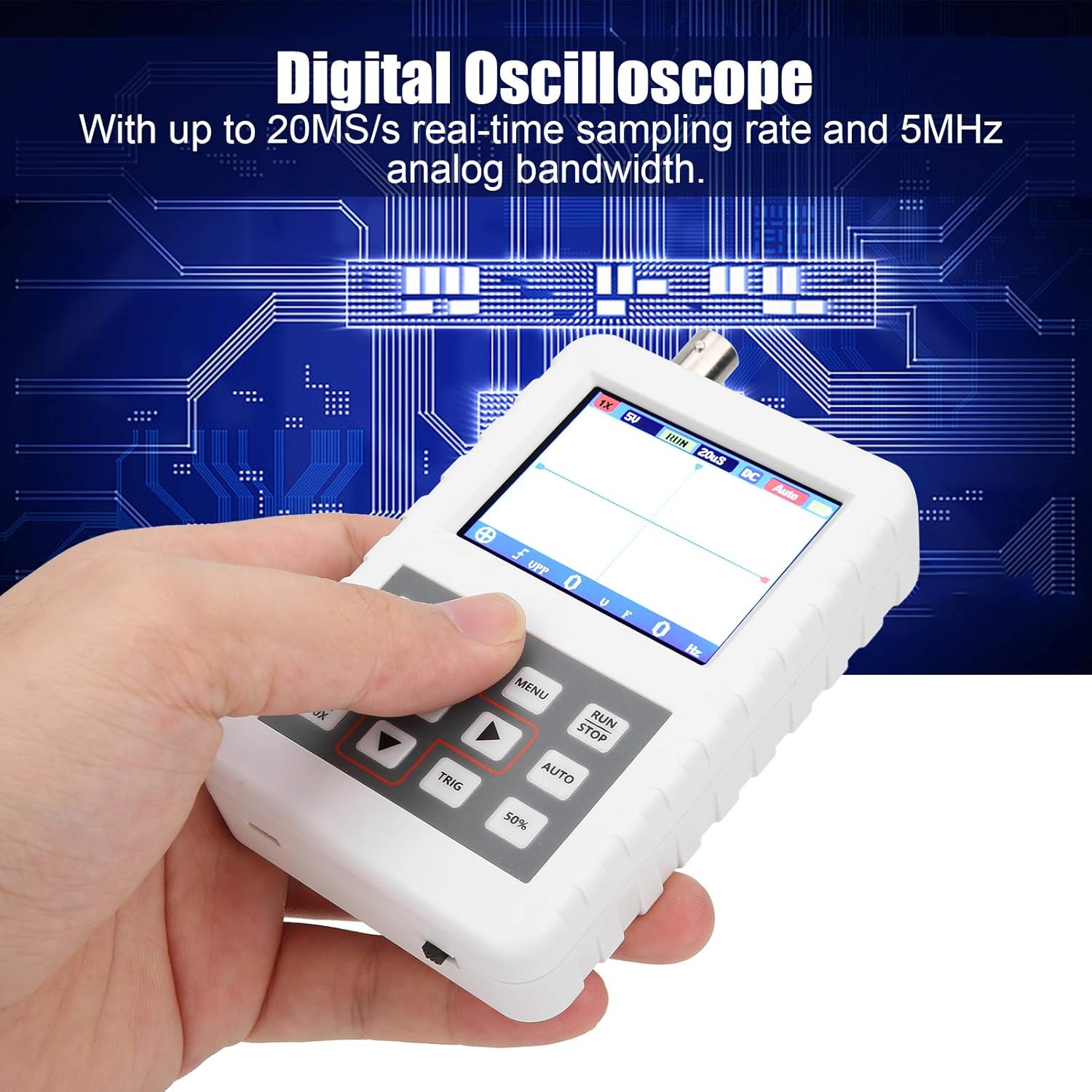
Image 1.1: The DSO FNIRSI PRO Digital Oscilloscope, highlighting its 20MS/s samplange Datenrate und 5 MHz analoge Bandbreite.

Image 1.2: The oscilloscope's 2.4-inch HD LCD screen with 320 x 240 resolution for clear waveform display.

Abbildung 1.3: Vorder- und Rückseite views of the DSO FNIRSI PRO, illustrating its physical layout.
2. Packungsinhalt
Bitte überprüfen Sie, ob alle unten aufgeführten Artikel in Ihrem Paket enthalten sind:
- 1 x DSO FNIRSI PRO Digital Oscilloscope
- 1 x Matching Probe
- 1 x USB-Datenkabel
- 1 x Benutzerhandbuch (dieses Dokument)
3. Ersteinrichtung
3.1 Aufladen des Geräts
Before first use, fully charge the oscilloscope. Connect the provided USB data line to the device's charging port and to a 5V/1A, 2A, 3A, or 4A USB power adapter. The built-in 1200mAh lithium battery can be charged continuously for approximately 3 hours.
3.2 Anschließen der Sonde
Connect the matching probe to the BNC connector on the top of the oscilloscope. Ensure a secure connection by twisting the probe connector clockwise until it locks into place.
3.3 Ein-/Ausschalten
To power on the device, press and hold the power button (usually located on the side or bottom) for a few seconds until the screen illuminates. To power off, press and hold the power button again until the device shuts down.
4. Bedienungsanleitung
4.1 Bedienelemente und Schnittstelle
The oscilloscope features a user-friendly interface with several buttons for navigation and function control.

Image 4.1: Operating the DSO FNIRSI PRO, showing the placement of control buttons.
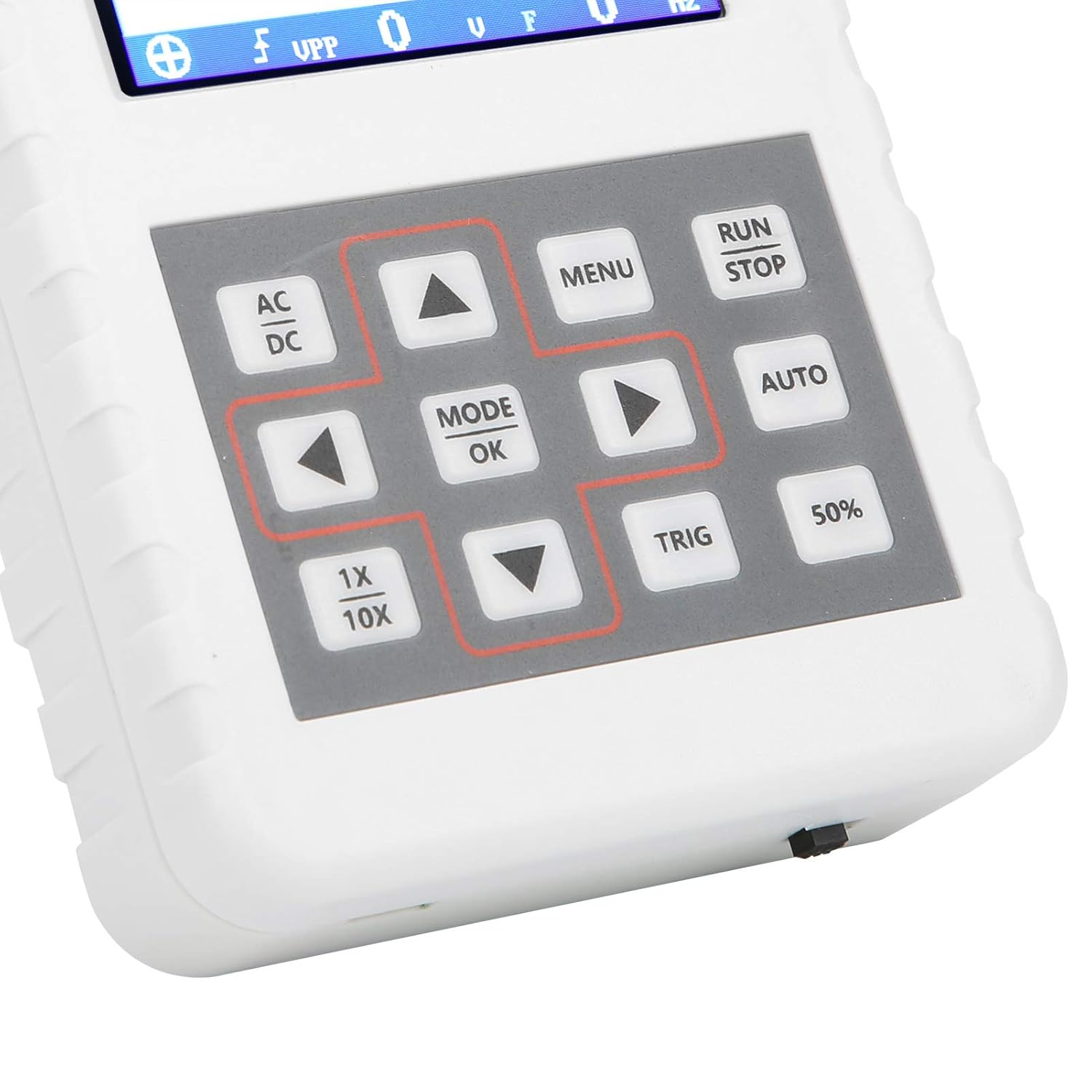
Abbildung 4.2: Detailansicht view of the oscilloscope's control panel.
- SPEISEKARTE: Öffnet das Hauptmenü für Einstellungen und Funktionen.
- RUN/STOP: Starts or pauses waveform acquisition.
- WAGEN: Automatically adjusts settings for optimal waveform display.
- TRIG: Adjusts trigger level.
- 50 %: Sets the trigger level to 50% of the waveform ampBreite.
- Wechselstrom Gleichstrom: Toggles between AC and DC coupling modes.
- 1x/10x: Sets the oscilloscope's input attenuation to match the probe's setting.
- MODE/OK: Confirms selections or changes modes.
- Pfeiltasten (Oben, Unten, Links, Rechts): Navigieren Sie durch die Menüs und passen Sie die Parameter an.
4.2 Probe Attenuation Settings
It is critical to match the probe's attenuation setting with the oscilloscope's input setting to ensure accurate measurements.
- Für 1X measurement (0-40V): Set both the physical switch on the probe and the 1X/10X button on the oscilloscope to the 1X Position.
- Für 10X measurement (40-800V): Set both the physical switch on the probe and the 1X/10X button on the oscilloscope to the 10X Position.
4.3 Measurement Modes and Triggering
The oscilloscope supports various trigger modes to stabilize waveform display:
- Einzel: Captures a single waveform event and then stops.
- Normal: Captures a waveform only when a trigger condition is met.
- Auto: Continuously acquires waveforms, even without a trigger, but will trigger if a signal is present.
Verwenden Sie die TRIG button and arrow keys to adjust the trigger level, which determines the voltage point at which the oscilloscope begins to acquire data.
4.4 Wellenformspeicherung und -verwaltung
The device includes 16MB of built-in storage, capable of storing up to 500 waveform images. Use the file manager function to browse, view, and manage saved waveforms. This includes viewing detailed information, flipping through images, and deleting unwanted files.

Abbildung 4.3: Beispielamples of sine wave measurements at various frequencies.

Abbildung 4.4: Beispielamples of square, triangular, and sawtooth wave measurements.
5. Pflege und Wartung
5.1 Reinigung
Reinigen Sie das Gerät mit einem weichen, trockenen Tuch. Verwenden Sie keine Scheuermittel oder Lösungsmittel, da diese das Gerät beschädigen können.asing oder Bildschirm. Stellen Sie vor der Reinigung sicher, dass das Gerät ausgeschaltet und von jeglicher Stromquelle getrennt ist.
5.2 Batteriepflege
Um die Akkulaufzeit zu verlängern, sollte der Akku nicht häufig vollständig entladen werden. Bei längerer Lagerung des Geräts sollte er auf etwa 50 % geladen und alle paar Monate erneut aufgeladen werden.
5.3 Speicherung
Store the oscilloscope in a cool, dry place, away from direct sunlight, extreme temperatures, and high humidity. Keep it protected from dust and physical impact.
6. Fehlerbehebung
- Issue: Abnormal measured data.
Lösung: Check the probe's attenuation switch (1X or 10X) and ensure it matches the setting on the oscilloscope (using the 1X/10X button). If the probe is set to 10X and the oscilloscope is set to 1X, the device will not be damaged, but the data displayed will be incorrect. - Issue: Device does not power on.
Lösung: Ensure the battery is sufficiently charged. Connect the device to a power source using the USB data line and allow it to charge for at least 30 minutes before attempting to power it on again. - Issue: Screen is blank or frozen.
Lösung: Try performing a soft reset by pressing and holding the power button for an extended period (e.g., 10-15 seconds) until the device powers off, then power it back on. If the issue persists, ensure the battery is charged.
7. Technische Daten
| Besonderheit | Spezifikation |
|---|---|
| Produktmodell | DSO FNIRSI PRO |
| Produktmaterial | ABS |
| Anzahl der Kanäle | 1 |
| Bildschirmgröße | Ca. 6.1 cm |
| Bildschirmauflösung | 320 x 240 |
| Anzeigetyp | LCD Bildschirm |
| Analoge Bandbreite | 5 MHz |
| Maximum S.ampling-Rate | 20 MSps |
| Trigger-Modus | Einzeln/Normal/Automatisch |
| Wellenformspeicherung | 16MB (up to 500 waveform pictures) |
| Eingebauter Akku | Lithiumbatterie 1200mAh |
| Standby-Zeit | 3 Stunden |
| Ladeeingang | 5V/1A/2A/3A/4A |
| Hersteller | KUIDAMOS |
| Ursprungsland | USA |
| Artikel Teilenummer | KUIDAMOStgaix9hwck |
8. Garantie und Kundendienst
Informationen zu Garantie, technischem Support oder Serviceanfragen finden Sie in der mit Ihrem Kauf gelieferten Dokumentation oder kontaktieren Sie den Verkäufer direkt. Bewahren Sie Ihren Kaufbeleg als Nachweis für eventuelle Garantieansprüche auf.