
Einführung
This manual provides comprehensive instructions for the safe and effective use of your SelfieShow 61-inch Extendable Selfie Stick Tripod, Model LDP-L05. Please read this manual thoroughly before operating the device and retain it for future reference.
Im Leistungsumfang enthalten
Das Paket enthält folgende Artikel:
- 1x Tripod Selfie Stick
- 1x Universal Phone Holder
- 1x GoPro Adapter
- 1x Wireless Remote Shutter
SelfieShow provides a 1-year hassle-free warranty and 24-hour friendly customer service for this product.
Produkt überview
The SelfieShow LDP-L05 is a versatile accessory designed for capturing photos and videos with enhanced stability and flexibility. It functions as both an extendable selfie stick and a stable tripod.

Figure 1: SelfieShow 61-inch Selfie Stick Tripod in various configurations.
Hauptkomponenten und Merkmale:
- Selfie Stick Tripod Combo: The device integrates a phone holder and a camera quick release plate. The phone clip is adjustable to accommodate devices between 6.5-10cm. A standard 1/4-inch screw allows for camera mounting.
- Ausziehbare Länge: The stick extends from 13.2 inches to 61.4 inches, offering a longer reach than standard models for wider shots and group photos.
- Einstellbare Drehung: Features a 225° neck rotation and a 360° head rotation, allowing for flexible angle adjustments for optimal shooting.
- Kabelloser Fernauslöser: A pocket-sized wireless remote control enables easy photo and video capture from up to 30 feet away. It offers fast response and stable connection, compatible with most smartphones without requiring app downloads.
- Breite Kompatibilität: The universal phone holder fits most smartphones (with or without a case) and is compatible with various iPhone and Android models. The 1/4-inch screw allows mounting of digital cameras, DSLRs, SLRs, action cameras (like GoPro), webKameras und Camcorder.

Abbildung 2: Ausführlich view of the tripod's components and features.

Figure 3: The tripod's adjustable height settings.

Figure 4: Illustrates the 360° panoramic shooting feature.

Figure 5: Demonstrates the swivel panning head's range of motion.

Figure 6: The wireless remote control in use.
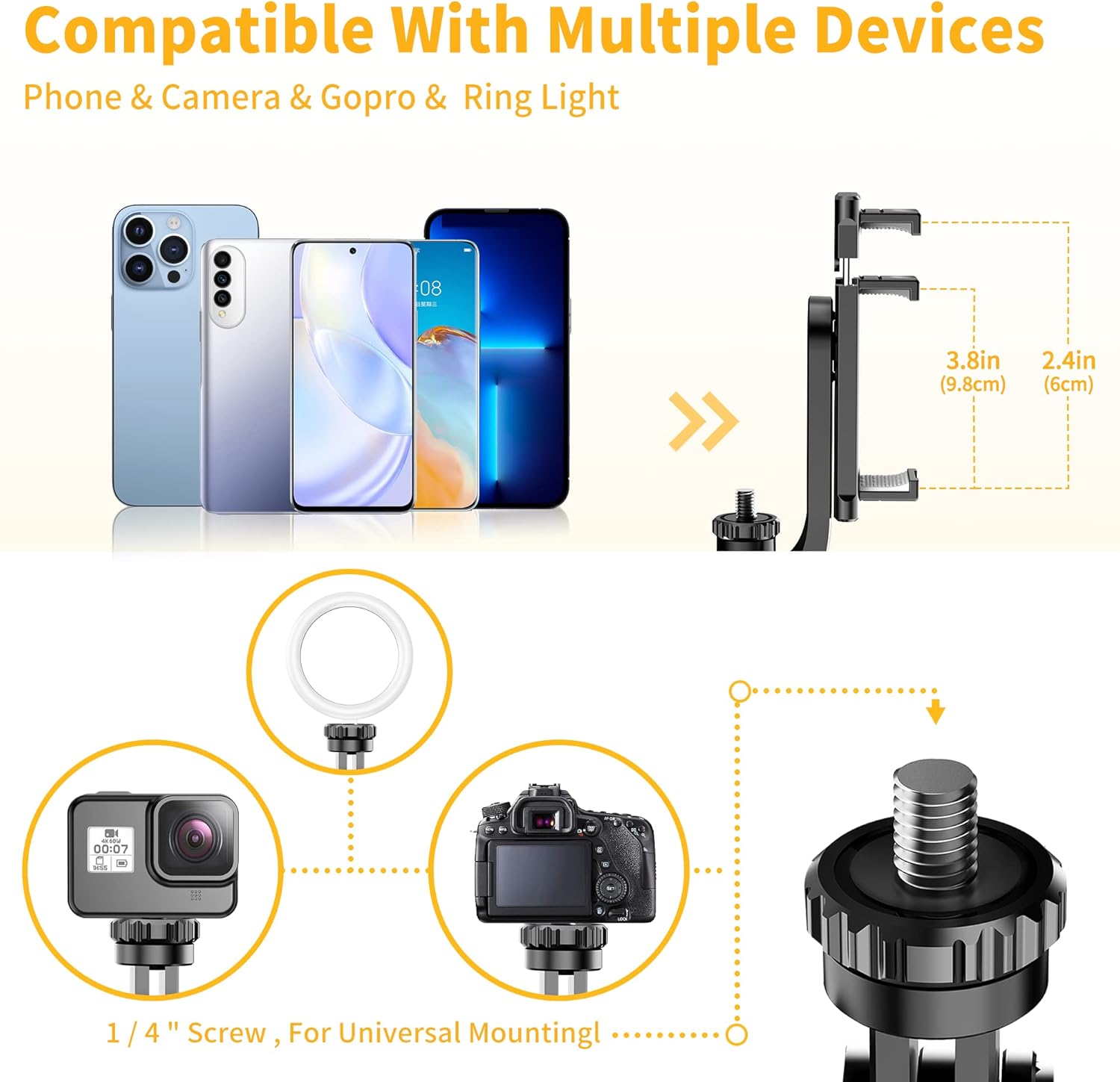
Figure 7: Compatibility with multiple devices.
Installationsanweisungen
1. Unfolding the Tripod:
- Halten Sie den Griff fest.
- Ziehen Sie den unteren Teil des Griffs vorsichtig nach unten, um die Stativbeine zu lösen.
- Spread the three legs outwards until they form a stable base.
2. Attaching Your Device:
- Für Smartphones: Extend the universal phone holder to fit your smartphone securely. Ensure the phone is centered and stable within the holder.
- For Cameras/GoPro: If using a camera or GoPro, remove the phone holder (if attached) and screw your device onto the 1/4-inch screw mount. Ensure it is tightened securely.
3. Pairing the Wireless Remote Shutter:
- Locate the wireless remote shutter, typically integrated into the handle. Slide it out to detach.
- Turn on the remote by pressing and holding the power button until an indicator light (usually blue) flashes.
- Öffnen Sie auf Ihrem Smartphone die Bluetooth-Einstellungen und suchen Sie nach verfügbaren Geräten.
- Select the device named "Selfie" or similar (refer to remote for exact name) to pair. The indicator light will stop flashing once successfully paired.
- Die Fernbedienung ist nun bereit für die Aufnahme von Fotos und Videos.
Video 1: Demonstration of the SelfieShow 61-inch Selfie Stick Tripod's setup and features, including remote pairing and extension.
Bedienungsanleitung
1. Verwendung als Selfie-Stick:
- Stellen Sie sicher, dass die Stativbeine zusammengeklappt und im Griff verriegelt sind.
- Ziehen Sie die Stange aus Aluminiumlegierung auf die gewünschte Länge aus.
- Adjust the phone holder or camera to the desired angle using the 225° neck rotation and 360° head rotation.
- Use the wireless remote shutter to capture photos or start/stop video recording.
2. Verwendung als Stativ:
- Unfold the tripod legs as described in the Setup section, ensuring a stable base on a flat surface.
- Extend the rod to the required height.
- Position your device using the adjustable head for optimal framing.
- Utilize the wireless remote shutter for hands-free operation.

Figure 8: Various usage scenarios for the tripod.
Video 2: Endeview of the SelfieShow Selfie Stick Tripod's features and operational modes.
Wartung
- Reinigen Sie das Gerät mit einem weichen, trockenen Tuch. Vermeiden Sie die Verwendung aggressiver Chemikalien oder scheuernder Materialien.
- Lagern Sie das Stativ an einem kühlen, trockenen Ort, geschützt vor direkter Sonneneinstrahlung und extremen Temperaturen.
- Um die Stabilität zu gewährleisten, stellen Sie vor jedem Gebrauch sicher, dass alle Schrauben und Verbindungen fest angezogen sind.
- If the remote control battery needs replacement, refer to the remote's specific instructions for battery type and replacement procedure.
Fehlerbehebung
Fernbedienung verbindet sich nicht:
- Stellen Sie sicher, dass die Fernbedienung aufgeladen ist oder eine neue Batterie hat.
- Stellen Sie sicher, dass Bluetooth auf Ihrem Smartphone aktiviert ist.
- Make sure the remote is within the 30-foot operating range.
- Try unpairing and re-pairing the remote in your phone's Bluetooth settings.
Instabilität des Stativs:
- Stellen Sie sicher, dass die Stativbeine vollständig ausgezogen und auf einer ebenen, stabilen Oberfläche arretiert sind.
- Check that your device is securely mounted and balanced on the holder.
- Avoid extending the rod to its maximum length in windy conditions or on uneven terrain.
Phone Holder Not Gripping Securely:
- Ensure your phone's dimensions are within the specified range (6.5-10cm).
- Check for any obstructions or debris in the phone holder's grip pads.
Technische Daten
| Besonderheit | Detail |
|---|---|
| Technische Daten | 2.95 x 1.48 x 13.23 Zoll |
| Artikelgewicht | 12.5 Unzen (355 Gramm) |
| Modellnummer | LDP-L05 |
| Batterien | 1 Lithium-Metall-Batterie erforderlich (im Lieferumfang enthalten) |
| Marke | SelfieShow |
| Farbe | Black (with handle) |
| Kompatible Geräte | Smartphone, Digital Camera, DSLR, SLR, Action Camera, Gopro, Webcam, Camcorder |
| Besonderheit | Remote Control, Portable |
| Material | Acrylnitril-Butadien-Styrol (ABS), Edelstahl |
| Gewichtsbeschränkung | 3 Kilogramm |
| Maximale Höhe | 149 Zentimeter (ca. 61 Zoll) |
| Stativkopftyp | Kugelköpfe |
Garantie und Support
Your SelfieShow 61-inch Extendable Selfie Stick Tripod is covered by a 1-year hassle-free warranty. For any inquiries, technical assistance, or warranty claims, please contact SelfieShow customer service. Our team is available 24 hours to provide friendly support.