
1. Einleitung
Thank you for choosing the Langsdom GT4 Dual Driver Earbuds. These wireless earbuds are designed to provide a superior audio experience with dual dynamic drivers, Bluetooth 5.0 connectivity, and convenient touch controls. This manual will guide you through the setup, operation, and maintenance of your new earbuds.
2. Packungsinhalt
Bitte prüfen Sie das Paket auf folgende Artikel:
- Langsdom GT4 Dual Driver Earbuds (Left and Right)
- Ladeetui
- USB-C-Ladekabel
- Soft Ear Caps (S, M, L sizes)
- Bedienungsanleitung

Image: Contents of the Langsdom GT4 earbud package, including earbuds, charging case, USB-C cable, and various ear tip sizes.
3. Produktüberschreitungview
The Langsdom GT4 earbuds feature advanced technology for an immersive audio experience.
3.1 Dual Dynamic Drivers
Each earbud is equipped with two 8mm dynamic drivers, providing enhanced bass and clear treble for a rich sound profile.

Image: Diagram illustrating the dual 8mm dynamic drivers within the Langsdom GT4 earbuds, highlighting superior audio sound with AAC and SBC support.
3.2 Bluetooth 5.0 Technology
Utilizing Bluetooth 5.0, the earbuds offer a stable and fast connection, ensuring high-quality audio transmission and compatibility with various devices.
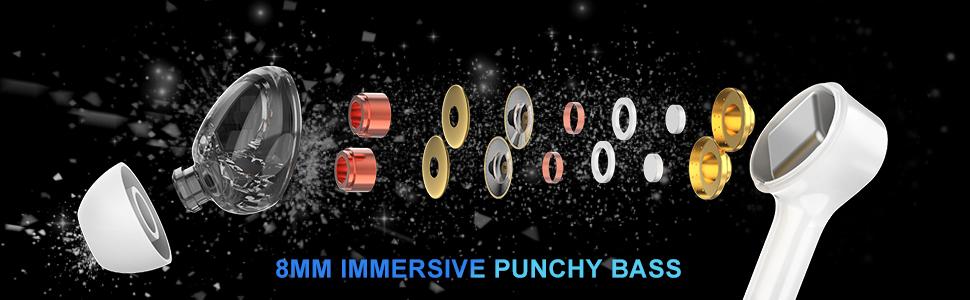
Image: Close-up of the Bluetooth 5.0 chip inside the earbud, emphasizing HD call quality, wide compatibility, and long battery life.
3.3 Lange Akkulaufzeit
The earbuds provide up to 5 hours of playtime on a single charge, with the charging case extending total playtime to approximately 30 hours.
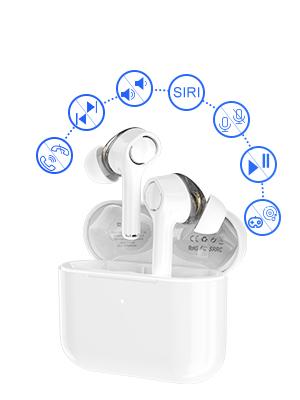
Image: Graphic showing the Langsdom GT4 earbuds and charging case, indicating 1.2 hours charging time, 5 hours play time, and 30 hours total endurance time.
3.4 Ergonomisches Design
Designed for comfort and stability, each earbud weighs only 4g and comes with three sizes of silicone ear tips to ensure a secure fit for extended wear.

Image: A person wearing the Langsdom GT4 earbuds, demonstrating their comfortable and secure fit.
4. Einrichtungsanweisungen
4.1 Aufladen der Ohrhörer und des Ladecase
- Legen Sie die Ohrhörer in das Ladecase. Achten Sie darauf, dass sie richtig sitzen.
- Verbinden Sie das USB-C-Ladekabel mit dem Ladeanschluss am Gehäuse und mit einer Stromquelle.
- The indicator light on the charging case will show charging status. A full charge takes approximately 1.2 hours for the earbuds and case.
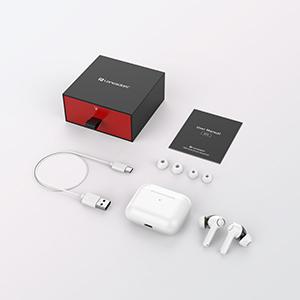
Image: Close-up of the USB-C charging port on the Langsdom GT4 charging case, with a charging cable connected.
4.2 Koppeln mit einem Gerät
- Öffnen Sie den Deckel des Ladegehäuses. Die Ohrhörer schalten sich automatisch ein und wechseln in den Kopplungsmodus.
- Aktivieren Sie Bluetooth auf Ihrem Gerät (Smartphone, Tablet usw.).
- Suchen nach "GT4" in the list of available Bluetooth devices and select it to connect.
- Sobald die Verbindung hergestellt ist, hören Sie einen Bestätigungston, und die Ohrhörer sind einsatzbereit.
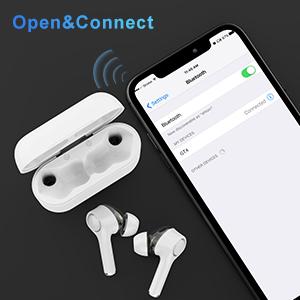
Image: A smartphone screen showing the Bluetooth settings with "GT4" selected for pairing, next to the open charging case with earbuds.
5. Bedienungsanleitung
5.1 Berührungssteuerung
The Langsdom GT4 earbuds feature intuitive touch controls. Gently tap the touch sensitive area on either earbud to perform the following actions:
| Aktion | Linker Ohrhörer (L) | Rechter Ohrhörer (R) |
|---|---|---|
| Abspielen/Pause | 1 Tippen Sie auf | 1 Tippen Sie auf |
| Lautstärke erhöhen | - | 2 Wasserhähne |
| Lautstärke verringern | 2 Wasserhähne | - |
| Nächstes Lied | 3s lang drücken | - |
| Vorheriges Lied | - | 3s lang drücken |
| Anruf annehmen/beenden | 1 Tippen Sie auf | 1 Tippen Sie auf |
| Anruf ablehnen | 2 Wasserhähne | 2 Wasserhähne |
| Activate Voice Assistant (Siri/Google) | 3 Wasserhähne | 3 Wasserhähne |
| Game Mode / Exit Game Mode | 3 Wasserhähne | - |
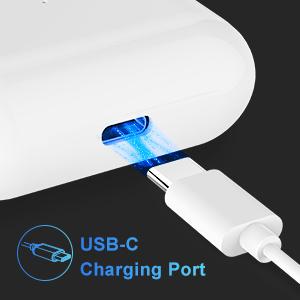
Image: Diagram illustrating the various touch control functions on the Langsdom GT4 earbuds, including play/pause, volume, call management, and voice assistant activation.
5.2 Musik- und Spielmodi
The GT4 earbuds offer a dual-mode function for optimized audio performance based on your activity.
- Musikmodus: Provides rich stereo bass and clear sound for an immersive listening experience.
- Spielmodus: Reduces latency for synchronized audio and video, enhancing your gaming experience.
To switch between modes, tap the left earbud 3 times.

Image: Graphic comparing Music Mode (low latency, stereo bass) and Gaming Mode (zero delay, synchronization) for the Langsdom GT4 earbuds.
6. Wartung
- Reinigen Sie die Ohrhörer und das Ladecase regelmäßig mit einem weichen, trockenen Tuch.
- Vermeiden Sie es, die Ohrhörer extremen Temperaturen, hoher Luftfeuchtigkeit oder Flüssigkeiten auszusetzen.
- Bewahren Sie die Ohrhörer bei Nichtgebrauch im Ladeetui auf, um sie zu schützen und die Akkulaufzeit zu verlängern.
- Do not attempt to disassemble or repair the earbuds yourself. Contact customer support for assistance.
7. Fehlerbehebung
| Problem | Lösung |
|---|---|
| Ohrhörer lassen sich nicht koppeln | Ensure earbuds are charged. Turn off and on Bluetooth on your device. Forget "GT4" from your device's Bluetooth list and re-pair. |
| Nur ein Ohrhörer funktioniert | Place both earbuds back in the charging case, close the lid, then open it again. Ensure both earbuds are charged. |
| Geringe Lautstärke oder schlechte Klangqualität | Adjust volume on both earbuds and your device. Ensure ear tips are properly sealed in your ear. Clean any debris from the earbud speakers. |
| Ohrhörer werden nicht aufgeladen | Check the charging cable and power source. Ensure earbuds are correctly seated in the charging case. Clean charging contacts on earbuds and case. |
| Connectivity issues (disconnections) | Ensure your device is within the Bluetooth range (33-50 feet). Avoid obstacles between earbuds and device. Try resetting the earbuds (refer to manufacturer's specific reset instructions if available, otherwise re-pair). |
8. Spezifikationen
- Modell: GT4
- Konnektivität: Kabellos (Bluetooth 5.0)
- Treibergröße: Dual 8mm Dynamic Drivers per earbud
- Spielzeit: Bis zu 5 Stunden (Ohrhörer), bis zu 30 Stunden (mit Ladeetui)
- Ladezeit: Ungefähr 1.2 Stunden
- Ladeanschluss: USB-C
- Steuerungstyp: Touch-Steuerung
- Gewicht der Ohrhörer: 4 Gramm (jeweils)
- Material: Plastik
- Abmessungen: 1.97 x 0.71 x 1.57 Zoll (Produkt)
9. Offizielles Produktvideo
Video: Ein offizielles Produktvideo präsentiertasing the Langsdom GT4 Dual Driver Earbuds, demonstrating features like auto-pairing, dual drivers, Bluetooth 5.0, secure fit, and long battery life.
10. Garantie und Support
Langsdom products come with a standard manufacturer's warranty. For detailed warranty information, product support, or service inquiries, please refer to the warranty card included in your package or visit the official Langsdom webWebsite.
Kontaktinformationen: Please refer to the contact details provided on the product packaging or the official Langsdom webWebsite für den Kundenservice.