
1. Einleitung
Vielen Dank für Ihren Einkauf.asing the QFX E-B3 Bluetooth Professional High-Power Speaker. This manual provides essential information for the safe and efficient operation of your speaker. Please read it thoroughly before use and retain it for future reference.
The QFX E-B3 is designed to deliver powerful audio with features including Bluetooth connectivity, FM radio, USB/SD card playback, LED party lights, and a 250W power amplifier. It also supports True Wireless System (TWS) for stereo pairing with another compatible speaker.
2. Sicherheitshinweise
- Energiequelle: Schließen Sie den Lautsprecher nur an die auf dem Gerät angegebene Stromversorgung an.
- Belüftung: Sorgen Sie für ausreichende Belüftung um den Lautsprecher herum. Blockieren Sie keine Belüftungsöffnungen.
- Wasser und Feuchtigkeit: This speaker is not waterproof. Do not expose it to rain, moisture, or any liquids to prevent electric shock or fire.
- Hitze: Halten Sie den Lautsprecher von Wärmequellen wie Heizkörpern, Heizlüftern, Öfen oder anderen Geräten fern, die Wärme erzeugen.
- Reinigung: Unplug the speaker from the power outlet before cleaning. Use a dry cloth for cleaning. Do not use liquid cleaners or aerosol cleaners.
- Wartung: Versuchen Sie nicht, dieses Produkt selbst zu warten. Überlassen Sie alle Wartungsarbeiten qualifiziertem Servicepersonal.
- Platzierung: Stellen Sie den Lautsprecher auf eine stabile, ebene Fläche, um zu verhindern, dass er herunterfällt.
3. Packungsinhalt
Überprüfen Sie, ob alle Artikel im Paket vorhanden sind:
- QFX E-B3 High-Power Speaker
- Mikrofon
- Fernbedienung
- Netzkabel
- Benutzerhandbuch (dieses Dokument)
4. Produktüberschreitungview
The QFX E-B3 speaker features dual 15-inch woofers and a 1-inch tweeter, protected by a metal grill. It includes integrated handles and wheels for portability.

Abbildung 4.1: Vorderseite view of the QFX E-B3 Speaker.
Bedienelemente und Anschlüsse auf der Rückseite
The rear panel houses all input/output connections and control knobs.
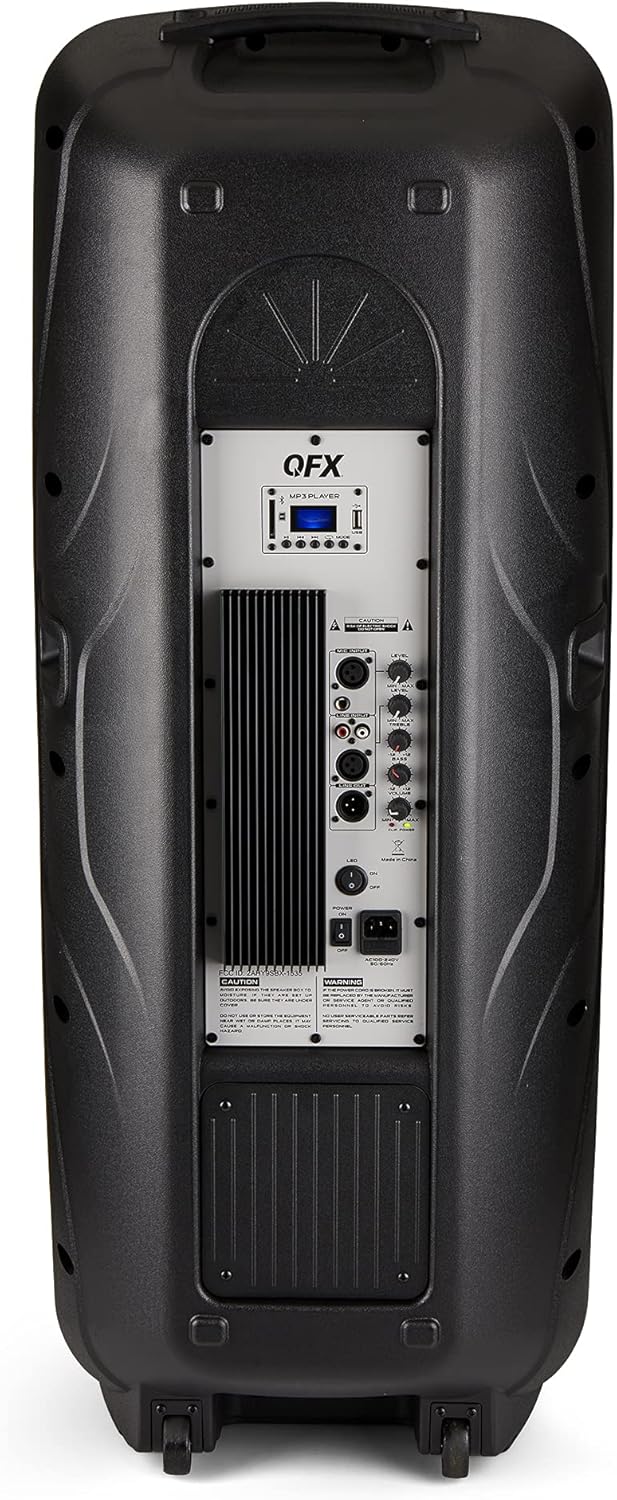
Figure 4.2: Rear panel with controls and ports.
- Stromschalter: Schaltet den Lautsprecher EIN/AUS.
- AC-Eingang: Schließt das Netzkabel an.
- USB/SD Card Ports: Zum Abspielen von Audio files von USB-Laufwerken oder SD-Karten.
- Bildschirm: Zeigt den aktuellen Modus und Streckeninformationen an.
- Modus-Taste: Switches between input modes (Bluetooth, FM, USB, SD, RCA).
- Wiedergabe-/Pause-Taste: Steuert die Wiedergabe über USB/SD/Bluetooth.
- Schaltflächen für vorherigen/nächsten Titel: Navigiert durch Musiktitel oder FM-Sender.
- Master-Lautstärkeregler: Regelt die Gesamtlautstärke.
- Bass/Treble Control Knobs: Adjusts low and high frequencies.
- XLR-Mikrofoneingang: Connects a wired microphone.
- Microphone Volume/Echo Knobs: Adjusts microphone volume and echo effect.
- RCA-Eingang (L/R): Connects external audio devices via RCA cables.
- XLR Line Input/Output: For connecting to other audio equipment.
5. Einrichtung
Erstplatzierung
Place the speaker on a stable, flat surface. For optimal sound, position it in a central location within the listening area. The integrated wheels and handle allow for easy transport.

Figure 5.1: Speaker being moved with handle and wheels.
Stromanschluss
- Stellen Sie sicher, dass sich der Netzschalter des Lautsprechers in der Position AUS befindet.
- Connect the AC power cable to the AC input on the rear panel of the speaker.
- Stecken Sie das andere Ende des Netzkabels in eine normale Wandsteckdose.
- Flip the power switch to the ON position. The display screen will illuminate.
6. Bedienungsanleitung
Bluetooth-Kopplung
- Turn on the QFX E-B3 speaker.
- Drücken Sie die MODUS button on the speaker or remote control until "BLUE" appears on the display screen, indicating Bluetooth mode.
- Aktivieren Sie Bluetooth auf Ihrem Mobilgerät (Smartphone, Tablet usw.).
- Suchen nach available Bluetooth devices and select "QFX E-B3" from the list.
- Nach erfolgreicher Kopplung gibt der Lautsprecher einen Bestätigungston aus. Sie können nun Audio von Ihrem Gerät über den Lautsprecher wiedergeben.
True Wireless System (TWS) Pairing
TWS allows two QFX E-B3 speakers to connect wirelessly for a stereo sound experience. This feature works only in Bluetooth mode.
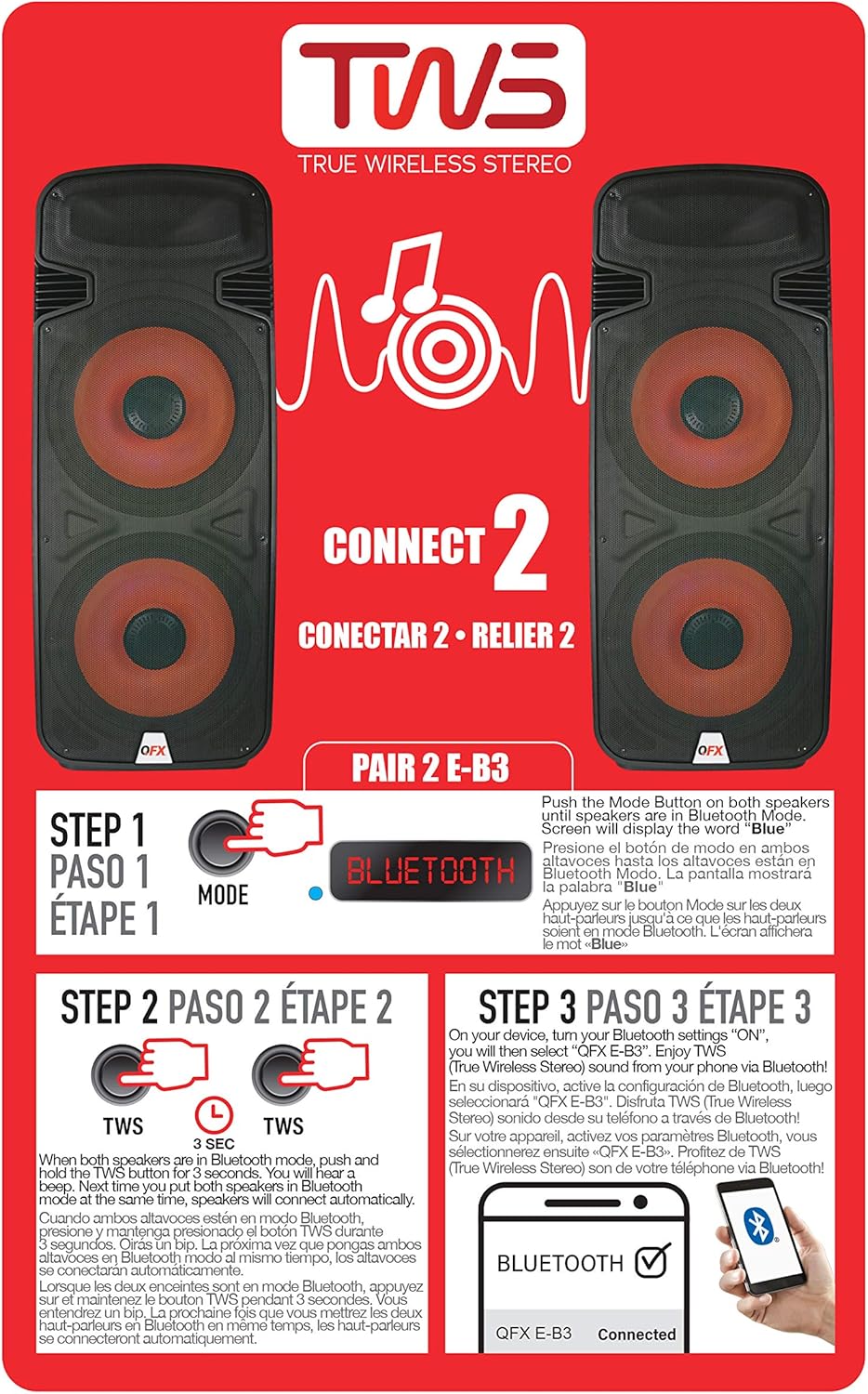
Figure 6.1: TWS Pairing Instructions.
- Ensure both QFX E-B3 speakers are powered on and in Bluetooth mode. The display on both speakers should show "BLUE".
- Drücken und halten Sie bei einem der Lautsprecher (dies wird Ihr Hauptlautsprecher sein) die Taste TWS button for approximately 3 seconds. The speakers will attempt to connect to each other.
- Once successfully paired, you will hear a confirmation sound, and the display on the primary speaker will show "BLUE" while the secondary speaker will show "BLUE" as well.
- On your Bluetooth-enabled device, search for and select "QFX E-B3". The two speakers will now play audio in stereo.
FM-Radiobetrieb
- Drücken Sie die MODUS button to switch to FM radio mode. The display will show the FM frequency.
- Halten Sie die Abspielen/Pause button to initiate an automatic scan for FM stations. The speaker will save all found stations.
- Verwenden Sie die Vorheriger/Nächster Titel Tasten zur Navigation durch die gespeicherten FM-Sender.
USB/SD-Kartenwiedergabe
- Insert a USB flash drive or SD card (with compatible audio files) in den entsprechenden Anschluss auf der Rückseite.
- The speaker will automatically switch to USB/SD mode and begin playing the audio files. Falls nicht, drücken Sie die Taste MODUS Taste zur Auswahl des USB- oder SD-Modus.
- Verwenden Sie die Abspielen/Pause Und Vorheriger/Nächster Titel Tasten zur Steuerung der Wiedergabe.
Mikrofoneingang
- Connect a microphone to the XLR Microphone Input on the rear panel.
- Adjust the Microphone Volume and Echo knobs to achieve the desired sound.
Cinch-Eingang
- Connect an external audio source (e.g., CD player, mixer) to the RCA Input (L/R) ports using appropriate RCA cables.
- Drücken Sie die MODUS button to select RCA input mode.
- Adjust the master volume on the speaker and the volume on your external audio source.
LED-Partylichter
The speaker features integrated LED party lights that activate automatically when the speaker is powered on. There are no specific controls for the LED lights mentioned; they are designed to enhance the audio experience.
7. Wartung
Reinigung
- Always unplug the speaker before cleaning.
- Verwenden Sie ein weiches, trockenes Tuch, um die Außenflächen des Lautsprechers abzuwischen.
- Verwenden Sie keine Scheuermittel, Wachse oder Lösungsmittel, da diese die Oberfläche beschädigen können.
- Halten Sie die Lüftungsöffnungen frei von Staub und Schmutz.
Lagerung
When not in use for extended periods, store the speaker in a cool, dry place, away from direct sunlight and extreme temperatures. Cover the speaker to protect it from dust.
8. Fehlerbehebung
If you encounter issues with your QFX E-B3 speaker, refer to the following common problems and solutions:
| Problem | Mögliche Ursache | Lösung |
|---|---|---|
| Kein Strom | Netzkabel nicht angeschlossen; Steckdose nicht aktiv; Lautsprecherschalter ausgeschaltet. | Ensure AC cable is securely connected to speaker and outlet. Check if outlet is working. Turn speaker power switch ON. |
| Kein Ton | Volume too low; Incorrect input mode selected; Audio source not playing. | Increase master volume. Press MODE button to select correct input. Ensure audio source is playing and its volume is up. |
| Bluetooth stellt keine Verbindung her | Speaker not in Bluetooth mode; Device Bluetooth off; Speaker already paired to another device; Device too far. | Ensure speaker is in Bluetooth mode ("BLUE" on display). Turn on device Bluetooth. Disconnect from other devices. Move device closer to speaker (within 30 feet). |
| TWS-Kopplung fehlgeschlagen | Speakers not in Bluetooth mode; TWS button not held long enough. | Ensure both speakers are in Bluetooth mode. Press and hold the TWS button on one speaker for 3 seconds. |
| USB/SD-Wiedergabe funktioniert nicht | Falscher Modus; Inkompatibel file Formatierung; Beschädigte USB-/SD-Karte. | Press MODE to select USB/SD. Ensure audio files are in a compatible format (e.g., MP3). Try a different USB/SD card. |
9. Spezifikationen
| Besonderheit | Spezifikation |
|---|---|
| Marke | QFX |
| Modellnummer | E-B3 |
| Maximale Lautsprecherausgangsleistung | 250 Watt |
| Konnektivitätstechnologie | USB, Bluetooth |
| Audioausgabemodus | Stereo |
| Montagetyp | Plug Mount, Wheel Mount |
| Lautsprechertyp | Woofer (Dual 15 Inches) |
| Controllertyp | Fernbedienung |
| Farbe | Party LED |
| Ist wasserdicht | FALSCH |
| Kontrollmethode | Fernbedienung |
| Woofer-Durchmesser | 15 Zoll |
| Anzahl der Audiokanäle | 2.0 |
| Wireless-Technologie | Bluetooth |
| Konnektivitätsprotokoll | Bluetooth |
| Stromquelle | Kabelgebundene Elektrik |
| Audiotreibertyp | Dynamischer Treiber |
| Größe des Audiotreibers | 15 Zoll |
| Artikelabmessungen (T x B x H) | 16.77"T x 13.98"B x 23.74"H |
| Artikelgewicht | 13.2 Pfund |
| Kompatible Geräte | Laptop, MP3-Player, Smartphone, Tablet, Fernseher |
| UPC | 606540039618 |
10. Garantieinformationen
This product is covered by a limited warranty. For specific details regarding warranty coverage and terms, please refer to the warranty information provided at the point of purchase or contact QFX customer support directly. The warranty is typically per contract with the retailer.
11. Unterstützung
For technical assistance, troubleshooting beyond this manual, or inquiries about your QFX E-B3 speaker, please contact QFX customer support or your retailer. Contact information can usually be found on the manufacturer's webauf der Website oder auf Ihrem Kaufbeleg.