
iHip WLG-PP27
iHip 3ft PVC Micro USB High-Speed Data and Charging Cable
Model: WLG-PP27
Einführung
This manual provides essential information for the proper use, setup, maintenance, and troubleshooting of your iHip 3ft PVC Micro USB High-Speed Data and Charging Cable. Please read this manual thoroughly before using the product.
The iHip Micro USB cable is designed for fast charging and high-speed data transfer, compatible with a wide range of devices including Android phones, tablets, gaming consoles, and other devices with a Micro USB interface. It features a durable rubber finish and a metal tip, engineered for longevity with a 10,000 bend test certification.
Packungsinhalt
- 1 x iHip 3ft PVC Micro USB High-Speed Data and Charging Cable
Aufstellen
The iHip Micro USB cable is designed for plug-and-play functionality. Follow these steps to connect your device:
- Ports identifizieren: Locate the Micro USB port on your device (e.g., smartphone, tablet, game controller) and a standard USB-A port on your power adapter, computer, or other charging/data source.
- Mit Gerät verbinden: Gently insert the Micro USB connector (the smaller, trapezoidal end) into the Micro USB port on your device. Ensure it is inserted horizontally and correctly to avoid damage.
- Anschluss an Strom-/Datenquelle: Insert the standard USB-A connector (the larger, rectangular end) into a compatible USB-A port on your power adapter, computer, or other charging/data source.
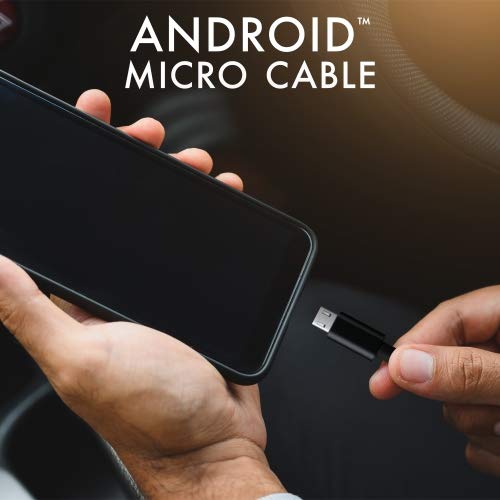
Image: Connecting the iHip Micro USB cable to a smartphone. The cable is designed for easy and secure connection.
Bedienungsanleitung
Aufladen Ihres Geräts
To charge your device using the iHip Micro USB cable:
- Schließen Sie das Kabel wie im Abschnitt „Einrichtung“ beschrieben an.
- Ensure your power adapter or USB port provides sufficient power. For fast charging, use a Quick Charge compatible power adapter (e.g., 9V/2A output) or a standard power adapter with 5V/2.4A output.
- The device's charging indicator should activate, confirming that charging has begun.
Datenübertragung
So übertragen Sie Daten zwischen Ihrem Gerät und einem Computer:
- Verbinden Sie das Micro-USB-Ende mit Ihrem Gerät und das USB-A-Ende mit einem USB-Anschluss Ihres Computers.
- Your computer should recognize the connected device. You may need to select "File Wechseln Sie gegebenenfalls in den "Transfer"- oder "MTP"-Modus auf dem Bildschirm Ihres Geräts.
- You can now access your device's storage to transfer files at speeds up to 480Mb/s.
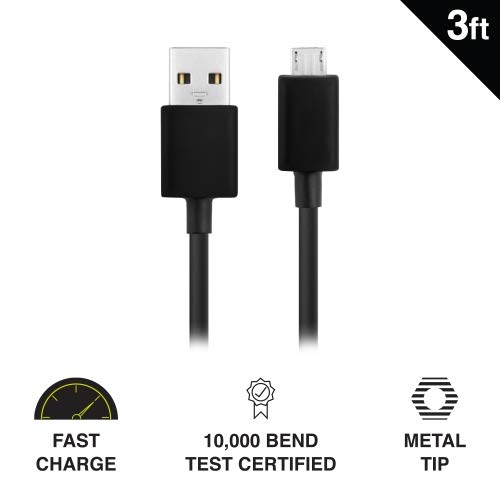
Image: Key features of the iHip Micro USB cable, highlighting its fast charge capability, durability, and robust metal tip.
Wartung und Pflege
To ensure the longevity and optimal performance of your iHip Micro USB cable, follow these maintenance guidelines:
- Richtige Handhabung: Fassen Sie den Stecker beim Ein- und Ausstecken des Kabels immer am Steckerkopf an. Ziehen Sie nicht direkt am Kabel selbst, da dies die internen Drähte beschädigen kann.
- Lagerung: Bewahren Sie das Kabel an einem sauberen, trockenen Ort, geschützt vor extremen Temperaturen und direkter Sonneneinstrahlung, auf. Vermeiden Sie es, das Kabel eng aufzuwickeln oder in scharfen Winkeln zu biegen.
- Reinigung: If the connectors become dirty, gently wipe them with a dry, lint-free cloth. Do not use liquids or abrasive cleaners.
- Stress vermeiden: Do not place heavy objects on the cable or allow it to be pinched, which can lead to internal damage.
Fehlerbehebung
If you encounter issues with your iHip Micro USB cable, try the following troubleshooting steps:
- Gerät wird nicht geladen:
- Stellen Sie sicher, dass beide Enden des Kabels fest angeschlossen sind.
- Versuchen Sie es mit einem anderen Netzteil oder USB-Anschluss.
- Testen Sie das Kabel mit einem anderen kompatiblen Gerät, um ein Geräteproblem auszuschließen.
- Check the Micro USB port on your device for any debris or damage.
- Langsamer Ladevorgang:
- Ensure you are using a power adapter with adequate output (e.g., 5V/2.4A or Quick Charge compatible).
- Avoid charging from low-power USB ports (e.g., some laptop USB 2.0 ports).
- Probleme bei der Datenübertragung:
- Vergewissern Sie sich, dass Ihr Gerät auf " eingestellt istFile Transfer- oder MTP-Modus bei Verbindung mit einem Computer.
- Probieren Sie einen anderen USB-Anschluss an Ihrem Computer aus.
- Starten Sie sowohl Ihr Gerät als auch Ihren Computer neu.
Technische Daten
| Besonderheit | Detail |
|---|---|
| Modellnummer | WLG-PP27 |
| Kabellänge | 3 Fuß (ca. 0.91 Meter) |
| Steckertyp | USB-A to Micro USB |
| Material | PVC with Rubber Finish, Metal Tip |
| Datenübertragungsgeschwindigkeit | Bis zu 480 Mbit/s |
| Haltbarkeit | 10,000+ bend lifespan certified |
| Kompatibilität | Android Cell Phones, Tablets, Windows Phones (Samsung Note/Galaxy, Nokia Lumia, LG, HTC), MP4, hard drives, PlayStation 4, Xbox One controller, and other Micro USB devices. |
| Technische Daten | 6.5 x 3 x 1 Zoll; 1.76 Unzen |

Image: The iHip 3ft PVC Micro USB cable, showcasing dank seines kompakten und flexiblen Designs.
Garantie und Support
The iHip Micro USB cable comes with a lifetime guarantee. For detailed warranty information and support, please visit the official iHip webWebsite:
For any further assistance or inquiries, please refer to the contact information provided on the iHip webWebsite.
Ask a question about this manual
Ask about setup, troubleshooting, compatibility, parts, safety, or missing instructions. Manuals+ will review the question and use this page’s manual context to help answer it.