
1. Einleitung
Thank you for choosing the Camelion Mini Portable Charger BC-1001B. This compact and efficient charger is designed to safely and reliably charge AA, AAA, and 9V rechargeable batteries. Please read this manual thoroughly before use to ensure proper operation and to maximize the lifespan of your charger and batteries.
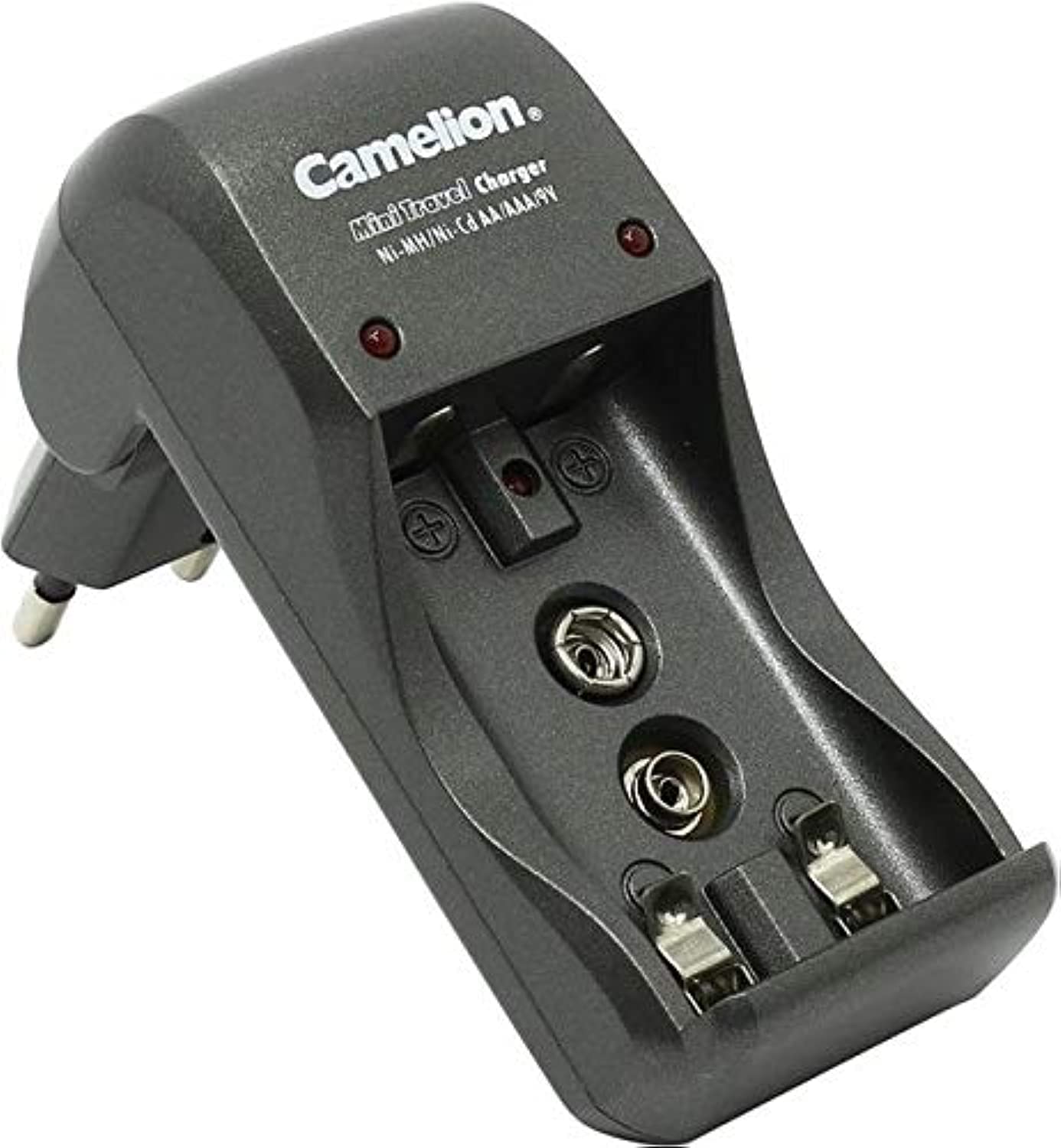
Image 1.1: The Camelion Mini Portable Charger BC-1001B. This image shows the compact design of the charger, suitable for various battery types.
2. Sicherheitsvorkehrungen
Um Verletzungen oder Schäden am Ladegerät und den Batterien zu vermeiden, beachten Sie bitte stets die folgenden Sicherheitsvorkehrungen:
- Use this charger only with specified rechargeable batteries (AA, AAA, 9V Nickel-Metal Hydride (Ni-MH) or Nickel-Cadmium (Ni-Cd)).
- Do not attempt to charge non-rechargeable batteries. This may lead to leakage, rupture, or explosion.
- Bewahren Sie das Ladegerät außerhalb der Reichweite von Kindern und Haustieren auf.
- Das Ladegerät darf weder Wasser, Feuchtigkeit noch extremen Temperaturen ausgesetzt werden.
- Ziehen Sie den Stecker des Ladegeräts aus der Steckdose, wenn es nicht benutzt wird oder während der Reinigung.
- Do not disassemble, modify, or attempt to repair the charger yourself. Contact qualified service personnel if repair is needed.
- Sorgen Sie während des Ladevorgangs für ausreichende Belüftung. Decken Sie das Ladegerät nicht ab.
3. Packungsinhalt
Bitte prüfen Sie das Paket auf folgende Artikel:
- 1 x Camelion Mini Portable Charger BC-1001B
- 1 x Benutzerhandbuch
4. Einrichtung
Befolgen Sie diese Schritte für die Ersteinrichtung:
- Auspacken: Nehmen Sie das Ladegerät vorsichtig aus der Verpackung.
- Stromanschluss: Connect the charger to a standard wall power outlet. Ensure the connection is secure.
- Einlegen der Batterie: Insert rechargeable batteries into the designated charging slots. Pay close attention to the polarity markings (+ and -) on both the batteries and the charger to ensure correct insertion.
5. Bedienungsanleitung
The Camelion Mini Portable Charger BC-1001B is designed for straightforward operation.
5.1 Laden von AA/AAA-Batterien
- Insert one or two AA or AAA rechargeable batteries into their respective charging slots. Ensure the positive (+) and negative (-) terminals align correctly with the charger's markings.
- Once batteries are correctly inserted, the charging indicator light for that slot will illuminate, typically red, to indicate that charging is in progress.
- When the batteries are fully charged, the indicator light will change color (e.g., to green) or turn off, depending on the charger's design.
- Remove the batteries promptly once charging is complete.
5.2 Laden von 9-V-Batterien
- Connect one 9V rechargeable battery to the dedicated 9V charging terminal. Ensure the positive (+) and negative (-) terminals align correctly.
- The charging indicator light for the 9V slot will illuminate, typically red, to indicate charging is in progress.
- When the 9V battery is fully charged, the indicator light will change color (e.g., to green) or turn off.
- Remove the 9V battery promptly once charging is complete.
5.3 Ladeanzeigen
The charger features LED indicators to show the charging status:
- Rote LED: Zeigt an, dass der Akku gerade geladen wird.
- Green LED (or LED off): Indicates that charging is complete, and the battery is ready for use.
6. Wartung
Durch sachgemäße Wartung wird die Langlebigkeit und optimale Leistung Ihres Ladegeräts sichergestellt.
- Reinigung: Always disconnect the charger from the power source before cleaning. Use a soft, dry cloth to wipe the exterior of the charger. Do not use liquid cleaners, solvents, or abrasive materials, as these can damage the device.
- Lagerung: When not in use, store the charger in a cool, dry place, away from direct sunlight, high temperatures, and moisture. Ensure no batteries are left in the charger during storage.
7. Fehlerbehebung
If you encounter issues with your charger, please refer to the table below for common problems and solutions:
| Problem | Mögliche Ursache | Lösung |
|---|---|---|
| Ladegerät lässt sich nicht einschalten | Kein Stromanschluss | Check if the charger is securely plugged into a working wall outlet. Try a different outlet. |
| Batteries not charging (indicator not lighting up) | Incorrect battery type or polarity / Faulty battery | Ensure you are using rechargeable AA, AAA, or 9V batteries. Verify correct positive (+) and negative (-) polarity. Try charging a different, known-good rechargeable battery. |
| Charger or batteries become excessively hot during charging | Poor ventilation / Faulty battery / Overcharging (less likely with modern chargers) | Ensure the charger is in a well-ventilated area and not covered. Remove the battery immediately if it feels excessively hot. Discontinue use of that battery if it consistently overheats. |
8. Spezifikationen
Technical details for the Camelion Mini Portable Charger BC-1001B:
| Besonderheit | Detail |
|---|---|
| Modell | BC-1001B |
| Marke | Kamelion |
| Kompatible Batterietypen | AA, AAA, 9V (Ni-MH/Ni-Cd Rechargeable) |
| Abmessungen (L x B x H) | 17.6 x 8.6 x 1.2 cm |
| Gewicht | 44 Gramm |
| Einhaltung | CE |
| UPC | 873999006915 |
9. Garantieinformationen
This Camelion product is covered by a standard manufacturer's warranty. The warranty period and terms may vary by region and retailer. Please retain your original purchase receipt as proof of purchase for any warranty claims. For detailed warranty information, please refer to the warranty card included with your product or visit the official Camelion webWebsite.
10. Kundendienst
Should you require technical assistance, have questions regarding product operation, or need to report an issue, please contact Camelion customer support. Contact information can typically be found on the product packaging, the official Camelion webWebsite oder über Ihren Händler.
Weitere Informationen finden Sie unter Camelion Store auf Amazon.