
1. Einleitung
Vielen Dank für Ihren Einkauf.asing the Trevi CMP 588 DAB Portable Stereo System. This manual provides essential information for the safe and correct operation of your device. Please read it thoroughly before use and retain it for future reference.
The Trevi CMP 588 DAB is a versatile portable stereo system featuring DAB/DAB+ and FM radio with RDS, a CD/MP3 player, USB input, AUX-in, Bluetooth connectivity, and a headphone jack, all designed for an enhanced audio experience.
2. Sicherheitshinweise
- Energiequelle: Verwenden Sie ausschließlich das angegebene Netzteil oder die Batterien. Stellen Sie sicher, dass die Lautstärketage entspricht den Anforderungen der Einheit.
- Wasser und Feuchtigkeit: Setzen Sie das Gerät weder Regen noch Feuchtigkeit aus und tauchen Sie es nicht in Wasser. Vermeiden Sie es, mit Flüssigkeiten gefüllte Gegenstände, wie z. B. Vasen, auf das Gerät zu stellen.
- Belüftung: Sorgen Sie für ausreichende Belüftung. Blockieren Sie keine Belüftungsöffnungen.
- Hitze: Halten Sie das Gerät von Wärmequellen wie Heizkörpern, Heizlüftern, Öfen oder anderen Geräten (einschließlich) fern. ampKonverter (Lüfter), die Wärme erzeugen.
- Reinigung: Ziehen Sie vor der Reinigung den Netzstecker. Verwenden Sie ein weiches, trockenes Tuch. Verwenden Sie keine flüssigen oder Aerosol-Reinigungsmittel.
- Wartung: Versuchen Sie nicht, dieses Produkt selbst zu warten. Überlassen Sie alle Wartungsarbeiten qualifiziertem Servicepersonal.
- CD-Spieler: Blicken Sie niemals direkt in den Laserstrahl.
3. Packungsinhalt
Prüfen Sie, ob alle Artikel vorhanden und in gutem Zustand sind:
- Trevi CMP 588 DAB Portable Stereo System
- Netzkabel
- Fernbedienung
- Benutzerhandbuch (dieses Dokument)
4. Produktmerkmale
- DAB/DAB+ and FM Radio with RDS
- High Readability Dot Matrix Display
- CD Player (supports CD-DA, MP3)
- USB Input for MP3 Playback
- AUX-in for external audio devices
- Bluetooth-Konnektivität
- Kopfhöreranschluss
- Tragbares Design mit Tragegriff
- Fernbedienung enthalten
5. Bedienelemente und Anschlüsse

Abbildung 1: Vorderseite view of the Trevi CMP 588 DAB, showing speakers, display, and main controls.
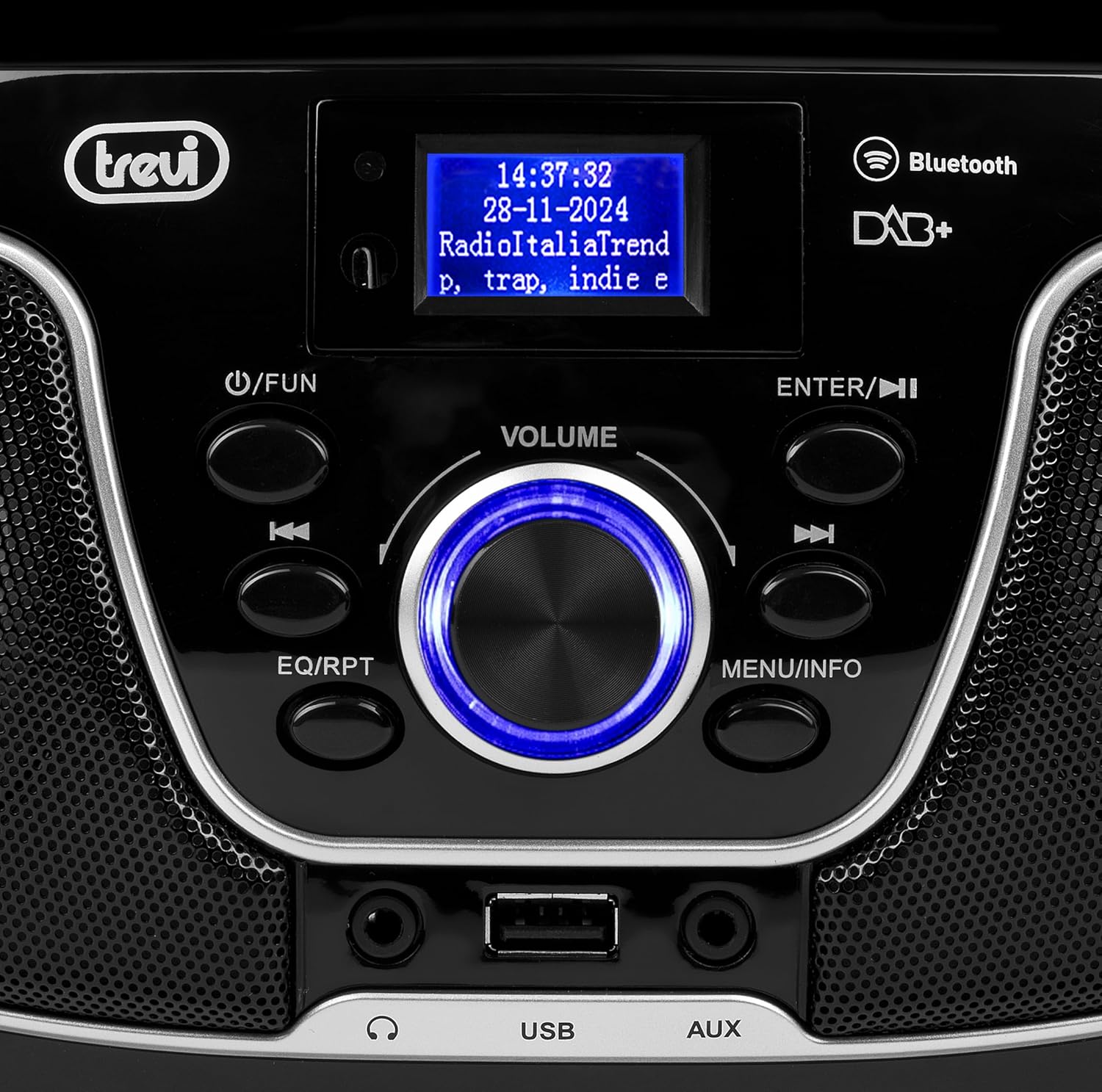
Abbildung 2: Ausführlich view of the control panel, including power, function, volume knob, and navigation buttons.
Bedienelemente auf der Vorderseite:
- POWER / FUN button: Press to turn on/off, press to switch functions (CD/USB/DAB/FM/Bluetooth/AUX).
- Lautstärkeregler: Rotate to adjust volume. Press to confirm selections.
- ENTER / ►►I button: Confirm selection / Skip to next track/station.
- I▼▼ / EQ/RPT button: Skip to previous track/station / Equalizer settings / Repeat mode.
- MENU / INFO button: Access menu / Display information.
- USB-Anschluss: Connect USB storage devices for MP3 playback.
- AUX-Eingangsbuchse: Schließen Sie externe Audiogeräte an.
- Kopfhöreranschluss: Schließen Sie Kopfhörer für privates Hören an.

Abbildung 3: Rückseite view of the Trevi CMP 588 DAB, showing the power input and telescopic antenna.
Anschlüsse an der Rückseite:
- Wechselstromeingang: Schließen Sie das mitgelieferte Wechselstromkabel an.
- Teleskopantenne: Für optimalen Radioempfang ausziehen.

Figure 4: Remote control for the Trevi CMP 588 DAB, showing various function buttons.
Fernbedienungsfunktionen:
- BEREITHALTEN: Einschalten / Ausschalten.
- FUNKTION: Switch between modes (CD, USB, DAB, FM, Bluetooth, AUX).
- STUMM: Audio stummschalten/Stummschaltung aufheben.
- RPT: Wiedergabemodus wiederholen.
- SCAN: Auto scan for radio stations.
- F+/CH+, F-/CH-: Navigate folders/channels.
- EQ: Equalizer-Einstellungen.
- PLAY/PAUSE (►II): Wiedergabe starten/pausieren.
- PREV/TUN- (▼▼): Previous track/tune down.
- NEXT/TUN+ (►►): Next track/tune up.
- STOP (■): Stoppen Sie die Wiedergabe.
- SPEISEKARTE: Menü aufrufen.
- INFO: Informationen anzeigen.
- PROG: Program tracks/stations.
- VOL+ / VOL-: Lautstärke anpassen.
6. Einrichtung
6.1 Stromanschluss
- Wechselstromversorgung: Connect the supplied AC power cable to the AC power input on the rear of the unit, then plug the other end into a wall outlet.
- Battery Operation (Optional): For portable use, insert 6 x C-size batteries (not included) into the battery compartment on the bottom of the unit. Ensure correct polarity.
6.2 Erstes Einschalten
Drücken Sie die POWER / FUN Taste am Gerät oder STANDBY button on the remote control to turn on the system. The display will light up.
6.3 Setting Up the Antenna
For optimal radio reception, fully extend the telescopic antenna located at the rear of the unit. Adjust its position for the best signal.
7. Bedienungsanleitung
7.1 DAB/DAB+ Radiobetrieb
- Drücken Sie die POWER / FUN button repeatedly until "DAB" mode is selected.
- The unit will automatically scan for available DAB/DAB+ stations on first use. To perform a manual scan, press the SPEISEKARTE button, navigate to "Full Scan" and press EINGEBEN.
- Sobald der Scanvorgang abgeschlossen ist, verwenden Sie die ▼▼ or ►► buttons to browse through the available stations. Press EINGEBEN um einen Sender auszuwählen.
- Drücken Sie die INFO button to cycle through different information displays (e.g., program type, signal strength, time).
7.2 FM-Radiobetrieb
- Drücken Sie die POWER / FUN button repeatedly until "FM" mode is selected.
- To auto-scan and store stations, press the SCAN button on the remote. The unit will scan and save strong signals.
- Zum manuellen Stimmen die Taste gedrückt halten ▼▼ or ►► buttons to search for the next available station. Press briefly to fine-tune the frequency.
- The RDS function will display station information (if available).
7.3 CD/MP3-Wiedergabe

Abbildung 5: Oben view of the Trevi CMP 588 DAB with the CD compartment open, ready for disc insertion.
- Öffnen Sie die Abdeckung des CD-Fachs.
- Place a CD (CD-DA or MP3 CD) onto the spindle with the label side facing up.
- Schließen Sie die Abdeckung des CD-Fachs.
- Drücken Sie die POWER / FUN Drücken Sie die Taste so lange, bis der Modus „CD“ ausgewählt ist.
- The unit will read the disc. Press WIEDERGABE/PAUSE (►II) , um die Wiedergabe zu starten.
- Verwenden ▼▼ or ►► to skip tracks. Press and hold to fast forward/rewind.
- Drücken STOP (■) , um die Wiedergabe zu stoppen.
7.4 USB-Wiedergabe
- Stecken Sie einen USB-Stick mit MP3 ein files in den USB-Port.
- Drücken Sie die POWER / FUN Drücken Sie die Taste so lange, bis der Modus „USB“ ausgewählt ist.
- Das Gerät erkennt automatisch MP3-Dateien und beginnt mit der Wiedergabe. files.
- Verwenden ▼▼ or ►► um Titel zu überspringen.
7.5 Bluetooth-Kopplung und -Wiedergabe
- Drücken Sie die POWER / FUN button repeatedly until "Bluetooth" mode is selected. The display will show "BT" or "PAIRING".
- Aktivieren Sie Bluetooth auf Ihrem Mobilgerät (Smartphone, Tablet usw.).
- Suchen nach available devices and select "TREVI CMP 588 DAB" from the list.
- Sobald die Kopplung hergestellt ist, können Sie Audio von Ihrem Gerät über die Stereoanlage abspielen.
- Use the controls on your mobile device or the stereo system to manage playback.
7.6 AUX-Eingangsbetrieb
- Connect an external audio device (e.g., MP3 player, smartphone) to the AUX-in jack using a 3.5mm audio cable (not included).
- Drücken Sie die POWER / FUN Drücken Sie die Taste so lange, bis der Modus „AUX“ ausgewählt ist.
- Play audio from your connected device. The volume can be controlled via both the stereo system and the external device.
8. Wartung
8.1 Reinigung des Geräts
Wischen Sie die Außenseite des Geräts mit einem weichen, trockenen Tuch ab. Verwenden Sie keine Scheuermittel, Wachse oder Lösungsmittel, da diese die Oberfläche beschädigen können. Stellen Sie sicher, dass das Gerät vor der Reinigung vom Stromnetz getrennt ist.
8.2 CD Linsenpflege
If the CD player experiences reading errors, the lens may be dirty. Use a commercially available CD lens cleaner to clean the lens. Do not touch the lens with your fingers.
8.3 Speicherung
If the unit will not be used for an extended period, remove the batteries (if applicable) and unplug the power cable. Store the unit in a cool, dry place away from direct sunlight and extreme temperatures.
9. Fehlerbehebung
| Problem | Mögliche Ursache | Lösung |
|---|---|---|
| Kein Strom | Netzkabel nicht angeschlossen; Batterien leer oder falsch eingelegt. | Überprüfen Sie den Anschluss des Stromkabels; tauschen Sie die Batterien aus oder stellen Sie die richtige Polarität sicher. |
| Kein Ton | Lautstärke zu niedrig; Stummschaltung aktiviert; Falsche Quelle ausgewählt. | Increase volume; Deactivate mute; Select correct function (CD, USB, DAB, FM, BT, AUX). |
| Schlechter Radioempfang | Antenne nicht ausgefahren oder falsch positioniert; Gebiet mit schwachem Signal. | Die Teleskopantenne vollständig ausziehen und einstellen; Versuchen Sie, das Gerät an einem anderen Standort aufzustellen. |
| CD/USB-Wiedergabe nicht möglich | Disc verschmutzt/verkratzt; Falsch file format on USB; USB drive not properly inserted. | Clean or replace disc; Ensure MP3 format for USB; Reinsert USB drive. |
| Bluetooth-Kopplung fehlgeschlagen | Device too far; Bluetooth not enabled on source device; Unit not in pairing mode. | Move devices closer; Enable Bluetooth on source device; Ensure unit is in Bluetooth mode and searching. |
10. Spezifikationen
- Modell: CM 588 DAB
- Energiequelle: AC 230V ~ 50Hz or 6 x C-size batteries (not included)
- Energieverbrauch: 15 Watt
- Lautsprechertyp: Stereo (2 speakers)
- Konnektivität: Bluetooth, USB, AUX-in
- Unterstützte Audioformate: CD audio (CD-DA), MP3
- Funkfrequenzen: DAB/DAB+, FM with RDS
- Abmessungen (L x B x H): 50 x 50 x 28 cm (ungefähr)
- Gewicht: 1.5 Kilogramm (ungefähr)
- Farbe: Schwarz
11. Garantie und Support
Für dieses Produkt gilt die Standard-Herstellergarantie. Die genauen Garantiebedingungen, einschließlich Garantiezeitraum und -umfang, entnehmen Sie bitte der beiliegenden Garantiekarte.
For technical support, service, or warranty claims, please contact your retailer or the official Trevi customer service. Contact information can typically be found on the Trevi webWebsite oder in der Produktverpackung.
Please retain your proof of purchase (receipt) for any warranty-related inquiries.