
Produkt überview
The ANJANK AC190-DE is a versatile digital radio alarm clock designed to enhance your daily routine. It features a 10W fast wireless charger, a convenient USB charging port, and a clear, dimmable LED display. Enjoy your favorite stations with its integrated FM radio, complete with a programmable sleep timer. For private listening, a 3.5mm audio jack is included. The device operates on mains power and includes a battery backup system to retain settings during power interruptions.

The ANJANK AC190-DE Digital Radio Alarm Clock, showcasing its wooden finish and clear LED display.

This infographic highlights the three primary functions of the device: an alarm clock, an FM radio, and a wireless charger.
Installationsanweisungen
- Stromanschluss: Connect the provided DC 9V power adapter to the "DC9V" port on the back of the unit. Plug the adapter into a standard wall outlet.
- Batterie-Backup: For retaining time and alarm settings during power outages, insert two AAA batteries (not included) into the battery compartment located on the bottom of the unit.
- FM-Antenne: For optimal FM radio reception, fully extend the integrated FM antenna.
Bedienung des Geräts
Kontrollen überview
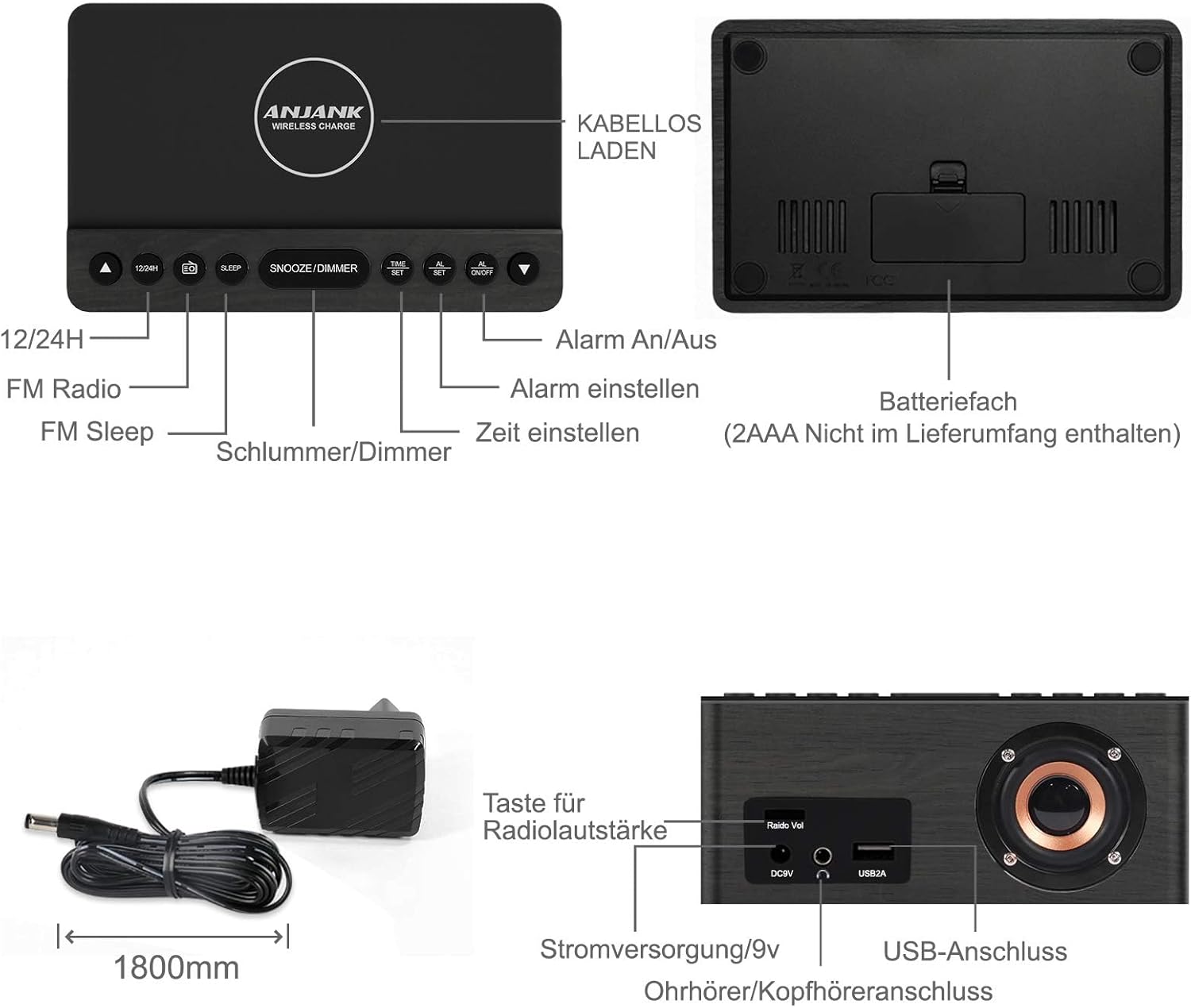
This diagram illustrates the location and function of the control buttons on the top panel and the ports on the rear of the ANJANK AC190-DE Digital Radio Alarm Clock. Key controls include 12/24H, FM Radio, Sleep, Snooze/Dimmer, Alarm On/Off, Time Set, and Alarm Set. Rear ports include DC9V power input, 3.5mm headphone jack, and USB 2A charging port.
Einstellen der Uhrzeit
- Halten Sie die ZEITEINSTELLUNG Drücken Sie den Knopf. Die Stundenziffern beginnen zu blinken.
- Verwenden Sie die UP or RUNTER Tasten zum Einstellen der Stunde.
- Drücken ZEITEINSTELLUNG again to confirm the hour and proceed to minute adjustment.
- Verwenden Sie die UP or RUNTER Tasten zum Einstellen der Minuten.
- Drücken ZEITEINSTELLUNG um die aktuelle Zeit zu speichern.
- Um zwischen 12-Stunden- und 24-Stunden-Format umzuschalten, drücken Sie die Taste 12/24 Uhr button. In 12-hour format, "AM" or "PM" indicators will be displayed.
Einstellen von Alarmen
Das Gerät unterstützt zwei unabhängige Alarme (AL1 und AL2).
- Halten Sie die WECKER GESTELLT button. "AL1" will flash, and the hour digits will begin to flash.
- Verwenden Sie die UP or RUNTER buttons to set the desired alarm hour for Alarm 1.
- Drücken WECKER GESTELLT Um die Stunde zu bestätigen und zur Minuteneinstellung überzugehen.
- Verwenden Sie die UP or RUNTER buttons to set the desired alarm minutes for Alarm 1.
- Drücken WECKER GESTELLT to select the alarm source: Buzzer or FM Radio. Use UP or RUNTER zur Auswahl.
- Drücken WECKER GESTELLT to set the alarm volume (for FM Radio alarm). Use UP or RUNTER anpassen.
- Drücken WECKER GESTELLT to save Alarm 1 settings.
- Repeat steps 1-7 for Alarm 2 by pressing WECKER GESTELLT until "AL2" flashes.
- Zum Aktivieren oder Deaktivieren eines Alarms drücken Sie die Taste ALARM EIN / AUS button repeatedly until the desired alarm indicator (AL1 or AL2) appears or disappears on the display.
- Schlummerfunktion: Wenn ein Alarm ertönt, drücken Sie die Taste SCHLUMMER/DIMMER Mit dieser Taste können Sie den Alarm für 9 Minuten stummschalten. Er ertönt nach 9 Minuten erneut.
- Einen Alarm stoppen: To stop an alarm completely, press any button other than SCHLUMMER/DIMMERDer Wecker wird für den nächsten Tag zurückgesetzt.
FM-Radiobetrieb

This image highlights the FM radio capabilities of the ANJANK AC190-DE, including its frequency range of 87.5-108 MHz, adjustable volume, sleep timer (10-120 minutes), and support for headphones.
- Ein-/Ausschalten: Drücken Sie die UKW-Radio Knopf zum Ein- und Ausschalten des Radios.
- Automatischer Scan: Halten Sie die UKW-Radio button to automatically scan and save available FM stations. The device can store up to 30 stations.
- Manuelle Abstimmung: Verwenden Sie die UP or RUNTER Tasten zur manuellen Einstellung einer bestimmten Frequenz.
- Lautstärkeregelung: Verwenden Sie die Radio Vol knob on the back of the unit to adjust the radio volume.
- Schlaf-Timer: Während das Radio spielt, drücken Sie die Taste SCHLAFEN button repeatedly to set a sleep timer (10-120 minutes). The radio will automatically turn off after the selected duration.
- Verwendung von Kopfhörern: Connect 3.5mm headphones to the headphone jack on the back for private listening.
Kabelloses Laden
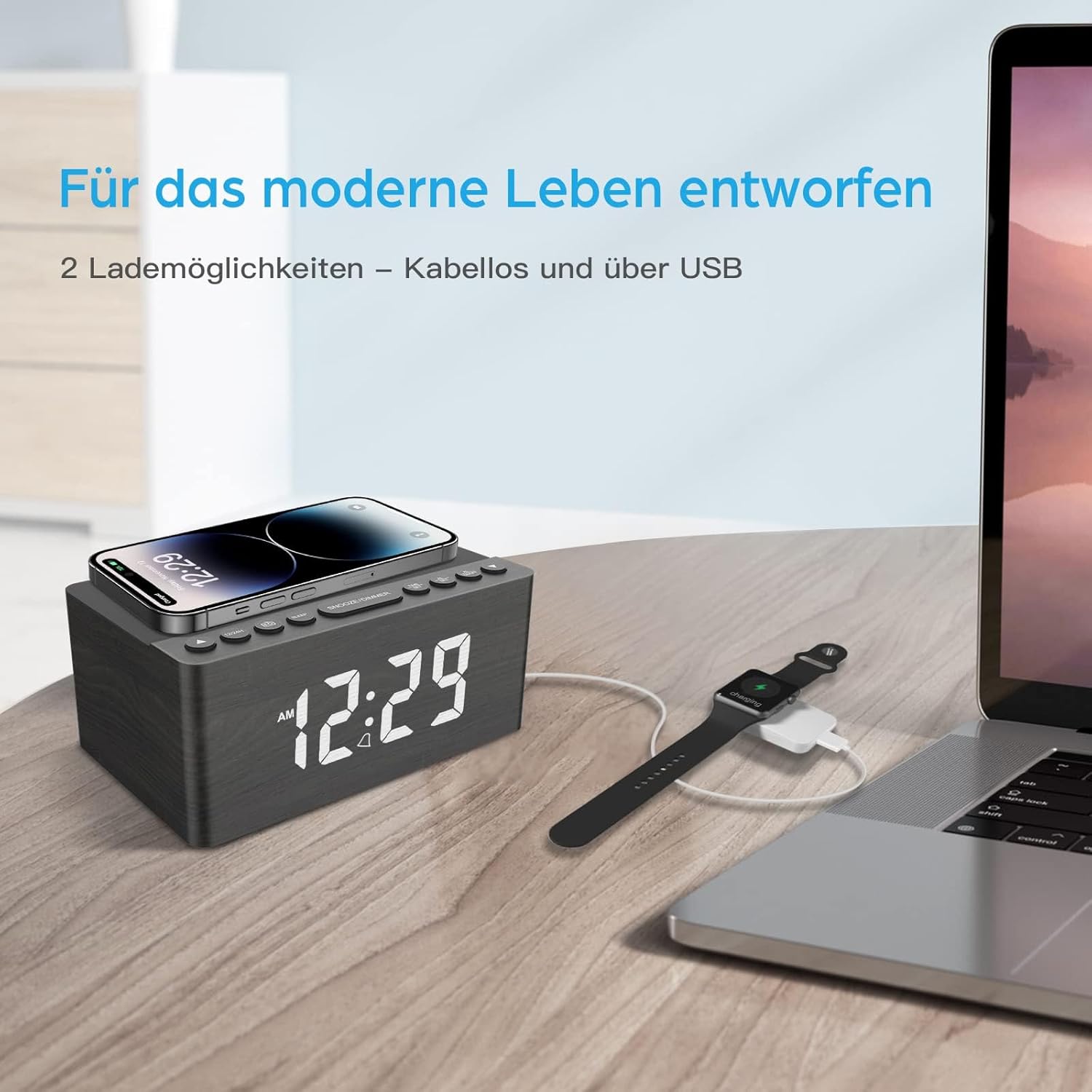
This image demonstrates the dual charging capabilities of the ANJANK AC190-DE, showing a smartphone being wirelessly charged on the top pad and a smartwatch connected to a laptop via USB, illustrating the convenience of charging multiple devices.
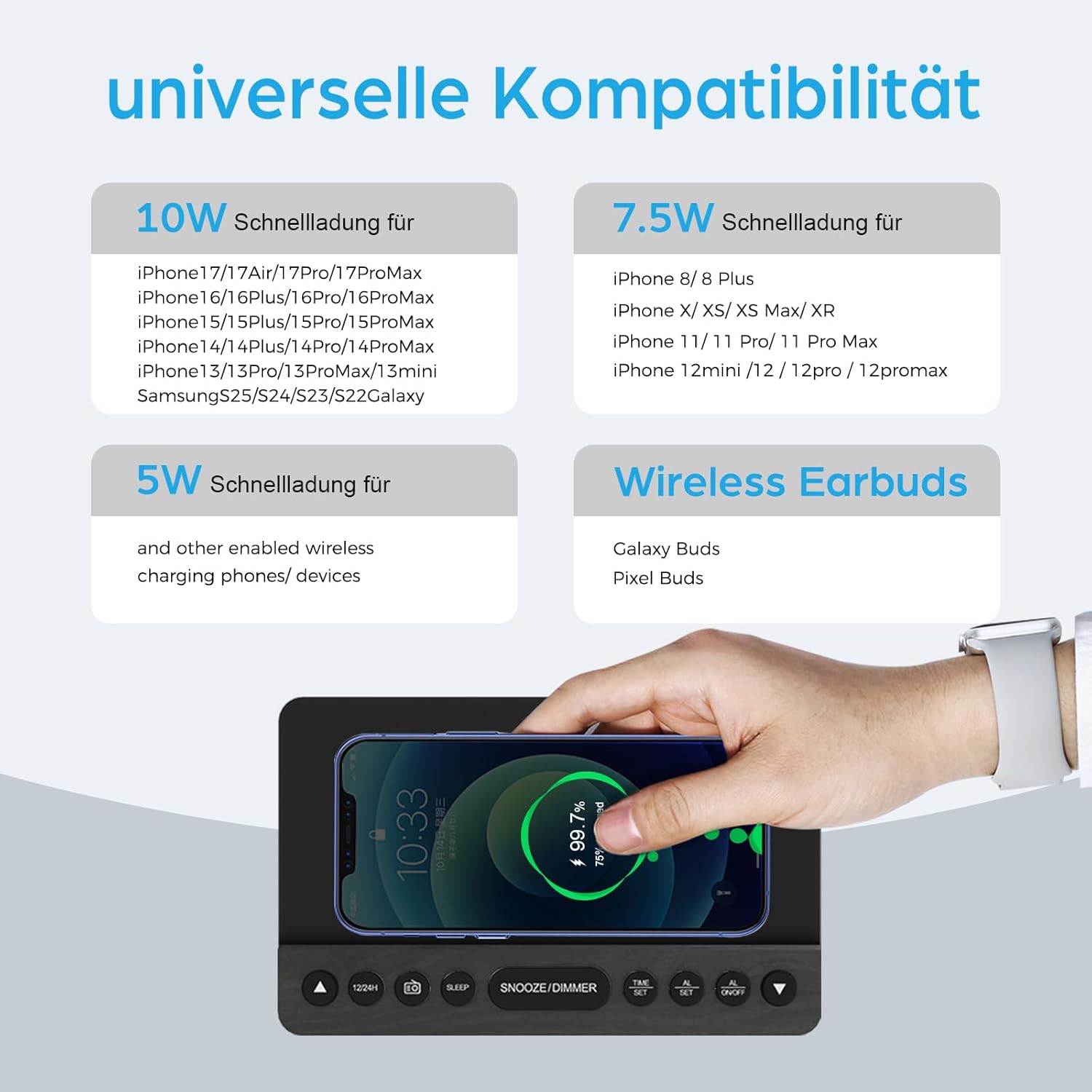
This infographic provides details on the universal compatibility of the wireless charging feature, specifying 10W fast charging for newer iPhone and Samsung models, 7.5W for other iPhone models, and 5W for other wireless charging phones and devices, including wireless earbuds.
- Place your Qi-compatible smartphone or device on the wireless charging pad located on the top surface of the clock.
- Für einen optimalen Ladevorgang muss das Gerät mittig auf der Ladefläche platziert werden.
- The charging indicator on the clock (if available) or on your device will confirm charging status.
- The charger supports 5W, 7.5W, and 10W adaptive charging.
Aufladen über USB
- Schließen Sie das USB-Ladekabel Ihres Geräts an den USB2A Anschluss auf der Rückseite der Uhr.
- This port provides 2A output for charging other electronic devices like a second phone, power bank, or smartwatch.
Display-Dimmer

This image demonstrates the 5-level dimmer function of the ANJANK AC190-DE, allowing users to adjust the LED display brightness from maximum to completely off, ensuring comfort in various lighting conditions.
- Drücken Sie die SCHLUMMER/DIMMER button (when no alarm is sounding) to cycle through the 5 brightness levels of the LED display.
- Wählen Sie die Helligkeitsstufe, die für Ihre Umgebung am angenehmsten ist.
Wartung
- Reinigung: Wischen Sie das Gerät mit einem weichen, trockenen Tuch ab. Verwenden Sie keine flüssigen Reinigungsmittel oder Scheuermittel.
- Platzierung: Vermeiden Sie es, das Gerät direkter Sonneneinstrahlung, der Nähe von Wärmequellen oder Bereichen mit hoher Luftfeuchtigkeit auszusetzen.
- Leistung: Disconnect the power adapter if the unit will not be used for an extended period.
Fehlerbehebung
- Kein Strom/Display aus:
- Stellen Sie sicher, dass das Netzteil fest mit dem Gerät und einer funktionierenden Steckdose verbunden ist.
- Check if the display dimmer is set to the lowest (off) level. Press SCHLUMMER/DIMMER Helligkeit zu erhöhen.
- Verify battery backup if applicable.
- Kabelloses Laden funktioniert nicht:
- Ensure your device is Qi-compatible and properly centered on the charging pad.
- Entfernen Sie alle dicken Handyhüllen oder metallischen Gegenstände zwischen dem Telefon und dem Ladepad.
- Check if the clock is powered on.
- Schlechter FM-Radioempfang:
- Die FM-Antenne vollständig ausziehen und neu positionieren.
- Try moving the unit to a different location to improve signal.
- Führen Sie erneut einen automatischen Sendersuchlauf durch, um stärkere Sender zu finden.
- Alarm ertönt nicht:
- Ensure the alarm is activated (AL1 or AL2 indicator visible on the display).
- Check if the alarm volume is set appropriately (for radio alarm).
- Verify the time and alarm settings are correct.
Technische Daten
| Besonderheit | Detail |
|---|---|
| Marke | ANJANK |
| Modellnummer | AC190-DE |
| Farbe | Grey + FM |
| Technische Daten | 12.3 x 3.81 x 10.2 cm |
| Artikelgewicht | 720 Gramm |
| Leistung/Watttage | 10 Watt |
| Material | Holz |
| Besondere Merkmale | Adjustable Brightness, Adjustable Volume, Alarm, Charging Port, Charging Station, Programmable, Radio, Snooze, Timers |
| Stromquelle | Verdrahtet |
| Gegenstandsform | Rechteckig |
| Thema | Musik |
| Rahmenmaterial | Holz |
| Batterien im Lieferumfang enthalten | No (Requires 2x AAA for backup) |

This image provides the physical dimensions of the ANJANK AC190-DE Digital Radio Alarm Clock.
Garantieinformationen
ANJANK offers a 30-day return policy for this product. Please refer to your purchase documentation or retailer's policy for specific terms and conditions regarding returns and warranty claims.
Kundenservice
For any inquiries or assistance, ANJANK provides 24-hour customer service. Please refer to the product packaging or the official ANJANK webAuf dieser Website finden Sie Kontaktdaten und weitere Unterstützungsangebote.


