
WSDCAM W-8397
WSDCAM 5-Zoll TFT-LCD CCTV-Kameratester-Monitor – Bedienungsanleitung
Modell: W-8397
1. Einleitung
This manual provides detailed instructions for the WSDCAM 5-inch TFT-LCD CCTV Camera Tester Monitor, Model W-8397. This versatile device is designed to assist with the installation, maintenance, and troubleshooting of various CCTV camera systems and network cables. It features a 5-inch TFT-LCD screen with 800x480 resolution, supporting multiple camera types including 4K 8MP CVI, TVI, AHD, SDI, and CVBS analog cameras. It also includes HDMI and VGA inputs, PTZ control, DC12V power output, and UTP cable testing capabilities.
2. Packungsinhalt und Einrichtung
Before using your WSDCAM CCTV Camera Tester, please ensure all components are present and the device is adequately charged.
2.1. Packungsinhalt
Das Standardpaket beinhaltet:
- WSDCAM 5-inch TFT-LCD CCTV Camera Tester (Model W-8397)
- Network cable test tool
- AC power adapter with USB A to USB micro cable
- Wrist strap and lanyard
- Four adapter cables for various connections
- Tragetasche

2.2. Aufladen des Geräts
The tester is equipped with a 5200mAh rechargeable Lithium-Ion battery, providing approximately 6 hours of operating time on a full charge. A full recharge typically takes about 4 hours.
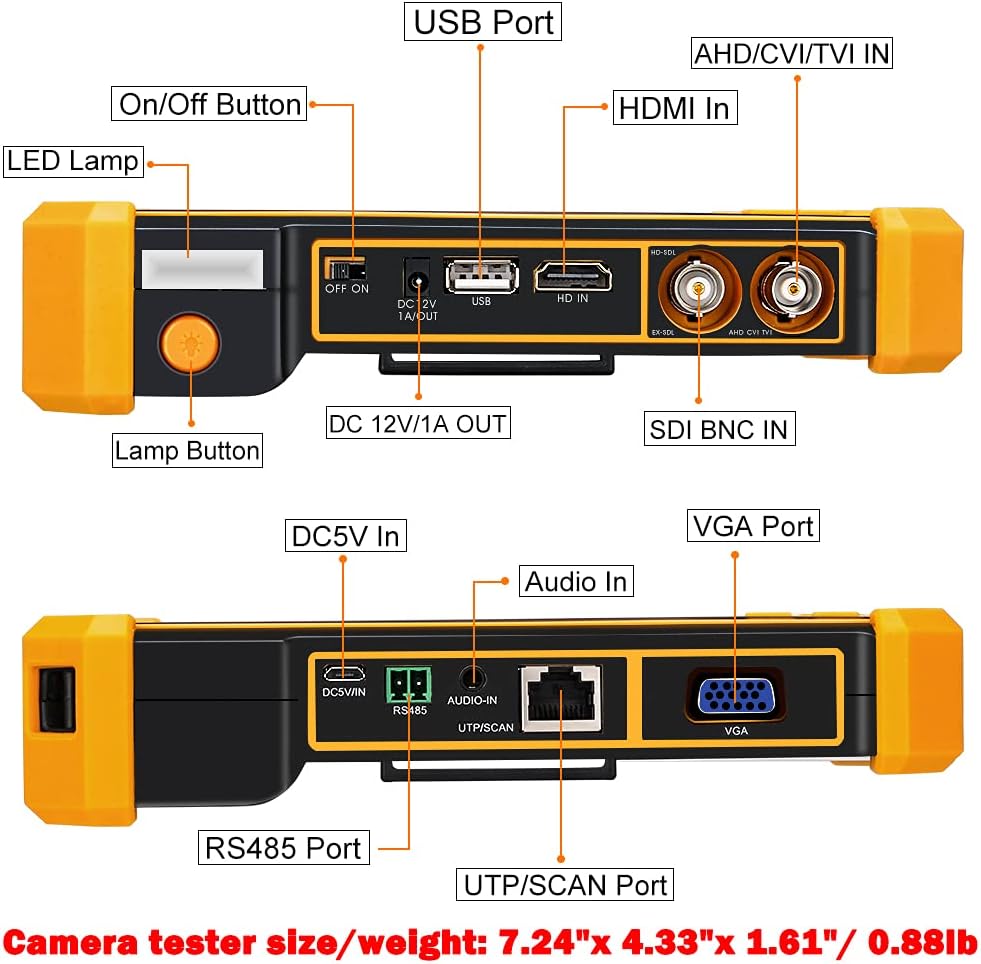
- Connect the provided AC power adapter to the DC5V In port on the tester.
- Stecken Sie den Adapter in eine normale Steckdose.
- The charging indicator will illuminate. Once fully charged, the indicator may change color or turn off depending on the model.
2.3. Ein-/Ausschalten
Locate the On/Off button on the side of the device. Press and hold the button for a few seconds to power the unit on or off. The 5-inch TFT-LCD screen will display the main interface upon startup.
3. Bedienungsanleitung
The WSDCAM CCTV Camera Tester offers a range of functions for various surveillance and networking tasks.
3.1. Camera Testing (Analog & HD Coaxial)
This tester supports a wide array of HD coaxial camera types and analog cameras. Note: This device does NOT support IP cameras.
- Unterstützte Kameratypen: 8MP TVI, 8MP CVI, 8MP AHD, 8MP EX-SDI/HD-SDI/3G-SDI, and CVBS analog cameras (PAL/NTSC auto adapt).
- Verbindung: Connect the camera's video output to the appropriate BNC input (AHD/CVI/TVI IN or SDI BNC IN) on the tester. For analog cameras, ensure proper power connection to the camera, and if needed, use the DC12V/1A OUT port on the tester to power the camera.
- Viewing Feed: Select the corresponding input mode (e.g., 'Auto HD' or 'CVBS IN') on the tester's main menu. The camera's live feed will be displayed on the 5-inch screen.
- PTZ-Steuerung: The built-in PTZ tester/controller allows for pan, tilt, and zoom adjustments of compatible PTZ cameras.
- Audio Surveillance Test: Connect the camera's audio output to the Audio In port on the tester to verify audio signals.

3.2. UTP Cable Test
The tester includes a UTP cable test function to check Ethernet cable sequences and continuity.
- Connect one end of the UTP cable to the UTP/SCAN Port on the tester.
- Connect the other end of the UTP cable to the included remote cable test tool.
- Select 'Cable Tester' from the main menu. The screen will display the wiring diagram and continuity status, helping identify any faults in the cable.

3.3. HDMI and VGA Input
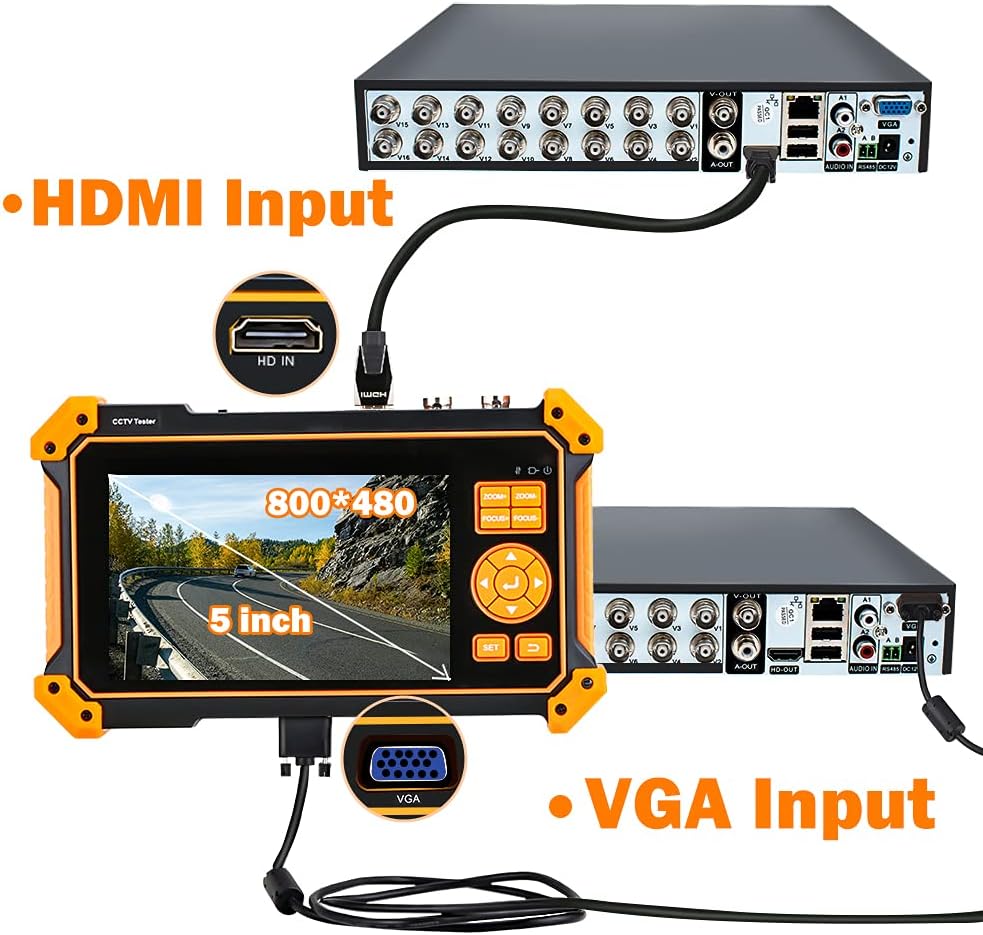
The device can function as a display for debugging DVR/NVR recorders or other video sources.
- HDMI-Eingang: Supports resolutions up to 4K at 30FPS. Connect an HDMI cable from your video source to the HDMI In port on the tester.
- VGA-Eingang: Supports resolutions up to 1920x1200P at 60FPS. Connect a VGA cable from your video source to the VGA Port on the tester.
- Select 'HDMI IN' or 'VGA' from the main menu to view das Eingangssignal.
3.4. LED-Arbeitslicht
The tester features a built-in LED light with three modes (Brighter, Bright, Flashing light) to assist in dark working environments. Press the 'Lamp Button' to cycle through the modes.
4. Wartung
Proper maintenance ensures the longevity and optimal performance of your WSDCAM CCTV Camera Tester.
- Batteriepflege: To prolong battery life, avoid fully discharging the battery frequently. Recharge the device regularly, even if not in active use, to maintain battery health.
- Reinigung: Use a soft, dry cloth to clean the device's exterior. For the screen, use a microfiber cloth specifically designed for electronics. Avoid abrasive cleaners or solvents.
- Lagerung: Store the tester in its provided carrying case in a cool, dry place away from direct sunlight, extreme temperatures, and excessive humidity.
5. Fehlerbehebung
If you encounter issues with your WSDCAM CCTV Camera Tester, refer to the following common problems and solutions.
- Kein Strom:
Lösung: Ensure the battery is charged. Connect the power adapter and attempt to power on. If the issue persists, check the power adapter and charging cable for damage. - No Video Signal on Screen:
Lösung: Verify that the camera is powered on and functioning correctly. Check all cable connections (BNC, HDMI, VGA) to ensure they are secure and connected to the correct input ports on the tester. Confirm that the correct input mode is selected on the tester's menu. Ensure the camera type is supported by the tester (e.g., not an IP camera). - UTP Cable Test Errors:
Lösung: Ensure both ends of the UTP cable are properly seated in the tester and the remote unit. Check the cable for visible damage or bent pins on the RJ45 connectors. - Audio funktioniert nicht:
Lösung: Confirm the camera has an audio output and it is connected to the tester's Audio In port. Check the audio settings on the tester to ensure volume is not muted or too low.
6. Spezifikationen
| Besonderheit | Spezifikation |
|---|---|
| Marke | WSDCAM |
| Modellnummer | W-8397 |
| Bildschirmtyp | 5 inch TFT-LCD (Not touch screen) |
| Bildschirmauflösung | 800*480 |
| Unterstützte Kameratypen | 8MP TVI, 8MP CVI, 8MP AHD, 8MP EX-SDI/HD-SDI/3G-SDI, CVBS Analog (PAL/NTSC auto adapt) |
| HDMI-Eingang | Unterstützt 4K mit 30 FPS |
| VGA-Eingang | Supports 1920 x 1200P 60FPS |
| Batterie | 5200mAh wiederaufladbare Lithium-Ionen |
| Betriebsdauer | Ca. 6 Stunden |
| Ladezeit | Ca. 4 Stunden |
| Abmessungen (L x B x H) | 7.24" x 4.33" x 1.61" (18.4 cm x 11 cm x 4.1 cm) |
| Gewicht | 0.88 kg |
| Zusätzliche Merkmale | PTZ Tester/Controller, Auto HD, UTP Cable Test, Audio Surveillance Test, DC12V Power Output, 3-mode LED Light |
7. Garantie und Support
WSDCAM products are designed for reliability and performance. For specific warranty information, please refer to the documentation included with your product or visit the official WSDCAM website. For technical support or service inquiries, please contact WSDCAM customer service through the contact information provided on the product packaging or their official webWebsite.
Optional protection plans are available for extended coverage. Please check with your retailer for details on 3-Year or 4-Year Protection Plans, or other comprehensive protection options.