
ROIDMI X20
ROIDMI X20 Akku-Staubsauger Bedienungsanleitung
Modell: X20
1. Wichtige Sicherheitshinweise
Please read this instruction manual carefully before using the ROIDMI X20 Cordless Vacuum Cleaner. Keep this manual for future reference.
- Dieses Gerät ist ausschließlich für den Hausgebrauch bestimmt. Verwenden Sie es nicht für gewerbliche oder industrielle Zwecke.
- Do not use the vacuum cleaner to pick up water or other liquids, hot ashes, cigarette butts, sharp objects, or hazardous materials.
- Ensure the power adapter and charging dock are compatible with your local power supply.
- Do not operate the vacuum cleaner with a damaged cord or plug. If the appliance is not working as it should, has been dropped, damaged, left outdoors, or dropped into water, return it to a service center.
- Halten Sie Haare, lose Kleidung, Finger und alle Körperteile von Öffnungen und beweglichen Teilen fern.
- Kinder dürfen den Staubsauger nicht bedienen. Bei der Benutzung in der Nähe von Kindern ist eine enge Aufsicht erforderlich.
- Verwenden Sie nur vom Hersteller empfohlene Aufsätze und Zubehör.
- Always turn off the appliance before connecting or disconnecting the motorized brush, extension rod, or other accessories.
- The battery pack must be removed from the appliance before it is scrapped. The appliance must be disconnected from the supply mains when removing the battery pack. The battery pack is to be disposed of safely.
2. Produktüberschreitungview und Komponenten
The ROIDMI X20 Cordless Vacuum Cleaner comes with several components designed for various cleaning tasks.

Image: The ROIDMI X20 main unit and various cleaning attachments, including different brush heads, a crevice tool, a dusting brush, and the magnetic charging dock.
Hauptbestandteile:
- Haupteinheit: Enthält Motor, Staubbehälter und Batterie.
- Verlängerungsstange: Verbindet die Haupteinheit mit der Bodenbürste oder anderen Aufsätzen für eine größere Reichweite.
- Weiche Walzenbürste: Ideal for hard floors.
- Carbon Fiber Brush: Suitable for carpets.
- Moppaufsatz: Zur Nassreinigung von Hartböden.
- Fugendüse: Für enge Spalten und Ecken.
- Staubwedel: Für empfindliche Oberflächen und Polsterstoffe.
- Magnetic Wireless Charging Dock: Zum bequemen Laden und Aufbewahren.
- Netzteil: Zum Aufladen des Gerätes.
3. Einrichtung und Erstgebrauch
Montage:
- Schieben Sie die Verlängerungsstange in das Hauptgerät, bis sie hörbar einrastet.
- Attach the desired floor brush (soft roller or carbon fiber) to the other end of the extension rod until it clicks.
- Für den mobilen Einsatz befestigen Sie das Zubehör direkt am Hauptgerät.
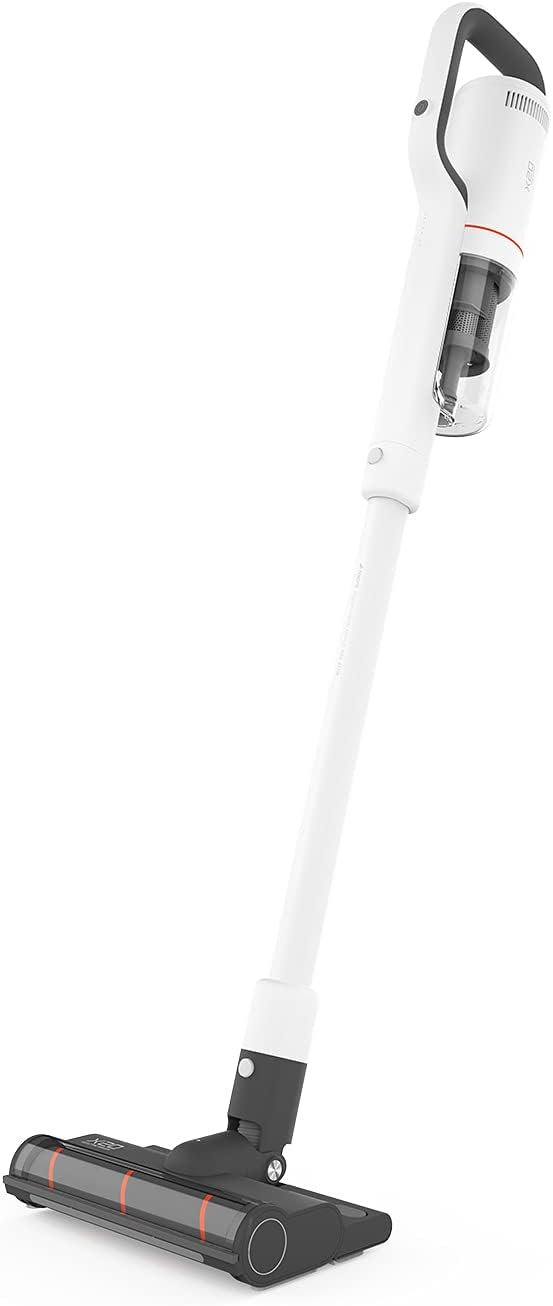
Image: The ROIDMI X20 Cordless Vacuum Cleaner fully assembled with the extension rod and floor brush attached, ready for use.
Laden:
Before first use, fully charge the vacuum cleaner. The ROIDMI X20 features magnetic wireless charging.
- Mount the magnetic wireless charging dock to a wall in a convenient location, ensuring it is near a power outlet.
- Schließen Sie das Netzteil an die Ladestation an und stecken Sie es in eine Steckdose.
- Place the vacuum cleaner onto the charging dock. The indicator light on the main unit will illuminate to show charging status.
- A full charge typically takes approximately 2.5 hours. The battery life is up to 65 minutes depending on the power mode used.
4. Bedienungsanleitung
Ein-/Ausschalter und Saugmodi:
- Press the power button on the main unit to turn the vacuum cleaner on. It will start in the standard suction mode.
- Press the mode button to cycle through the three available power levels (Standard, Strong, Max).
- Drücken Sie den Netzschalter erneut, um den Staubsauger auszuschalten.
Staubsaugen:
The ROIDMI X20 is suitable for both hard floors and carpets.

Image: A person using the ROIDMI X20 Cordless Vacuum Cleaner to clean a grey carpet in a living room setting.
- Für Hartböden: Use the soft roller brush. Move the vacuum cleaner slowly over the surface to ensure thorough cleaning.
- Für Teppiche: Use the carbon fiber brush. For deeper cleaning, select a higher suction mode.

Image: A person using the ROIDMI X20 Cordless Vacuum Cleaner to clean a light wooden floor, demonstrating its maneuverability.
Wischfunktion:
The ROIDMI X20 integrates vacuuming and mopping for simultaneous cleaning.
- Fill the water tank of the mop attachment with clean water.
- Attach the mop cloth securely to the mop attachment.
- Attach the mop attachment to the floor brush.
- Proceed with vacuuming as usual. The mop attachment will simultaneously wipe the floor.
Anhänge verwenden:
Detach the extension rod and attach the crevice tool or dusting brush directly to the main unit for cleaning furniture, car interiors, or hard-to-reach areas.
App-Steuerung:
The ROIDMI X20 can be connected to a smartphone app for additional control and monitoring features. Refer to the app's instructions for pairing and functionality.
5. Wartung
Regular maintenance ensures optimal performance and extends the lifespan of your ROIDMI X20.
Entleeren des Staubbehälters:
- Stellen Sie sicher, dass der Staubsauger ausgeschaltet ist.
- Suchen Sie den Entriegelungsknopf für den Abfallbehälter am Hauptgerät.
- Drücken Sie den Knopf, um den Abfallbehälter abzunehmen.
- Entleeren Sie den Inhalt in einen Abfalleimer.
- Bringen Sie den Abfalleimer wieder sicher an.
Filter reinigen:
The ROIDMI X20 uses a HEPA filter. Clean the filters regularly to maintain suction power.
- Entferne den Mülleimer.
- Nehmen Sie die Filterbaugruppe vorsichtig aus dem Abfallbehälter.
- Tap the HEPA filter gently to remove loose dust.
- Rinse the filter under running water (ensure it is completely dry before reinstallation, which may take 24-48 hours).
- Reassemble the filters and dustbin once completely dry.
Cleaning Brush Rolls:
Haare und Schmutz können sich in den Bürstenwalzen verfangen und die Leistung beeinträchtigen.

Image: A close-up of the ROIDMI X20 floor brush with a cleaning tool next to it, used for removing tangled hair and debris from the brush roll.
- Schalten Sie den Staubsauger aus und nehmen Sie die Bodenbürste ab.
- Suchen Sie den Entriegelungsmechanismus der Bürstenwalze (in der Regel ein Riegel oder eine Schraube).
- Entfernen Sie die Bürstenrolle.
- Verwenden Sie eine Schere oder das mitgelieferte Reinigungswerkzeug, um verhedderte Haare oder Fasern abzuschneiden und zu entfernen.
- Entfernen Sie jeglichen Schmutz aus dem Bürstenwalzengehäuse.
- Setzen Sie die Bürstenwalze wieder ein und befestigen Sie sie.
Cleaning Mop Attachment:
After each use, remove and clean the mop cloth. It can typically be hand-washed or machine-washed.
6. Fehlerbehebung
If you encounter issues with your ROIDMI X20, refer to the following common problems and solutions:
| Problem | Mögliche Ursache | Lösung |
|---|---|---|
| Vakuum lässt sich nicht einschalten | Die Batterie ist schwach oder leer Der Netzschalter wurde nicht richtig gedrückt | Charge the vacuum cleaner fully Stellen Sie sicher, dass der Netzschalter fest gedrückt ist |
| Geringe Saugleistung | Mülleimer ist voll Filter sind verstopft Die Bürstenrolle ist verheddert Verstopfung in Düse/Schlauch | Leeren Sie den Mülleimer Filter reinigen oder ersetzen Bürstenrolle reinigen Überprüfen Sie, ob Hindernisse vorhanden sind, und entfernen Sie diese |
| Bürstenrolle dreht sich nicht | Die Bürstenrolle ist verheddert Verstopfung im Bürstenkopf Bürstenkopf nicht richtig befestigt | Bürstenrolle reinigen Entfernen Sie alle Hindernisse Stellen Sie sicher, dass der Bürstenkopf fest sitzt. |
| Das Vakuum wird während des Betriebs unterbrochen. | Batterie ist leer Überhitzungsschutz aktiviert | Laden Sie den Akku auf Turn off the vacuum and allow it to cool down for at least 30 minutes before resuming use |
7. Spezifikationen
Key technical specifications for the ROIDMI X20 Cordless Vacuum Cleaner:
| Besonderheit | Spezifikation |
|---|---|
| Marke | ROIDMI |
| Modellname | X20 |
| Besonderheit | Bagless, Vacuum Mop Combo |
| Filtertyp | HEPA-Filter |
| Im Lieferumfang enthaltene Komponenten | Battery, Mop, Various Brushes |
| Kabellos | Ja |
| Fassungsvermögen des Staubbehälters | 500 Milliliter |
| Empfohlene Verwendung | Teppich, Hartboden |
| Formfaktor | Stock |
| Farbe | Weiß |
| Geräuschpegel | 72 dB |
| Akkulaufzeit | Bis zu 65 Minuten |
| Kontrollmethode | Druckknopf, App |
| Anzahl der Leistungsstufen | 3 |
| Artikelgewicht | 13.2 Pfund |
| Verpackungsabmessungen | 23.86 x 12.68 x 8.11 Zoll |
8. Garantie und Support
The ROIDMI X20 Cordless Vacuum Cleaner comes with a manufacturer's warranty. Please refer to the warranty card included in your product packaging for specific terms and conditions, including warranty period and coverage details.
For technical support, troubleshooting assistance beyond this manual, or warranty claims, please contact ROIDMI customer service through their official webWebsite oder die in Ihrer Produktdokumentation angegebenen Kontaktinformationen.
Ask a question about this manual
Ask about setup, troubleshooting, compatibility, parts, safety, or missing instructions. Manuals+ will review the question and use this page’s manual context to help answer it.