
1. Wichtige Sicherheitshinweise
Bitte lesen Sie vor der Montage und Inbetriebnahme alle Anweisungen sorgfältig durch. Bewahren Sie diese Anleitung zum späteren Nachschlagen auf.
- WARNUNG: Um die Stabilität zu gewährleisten, montieren Sie den Schreibtisch stets gemäß der beiliegenden Anleitung.
- Die maximale Tragfähigkeit von 177 lbs (80 kg) darf nicht überschritten werden.
- Be cautious when using the height adjustment feature to avoid injury from moving parts.
- Keep hands and fingers away from the moving parts during operation.
- Ensure the power cord is not pinched or damaged during assembly or operation.
- Dieses Produkt ist nur für den Gebrauch in Innenräumen vorgesehen.
2. Produktüberschreitungview
The FLEXISPOT E1L is a dual-motor, L-shaped electric standing desk designed for home and office use. It features adjustable height, a quiet operation, and a customizable control panel.

Image 2.1: The FLEXISPOT E1L desk frame demonstrating its adjustable height capabilities.

Image 2.2: The FLEXISPOT E1L desk in a typical office setup, showcasing its L-shape and functionality.
3. Aufbau und Montage
Assembly of the FLEXISPOT E1L desk is designed to be straightforward, typically taking less than 30 minutes. All necessary tools are included.
3.1 Auspacken und Komponentenprüfung
Carefully unpack all components and verify against the packing list. Ensure all parts are present and undamaged before proceeding.
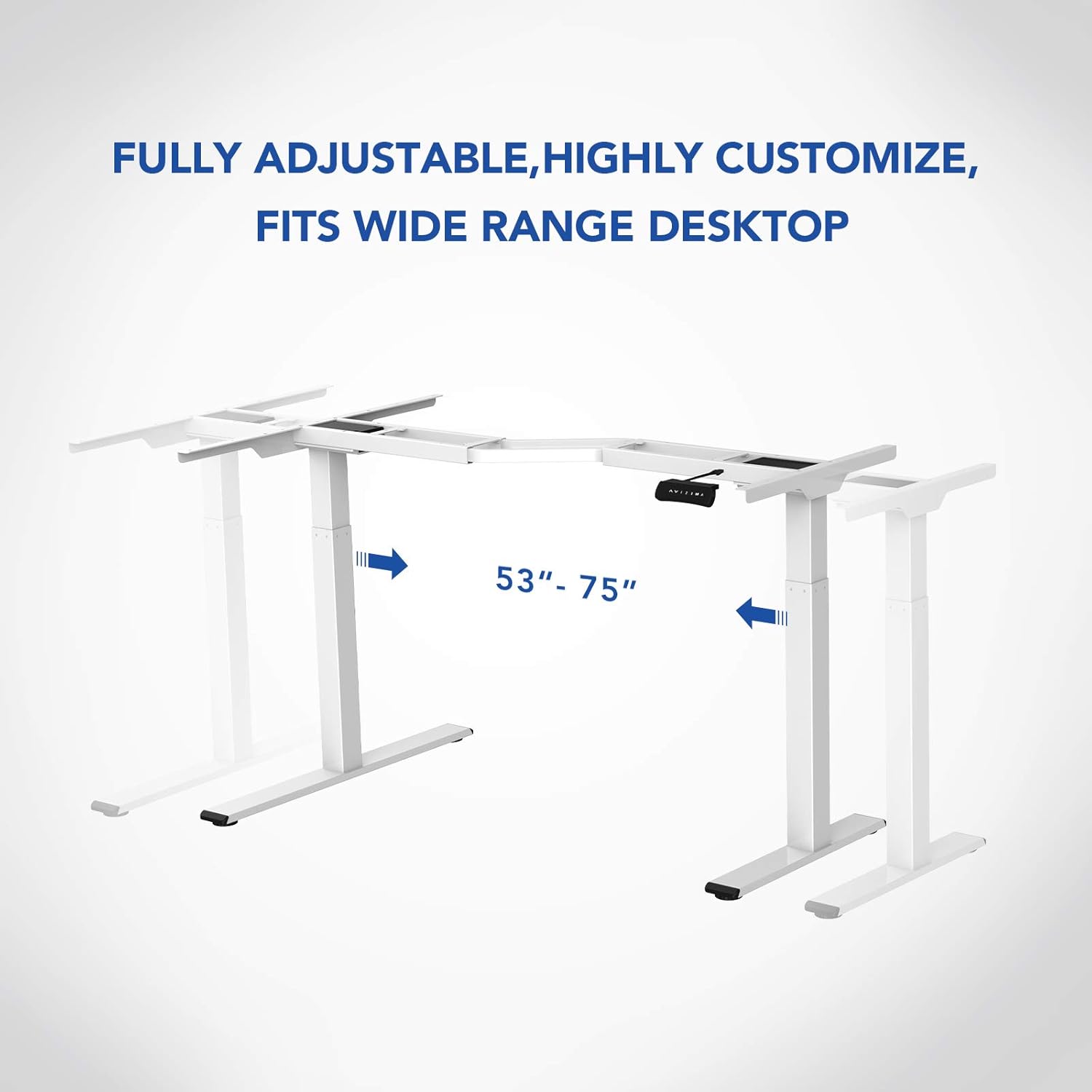
Bild 3.1: Überview of the FLEXISPOT E1L desk frame components prior to assembly.
3.2 Montageschritte
- Befestigen Sie die Hubsäulen am Tischrahmen.
- Befestigen Sie die Füße an der Unterseite der Hebesäulen.
- Connect the control box and motor cables as per the detailed diagram in the included assembly guide.
- Mount the control panel to the desired location on the desk.
- Place the desktop surface onto the assembled frame and secure it.
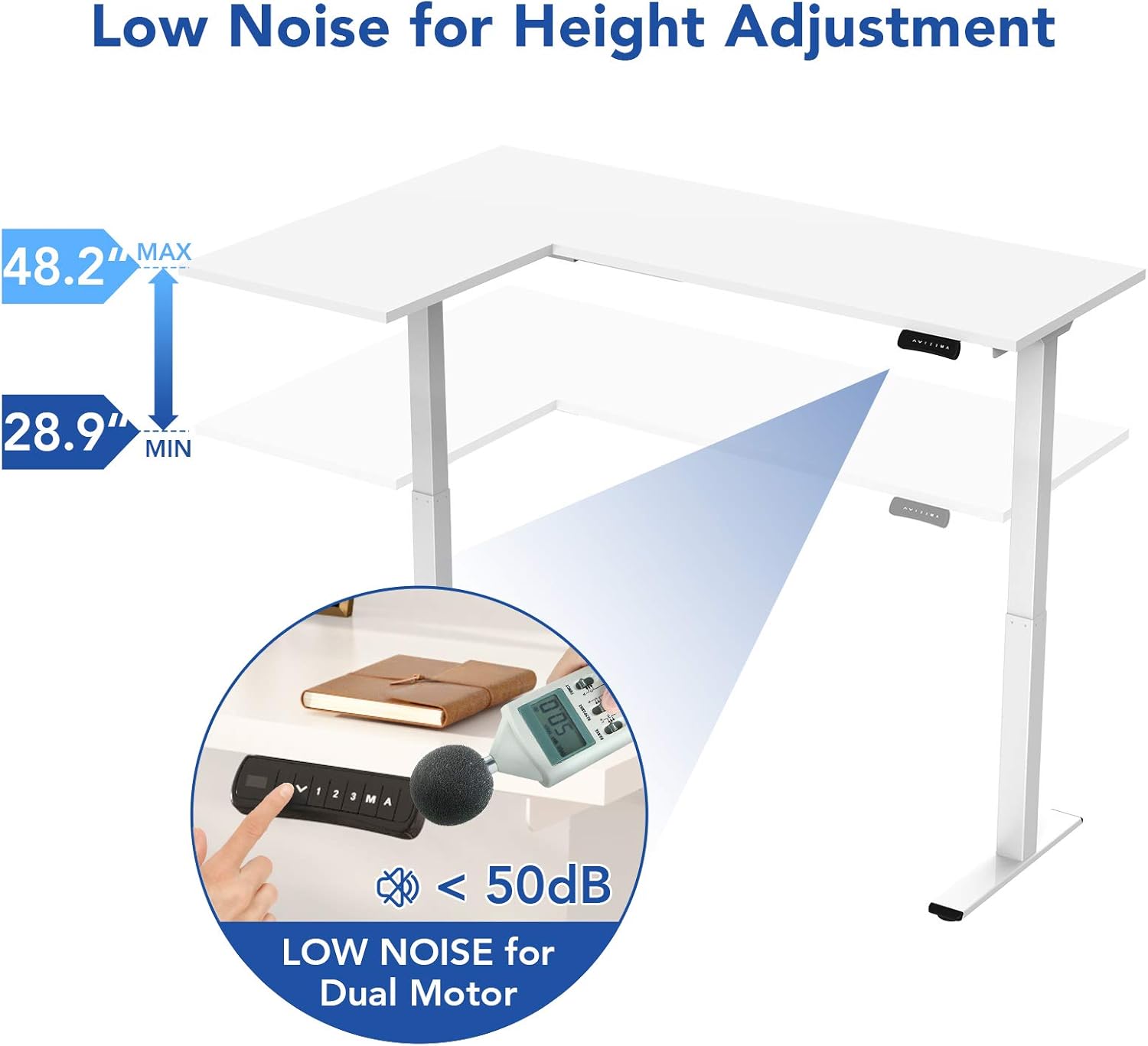
Image 3.2: An assembly step illustrating the connection of the L-shaped desk frame components.

Image 3.3: The desk frame nearing completion, with the control panel attached.
3.3 Reversible L-Shape Configuration
The L-shaped configuration of the desk is reversible, allowing you to set up the longer side on either the left or right, depending on your preference and workspace layout. This flexibility is determined during the assembly process.

Image 3.4: Visual representation of the desk's reversible L-shape, allowing for left or right-hand configurations.
4. Bedienungsanleitung
4.1 Höhenverstellung
The desk features a dual-motor lift mechanism for smooth and quiet height adjustments. The height can be adjusted from 27.9 inches (70.9 cm) to 47.2 inches (120 cm).
- Verwenden Sie die Up (▲) und Runter (▼) buttons on the control panel to manually adjust the desk height.
- The desk operates at a speed of 1 inch per second and maintains a noise level under 50 dB during movement.

Image 4.1: Illustration highlighting the low noise operation (under 50 dB) of the desk's dual motor system.
4.2 Funktionen des Bedienfelds
The built-in LED control panel allows for easy customization and programming of desk height settings.

Image 4.2: Close-up of the control panel, detailing its buttons and functions.
- Auf-/Ab-Tasten (▲, ▼): Die Schreibtischhöhe manuell einstellen.
- Speichervoreinstellungen (1, 2, 3): Store and recall up to three preferred height settings. To save a height, adjust the desk to the desired position, then press the 'M' button followed by the desired number (1, 2, or 3).
- Speichertaste (M): Used to save height presets.
- Sit-Stand Reminder (A): Activate a programmable timer to remind you to switch between sitting and standing postures. Refer to the full assembly guide for detailed programming instructions.
4.3 Antikollisionssystem
The desk is equipped with a built-in anti-collision system. If the desk encounters an obstruction during height adjustment, it will automatically stop and reverse slightly to prevent damage or injury.

Image 4.3: Visual explanation of the anti-collision system, showing the desk reversing upon contact with an obstacle.
5. Wartung
Regular maintenance ensures the longevity and optimal performance of your FLEXISPOT E1L desk.
- Reinigung: Wischen Sie die Schreibtischoberfläche und den Rahmen mit einem weichen, fusselfreien Tuch ab.amp Mit einem Tuch abwischen. Vermeiden Sie scheuernde Reiniger oder Lösungsmittel, die die Oberfläche beschädigen könnten.
- Kabelmanagement: Periodically check all cables to ensure they are securely connected and not pinched or frayed. Use the included cable management tray to keep wires organized.
- Befestigungsmaterial: Überprüfen Sie gelegentlich alle Schrauben und Bolzen auf festen Sitz. Ziehen Sie sie gegebenenfalls nach.
- Motorinspektion: Listen for any unusual noises during operation. If you notice any, discontinue use and consult the troubleshooting section or contact customer support.
6. Fehlerbehebung
Sollten Sie Probleme mit Ihrem Schreibtisch haben, beachten Sie bitte die folgenden gängigen Schritte zur Fehlerbehebung:
| Problem | Mögliche Ursache | Lösung |
|---|---|---|
| Der Schreibtisch bewegt sich nicht. | Power cable disconnected; control box error; overload. | Check power connections. Unplug and replug the power cord. Reduce weight on the desk. |
| Der Schreibtisch wackelt ungleichmäßig. | Uneven load; motor synchronization issue. | Distribute weight evenly. Perform a reset (refer to the full manual for specific reset procedures). |
| Fehlercode angezeigt. | Spezifischer Systemfehler. | Refer to the detailed error code list in the complete user manual or contact customer support. Often, a power cycle (unplugging for 10 seconds and replugging) can resolve temporary errors. |
| Das Antikollisionssystem löst zu leicht aus. | Sensitivity setting too high. | Adjust the anti-collision sensitivity setting via the control panel (refer to the full manual for instructions). |
If these steps do not resolve the issue, please contact FLEXISPOT customer support.
7. Spezifikationen
| Besonderheit | Spezifikation |
|---|---|
| Marke | FLEXISPOT |
| Modellnummer | E1L |
| Schreibtisch-Design | L-förmiger Computertisch |
| Rahmenmaterial | Stahl in Industriequalität |
| Hebemechanismus | Dual Electric Motor |
| Höhenverstellbereich | 27.9" bis 47.2" (70.9 cm bis 120 cm) |
| Liftgeschwindigkeit | 1 Zoll/Sekunde |
| Geräuschpegel | Unter 50 dB |
| Maximale Gewichtskapazität | 177 kg |
| Bedienfeld | LED with 3 Memory Presets & Sit-Stand Reminder |
| Besondere Merkmale | Anti-Collision System, Corded Operation, Reversible L-Shape |
| Montage erforderlich | Ja (einschließlich aller Montagewerkzeuge) |
| Empfohlene Personen für die Versammlung | 1 |
8. Garantie und Support
8.1 Garantieinformationen
The FLEXISPOT E1L desk comes with a Limited Warranty. Please refer to the warranty card included with your product or visit the official FLEXISPOT website for detailed terms and conditions regarding parts and labor coverage.
8.2 Kundendienst
For technical assistance, warranty claims, or any questions regarding your FLEXISPOT E1L desk, please contact FLEXISPOT customer support through their official webWebsite oder die Kontaktinformationen, die auf Ihrer Produktverpackung angegeben sind.
Besuchen Sie auch die FLEXISPOT Store auf Amazon Für weitere Produktinformationen und Supportressourcen.