
Einführung
This manual provides comprehensive instructions for the VINABTY AKB37026852 replacement remote control. It is designed to operate various LG DVD Home Cinema systems. Please read this manual carefully to ensure proper use and to maximize your experience with the remote control.
Produkt überview
The VINABTY AKB37026852 is a direct replacement remote control, offering full functionality for compatible LG DVD Home Cinema models. It features an ergonomic design for comfortable handling and intuitive button layout for ease of use.
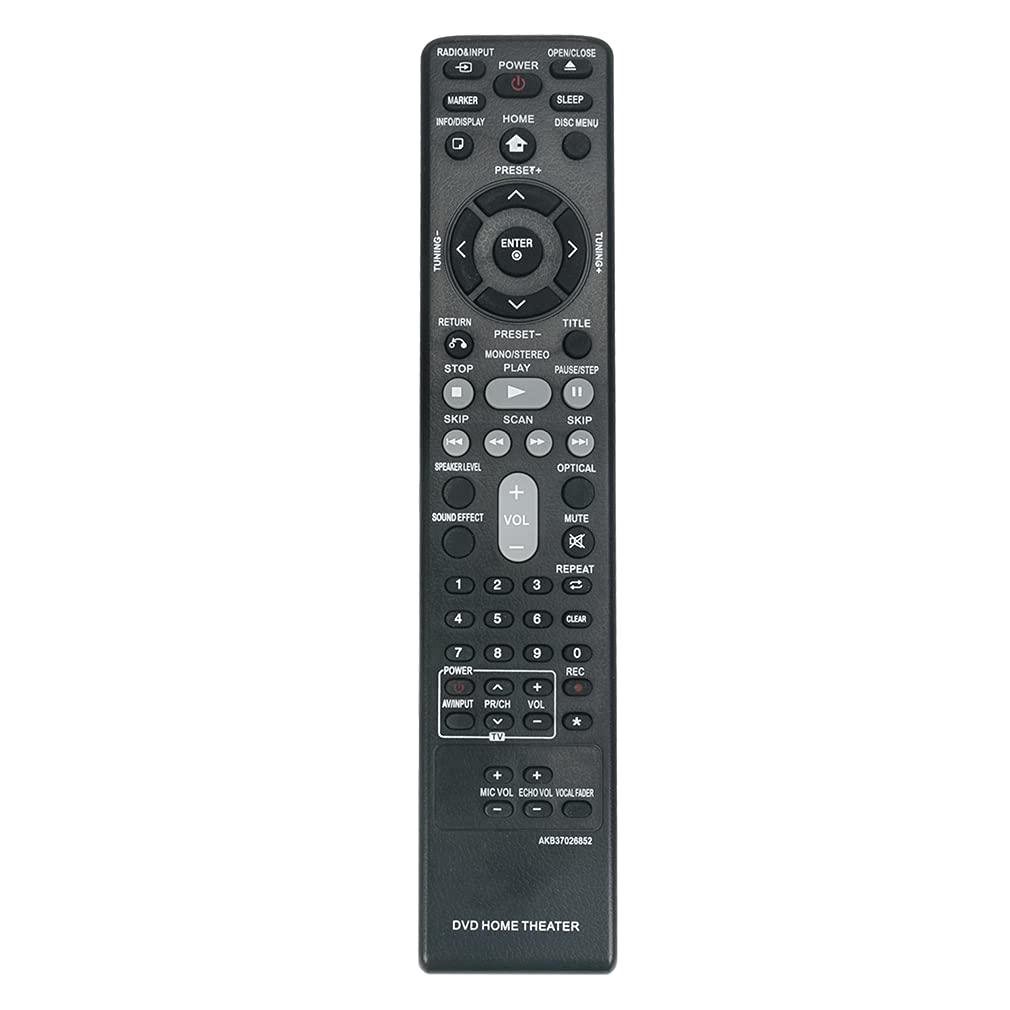
Bild: Vorderseite view of the VINABTY AKB37026852 replacement remote control, showing all buttons and their labels.
Kompatible Modelle:
- LG DVD Home Cinema Systems: DH4130S, HT304, HT305, HT532, HT805, HT806, HT906, W95, LHD625, S63S1-S, S63T1-C, S75T1-W
- Specific models: HT805ST (HT805ST, SH85ST-S/C/W), DH4220S (DH4220S, S42S1-S/W), DH7531T (DH7531T, S73T1-S/W, S73T4-C), S43S3-S/W DH6530T (DH6530T, S63T1-S/C/W), HT806ST (HT806ST, SH86ST-S/C, SH95TA-W), DVD Wireless Home Theater System HT906TAW (HT906TAW, SH96TA-S/W, SH96SB-C)
Aufstellen
Einlegen der Batterie:
- Suchen Sie die Batteriefachabdeckung auf der Rückseite der Fernbedienung.
- Schieben Sie den Deckel nach unten oder drücken Sie den Riegel und heben Sie ihn an, um das Fach zu öffnen.
- Legen Sie zwei AAA-Alkalibatterien (nicht im Lieferumfang enthalten) ein und achten Sie darauf, dass die positiven (+) und negativen (-) Anschlüsse mit den Abbildungen im Batteriefach übereinstimmen.
- Setzen Sie die Abdeckung des Batteriefachs wieder ein, indem Sie sie so weit hineinschieben, bis sie sicher einrastet.
No additional setup or programming is required. The remote control is ready for use immediately after battery installation.
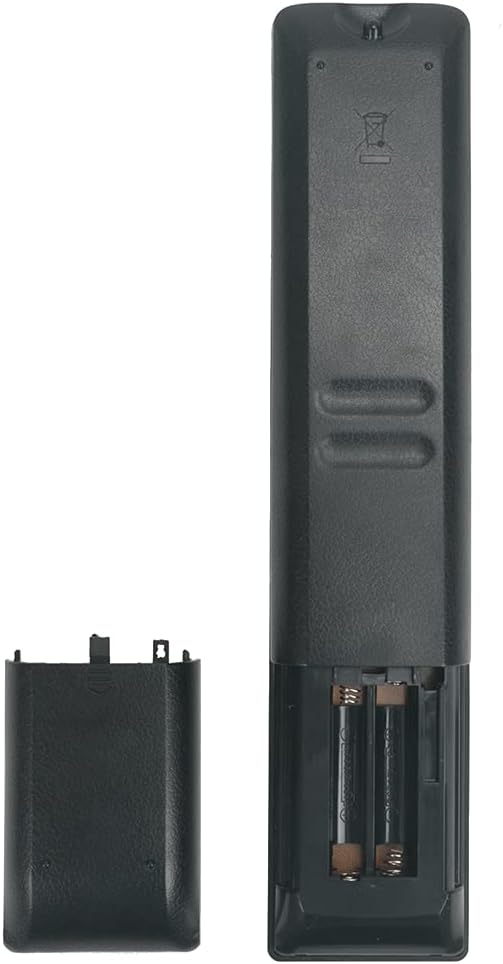
Bild: Rückseite view of the remote control with the battery compartment open, showing where to insert two AAA batteries.
Bedienungsanleitung
Point the remote control directly at your LG DVD Home Cinema system. Ensure there are no obstructions between the remote and the device. The effective range is approximately 10 meters (33 feet).
Hauptfunktionen:
| Taste | Funktion |
|---|---|
| LEISTUNG | Turns the LG Home Cinema system On or Off. |
| RADIO/INPUT | Switches between different input sources or radio mode. |
| ÖFFNEN/SCHLIESSEN | Öffnet oder schließt das Disc-Fach. |
| INFO/DISPLAY | Displays information about the current playback or system status. |
| HEIM | Öffnet das Hauptmenü oder den Startbildschirm. |
| SCHLAFEN | Stellt den Sleep-Timer ein. |
| DISC-MENÜ | Accesses the menu of the loaded disc. |
| Navigationstasten (Hoch, Runter, Links, Rechts, EINGABE) | Dient zur Navigation in Menüs und zur Bestätigung von Auswahlen. |
| ZURÜCKKEHREN | Geht zurück zum vorherigen Menü oder Bildschirm. |
| TITEL | Accesses the disc title menu. |
| VOREINSTELLUNG+/- | Changes radio presets or navigates through stored settings. |
| ABSTIMMUNG+/- | Adjusts radio frequency manually. |
| STOPPEN | Stoppt die Wiedergabe. |
| SPIELEN | Startet die Wiedergabe oder setzt sie fort. |
| PAUSE/SCHRITT | Pauses playback or advances frame by frame. |
| ÜBERSPRINGEN (<< / >>) | Springt zum vorherigen oder nächsten Titel/Kapitel. |
| SCAN (<< / >>) | Fast reverse or fast forward playback. |
| LAUTSTÄRKE+/- | Regelt den Master-Lautstärkepegel. |
| MUTE | Schaltet den Ton stumm oder hebt die Stummschaltung auf. |
| WIEDERHOLEN | Wiederholt den aktuellen Titel, das aktuelle Kapitel oder die aktuelle CD. |
| KLAR | Clears entries or selections. |
| Zifferntasten (0-9) | Direct selection of tracks, chapters, or inputting numbers. |
| SOUNDEFFEKT | Cycles through available sound effects or equalizer presets. |
| LAUTSPRECHERPEGEL | Passt die Lautstärke einzelner Lautsprecher an. |
| OPTIK | Selects the optical audio input. |
| MIC VOL +/- | Passt die Mikrofonlautstärke an. |
| ECHO VOL +/- | Adjusts microphone echo effect volume. |
| VOCAL-FADER | Reduces the vocal track on karaoke discs. |
Fehlerbehebung
- Fernbedienung reagiert nicht:
- Achten Sie darauf, dass die Batterien mit der richtigen Polarität (+/-) eingelegt sind.
- Ersetzen Sie die alten Batterien durch neue Alkalibatterien.
- Check for any obstructions between the remote control and the LG Home Cinema system's infrared receiver.
- Ensure you are within the effective operating range (approx. 10 meters) and pointing the remote directly at the device.
- Bestimmte Funktionen funktionieren nicht:
- Verify that your LG Home Cinema system model is listed as compatible in the "Product Overview" section. While this remote is broadly compatible, some very specific functions might vary slightly depending on the original remote's layout for certain older or niche models.
- If a particular button does not seem to work, ensure the system is in the correct mode (e.g., DVD mode for disc functions, Radio mode for tuning).
Wartung
- Reinigung: Reinigen Sie die Fernbedienung mit einem weichen, trockenen Tuch. Verwenden Sie keine flüssigen Reinigungsmittel oder Scheuermittel.
- Batteriepflege: Um ein Auslaufen zu verhindern, entfernen Sie die Batterien, wenn die Fernbedienung längere Zeit nicht benutzt wird.
- Lagerung: Bewahren Sie die Fernbedienung an einem kühlen, trockenen Ort fern von direkter Sonneneinstrahlung und extremen Temperaturen auf.
- Vermeiden Sie Tropfen: Schützen Sie die Fernbedienung vor Stößen, da diese die internen Komponenten beschädigen können.
Technische Daten
- Marke: VINABTY
- Modellname: AKB37026852
- Konnektivitätstechnologie: Infrarot
- Kompatible Geräte: LG DVD Home Cinema Systems
- Maximale Reichweite: 10 Meter
- Akku-Typ: Alkaline (AAA x 2, not included)
- Besonderheit: Ergonomisches Design
- Farbe: Schwarz
Garantie und Support
VINABTY is committed to providing excellent after-sales service. If you encounter any issues with your remote control or have questions regarding its operation, please do not hesitate to contact our customer support. We are dedicated to ensuring your satisfaction with our products and services.
For support, please refer to the contact information provided with your purchase or visit the VINABTY official webWebsite.