
Apevia ATX-PM850W
Apevia Premier 850W Teilmodulares Gaming-Netzteil – Benutzerhandbuch
Model: ATX-PM850W
Einführung
This manual provides comprehensive instructions for the installation, operation, and maintenance of your Apevia Premier 850W Semi-Modular Gaming Power Supply. Designed for high performance and reliability, this 80+ Gold certified power supply features active PFC, a semi-modular cable design, and customizable RGB lighting modes. Please read this manual thoroughly before installation to ensure proper setup and safe operation.
Sicherheitshinweise
Beachten Sie stets die folgenden Sicherheitsvorkehrungen, um Verletzungen oder Schäden an Ihrer Ausrüstung zu vermeiden:
- Vor der Installation oder Wartung muss sichergestellt werden, dass die Stromversorgung vom Hauptstromanschluss getrennt ist.
- Öffnen Sie nicht das Netzteil casing. Hohes VolumentagSie sind auch im nicht angeschlossenen Zustand vorhanden.
- Installieren Sie das Netzteil in einem gut belüfteten Bereich, um eine Überhitzung zu vermeiden.
- Verwenden Sie ausschließlich die mit dem Netzteil gelieferten Kabel.
- Das Netzteil darf keiner Feuchtigkeit oder extremen Temperaturen ausgesetzt werden.
- This power supply automatically switches between 110V and 230V; no manual toggle switch is required.
Packungsinhalt
Überprüfen Sie, ob alle Artikel im Paket vorhanden sind:
- Apevia Premier 850W Semi-Modular Power Supply (ATX-PM850W)
- Netzkabel
- Modular Cables (PCI-E, SATA, Peripheral, Floppy)
- Befestigungsschrauben
- Benutzerhandbuch (dieses Dokument)

Image: Apevia Premier 850W Power Supply, packaging, and included modular cables and power cord.
Merkmale
- 850 W Dauerleistung: Provides stable and reliable power output for high-performance gaming systems.
- 80 PLUS Gold-zertifiziert: Achieves 90%+ efficiency at 20%, 50%, and 100% load levels, reducing heat generation and electricity consumption.
- Semi-Modular Design: Allows for improved cable management by connecting only the necessary cables, reducing clutter and improving airflow within the PC case.
- Active PFC (Power Factor Correction): Boasts a 99% factor correction, enhancing performance and energy efficiency.
- 135mm RGB Fan: Features an auto-thermally controlled fan with 366 selectable RGB lighting modes, adding aesthetic appeal and efficient cooling. The fan speed adjusts based on the power supply's temperature.
- Heavy Duty Protections: Includes Short-Circuit Protection (SCP), Over-Voltage Protection (OVP), Over-Power Protection (OPP), and Under-Voltage Protection (UVP) to safeguard your components.
- Double Forward Converter Design: Enhances stability and efficiency.
- Breite Kompatibilität: Supports ATX 12V 2.3 Version, Dual/Quad Core CPUs, SLI/Crossfire configurations, and Haswell processors.
- Japanese Capacitor: Utilizes a large Japanese capacitor for enhanced reliability and lifespan.

Image: Visual representation of the power supply's 80+ Gold efficiency and semi-modular cable benefits.
Setup und Installation
Follow these steps to properly install your Apevia Premier Power Supply:
- Bereiten Sie Ihr System vor: Ensure your computer is completely powered off and unplugged from the wall outlet. Open your PC case.
- Altes Netzteil entfernen (falls zutreffend): Trennen Sie alle Kabel von Ihrem alten Netzteil und nehmen Sie es aus dem Gehäuse.
- Das neue Netzteil einbauen: Carefully place the Apevia Premier 850W PSU into the power supply bay of your PC case. Secure it with the provided mounting screws.
- Wichtige Kabel anschließen:
- 20/24-pin Main Power Connector: Connect the main power cable to your motherboard. This connector can be split into 20+4 pins for motherboards requiring a 20-pin connector.
- P8 (4+4P) ESP 12V CPU Connector: Connect this to your motherboard's CPU power input. This 8-pin connector can be split into two 4-pin connectors for motherboards requiring a 4-pin power connector.
- Modulare Kabel anschließen: Identify the necessary cables for your components (graphics card, SSDs/HDDs, optical drives) and plug them into the corresponding modular ports on the power supply.
- PCI-E (6+2 pin) Connectors: Use these for your graphics card(s). The 8-pin PCI-E GPU connector can be split into a 6+2 pin configuration for graphics cards requiring a 6-pin power connector.
- SATA-Anschlüsse: For SATA hard drives, SSDs, and optical drives.
- Periphere (Molex-)Steckverbinder: For older components or case fans.
- Floppy Connector: For legacy floppy drives or certain fan controllers.
- Kabelmanagement: Route cables neatly to improve airflow and aesthetics. Utilize the semi-modular design to only use cables you need.
- Gehäuse schließen und Gerät einschalten: Once all connections are secure, close your PC case. Connect the AC power cord to the power supply and then to a wall outlet. Flip the power switch on the PSU to the 'ON' position.
Wichtiger Hinweis:
The power supply will not power on simply by connecting the power cord to both the power supply and wall outlet. Ensure that all the power supply cables are properly connected to the PC components for it to power on.

Image: Detailed diagram illustrating the types and lengths of connectors included with the power supply, such as ATX Main, EPS 12V, PCI Express, SATA, Peripheral, and Floppy connectors.

Abbildung: Seite view of the power supply unit, highlighting the modular ports for PCI-E and SATA/Peripheral cables, allowing for flexible cable management.
Bedienungsanleitung
Once installed and connected, the power supply operates automatically. The 135mm fan will adjust its speed based on the internal temperature to maintain optimal cooling.
RGB-Beleuchtungssteuerung
The Apevia Premier Power Supply features 366 selectable RGB lighting modes for its fan. To change the lighting mode, locate the dedicated button on the back of the PSU (near the power switch). Press this button to cycle through various modes, including:
- RGB-Zyklus
- Breathe Cycle
- Atemmodus
- RGB-Modus
- Solid Colors (Red, Blue, Green, Pink, Orange, White)
- Aus-Modus
- Und viele mehr.
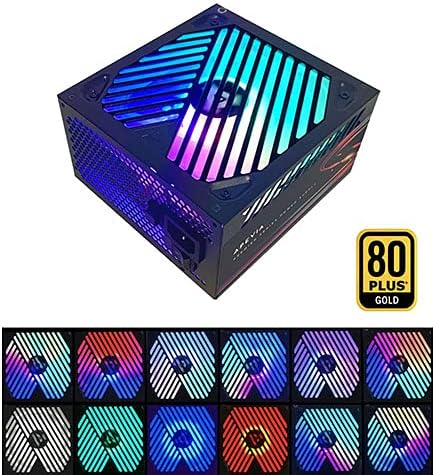
Image: The power supply unit showcasing its RGB fan with multiple color options, demonstrating the customizable lighting effects.
Wartung
Um die Langlebigkeit und optimale Leistung Ihres Netzteils zu gewährleisten, beachten Sie bitte die folgenden Wartungstipps:
- Lüftungsschlitze freihalten: Periodically check that the power supply's intake and exhaust vents are free from dust and obstructions.
- Staubentfernung: Use compressed air to gently clean dust from the fan and internal components of the power supply (only when the unit is unplugged and outside the PC case, if possible).
- Kabelintegrität: Ensure all connected cables are securely seated and not pinched or damaged.
Fehlerbehebung
If you encounter issues with your Apevia Premier Power Supply, refer to the following common problems and solutions:
| Problem | Mögliche Ursache | Lösung |
|---|---|---|
| Power Supply does not turn on. | Not all cables are properly connected to PC components. | Ensure the 20/24-pin main power, 4+4-pin CPU, and any necessary PCI-E cables are fully seated in their respective ports on the motherboard and graphics card. The PSU requires a load to power on. |
| Das System schaltet sich ein, schaltet sich aber sofort wieder ab. | Overload, short circuit, or component malfunction. | Check for any loose connections or short circuits. Ensure your system's power requirements do not exceed the PSU's capacity. Test components individually if possible. |
| RGB fan not lighting up or cycling modes. | RGB control button not pressed or internal issue. | Press the RGB control button on the back of the PSU to cycle through modes. If still unresponsive, ensure the PSU is receiving power. |
| Unusual noise from the PSU fan. | Dust accumulation or fan bearing issue. | Clean the fan and vents. If the noise persists and is excessive, contact customer support. |
Technische Daten
| Besonderheit | Detail |
|---|---|
| Modellnummer | ATX-PM850W |
| Wastage | 850 Watt |
| Effizienzzertifizierung | 80 PLUS Gold |
| Formfaktor | ATX |
| Stromversorgungsdesign | Teilmodular |
| Kühlmethode | Air (135mm RGB Fan) |
| Produktabmessungen (L x B x H) | 6.2 x 5.9 x 3.4 Zoll |
| Artikelgewicht | 4.31 Pfund |
| Eingangslautstärketage | Auto-switching (110V/230V) |
| Leistung (Max.) | +3.3V@20A, +5V@20A, +12V@83.3A, -12V@0.3A, +5Vsb@3A |
| Schutz | SCP, OVP, OPP, UVP |
Garantie und Support
For warranty information or technical support, please refer to the official Apevia webBesuchen Sie die Website oder kontaktieren Sie direkt den Kundenservice. Bewahren Sie Ihren Kaufbeleg als Kaufnachweis für Garantieansprüche auf.
Besuchen Sie die Apevia Store on Amazon Für weitere Produktinformationen und Support-Ressourcen.
Ask a question about this manual
Ask about setup, troubleshooting, compatibility, parts, safety, or missing instructions. Manuals+ will review the question and use this page’s manual context to help answer it.