
Einführung
Thank you for choosing the Renkforce RF-SBS-500 2D Wired Barcode Scanner. This device is designed for efficient and reliable scanning of both 1D and 2D barcodes from various surfaces, including paper and smartphone screens. Its omnidirectional scanning capability and hands-free operation make it suitable for a wide range of applications. This manual provides essential information for the proper setup, operation, and maintenance of your scanner.
Sicherheitshinweise
- Setzen Sie den Scanner keinen extremen Temperaturen, hoher Luftfeuchtigkeit oder direkter Sonneneinstrahlung aus.
- Vermeiden Sie es, den Scanner fallen zu lassen oder starken Stößen auszusetzen.
- Versuchen Sie nicht, den Scanner zu zerlegen oder zu verändern. Dadurch erlischt die Garantie.
- Keep the scanning window clean to ensure optimal performance. Use a soft, dry cloth.
- Ensure the USB cable is connected securely to prevent accidental disconnection.
Packungsinhalt
- Renkforce RF-SBS-500 2D Wired Barcode Scanner
- Integrated USB-A Cable
- Benutzerhandbuch (dieses Dokument)
Aufstellen
Follow these steps to set up your Renkforce RF-SBS-500 barcode scanner:
- Den Scanner auspacken: Nehmen Sie den Scanner vorsichtig aus der Verpackung.
- Mit einem Computer verbinden: Plug the integrated USB-A cable from the scanner into an available USB port on your desktop or laptop computer.
- Treiberinstallation: The scanner is typically plug-and-play. Your operating system (Windows, macOS, Linux) should automatically detect and install the necessary drivers. Wait for the installation to complete.
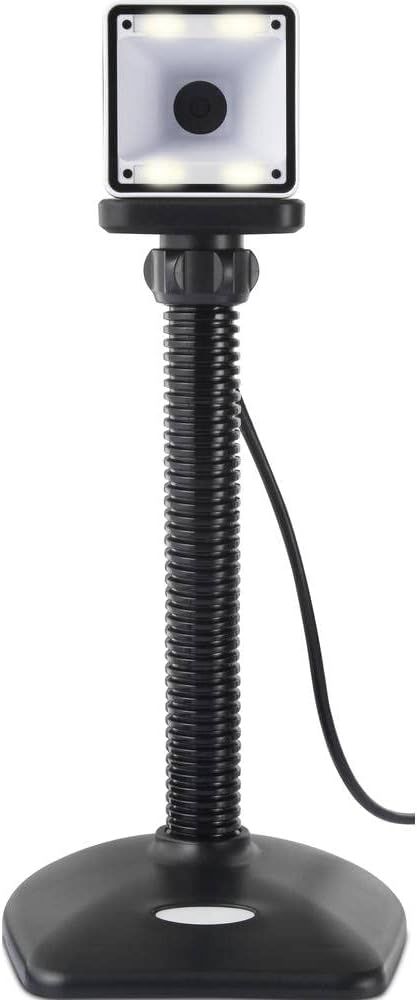
- Platzierung: Place the scanner on a stable, flat surface. The flexible neck allows for adjustment of the scanning head angle for optimal positioning.

Bedienung des Scanners
The Renkforce RF-SBS-500 is designed for ease of use with its omnidirectional and hands-free capabilities.
- Einschalten: Once connected via USB, the scanner will power on automatically. The LED indicators on the scanner head may illuminate briefly.
- Scannen eines Barcodes: Position the barcode within the scanning area of the scanner head. The scanner will automatically detect and read the barcode.
- Visuelles und akustisches Feedback: Upon successful scanning, the integrated buzzer will emit a short beep, and the LED display on the scanner will flash or change color, indicating a successful read.
- Omnidirektionales Lesen: The scanner can read barcodes regardless of their orientation, eliminating the need to align the barcode precisely.
- Hands-Free Mode (Presentation Mode): The scanner operates continuously in a presentation mode, allowing you to simply pass items with barcodes in front of the scanning window without pressing any buttons. This saves time and improves workflow efficiency.
- Unterstützte Barcodes: The scanner supports both 1D (e.g., EAN, UPC, Code 39) and 2D (e.g., QR Code, Data Matrix, PDF417) barcode types.
Wartung
Durch sachgemäße Wartung wird die Langlebigkeit und optimale Leistung Ihres Scanners sichergestellt.
- Reinigung des Scanfensters: Reinigen Sie das Scanfenster regelmäßig mit einem weichen, fusselfreien Tuch. Bei hartnäckigem Schmutz leicht andrücken.ampen the cloth with water or a mild, non-abrasive cleaner. Do not spray cleaner directly onto the scanner.
- Allgemeine Reinigung: Wischen Sie die Außenseite des Scanners mit einem trockenen oder leicht feuchten Tuch ab.amp Tuch. Vermeiden Sie die Verwendung aggressiver Chemikalien oder scheuernder Materialien.
- Lagerung: Bewahren Sie den Scanner bei Nichtgebrauch an einem sauberen, trockenen Ort fern von direkter Sonneneinstrahlung und extremen Temperaturen auf.
Fehlerbehebung
Sollten Sie Probleme mit Ihrem Scanner haben, beachten Sie bitte die folgenden häufig auftretenden Probleme und Lösungen:
| Problem | Mögliche Ursache | Lösung |
|---|---|---|
| Der Scanner lässt sich nicht einschalten. | USB cable not connected properly or faulty USB port. | Ensure the USB cable is firmly connected to both the scanner and the computer. Try a different USB port. |
| Der Scanner liest keine Barcodes. | Barcode damaged, scanning window dirty, or incorrect barcode type. | Check the barcode for damage. Clean the scanning window. Ensure the barcode type is supported (1D/2D). Adjust the distance and angle of the barcode to the scanner. |
| No beep or LED feedback after scanning. | Barcode not read successfully. | Refer to the "Scanner does not read barcodes" solution. If the issue persists, contact support. |
| Die gescannten Daten werden fehlerhaft angezeigt. | Keyboard layout mismatch or software issue. | Ensure your computer's keyboard layout matches the expected output. Test with a simple text editor. |
If the problem persists after trying these solutions, please contact Renkforce customer support.
Technische Daten
| Besonderheit | Spezifikation |
|---|---|
| Modellnummer | RF-4679568 |
| Scanfähigkeit | 1D- und 2D-Barcodes |
| Konnektivitätstechnologie | USB-A (kabelgebunden) |
| Scanrate | 60 Bilder pro Sekunde |
| Scan-Modus | Omnidirectional, Hands-free (Presentation Mode) |
| Rückmeldung | Integrated Buzzer, LED Display |
| Kompatible Geräte | Desktop Computer, Laptop, Smartphone (via appropriate adapter if needed) |
| Abmessungen (L x B x H) | 150 x 5.2 x 5.2 cm |
| Artikelgewicht | 102 Gramm |
| Stromquelle | Stromversorgung über USB |
| Ursprungsland | Deutschland |
Garantie und Support
Renkforce products are manufactured to high-quality standards and come with a standard warranty. Please refer to your purchase documentation or the Renkforce official webAuf der Website finden Sie die spezifischen Garantiebedingungen, die für Ihre Region gelten.
For technical support, troubleshooting assistance, or warranty claims, please contact Renkforce customer service. Contact details can typically be found on the Renkforce webauf der Website oder auf Ihrer Produktverpackung.