
Walfront SVP-916
Walfront SVP-916 Adjustable Over and Under Voltage Protector-Benutzerhandbuch
Model: SVP-916 (40A)
Einführung
This user manual provides comprehensive instructions for the installation, operation, maintenance, and troubleshooting of the Walfront SVP-916 Adjustable Over and Under Voltage Protector. This device is designed to protect electrical appliances from damage caused by voltagDie Schwankungen, einschließlich Übervoltage und Untervoltage conditions. Please read this manual thoroughly before using the product to ensure safe and efficient operation.
Hauptmerkmale
- Übervolumentage-Schutz
- Untervoltage-Schutz
- Bandtage Anzeige (Vol.tage-Messung)
- Einstellbare Übersteuerungtage Schutzwert
- Einstellbare Übersteuerungtage Erholungswert
- Einstellbare Übersteuerungtage Schutzwirkungszeit
- Einstellbare Unterlautstärketage Schutzwert
- Einstellbare Unterlautstärketage Erholungswert
- Einstellbare Unterlautstärketage Schutzwirkungszeit
- Adjustable delay time for fault recovery
- Adjustable power-on delay on time
- Reset method selection
- Fehlerbehebung
- Werkseinstellungen wiederherstellen
Produkt überview

Abbildung 1: Front view of the Walfront SVP-916 Adjustable Voltage Protector, showing the digital display and control buttons.

Abbildung 2: Seite view of the Walfront SVP-916, highlighting its compact design and qualification sticker.
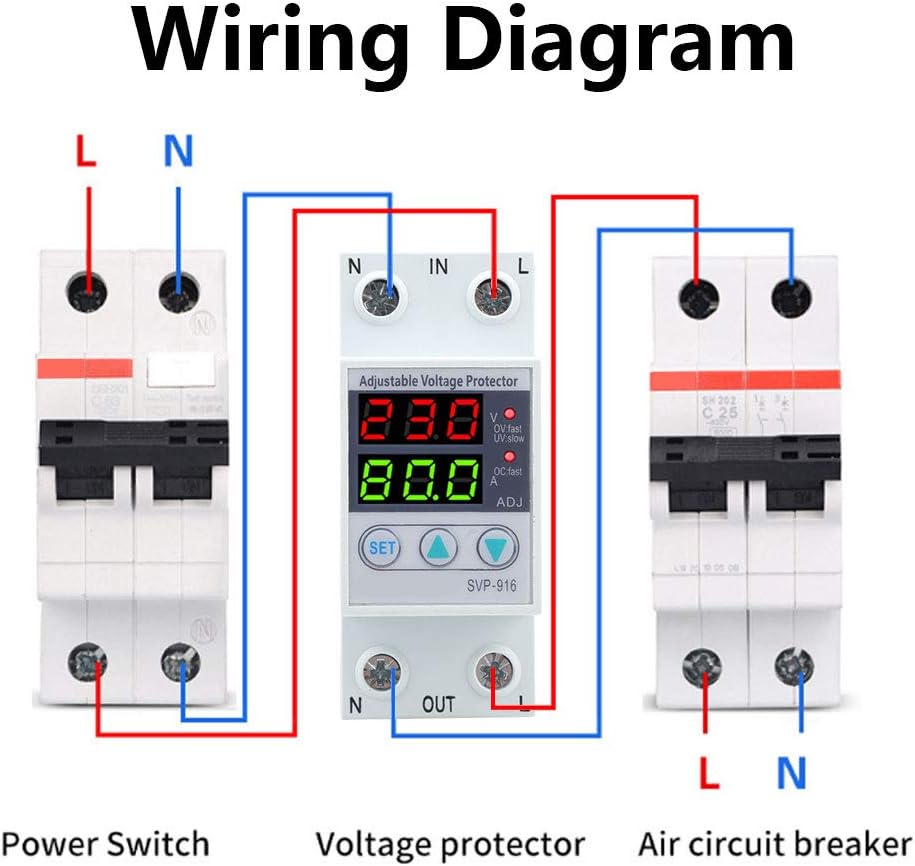
Abbildung 3: Detailed dimensions of the Walfront SVP-916, showing measurements in millimeters and inches for installation planning.
Setup und Installation
Before installation, ensure the main power supply is turned off to prevent electric shock. This device is designed for DIN rail mounting.
Schaltplan

Abbildung 4: Schaltplan zur Veranschaulichung des Anschlusses der Lautstärketage protector between a power switch and an air circuit breaker. Ensure correct L (Live) and N (Neutral) connections for both input and output terminals.
- Mount the SVP-916 protector onto a standard DIN rail in your electrical panel.
- Connect the incoming Live (L) and Neutral (N) wires from your power source to the "IN" terminals of the protector.
- Connect the outgoing Live (L) and Neutral (N) wires from the "OUT" terminals of the protector to your load (e.g., air circuit breaker, appliances).
- Stellen Sie sicher, dass alle Verbindungen sicher und ordnungsgemäß isoliert sind.
- Once wiring is complete, restore power to the circuit. The device display will light up.
Bedienungsanleitung
The SVP-916 features a digital display for real-time voltage and current monitoring, along with buttons for setting protection parameters.
Parametereinstellung
Zum Einstellen der Lautstärketage and current coefficients, follow these steps:
- Drücken Sie die SATZ button 10 times. The display will show "PF1" and a numerical value (default 524). This value represents the voltage coefficient.
- Verwenden Sie die Up (▲) Und Runter (▼) buttons to adjust this value. For example, to increase the displayed voltage, increase this coefficient.
- Drücken Sie die SATZ button again. The display will show "PF2" and a numerical value (default 129). This value represents the current coefficient.
- Verwenden Sie die Up (▲) Und Runter (▼) buttons to adjust this value if needed.
- Drücken Sie die SATZ button twice more to save the settings and return to normal operation.
Video 1: Demonstration of adjusting the voltage and current coefficients on the Walfront SVP-916. This video shows how to access the PF1 and PF2 settings and modify their values to calibrate the device's readings.
Schutzeinstellungen
The device allows for adjustment of various protection parameters:
- Übervolumentage Schutzwert: Adjustable from OFF-80V-100V (Default: 90V).
- Übervolumentage Recovery Value: Stellt die Lautstärke eintage at which the device restores power after an overvoltagDas Ereignis.
- ÜbervolumentagAktionszeit: Configures the delay before the device trips on overvoltage.
- Untervoltage Schutzwert: Legt die Mindestlautstärke festtage Schwelle.
- Untervoltage Recovery Value: Stellt die Lautstärke eintage at which the device restores power after an undervoltagDas Ereignis.
- UntervoltagAktionszeit: Configures the delay before the device trips on undervoltage.
- Fault Recovery Delay Time: Delay before power is restored after any protection trip.
- Power-on Delay Time: Delay before power is supplied to the load upon initial power-up.
Wartung
The Walfront SVP-916 is designed for low maintenance. Regular checks can ensure its longevity and proper function:
- Sichtprüfung: Überprüfen Sie das Gerät regelmäßig auf Anzeichen von physischen Beschädigungen, lockeren Verbindungen oder Verfärbungen.
- Reinigung: Halten Sie das Gerät sauber und staubfrei. Verwenden Sie zum Reinigen ein trockenes, weiches Tuch. Verwenden Sie keine flüssigen Reiniger oder Lösungsmittel.
- Verbindungsprüfung: Ensure all wiring connections remain tight and secure. Loose connections can lead to overheating or intermittent operation.
- Funktionstest: If possible, periodically test the protection functions by simulating overvoltage oder undervoltage conditions (e.g., using a variable power supply) to ensure the device trips as expected.
In case of any malfunction, refer to the troubleshooting section or contact customer support. Do not attempt to open or repair the device yourself, as this may void the warranty and pose a safety risk.
Fehlerbehebung
This section provides solutions to common issues you might encounter with your SVP-916 Voltage Beschützer.
| Problem | Mögliche Ursache | Lösung |
|---|---|---|
| Gerät lässt sich nicht einschalten. | Keine Stromversorgung; falsche Verkabelung; interner Fehler. | Check main power supply. Verify wiring connections according to the diagram. If problem persists, contact support. |
| Das Gerät schaltet sich häufig ab. | Bandtage fluctuations; protection settings too sensitive. | Monitorvoltage stability. Adjust overvoltage/Untervoltage protection values or action times to be less sensitive if appropriate for your application. |
| Falsche Lautstärketage/current display. | Calibration issue (PF1/PF2 settings). | Refer to "Parameter Adjustment" in Operating Instructions to recalibrate PF1 (voltage) and PF2 (current) values. |
| Device does not reset after trip. | Fault condition still present; manual reset required; internal fault. | Stellen Sie sicher, dass die Lautstärketage/current has returned to normal range. Check reset method selection. If manual reset is enabled, press the reset button. If problem persists, contact support. |
Wiederherstellen der Werkseinstellungen
To restore the device to its factory default settings, you must manually adjust the PF1 and PF2 values back to their default (PF1: 524, PF2: 129) as described in the "Parameter Adjustment" section. There is no single button for factory reset.
Technische Daten
| Parameter | Wert |
|---|---|
| Marke | Walfront |
| Modell | SVP-916 (40A) |
| Nennvolumentage | 100-130 V Wechselspannung |
| Frequenz | 50/60 Hz |
| Artikelgewicht | 6.5 Unzen |
| Technische Daten | 0.39 x 0.39 x 0.39 inches (approx. 10x10x10 mm) |
| Ursprungsland | China |
| Material | Plastik |
| Installationsmethode | DIN-Schienenmontage |
Garantieinformationen
Bitte beachten Sie die Produktverpackung oder die Angaben des Verkäufers. website for specific warranty terms and conditions. Typically, Walfront products come with a standard manufacturer's warranty covering defects in materials and workmanship.
Kundenservice
For technical assistance, troubleshooting beyond this manual, or warranty claims, please contact Walfront customer support through their official website or the retailer from whom you purchased the product. Have your product model (SVP-916) and purchase details ready when contacting support.
You can visit the Walfront Store for more information: Walfront Official Store
Ask a question about this manual
Ask about setup, troubleshooting, compatibility, parts, safety, or missing instructions. Manuals+ will review the question and use this page’s manual context to help answer it.