
Einführung
This manual provides essential instructions for the proper setup, operation, and maintenance of your ISLANDSAFE Digital Small Personal Safe, Model QT. Please read this manual thoroughly before using the safe to ensure correct functionality and security.
Sicherheitshinweise
- Keep emergency keys in a secure location away from the safe and out of reach of children. Do not store them inside the safe.
- Ensure the safe is placed on a stable, level surface or securely mounted to a wall or cabinet.
- Do not attempt to force the safe open if the electronic lock malfunctions. Use the emergency override methods.
- Tauschen Sie die Batterien umgehend aus, sobald die Anzeige für niedrigen Batteriestand erscheint, um eine Aussperrung zu vermeiden.
- This safe is water-resistant, not waterproof. Avoid exposing it to excessive moisture or direct water contact.
Packungsinhalt
- ISLANDSAFE Digital Personal Safe (Model QT)
- Not-Überbrückungstasten (2)
- Notbatteriekasten
- Removable Shelf (1)
- Mounting Hardware (Expansion Screws)
- Bedienungsanleitung
Produkt überview
The ISLANDSAFE Digital Personal Safe is designed to secure your valuables with an electronic combination lock and robust construction. It features a matte finish alloy steel body, dual solid steel bolts, and a pry-resistant door for enhanced security. The interior includes a soft lining and a removable shelf for organized storage.

Image: The ISLANDSAFE Digital Safe with its door open, revealing a spacious interior with a removable shelf, storing various items such as a camera, lens, and small containers.
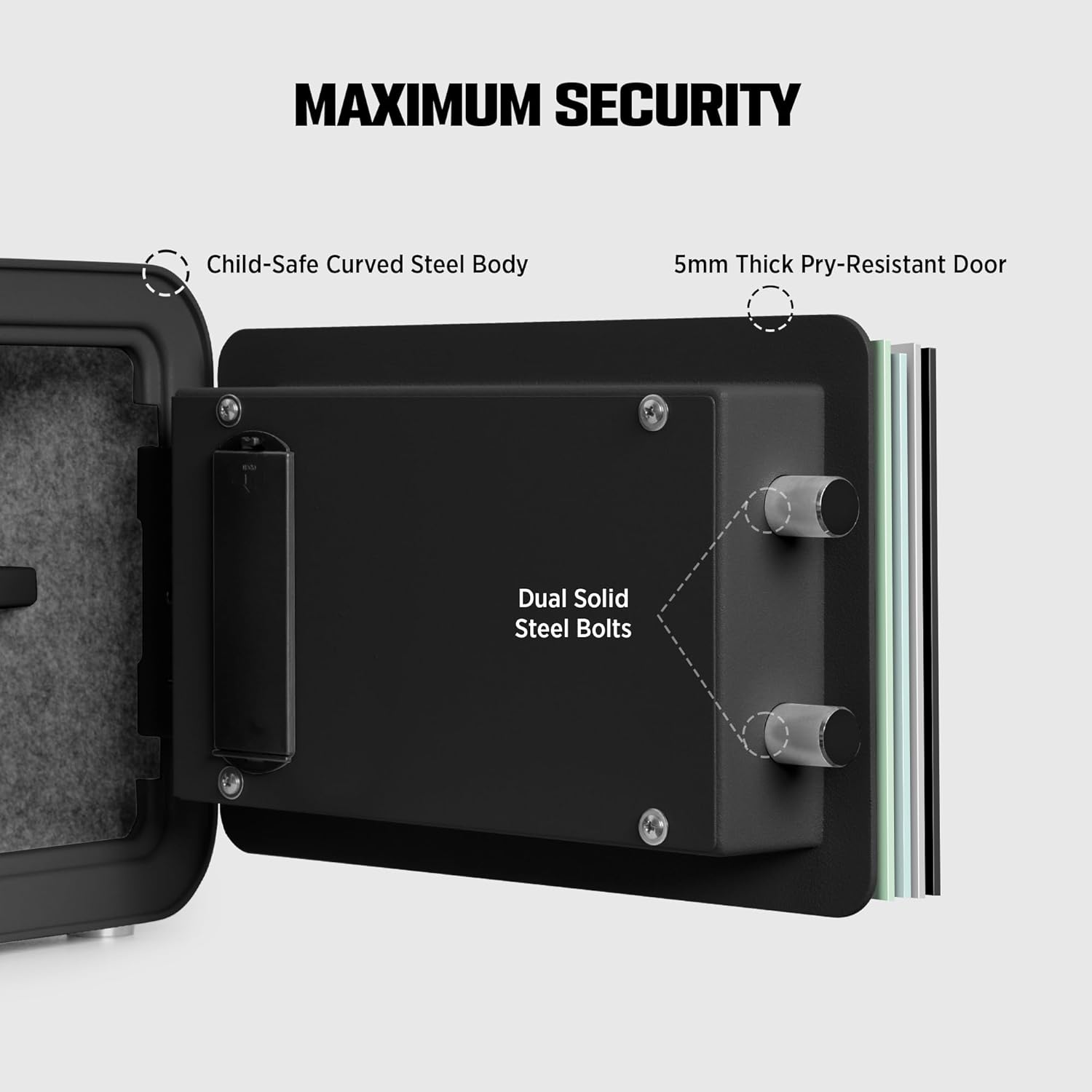
Bild: Eine detaillierte view of the safe's door mechanism, illustrating the 5mm thick pry-resistant door and dual solid steel locking bolts for maximum security.

Bild: Nahaufnahme views showcasing the safe's design elements: streamlined curved edges, soft interior lining, a built-in LED light for visibility, and protective floor pads.
Aufstellen
1. Einlegen der Batterien
- Suchen Sie das Batteriefach an der Innenseite der Tresortür.
- Insert 4 AA Alkaline batteries (not included) according to the polarity markings.
- Schließen Sie den Batteriefachdeckel.
2. Erstmalige Passcode-Einstellung
The safe comes with a factory default passcode (usually 1-2-3-4 or 0-0-0-0). It is crucial to change this immediately.
- With the safe door open, press the red reset button located on the inside of the door near the hinge. You will hear a beep.
- On the keypad, enter your desired 3-8 digit passcode.
- Press the '#' button to confirm. The safe will beep, indicating the new passcode is set.
- Testen Sie den neuen Zugangscode bei geöffneter Tür, bevor Sie sie schließen.
3. Montage des Tresors
The safe has pre-drilled mounting holes on the back for secure installation.
- Choose a suitable location on a wall or inside a cabinet.
- Markieren Sie die Bohrpunkte anhand der vorgebohrten Löcher auf der Rückseite des Tresors.
- Bohren Sie an den markierten Stellen Pilotlöcher.
- Richten Sie den Tresor an den vorgebohrten Löchern aus und befestigen Sie ihn mit den mitgelieferten Spreizschrauben.
Bedienung des Safes

Image: Visual guide to the three secure access modes: Keypad Entry, Override Key, and Emergency Power, with step-by-step instructions for each.
1. Tastatureingabe
- Enter your personal passcode (3-8 digits).
- Drücken Sie die Taste '#'. Das grüne Licht leuchtet auf.
- Innerhalb von 5 Sekunden muss der Knopf im Uhrzeigersinn gedreht werden, um die Tresortür zu öffnen.
2. Override Key Access
Use this method if you forget your passcode or if the batteries are completely drained.
- Remove the small cover plate on the keypad to reveal the keyhole.
- Insert one of the emergency override keys and turn it counter-clockwise.
- While holding the key in the turned position, turn the main knob clockwise to open the safe door.
- Remove the key once the door is open.
3. Emergency Power Box Usage
This method is for when batteries are dead and emergency keys are not immediately available, or if the keypad is unresponsive due to low power.
- Connect the emergency battery box to the external power port on the keypad.
- Enter your passcode on the keypad.
- Drücken Sie die Taste '#'. Das grüne Licht leuchtet auf.
- Innerhalb von 5 Sekunden muss der Knopf im Uhrzeigersinn gedreht werden, um die Tresortür zu öffnen.
4. Ändern des Passcodes
Follow these steps to change your passcode at any time:
- Open the safe door using your current passcode or emergency key.
- Press the red reset button on the inside of the door. You will hear a beep.
- Geben Sie Ihren neuen 3- bis 8-stelligen Passcode über das Tastenfeld ein.
- Press the '#' button to confirm. A beep will indicate successful programming.
- Verify the new passcode with the door open before closing it.
5. Alarmsystem
The ISLANDSAFE Digital Personal Safe is equipped with a dual alarm system to deter unauthorized access.
- Failed Entry Alarm: If an incorrect passcode is entered 3 consecutive times, the safe will activate a 60-second audible alarm.
- Vibration/Attack Alarm: If the safe experiences violent shaking or an attempted attack, a vibration sensor will trigger a 60-second audible alarm.

Image: An illustration detailing the dual alarm system, showing triggers for failed entry and violent impact, leading to a 60-second audible alert.
Wartung
1. Batteriewechsel
When the low battery indicator light illuminates on the keypad, it is time to replace the batteries. Use 4 new AA Alkaline batteries. Refer to the "Installing Batteries" section under Setup for detailed steps.
2. Reinigung
To clean the exterior of your safe, use a soft, damp cloth. Avoid abrasive cleaners or solvents that could damage the finish. For the interior, a dry cloth is sufficient. Ensure no moisture enters the electronic components.
Fehlerbehebung
| Problem | Mögliche Ursache | Lösung |
|---|---|---|
| Der Tresor lässt sich nicht mit dem Passwort öffnen. | Incorrect passcode entered; batteries are low or dead; knob not turned within 5 seconds. | Re-enter passcode carefully. Replace batteries or use emergency power box. Turn knob immediately after green light. |
| Die Tastatur reagiert nicht. | Die Batterien sind komplett leer. | Use the emergency power box or emergency override key to open the safe and replace batteries. |
| Der Alarm ertönt unerwartet. | Incorrect passcode entered multiple times; safe was shaken or impacted. | Enter correct passcode to disarm. Avoid moving or impacting the safe while locked. |
| Cannot change passcode. | Reset button not pressed correctly; new passcode not confirmed with '#'. | Ensure the reset button is pressed until a beep is heard. Confirm new passcode by pressing '#'. |
Technische Daten

Image: A detailed diagram illustrating the exterior and interior dimensions of the safe, along with other key specifications.
| Besonderheit | Detail |
|---|---|
| Marke | INSELSICHER |
| Modellnummer | QT |
| Außenabmessungen (T x B x H) | 11" x 13.7" x 9.8" |
| Kapazität | 0.8 Kubikfuß |
| Sperrtyp | Elektronisches Zahlenschloss |
| Material | Legierter Stahl |
| Besondere Merkmale | Alarm System, Anti-Theft, Portable, Removable Shelf |
| Montagetyp | Wandhalterung |
| Artikelgewicht | 10 Kilogramm (22 Pfund) |
| Alarmtyp | Vibration |
| Wasserbeständigkeit | Wasserfest |
| Batterien erforderlich | Yes (4x AA Alkaline, not included) |
Garantie und Support
ISLANDSAFE is committed to providing quality products and customer satisfaction. For any questions, concerns, or technical assistance regarding your safe, please utilize our 24-hour online customer service. Contact information can typically be found on the product packaging or the official ISLANDSAFE webWebsite.