
CDIYTOOL 4yhujuyj
CDIYTOOL 100A MPPT Solar Charge Controller User Manual
Model: 4yhujuyj
Einführung
This manual provides essential information for the safe and efficient operation of your CDIYTOOL 100A MPPT Solar Charge Controller. This controller is designed for 36V, 48V, and 60V battery systems and features an LCD display, multiple load control modes, and dual USB outputs. Please read this manual thoroughly before installation and use.
The controller automatically adapts to 36V/48V/60V systems and is not suitable for 12V/24V systems. It utilizes innovative MPPT technology for high tracking efficiency, detecting the maximum charging current.
Sicherheitshinweise
Always adhere to the following safety guidelines to prevent injury and damage to the controller or other components.
- Stellen Sie sicher, dass die Batterie über ausreichend Spannung verfügttage for the controller to recognize the correct battery type upon first use.
- Connect the battery to the controller first, then connect the solar panels. Reversing this order can damage the controller.
- Die maximale Eingangslautstärketage is 50V. Ensure your solar panel configuration does not exceed this limit. For example, a 19V photovoltaic panel matches a 12V battery, and a 38V photovoltaic panel matches a 24V battery. When a 38V panel is connected, the maximum voltage may reach 42V.
- The controller is suitable for various battery types (including open, lead-acid, gel, and lithium batteries). Refer to the controller's settings for specific battery types.
- The controller provides protection against overvoltage, short circuit, overload, overcharge, and over-discharge.
- Versuchen Sie nicht, den Controller selbst zu zerlegen oder zu reparieren. Wenden Sie sich zur Reparatur an qualifiziertes Fachpersonal.

Image: Excerpt from the user manual detailing safety instructions and a connection diagram.
Produkteigenschaften
- Multifunktions-LCD-Display: Provides real-time display of charging current, discharge current, and power generation.
- MPPT-Technologie: Innovative Maximum Power Point Tracking with high efficiency (up to 99%) for optimal solar energy harvesting.
- Zuverlässiger Schutz: Inklusive Übervoltage, short circuit, overload, overcharge, and over-discharge protection.
- Automatic Focusing MPPT Tracking: Ensures high charging efficiency and bidirectional focusing tracking.
- Temperaturkompensation: Passt die Ladeleistung automatisch antage based on ambient temperature changes.
- Zwei USB-Ausgänge: Provides 5V/2A output for charging mobile devices.

Bild: Vorderseite view of the CDIYTOOL 100A MPPT Solar Charge Controller, highlighting the LCD display and dual USB ports.
Setup und Installation
Follow these steps for proper installation of the solar charge controller:
- Verkabelung vorbereiten: Ensure all wires are correctly sized for the expected current and are properly insulated.
- Batterie anschließen: Connect the battery to the charge controller first. Ensure correct polarity (+ to + and - to -). The controller requires sufficient battery voltage to recognize the system type.
- Solarpanel anschließen: Connect the solar panel(s) to the charge controller. Ensure correct polarity. Do not exceed the maximum input voltagvon 50V.
- Last anschließen (optional): Connect your DC load to the load terminals of the controller. The controller can manage load output based on settings.
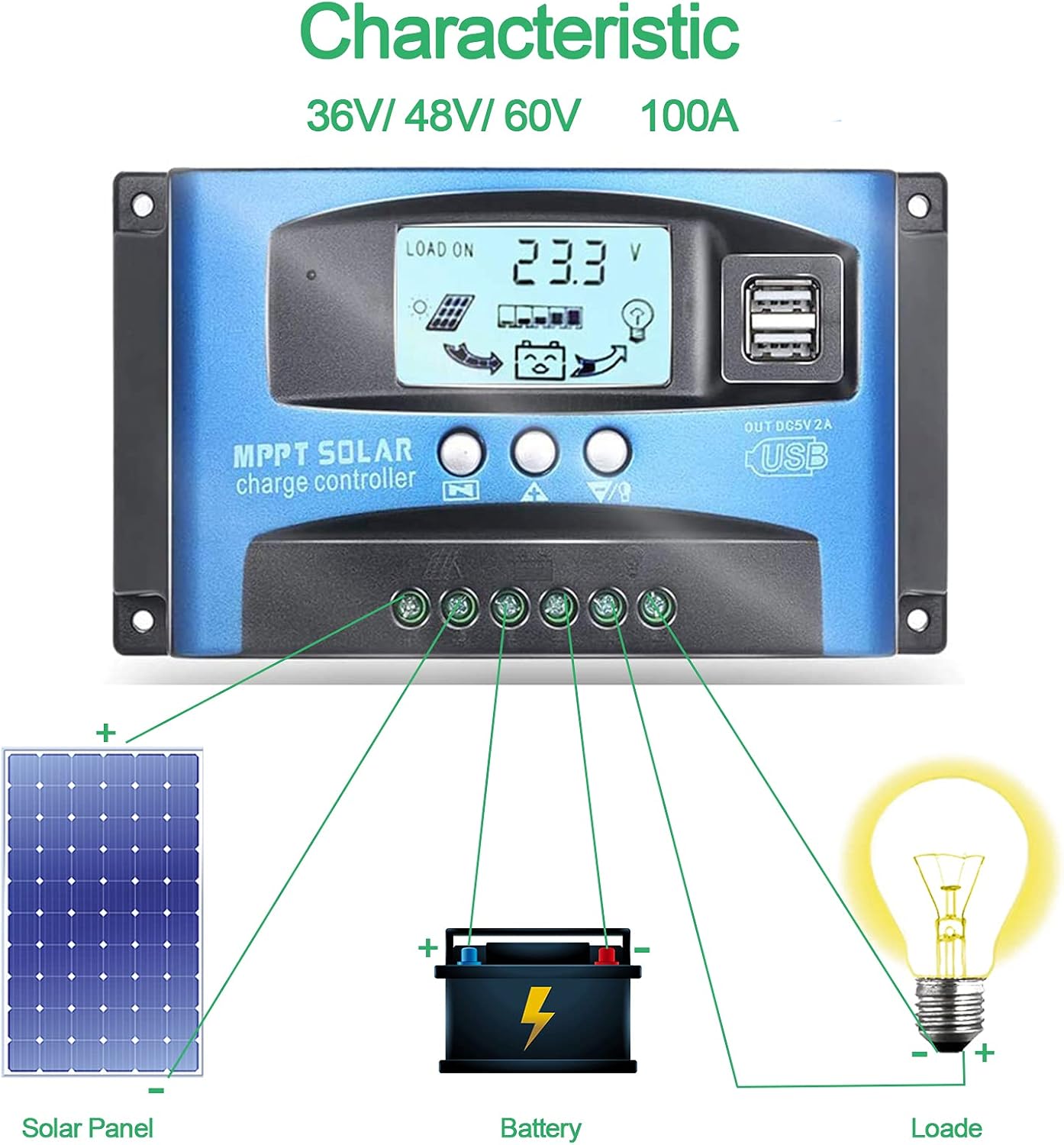
Image: Connection diagram illustrating how to connect solar panels, battery, and load to the charge controller.

Bild: Detailliert view of the controller with labels for its components, including buttons, LCD, USB ports, and connection points.
Bedienungsanleitung
The controller features an LCD display and three buttons for operation: Menu, Page Up, and Page Down/Manual.
LCD Anzeige
Das LCD-Display zeigt verschiedene Parameter an, darunter den Akkustand.tage, charging current, discharge current, and system status. The icons on the display indicate solar panel activity, battery charge level, and load status.
Tastenfunktionen
- Menü-Schaltfläche: Press to enter the menu interface and cycle through different settings. Long press to modify parameters.
- Bild-auf-Schaltfläche: Wird verwendet, um Werte zu erhöhen oder in Menüs nach oben zu navigieren.
- Page Down/Manual Button: Used to decrease values or navigate downwards in menus. Also functions as a manual load control switch (on/off) when on the main interface.
Aufladen über USB
The controller is equipped with dual USB ports providing 5V/2A output for charging compatible devices such as mobile phones and tablets.

Image: Demonstration of the controller's dual USB ports being used to charge a mobile phone.
Wartung
Regelmäßige Wartung gewährleistet die Langlebigkeit und optimale Leistung Ihres Solarladereglers.
- Verbindungen prüfen: Überprüfen Sie regelmäßig alle Kabelverbindungen auf festen Sitz und Korrosion. Lose Verbindungen können zu Stromausfall oder Überhitzung führen.
- Controller reinigen: Halten Sie den Controller sauber und frei von Staub und Schmutz. Wischen Sie die Oberfläche mit einem trockenen Tuch ab. Verwenden Sie keine flüssigen Reinigungsmittel.
- Leistung überwachen: Regularly check the LCD display for normal operation and expected voltage/aktuelle Messwerte.
- Batteriezustand: Ensure your battery is well-maintained and within its recommended operating parameters.
Fehlerbehebung
Dieser Abschnitt bietet Lösungen für häufig auftretende Probleme.
| Situation | Mögliche Ursache | Lösung |
|---|---|---|
| Keine Anzeige auf dem Bildschirm | Batterie nicht angeschlossen oder niedrige Spannungtage | Connect battery, check battery voltage |
| No charge when sunny | Solar panel reversed or open circuit | Reconnect solar panel, check wiring |
| Laden funktioniert nicht | Load short circuit, overload, or over-discharge protection | Check load wiring, reduce load, or charge battery |
| Controller lädt nicht | Solarpanel voltage too low or battery full | Ensure sufficient solar input, check battery status |
The controller includes built-in protections for reverse polarity, overvoltage, short circuit, overload, overcharge, and over-discharge. If an issue persists after troubleshooting, contact customer support.
Technische Daten
| Parameter | Wert |
|---|---|
| Modell | 4yhujuyj |
| Marke | CDIYTOOL |
| Nennstrom | 100 A |
| Systemlautstärketage | 36V/48V/60V Auto Adapt (Not for 12V/24V) |
| Max. Solareingangsvol.tage | 50 V |
| USB-Ausgang | Dual 5V/2A |
| Anzeigetyp | LCD |
| Artikelgewicht | 14.4 Unzen |
| Verpackungsabmessungen | 6.81 x 3.98 x 2.01 Zoll |

Image: Diagram showing the physical dimensions of the solar charge controller.
Weitere Ressourcen und Support
For further assistance or to access the mobile application for monitoring, please refer to the following:
Mobile Anwendung
The BL-912V APP can be installed on your Android phone to monitor and control the solar charge controller. Scan the QR code below or visit the provided link to download and install the application.
Link zum Herunterladen: http://fir.sdhzwl.cn/5w4b
The mobile phone app allows for remote monitoring of charging and discharging data, daily power generation, and other functions.
Image: Section of the user manual detailing the BL-912V APP installation process, including a QR code.
Garantie und Kundendienst
For warranty information or technical support, please contact CDIYTOOL customer service through the platform where you purchased the product. Keep your purchase receipt for warranty claims.
Typische Anwendungen
The CDIYTOOL MPPT Solar Charge Controller is suitable for a variety of off-grid solar power applications, including:
- Residential solar power systems
- RV and marine solar setups
- Solare Straßenbeleuchtung
- Remote monitoring stations
- Agricultural irrigation systems

Bild: Examples of typical applications for the solar charge controller in various settings.
Ask a question about this manual
Ask about setup, troubleshooting, compatibility, parts, safety, or missing instructions. Manuals+ will review the question and use this page’s manual context to help answer it.