
EGLOO S4
EGLOO S4 Smart Home Security Camera User Manual
Model: S4 (TSC-221P)
Einführung
The EGLOO S4 is a versatile 1080P Wi-Fi smart camera designed for comprehensive home monitoring. It functions as a security camera, baby monitor, and pet camera, offering advanced features such as integrated temperature and humidity monitoring, remote appliance control, motion and sound detection with real-time alerts, clear IR night vision, and two-way audio communication. Its wide field of view and digital zoom capabilities provide comprehensive coverage for various indoor environments.
Sicherheitshinweise
- Ensure the camera is placed on a stable, flat surface to prevent falling.
- Halten Sie das Gerät von Wasser, Feuchtigkeit und extremen Temperaturen fern.
- Versuchen Sie nicht, das Gerät selbst zu zerlegen oder zu reparieren. Wenden Sie sich an qualifiziertes Servicepersonal.
- Verwenden Sie ausschließlich das mitgelieferte Netzteil, um Schäden zu vermeiden.
- Keep out of reach of children and pets to avoid accidental damage or injury.
- Vermeiden Sie es, die Kamera direkter Sonneneinstrahlung oder der Nähe von Wärmequellen auszusetzen.
Packungsinhalt
Bitte überprüfen Sie, ob alle Artikel in Ihrem Paket vorhanden sind:
- EGLOO S4 Smart Home Security Camera
- Netzteil
- Benutzerhandbuch (dieses Dokument)
- Mounting Accessories (if applicable, not specified but common)
Produkt überview

Front view of the EGLOO S4 camera, showcasing its compact dome design with a black camera head and a light-colored base.

The EGLOO S4 camera held in a hand, illustrating its small and portable size.
Hauptmerkmale:
- 1080P Full HD-Video: Bietet eine klare und detaillierte Videoüberwachung.
- Temperatur- und Feuchtigkeitssensor: Real-time environmental monitoring.
- Bewegungs- und Geräuscherkennung: Erhalten Sie sofortige Benachrichtigungen auf Ihrem Mobilgerät.
- Motion Tracking (AI Supported): Folgt automatisch erkannten Bewegungen.
- Remote Appliance Control: Control compatible appliances from anywhere.
- Clear IR Night Vision: Gewährleistet Sichtbarkeit bei schlechten Lichtverhältnissen.
- 140°-Weitwinkelobjektiv: Bietet ein breites Spektrum an view.
- 8x Digitalzoom: Zoom in for closer details.
- Zweiwege-Audio: Communicate with individuals or pets through the camera.
- 4-Channel Simultaneous Screen: Monitor multiple cameras or views auf einmal.
- Einfache Einrichtung: Entwickelt für eine schnelle und unkomplizierte Installation.

Diagram illustrating the key features of the EGLOO S4 camera, including temperature/humidity, motion/sound alerts, motion tracking, 1080P video, and easy setup.

A smartphone screen displaying a 4-channel simultaneous view from the EGLOO S4 camera, highlighting features like night vision, wide angle, digital zoom, and two-way audio.
Installationshandbuch
1. Download the EGLOO App:
Suchen nach "EGLOO" in your mobile device's app store (App Store for iOS or Google Play Store for Android) and download the official application. Alternatively, scan the QR code below:

Scan this QR code to quickly download the EGLOO application.
Weitere Informationen finden Sie unter: http://m.site.naver.com/0ZStX
2. Kamera einschalten:
Connect the provided power adapter to the camera's power port and plug it into a wall outlet. The camera will power on automatically.
3. Add Device in App:
- Open the EGLOO app and create an account or log in.
- Follow the in-app instructions to add a new device. This typically involves selecting your camera model and connecting it to your Wi-Fi network (2.4GHz Wi-Fi is supported).
- Ensure your mobile device is connected to the same Wi-Fi network during the setup process.

A hand holding a smartphone displaying the EGLOO application logo, indicating readiness for setup.
Bedienungsanleitung
Live View und Kontrollen:
Once connected, you can access the live video feed from your camera through the EGLOO app. Use the on-screen controls to pan, tilt, and zoom the camera, activate two-way audio, or take snapshots/record video.
Temperatur- und Luftfeuchtigkeitsüberwachung:
The EGLOO S4 continuously monitors the ambient temperature and humidity. View real-time data directly within the app to ensure optimal environmental conditions, especially for baby or pet monitoring.
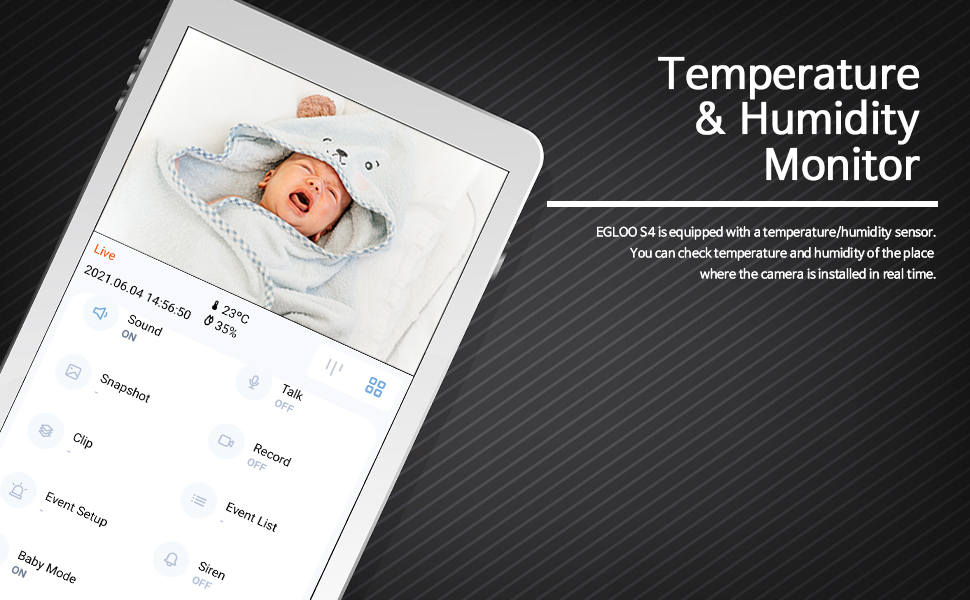
The EGLOO app interface displaying real-time temperature and humidity readings alongside the live camera feed, useful for monitoring a baby's room.
Bewegungs- und Geräuscherkennung:
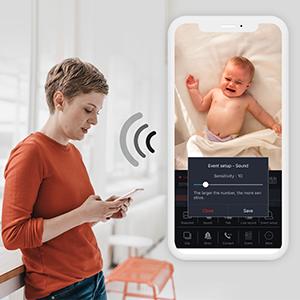
Configure motion and sound detection settings in the app to receive instant push notifications when activity is detected. Adjust sensitivity levels to minimize false alerts.

A woman checking her smartphone, which displays notification alerts from the EGLOO S4 camera for motion and sound detection.
Remote Appliance Control:
The EGLOO S4 can act as a smart remote control for various home appliances. Follow the in-app guide to pair your appliances with the camera for remote operation.

An illustration showing the EGLOO S4 camera positioned in a living room, with lines indicating its ability to connect and control various home appliances remotely.

A smartphone screen displaying controls for an air conditioner, demonstrating the remote appliance control feature of the EGLOO S4 camera.
Nachtsicht:
The camera automatically switches to infrared (IR) night vision in low-light conditions, providing clear black-and-white video. The "Night Color" technology enhances visibility.
A split image demonstrating the difference between normal lighting and the clear infrared night vision capability of the camera in a room setting.
Zweiwege-Audio:
Utilize the two-way audio feature to speak through the camera and hear responses. This is ideal for comforting a baby, communicating with a pet, or interacting with family members.

An image of a puppy with a speech bubble saying "Hi, puppy!", illustrating the two-way audio communication feature of the camera for interacting with pets.
Wartung
- Reinigung: Reinigen Sie Objektiv und Gehäuse der Kamera vorsichtig mit einem weichen, trockenen Tuch. Verwenden Sie keine scharfen Chemikalien oder Scheuermittel.
- Lagerung: If storing the camera for an extended period, disconnect it from power and keep it in a cool, dry place.
- Software-Updates: Regularly check the EGLOO app for firmware updates to ensure optimal performance and security.
Fehlerbehebung
| Problem | Mögliche Ursache | Lösung |
|---|---|---|
| Die Kamera verbindet sich nicht mit dem WLAN. | Falsches WLAN-Passwort; Kamera zu weit vom Router entfernt; 5-GHz-WLAN-Netzwerk. | Verify Wi-Fi password. Move camera closer to router. Ensure you are connecting to a 2.4GHz Wi-Fi network. Restart camera and router. |
| Es wurden keine Benachrichtigungen empfangen. | App notification settings disabled; phone notification settings disabled; incorrect detection sensitivity. | Check notification settings within the EGLOO app. Verify phone's system notification settings for the EGLOO app. Adjust motion/sound detection sensitivity. |
| Schlechte Videoqualität. | Weak Wi-Fi signal; insufficient bandwidth. | Ensure strong Wi-Fi signal. Reduce other network activity. Consider moving camera closer to router or upgrading internet plan. |
| Die Kamera reagiert nicht. | Stromproblem; Softwarefehler. | Unplug the power adapter, wait 10 seconds, then plug it back in to restart the camera. If the issue persists, contact customer support. |
Technische Daten
| Besonderheit | Detail |
|---|---|
| Modellname | S4 |
| Artikelmodellnummer | TSC-221P |
| Konnektivitätstechnologie | Kabellos (Wi-Fi) |
| Auflösung der Videoaufnahme | 1080p |
| Maximal Webcam-Bildauflösung | 200 Megapixel |
| Bereich View | 360 Grad |
| Zoomtyp | Digital Zoom |
| Low-Light-Technologie | Nachtfarbe |
| Alarmtyp | Audio und Bewegung |
| Artikelabmessungen (L x B x H) | 4.34 x 3.1 x 4.34 Zoll |
| Artikelgewicht | 0.44 Pfund (7 Unzen) |
| Stromquelle | AC Adapter (Batteries Not Required) |
| Internationale Schutzbewertung | IP65 |
| Hersteller | TRÜEN |
Garantie und Support
For warranty information and technical support, please refer to the official EGLOO website or contact the manufacturer directly. The installation manual is available as a PDF document for further reference.
Hersteller: TRÜEN
Installationshandbuch (PDF): PDF herunterladen
Ask a question about this manual
Ask about setup, troubleshooting, compatibility, parts, safety, or missing instructions. Manuals+ will review the question and use this page’s manual context to help answer it.