
1. Einleitung
This manual provides comprehensive instructions for the assembly, operation, and maintenance of your FLEXISPOT EN2 Electric Height Adjustable Standing Desk. Please read this manual thoroughly before assembly and use to ensure safe and efficient operation.
The FLEXISPOT EN2 desk features a spacious one-piece desktop, an electric height adjustment system with memory presets, and a removable clamp power strip for convenient device charging and cable management. It is designed to support a dynamic work environment, allowing seamless transitions between sitting and standing positions.
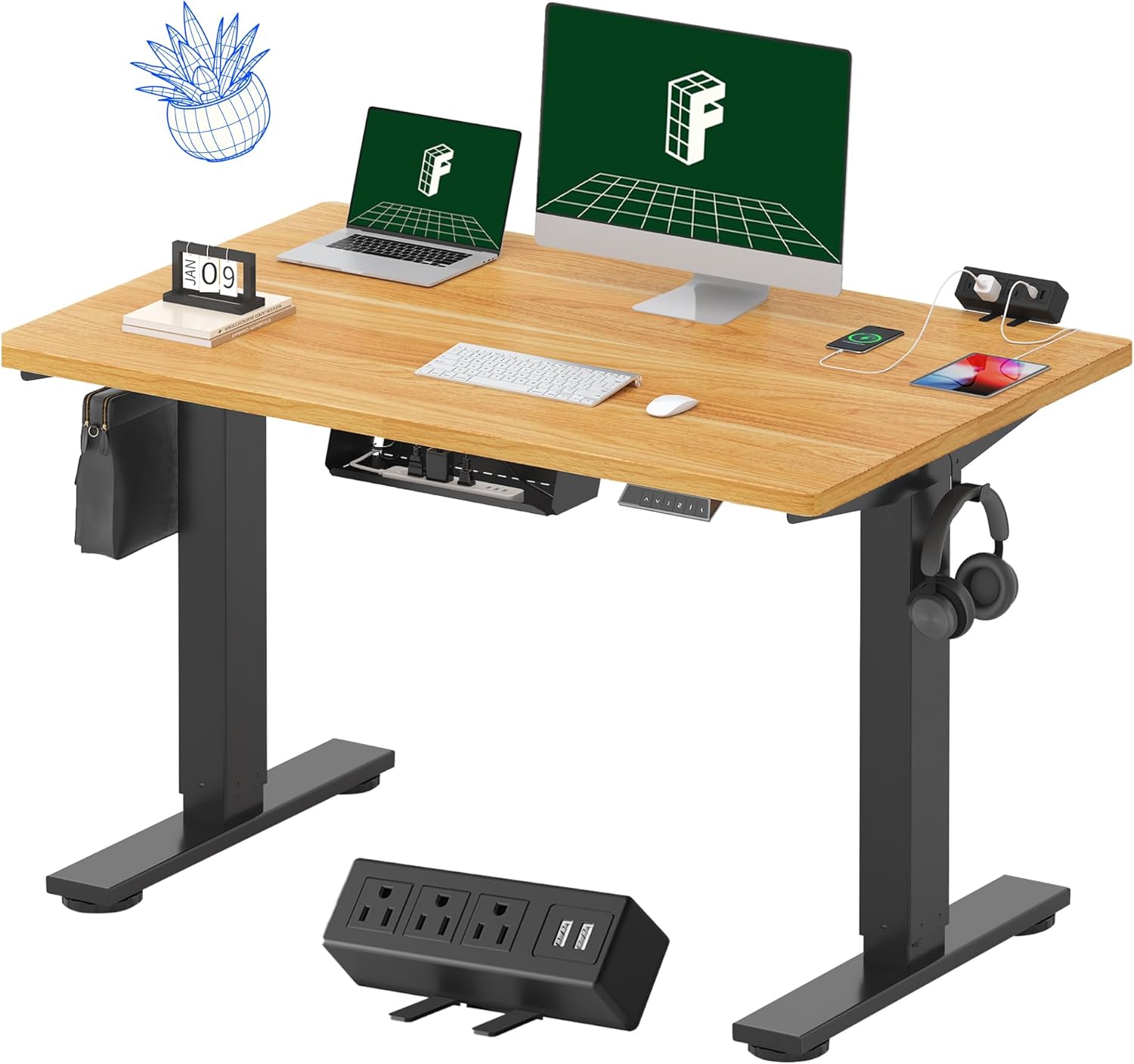
Image 1.1: FLEXISPOT EN2 Standing Desk with Maple Top and Black Frame, showcasing a typical setup with monitors, a laptop, and a clamp Steckdosenleiste.
2. Sicherheitshinweise
WARNUNG: Die Nichtbeachtung dieser Sicherheitshinweise kann zu Verletzungen oder Schäden am Produkt führen.
- Befolgen Sie die Montageanleitung immer sorgfältig.
- An electric drill (not included) may be required for assembly.
- Ensure the desk is properly anchored to prevent tipping.
- Die empfohlene Höchstgewichtsgrenze von 80 kg (176 Pfund) darf nicht überschritten werden.
- Keep the work surface clear of items that could fall and cause injury during height adjustments.
- Always unplug the desk before performing any maintenance or making adjustments to the frame or electrical components.
- Halten Sie Kinder und Haustiere während des Betriebs vom Schreibtisch fern.
3. Packungsinhalt
Your FLEXISPOT EN2 Standing Desk will arrive in two separate packages, which may be shipped separately. Please ensure you have received both packages and all components before beginning assembly.

Image 3.1: Illustration showing the desk components arriving in two separate packages: one for the desktop and one for the desk frame.
Enthaltene Komponenten:
- One-piece desktop (48" x 30" Maple Top)
- Electric height-adjustable frame (Black)
- Digitaler 6-Tasten-Controller mit 4 Speicherplätzen
- Removable clamp power strip (3 AC outlets, 2 USB charging ports)
- Kabelmanagementgerät
- Assembly hardware and tools (excluding electric drill)
4. Aufbau und Montage
Assembly typically requires two people and an electric drill (not included). Follow the detailed instructions provided in the separate assembly guide included with your product. The process involves attaching the legs to the desktop and connecting the control panel and motor.
Montagetipps:
- Legen Sie alle Komponenten auf eine weiche, saubere Unterlage, um Kratzer zu vermeiden.
- Achten Sie darauf, dass alle Schrauben fest angezogen sind, aber ziehen Sie sie nicht zu fest an.
- Properly route all cables using the provided cable management solutions to avoid interference with desk movement.
Video 4.1: Official FLEXISPOT Standing Desk Frame Installation Guide. This video demonstrates the step-by-step process of assembling the desk frame and attaching it to the desktop.
5. Bedienungsanleitung
5.1 Digitales Bedienfeld
The desk is operated using a 6-button digital controller, typically mounted on the underside of the desktop. It features up/down arrows, an LED display for height, and four programmable memory presets.

Image 5.1: Digital control panel with LED display showing current height, up/down arrows, and four numbered memory preset buttons.
5.2 Höhenverstellung
- Halten Sie die Pfeil nach oben (^) Knopf zum Anheben des Schreibtisches.
- Halten Sie die Pfeil nach unten (v) Knopf zum Absenken des Schreibtisches.
- The desk adjusts smoothly from 28.1 inches (71.4 cm) to 45.7 inches (116.1 cm).
- Der Motor arbeitet leise mit weniger als 50 dB.
5.3 Einstellen von Speichervoreinstellungen
The controller allows you to save up to four preferred height settings for quick adjustments.
- Stellen Sie den Schreibtisch mithilfe der Auf-/Ab-Pfeile auf die gewünschte Höhe ein.
- Drücken Sie die Speicher (M) Drücken Sie den Knopf. Die LED-Anzeige blinkt.
- Drücken Sie innerhalb von 3 Sekunden eine der nummerierten voreingestellten Tasten (1, 2, 3 oder 4) um die aktuelle Höhe in dieser Voreinstellung zu speichern.
- Um eine gespeicherte Höhe abzurufen, drücken Sie einfach die entsprechende nummerierte Voreinstellungstaste. Der Schreibtisch fährt automatisch in die gespeicherte Position.
Video 5.2: FlexiSpot Brand Store video demonstrating the desk's height adjustment and memory preset functions.
6. Funktionen
6.1 One-Piece Desktop
The desk features a spacious, single-piece desktop made of FSC-Certified wood. This design provides a smooth, seamless work surface, enhancing stability and aesthetics compared to multi-piece desktops.

Image 6.1: Visual comparison highlighting the smooth surface of a single-piece desktop against the visible seams of a two-piece desktop.
6.2 Removable Clamp Mehrfachsteckdose
A desktop-mounted power strip is included, featuring 3 AC outlets (125V/12A) and 2 USB charging ports (5V/2A). This allows for convenient charging of electronic devices directly from your desk. The power strip can be clipped to the back or side of your desk.

Image 6.2: Close-up of the removable clamp power strip, detailing its 3 AC outlets and 2 USB-A ports, and how it attaches to the desk edge.
6.3 Kabelmanagement
The desk includes a cable management device to help organize and tidy up your workspace, preventing cables from dangling and interfering with desk movement.

Image 6.3: Illustration demonstrating effective cable management with an under-desk tray, showing a tidy setup compared to unmanaged cables.
7. Wartung
- Überprüfen Sie regelmäßig alle Schrauben und Verbindungen auf festen Sitz.
- Clean the desktop surface with a soft, damp Tuch. Vermeiden Sie Scheuermittel, die die Oberfläche beschädigen könnten.
- Motor und elektrische Bauteile vor Staub und Feuchtigkeit schützen.
- Do not place hot items directly on the desktop without protective coasters.
8. Fehlerbehebung
8.1 Desk Not Moving or Displaying Error Code (e.g., "r5t")
If your desk is not responding or the LED display shows an error code like "r5t", a system reset may be required.
- Ziehen Sie den Stecker des Schreibtisches aus der Steckdose.
- Warten Sie mindestens 10-15 Sekunden.
- Schließen Sie den Schreibtisch wieder an die Steckdose an.
- Press and hold the "Down Arrow (v)" button until the desk reaches its lowest position and then slightly rises. This indicates a successful reset.
- Wenn das Problem weiterhin besteht, wenden Sie sich an den Kundendienst.
8.2 Desk Wobbling at Higher Heights
While the desk is designed for stability, minor wobbling can occur at maximum heights. Ensure the adjustable feet on the leg bases are properly leveled to compensate for uneven flooring.
9. Spezifikationen
| Besonderheit | Spezifikation |
|---|---|
| Marke | FLEXISPOT |
| Modell | EN 2-Norm |
| Desktop-Material | FSC-Certified Maple Wood |
| Desktop-Abmessungen | 48 Zoll (B) x 30 Zoll (T) |
| Desktop-Dicke | 1 Zoll |
| Rahmenmaterial | Industrial-grade Alloy Steel (Black) |
| Höhenverstellbereich | 28.1" bis 45.7" (71.4 cm bis 116.1 cm) |
| Motorgeräuschpegel | < 50 dB |
| Gewichtskapazität | 176 kg |
| Bedienfeld | Digitaler 6-Tasten-Controller mit 4 Speicherplätzen |
| Steckdose | 3 AC outlets (125V/12A), 2 USB charging ports (5V/2A) |
| Montage erforderlich | Yes (electric drill recommended) |
10. Garantie und Support
10.1 Garantieinformationen
- 5 Jahr Garantie: Deckt Rahmen, Motoren und andere mechanische Geräte ab.
- 2 Jahr Garantie: Beinhaltet Steuerungen, Schalter und Elektronik.
Please retain your proof of purchase for warranty claims. The warranty covers defects in materials and workmanship under normal use.
10.2 Kundendienst
For any questions, troubleshooting assistance, or warranty claims, please contact FLEXISPOT customer support through their official webWebsite oder der Einzelhändler, bei dem Sie das Produkt gekauft haben.