
1. Einleitung
This manual provides comprehensive instructions for the setup, operation, and maintenance of your Mitzu MRC-UNI13 Universal Remote Control. Please read this manual carefully before using the device to ensure proper functionality and to maximize its lifespan.
2. Produktüberschreitungview
The Mitzu MRC-UNI13 is a universal remote control designed for Smart TVs and Slim Screens. It features a lightweight and ergonomic design, providing a practical solution for controlling multiple television brands.
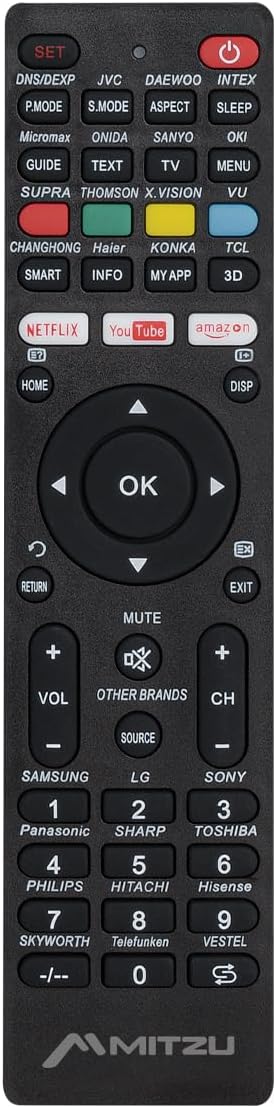
Bild 2.1: Front view of the Mitzu MRC-UNI13 Universal Remote Control, showing all buttons and layout.

Bild 2.2: Abgewinkelt view of the Mitzu MRC-UNI13 Universal Remote Control, highlighting its slim profile.

Bild 2.3: Mitzu MRC-UNI13 Universal Remote Control with approximate dimensions: 17.7 cm length, 4.5 cm width, and 2 cm thickness.
3. Einrichtung
3.1. Einlegen der Batterie
The Mitzu MRC-UNI13 remote control requires two AAA batteries (not included) for operation. Follow these steps to install the batteries:
- Suchen Sie die Batteriefachabdeckung auf der Rückseite der Fernbedienung.
- Schieben Sie den Deckel nach unten oder drücken Sie den Riegel, um ihn zu öffnen.
- Legen Sie zwei AAA-Batterien ein und achten Sie darauf, dass die Plus- (+) und Minus- (-) Anschlüsse mit den Markierungen im Inneren des Batteriefachs übereinstimmen.
- Setzen Sie die Abdeckung des Batteriefachs wieder ein, indem Sie sie so weit hineinschieben, bis sie sicher einrastet.
Notiz: Verwenden Sie stets neue Batterien und tauschen Sie beide Batterien gleichzeitig aus. Mischen Sie keine alten und neuen Batterien oder unterschiedliche Batterietypen.
3.2. Programmieren der Fernbedienung
The MRC-UNI13 is a universal remote control that needs to be programmed to operate your specific television. The programming method typically involves entering a code or using an auto-search function. Refer to the included code list (if provided with the physical product) for your TV brand. If no code list is available, or if the codes do not work, use the auto-search method.
3.2.1. Code Entry Method (Example)
- Turn on the TV you wish to control manually.
- Halten Sie die SATZ button on the remote until the indicator light (usually red) illuminates.
- Enter the 3-digit code for your TV brand using the numeric keypad. (e.g., for Samsung, LG, Sony, Panasonic, Sharp, Toshiba, Philips, Hitachi, Hisense, Skyworth, Telefunken, Vestel, etc., as indicated on the remote).
- Wenn der Code korrekt ist, erlischt die Kontrollleuchte. Testen Sie die Fernbedienung durch Drücken der Taste. LEISTUNG button. If the TV turns off, the remote is programmed.
- If the TV does not respond, repeat the process with the next code listed for your brand.
3.2.2. Auto-Search Method (Example)
- Turn on the TV you wish to control manually.
- Richten Sie die Fernbedienung auf den Fernseher.
- Halten Sie die SATZ und die LEISTUNG button simultaneously until the indicator light illuminates.
- Release both buttons. The indicator light will flash.
- Drücken Sie kontinuierlich die Lautstärke+ Taste (oder CH+) repeatedly until the TV volume changes or the channel changes. This indicates the remote has found a compatible code.
- Once the TV responds, immediately press the SATZ Drücken Sie diese Taste, um den Code zu speichern. Die Kontrollleuchte erlischt.
- Test all functions of the remote. If some functions do not work, you may need to repeat the auto-search process to find a more compatible code.
Notiz: The exact programming steps may vary slightly. If these methods do not work, consult the specific instructions that came with your physical remote or visit the Mitzu support website for detailed programming guides.
4. Bedienungsanleitung
Once programmed, the Mitzu MRC-UNI13 remote control functions similarly to your original TV remote. Below is a general guide to its main functions:
- POWER (Roter Knopf): Schaltet den Fernseher ein oder aus.
- EINSTELLEN: Wird zur Programmierung der Fernbedienung verwendet.
- DNS/DEXP, JVC, DAEWOO, INTEX, etc. (Brand Buttons): Specific buttons for direct brand code entry or selection.
- P.MODE, S.MODE, ASPECT, SLEEP: Picture mode, Sound mode, Aspect ratio, Sleep timer functions.
- GUIDE, TEXT, TV, MENU, VU: Electronic Program Guide, Teletext, TV/AV input, Menu, Volume Up/Down (likely a typo on the remote, VU usually means Volume Up).
- SMART, INFO, MY APP, 3D: Smart TV functions, Information display, Custom app access, 3D mode.
- NETFLIX, YouTube, Amazon: Direct access buttons for streaming services.
- HOME, DISP: Home menu, Display information.
- Navigationsfeld (Hoch, Runter, Links, Rechts, OK): Navigiert durch Menüs und bestätigt Auswahlen.
- RETURN, EXIT: Zum vorherigen Bildschirm zurückkehren oder ein Menü verlassen.
- STUMM: Schaltet den Fernsehton stumm oder hebt die Stummschaltung auf.
- VOL+ / VOL-: Regelt die Lautstärke nach oben oder unten.
- CH+ / CH-: Ändert den Kanal nach oben oder unten.
- QUELLE: Wählt Eingangsquellen aus (HDMI, AV usw.).
- Ziffernblock (0-9): Direkter Kanaleintrag.
- -/--: For two-digit channel entry.
Notiz: The functionality of some buttons may depend on the specific TV model and brand you are controlling. Not all buttons may be supported by all TVs.
5. Wartung
To ensure the longevity and optimal performance of your Mitzu MRC-UNI13 Universal Remote Control, follow these maintenance guidelines:
- Reinigung: Reinigen Sie die Fernbedienung mit einem weichen, trockenen Tuch. Bei hartnäckigem Schmutz leicht andrücken.ampen the cloth with water or a mild cleaning solution. Do not use abrasive cleaners, alcohol, or solvents.
- Batteriepflege:
- Wenn die Fernbedienung längere Zeit nicht verwendet wird, entfernen Sie die Batterien, um ein Auslaufen zu verhindern.
- If battery leakage occurs, clean the compartment thoroughly before inserting new batteries.
- Entsorgen Sie gebrauchte Batterien gemäß den örtlichen Vorschriften.
- Lagerung: Bewahren Sie die Fernbedienung an einem kühlen, trockenen Ort auf, fern von direkter Sonneneinstrahlung, extremen Temperaturen und hoher Luftfeuchtigkeit.
- Handhabung: Vermeiden Sie es, die Fernbedienung fallen zu lassen oder starken Stößen auszusetzen, da dies die internen Bauteile beschädigen kann.
6. Fehlerbehebung
If you encounter issues with your Mitzu MRC-UNI13 Universal Remote Control, refer to the following troubleshooting tips:
- Die Fernbedienung funktioniert überhaupt nicht:
- Prüfen Sie, ob die Batterien korrekt mit der richtigen Polarität (+/-) eingelegt sind.
- Ersetzen Sie alte Batterien durch neue.
- Ensure there is a clear line of sight between the remote and the TV's infrared sensor.
- Remote controls some functions but not others:
- The current code may not be fully compatible with your TV model. Try reprogramming the remote using a different code for your TV brand or using the auto-search method again.
- Some advanced functions (e.g., specific Smart TV features) may not be supported by universal remotes.
- Indicator light does not illuminate during programming:
- Stellen Sie sicher, dass Sie die Taste gedrückt halten. SATZ button for the required duration.
- Batterien prüfen oder ersetzen.
- TV does not respond during auto-search:
- Ensure the TV is turned on manually before starting the auto-search.
- Achten Sie darauf, dass die Fernbedienung direkt auf den Fernseher gerichtet ist.
- Drücken Sie die Lautstärke+ or CH+ button repeatedly and quickly enough to cycle through codes.
If the problem persists after trying these steps, contact Mitzu customer support for further assistance.
7. Spezifikationen
| Besonderheit | Detail |
|---|---|
| Marke | Mitzu |
| Modell | MRC-UNI13 |
| Kompatible Geräte | Televisions (Smart TVs, Slim Screens) |
| Besondere Merkmale | Lightweight, Universal Compatibility (up to 10 devices, though typically programmed for one TV at a time) |
| Konnektivitätstechnologie | Infrarot (IR) |
| Stromquelle | 2 x AAA-Batterien (nicht enthalten) |
| Abmessungen (ca.) | 22.2 x 8.8 x 2.8 cm (Package); Remote: ~17.7 x 4.5 x 2 cm |
| Gewicht (ca.) | 70 g (Packung) |
8. Garantie und Support
8.1. Garantieinformationen
Mitzu products are designed for quality and reliability. For specific warranty terms and conditions, please refer to the warranty card included with your purchase or visit the official Mitzu webBewahren Sie Ihren Kaufbeleg für Garantieansprüche auf.
8.2. Kundendienst
For technical assistance, programming codes, or any other inquiries regarding your Mitzu MRC-UNI13 Universal Remote Control, please contact Mitzu customer support. Contact details can typically be found on the Mitzu official webauf der Website oder auf der Produktverpackung.
Besuchen Sie auch die Mitzu Brand Store on Amazon für weitere Produktinformationen.