
1. Einleitung
The ezcap234 Portable Cassette Player & Recorder is a versatile device designed for playing cassette tapes, converting them to MP3 files, and functioning as an AM/FM radio. It also features a built-in microphone for voice recording and a speaker for direct audio output. This manual provides detailed instructions for the setup, operation, and maintenance of your device.

Figure 1.1: Ezcap234 Portable Cassette Player and Recorder (Grey model)
This image displays the Ezcap234 device from a slightly elevated angle, showcasing its grey and black casing, speaker grille, control buttons, and extended antenna. It highlights the compact and portable design of the unit.
2. Produktmerkmale
- AM/FM-Radioempfang: Supports AM 520-1610KHz and FM 87-108MHz with excellent reception via a long antenna and upgraded DSP chip.
- Kassettenspieler: Plays standard cassette tapes with an auto-stop function. Includes playback function for recorded files.
- Cassette to MP3 Converter: Converts audio from cassette tapes directly to digital MP3 files on a Micro SD (TF) card. Supports automatic song division and FAT/FAT32 TF card format. No computer or driver required.
- Audiorecorder: Features a built-in microphone for voice recording directly to the TF card.
- Tonqualität: Equipped with a 1W speaker for clear audio output. Includes a 3.5mm headphone jack for private listening.
- Tragbares Design: Lightweight and compact, suitable for on-the-go use.
- Stromversorgung: Operates on 2x AA batteries or via USB power.

Figure 2.1: Key Features of the Ezcap234
This image illustrates the primary functionalities of the Ezcap234, including Tape Player/Converter, AM/FM Radio, Voice Recorder, Earphone Jack, Playback, and Inside Speaker, represented by distinct icons.
3. Packungsinhalt
Überprüfen Sie, ob alle Artikel im Paket vorhanden sind:
- Ezcap234 Portable Cassette Player & Recorder
- USB-Kabel
- Bedienungsanleitung
- Micro SD-Karte

Figure 3.1: Contents of the Ezcap234 Retail Box
This image shows the Ezcap234 device, its retail packaging, a USB cable, and the user guide, indicating the items included in the product box.
4. Produktlayout und Bedienelemente
Familiarize yourself with the various parts and controls of your Ezcap234 device:

Figure 4.1: Ezcap234 Labeled Diagram
Dieses Diagramm bietet eine detaillierte view of the Ezcap234, with labels pointing to key components such as the antenna, volume adjustment, microphone, earphone jack, Micro SD card slot, radio tuning knob, FM/AM switch, Tape/Radio switch, Record/Stop recording button, Indicator LED, UP/DOWN buttons, Play/Stop playing button, Tape fast forward and rewind buttons, Stop playing tape button, Play tape button, Speaker, and 5V DC jack.
- Antenne: Extend for improved AM/FM radio reception.
- Lautstärkeregelung: Rotary knob to control audio output level.
- Mikrofon: Eingebautes Mikrofon für Sprachaufnahmen.
- Kopfhöreranschluss (3.5 mm): Zum Anschließen von Kopfhörern.
- Micro-SD-Kartensteckplatz: Insert TF card for MP3 conversion and recording.
- Radio-Tuning-Knopf: Passt die Funkfrequenz an.
- FM/AM Switch: Wählt zwischen FM- und AM-Radiofrequenzbändern.
- Tape/Radio Switch: Toggles between cassette player and radio modes.
- Record / Stop Recording Button: Startet oder beendet die Aufnahme.
- Anzeige-LED: Shows device status (e.g., recording, power).
- UP / DOWN-Tasten: Navigation buttons, typically for MP3 playback.
- Play / Stop Playing Button: Startet oder pausiert die Kassetten-/MP3-Wiedergabe.
- Tape Fast Forward and Rewind Buttons: Controls tape movement.
- Stop Playing Tape Button: Stops cassette playback.
- Lautsprecher: Integrierter Lautsprecher für die Audioausgabe.
- 5-V-DC-Buchse: Zum Anschließen des USB-Stromkabels.
5. Einrichtung
5.1 Netzteil
The Ezcap234 can be powered by two (2) AA batteries or via the included USB cable.
- Einlegen der Batterie: Open the battery compartment cover on the back of the device. Insert two AA batteries, ensuring correct polarity (+/-). Close the cover securely.
- USB-Stromversorgung: Connect the small end of the USB cable to the 5V DC jack on the device and the other end to a USB power adapter (not included) or a computer USB port.
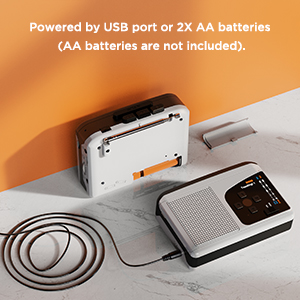
Figure 5.1: Powering the Ezcap234
This image demonstrates the two power options for the Ezcap234: connecting via a USB cable to a power source or inserting two AA batteries into the battery compartment.
5.2 Micro SD (TF) Card Insertion
A Micro SD (TF) card is required for converting tapes to MP3, recording voice, and playing MP3 files. Ensure the card is formatted to FAT or FAT32.
- Suchen Sie den Micro-SD-Kartensteckplatz an der Seite des Geräts.
- Insert the Micro SD card gently until it clicks into place. To remove, push the card in again until it springs out.
6. Bedienungsanleitung
6.1 Kassettenwiedergabe
- Öffnen Sie das Kassettenfach und legen Sie eine Musikkassette ein. Schließen Sie das Fach.
- Schieben Sie den Tape/Radio switch to the "Tape" position.
- Drücken Sie die Spielen Taste, um die Wiedergabe zu starten.
- Passen Sie die Volumen Stellen Sie mit dem Drehknopf die gewünschte Lautstärke ein.
- Verwenden Sie die Schneller Vorlauf or Zurückspulen Tasten zur Navigation durch das Band.
- Drücken Sie die Stoppen button to end playback. The device features an auto-stop function at the end of the tape.
6.2 AM/FM-Radiobetrieb
- Schieben Sie den Tape/Radio switch to the "Radio" position.
- Schieben Sie den UKW/MW switch to select your desired band (FM or AM).
- Erweitern Sie die Antenne für optimalen Empfang.
- Drehen Sie den Radio-Tuning-Knopf to find a station.
- Passen Sie die Volumen Knopf.

Figure 6.1: Ezcap234 Radio Functionality
This image visually represents the Ezcap234's capability to receive AM/FM radio broadcasts, with text bubbles indicating various types of content like Sport Programs, Weather, Music, Entertainment Programs, Talk shows, and News.
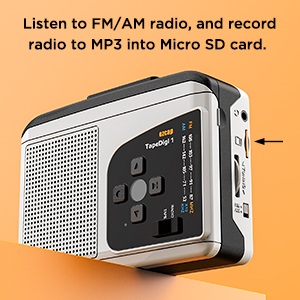
Figure 6.2: Recording Radio to MP3
Dieses Bild zeigt die Seite view of the Ezcap234, highlighting the Micro SD card slot, with text indicating the ability to listen to FM/AM radio and record it to MP3 on the Micro SD card.
6.3 Kassette zu MP3-Konvertierung
This device allows you to convert audio from cassette tapes directly to MP3 files on a Micro SD (TF) card without needing a computer.
- Ensure a FAT/FAT32 formatted Micro SD card is inserted into the slot.
- Legen Sie die Musikkassette ein, die Sie konvertieren möchten.
- Schieben Sie den Tape/Radio switch to the "Tape" position.
- Drücken Sie die Spielen Knopf am Kassettenrekorder.
- Drücken Sie die Aufzeichnen button. The Indicator LED will change to confirm recording has started.
- The device supports automatic song division. Each song will be saved as a separate MP3 file.
- Um die Aufnahme zu stoppen, drücken Sie die Aufzeichnen erneut die Taste.

Figure 6.3: Direct Recording from Tape to TF Card
This image shows the Ezcap234 with a cassette tape placed next to it, illustrating the direct recording capability of tapes onto a TF card.
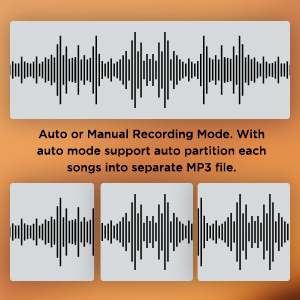
Figure 6.4: Recording Mode Options
This graphic displays waveform representations, indicating that the Ezcap234 supports both auto and manual recording modes, with auto mode capable of partitioning songs into separate MP3 files.
6.4 Sprachaufzeichnung
The built-in microphone allows you to record external voices directly to the Micro SD card.
- Ensure a Micro SD card is inserted.
- Schieben Sie den Tape/Radio switch to the "Radio" position (or any mode where tape is not playing).
- Drücken Sie die Aufzeichnen button. The Indicator LED will illuminate.
- Sprechen Sie deutlich in das eingebaute Mikrofon.
- Um die Aufnahme zu stoppen, drücken Sie die Aufzeichnen erneut die Taste.
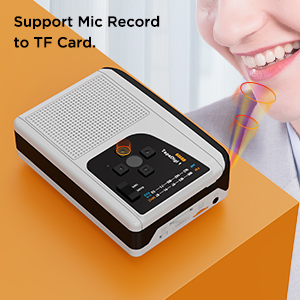
Figure 6.5: Microphone Recording Capability
This image depicts a person speaking near the Ezcap234, with sound waves emanating from their mouth towards the device, illustrating its support for microphone recording to a TF card.
6.5 MP3 Playback from TF Card
Sie können MP3 abspielen files stored on your Micro SD card. Ensure MP3 files are placed in the "TAPEMP3" folder on the card.
- Ensure a Micro SD card with MP3 files in the "TAPEMP3" folder is inserted.
- Schieben Sie den Tape/Radio switch to the "Tape" position.
- Drücken Sie die Spielen button. The device will automatically detect and play MP3 files from the "TAPEMP3" folder.
- Verwenden Sie die AUF/AB Tasten zur Navigation zwischen den Titeln.
- Passen Sie die Volumen Knopf.
- Drücken Sie die Stoppen Taste zum Beenden der Wiedergabe.
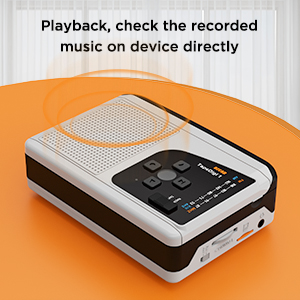
Figure 6.6: Playback Functionality
This image shows the Ezcap234 with sound waves emanating from it, indicating its ability to play back and allow users to check recorded music directly on the device.
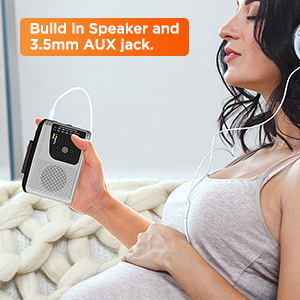
Figure 6.7: Headphone Use
This image depicts a person holding the Ezcap234 while wearing headphones, emphasizing the device's built-in speaker and 3.5mm AUX jack for private listening.
7. Wartung
- Reinigung: Reinigen Sie die Außenseite des Geräts mit einem weichen, trockenen Tuch. Verwenden Sie keine flüssigen Reinigungsmittel oder Scheuermittel.
- Reinigung des Kassettenkopfes: Periodically clean the cassette player's head and pinch rollers with a cotton swab lightly dampwurde mit Isopropylalkohol behandelt, um eine optimale Klangqualität zu gewährleisten und Beschädigungen des Bandes zu vermeiden.
- Lagerung: When not in use for extended periods, remove batteries to prevent leakage. Store the device in a cool, dry place away from direct sunlight and extreme temperatures.
- Feuchtigkeit vermeiden: Halten Sie das Gerät von Wasser und hoher Luftfeuchtigkeit fern.
8. Fehlerbehebung
| Problem | Mögliche Ursache | Lösung |
|---|---|---|
| Gerät lässt sich nicht einschalten. | Batteries are dead or incorrectly inserted. USB cable is not connected properly or power source is faulty. | Replace batteries or ensure correct polarity. Check USB cable connection and try a different USB port or power adapter. |
| Kein Ton aus Lautsprecher/Kopfhörern. | Volume is too low. Headphones not fully plugged in. Device is in the wrong mode (e.g., Tape mode for Radio). | Increase volume. Ensure headphones are fully inserted into the 3.5mm jack. Verify the Tape/Radio switch is in the correct position. |
| Schlechter Radioempfang. | Antenna not extended. Weak signal in current location. | Fully extend the antenna. Try repositioning the device or moving to a different location. |
| Cassette to MP3 conversion fails or files sind beschädigt. | Micro SD card not formatted to FAT/FAT32. Card is full. Tape head is dirty. | Format the Micro SD card to FAT or FAT32. Delete unnecessary files from the card or use a new card. Clean the cassette head. |
| MP3 files on TF card not playing. | MP3 files are not in the "TAPEMP3" folder. Incorrect file Format. | MP3-Dateien sicherstellen files are placed in a folder named "TAPEMP3" on the root of the Micro SD card. Verify files are standard MP3 format. |
9. Spezifikationen
| Besonderheit | Detail |
|---|---|
| Technische Daten | 4.7 x 3.5 x 1.4 Zoll (11.94 x 8.89 x 3.56 cm) |
| Artikelgewicht | 10.5 Unzen (297.67 Gramm) |
| Hersteller | ezcap |
| Modellnummer | 7a57a55c-dbb1-4096-9f82-bf14841a9e93 |
| Farbe | Grau |
| Besonderheit | Leicht, tragbar |
| Konnektivitätstechnologie | USB |
| Tuner-Technologie | AM, FM |
| Stromquelle | Battery Powered (2x AA batteries), USB Power Supply |
| Unterstützte Funkbänder | AM, FM |
| Frequenz | FM: 87-108 MHz; AM: 520-1610 KHz |
| Im Lieferumfang enthaltene Komponenten | Owner's Manual, USB cable, micro SD card |

Figure 9.1: Ezcap234 Product Dimensions
Dieses Bild vermittelt eine Perspektive view of the Ezcap234, with overlaid measurements indicating its approximate dimensions: 4.7 inches in length, 3.5 inches in width, and 1.4 inches in height.
10. Garantie und Support
For product support, technical assistance, or warranty inquiries, please contact the manufacturer, ezcap. Refer to the contact information provided with your purchase documentation or visit the official ezcap webWebsite für weitere Details.
Please note that return policies may vary based on the retailer. For purchases made on Amazon, a 30-day refund/replacement policy is typically available from the date of purchase.
Hersteller: ezcap Official Store