
Einführung
This manual provides detailed instructions for the installation, operation, and maintenance of your Xigmatek Aquarius Plus Black ATX PC Case. Please read this manual thoroughly before beginning installation to ensure proper setup and safe use of your new PC case.
The Xigmatek Aquarius Plus Black is a mid-tower gaming PC case designed to accommodate ATX, Micro-ATX, and Mini-ITX motherboards. It features excellent cooling potential with support for up to 10 x 120mm fans, including 7 pre-installed ARGB 120mm AY120 fans. The case also offers ample space for a 360mm graphics card, a 158mm CPU cooler, and includes 4 drive bays (2 x 3.5" and 2 x 2.5"/3.5"). Its aesthetic design includes two seamless tempered glass panels and three dust filters for protection.
Sicherheitshinweise
- Vor dem Einbau oder Ausbau von Bauteilen muss immer die Stromversorgung von der Steckdose getrennt werden.
- Behandeln Sie alle Komponenten vorsichtig, um Schäden durch elektrostatische Entladung (ESD) zu vermeiden. Erwägen Sie die Verwendung eines antistatischen Armbands.
- Avoid placing the PC case in direct sunlight, near heat sources, or in areas with high humidity.
- Sorgen Sie für ausreichende Belüftung rund um das Gehäuse, um eine Überhitzung zu vermeiden.
- Halten Sie Kleinteile und Verpackungsmaterialien von Kindern fern.
- Do not attempt to modify the case structure. Unauthorized modifications may void your warranty and pose safety risks.
Packungsinhalt
Überprüfen Sie, ob alle Artikel im Paket vorhanden sind:
- Xigmatek Aquarius Plus Black ATX PC Case
- 7 x 120mm ARGB AY120 Fans (pre-installed)
- Accessory kit (screws, standoffs, cable ties)
- Benutzerhandbuch (dieses Dokument)
Merkmale
- Mittelturm-Design: Unterstützt ATX-, Micro-ATX- und Mini-ITX-Motherboards.
- Fortschrittliche Kühlung: Pre-installed with 7 x 120mm ARGB AY120 fans; supports up to 10 x 120mm fans.
- Paneele aus gehärtetem Glas: Two seamless tempered glass panels for a clear view von internen Komponenten.
- Ample Lagerung: 4 drive bays (2 x 3.5" HDD, 2 x 2.5"/3.5" SSD/HDD).
- Bauteilabstand: Supports graphics cards up to 360mm and CPU coolers up to 158mm.
- Staubfiltration: Three dust filters included to protect internal components.
- Front I / O: 1 x USB 2.0, 3 x USB 3.0 ports.
Setup und Installation
Follow these steps to install your PC components into the Xigmatek Aquarius Plus case.
1. Fallvorbereitung
Carefully remove the tempered glass side panels by unscrewing the thumb screws at the rear of the case. Place the panels on a soft, flat surface to prevent scratches.

Image: The bare chassis of the Xigmatek Aquarius Plus, showing its internal structure before component installation.
2. Install the Motherboard
- Identify the correct standoff positions for your ATX, Micro-ATX, or Mini-ITX motherboard. The case may have pre-installed standoffs or require you to install them using the provided accessory kit.
- Place the motherboard I/O shield into the rear opening of the case.
- Richten Sie das Motherboard sorgfältig an den Abstandshaltern und der I/O-Blende aus und senken Sie es dann vorsichtig in die vorgesehene Position ab.
- Secure the motherboard with the appropriate screws from the accessory kit. Do not overtighten.

Abbildung: Ein interner view of the Xigmatek Aquarius Plus case, illustrating the motherboard tray and fan placement.
3. Install Storage Drives
The case supports 2 x 3.5" HDDs and 2 x 2.5"/3.5" SSDs/HDDs.
- Locate the drive bays. Typically, 3.5" bays are found in a cage near the power supply shroud, and 2.5" mounts are on the back of the motherboard tray.
- For 3.5" drives, slide the drive into the bay and secure it with screws.
- For 2.5" drives, mount them to the designated trays or screw points on the motherboard tray.
4. Install the Power Supply Unit (PSU)
The Xigmatek Aquarius Plus supports bottom-mounted PSUs.
- Schieben Sie das Netzteil in das dafür vorgesehene Fach an der unteren Rückseite des Gehäuses.
- Befestigen Sie das Netzteil von hinten mit Schrauben am Gehäuse.
- Route the necessary power cables through the cable management cutouts to the motherboard and other components.
5. Install Expansion Cards (e.g., Graphics Card)
The case has 4 expansion slots.
- Entfernen Sie die erforderlichen Erweiterungssteckplatzabdeckungen von der Rückseite des Gehäuses.
- Insert your graphics card or other expansion card into the appropriate PCIe slot on your motherboard.
- Befestigen Sie die Karte mit einer Schraube am Gehäuse.
6. Connect Front I/O Cables
Connect the front panel cables (USB 2.0, USB 3.0, HD Audio, Power Switch, Reset Switch, Power LED, HDD LED) to their corresponding headers on your motherboard. Refer to your motherboard manual for exact header locations.
7. Kabelmanagement
Nutzen Sie die Kabeldurchführungen und Befestigungspunkte hinter dem Mainboard-Tray, um Kabel zu verlegen und zu sichern. Dies verbessert die Luftzirkulation und die Optik.
8. Reattach Panels
Once all components are installed and cables are managed, carefully reattach the tempered glass side panels and secure them with the thumb screws.
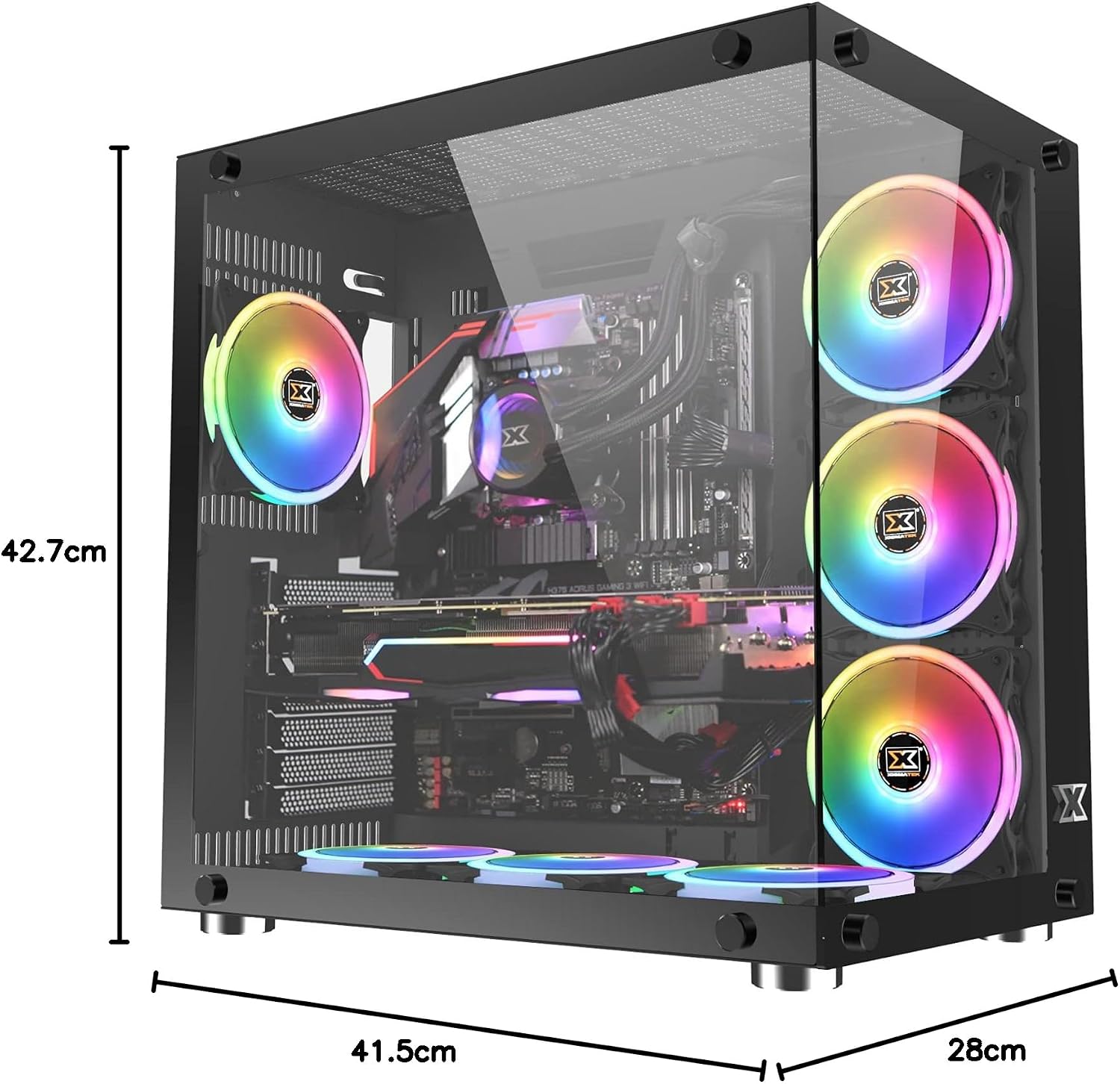
Image: The Xigmatek Aquarius Plus case fully assembled with internal components, showcasing its dimensions (41.5cm D x 28cm W x 42.7cm H).
Bedienungsanleitung
After successful installation, connect your peripherals (monitor, keyboard, mouse) and power cable to the PSU. Press the power button on the front panel to start your system.
ARGB-Lüftersteuerung
The pre-installed ARGB fans are typically connected to a fan controller or directly to an ARGB header on your motherboard. Refer to your motherboard's manual or the fan controller's instructions for details on how to customize the lighting effects and fan speeds.
Wartung
Regelmäßige Wartung trägt dazu bei, die optimale Leistung und Langlebigkeit Ihrer PC-Komponenten zu gewährleisten.
- Staubfilter: The Xigmatek Aquarius Plus includes three dust filters. Regularly remove and clean these filters to prevent dust buildup inside the case. Use compressed air or a soft brush.
- Innenreinigung: Periodically open the case and use compressed air to remove dust from fans, heatsinks, and other components. Ensure the system is powered off and unplugged before cleaning.
- Paneele aus gehärtetem Glas: Clean the tempered glass panels with a soft, lint-free cloth and a glass cleaner designed for electronics. Avoid abrasive materials.
Fehlerbehebung
Sollten Probleme auftreten, beachten Sie die folgenden gängigen Schritte zur Fehlerbehebung:
- System schaltet sich nicht ein:
- Prüfen Sie, ob das Netzkabel fest mit dem Netzteil und der Steckdose verbunden ist.
- Stellen Sie sicher, dass sich der Netzteilschalter in der Position „EIN“ befindet.
- Überprüfen Sie, ob das Netzschalterkabel an der Vorderseite korrekt mit dem Anschluss auf dem Motherboard verbunden ist.
- Confirm all internal power cables (24-pin ATX, CPU, GPU) are properly seated.
- Lüfter drehen sich nicht/ARGB leuchtet nicht:
- Überprüfen Sie die Stromanschlüsse des Lüfters am Motherboard oder am Lüftercontroller.
- Verify ARGB connections to the motherboard or controller.
- Ensure fan controller is powered (if applicable).
- USB-Anschlüsse funktionieren nicht:
- Confirm the front panel USB cables are correctly connected to the motherboard's USB headers.
For more complex issues, consult the manuals for your individual PC components (motherboard, GPU, PSU) or contact Xigmatek customer support.
Technische Daten
| Modellname | Aquarius Plus Black |
| Modellnummer | EN 46423-Norm |
| Gehäusetyp | Mittelturm |
| Motherboard-Kompatibilität | ATX, Mikro-ATX, Mini-ITX |
| Abmessungen (T x B x H) | 41.5 cm x 28 cm x 42.7 cm |
| Gewicht | 7 kg |
| Material | Gehärtetes Glas, Stahl |
| Erweiterungssteckplätze | 4 |
| Laufwerksschächte | 2 x 3.5" HDD, 2 x 2.5"/3.5" SSD/HDD |
| Vorinstallierte Lüfter | 7 x 120mm ARGB AY120 Fans |
| Maximale Lüfterunterstützung | Bis zu 10 x 120-mm-Lüfter |
| Maximale GPU-Länge | 360 mm |
| Maximale Höhe des CPU-Kühlers | 158 mm |
| Netzteilmontage | Unten |
| Front I / O Ports | 1 x USB 2.0, 3 x USB 3.0 |
| Kühlmethode | Luft |
| Beleuchtung | RGB (on fans) |
Garantie und Support
For warranty information and technical support, please refer to the official Xigmatek webBesuchen Sie unsere Website oder wenden Sie sich an Ihren Händler vor Ort. Bewahren Sie Ihren Kaufbeleg für Garantieansprüche auf.