
Einführung
This manual provides detailed instructions for the installation, operation, and maintenance of your Yunir Brushless Motor Controller Kit. This kit is designed for electric scooters, bikes, and similar vehicles, offering reliable performance with its brushless motor controller and clear LCD display. Please read this manual thoroughly before installation and use to ensure proper function and safety.
Sicherheitshinweise
- Vor Installations-, Wartungs- oder Fehlersucharbeiten muss immer die Stromzufuhr unterbrochen werden.
- Stellen Sie sicher, dass alle Verbindungen sicher und ordnungsgemäß isoliert sind, um Kurzschlüsse zu vermeiden.
- Do not expose the controller or display to extreme temperatures, direct sunlight for prolonged periods, or corrosive substances.
- While the LCD display is rainproof, avoid submerging the components in water.
- Wenn Sie sich bei einem Installationsschritt unsicher sind, wenden Sie sich an einen qualifizierten Techniker.
Produkt überview
The Yunir Brushless Motor Controller Kit provides efficient and sensitive control for your electric vehicle. It features a robust, rainproof design and includes an LCD display for clear data visualization.
- Langlebige Konstruktion: Made from premium materials, ensuring a light, robust, and rainproof design suitable for various weather conditions.
- Klares LCD-Display: The backlit LCD display clearly shows status and data, making it easy to read even in dim environments. Intuitive buttons allow for quick operation.
- Quiet and Sensitive Control: The brushless controller operates quietly and offers high sensitivity for smooth vehicle performance.
- Vielseitige Kompatibilität: Supports 36V/48V systems with 350W power output, ensuring efficient operation for compatible electric vehicles.

Image: The Yunir Brushless Motor Controller Kit, including the controller unit and the LCD display.
Setup und Installation
Follow these steps for proper installation of the controller and LCD display.
1. Schaltplan des Controllers
Refer to the diagram below for connecting the controller to your electric vehicle's components. Ensure each wire is connected to its corresponding function.

Image: Detailed wiring diagram for the Yunir Brushless Motor Controller, showing connections for accelerator, lamp, brake, display, Hall sensor, and power.
2. Cable Identification
Each cable in the kit is color-coded for easy identification and connection:
- Rot: Positive power connection
- Schwarz: Negative power connection
- Gelb: Ausgangsleistung
- Braun: Positive lamp Elektrode
- Weiß: Negative lamp Elektrode
- Blau: Anzeigesignal
- Grün: Signal empfangen
3. LCD Display Mounting
The LCD display comes with a holder designed to fit 22.5 mm handlebars. Mount the display securely in a position that allows for easy viewing while operating your vehicle.

Image: The LCD display holder, designed for secure mounting on 22.5mm handlebars.

Image: The rainproof LCD display mounted on handlebars, showing its suitability for all weather conditions.
Bedienungsanleitung
1. Funktionen des LCD-Displays
The LCD display provides real-time information about your vehicle's status and performance. Use the intuitive buttons to navigate through different modes and settings.

Bild: Eine Nahaufnahme view of the LCD display screen, showing various parameters like speed, battery level, and distance.
- Hintergrundbeleuchtung: The display features a backlight for clear visibility in low-light conditions.
- Datenanzeige: Shows essential data such as speed, battery level, distance, and more.
- Tasten: Use the buttons to power on/off, adjust settings, and switch display modes.
2. Parameter Settings (P13)
The controller allows for adjustment of certain parameters. One important setting is P13, which relates to the product power and booster type.
- The factory default setting for product power is 8. This is suitable for most standard split boosters.
- If your vehicle uses an integrated booster, you may need to adjust the P13 setting to 12.
- In cases of incompatible booster types, adjust P13 to either 8 or 12 as required for optimal performance.
Note: The controller model may be sent randomly. Ensure compatibility before ordering and installation.
Wartung
- Reinigung: Wipe the controller and display with a soft, damp Tuch. Verwenden Sie keine scharfen Chemikalien oder Scheuermittel.
- Verbindungen: Überprüfen Sie regelmäßig alle Drahtverbindungen, um sicherzustellen, dass sie fest sitzen und frei von Korrosion sind.
- Inspektion: Inspect the cables and housing for any signs of damage, wear, or fraying. Replace damaged components immediately.
- Lagerung: If storing the vehicle for an extended period, ensure the components are clean and stored in a dry environment.
Fehlerbehebung
If you encounter issues with your Yunir Brushless Motor Controller Kit, consider the following common troubleshooting steps:
- Kein Strom/Display aus: Check all power connections, including battery and main switch. Ensure the battery is charged.
- Motor reagiert nicht: Verify all motor phase lines and Hall sensor connections are correct and secure. Check the speed throttle connection.
- Incorrect Speed/Data: Ensure the LCD display signal wire is properly connected. If applicable, check P13 settings for booster compatibility.
- Intermittierender Betrieb: Überprüfen Sie alle Kabel auf lose Verbindungen oder beschädigte Isolierung.
- Fehlercodes: If the LCD display shows an error code, consult the specific error code documentation for your display model (if available) or contact support.
Sollten die Probleme nach Durchführung dieser Schritte weiterhin bestehen, wenden Sie sich bitte an den Kundendienst, um weitere Unterstützung zu erhalten.
Technische Daten
| Besonderheit | Detail |
|---|---|
| Modellnummer | Yunirfq7a8cnm1g7609-02 |
| Bandtage Kompatibilität | 36 V/48 V |
| Leistungsabgabe | 350 W |
| Controller-Abmessungen | Ca. 8.8 cm x 5.2 cm x 3 cm (3.46 Zoll x 2.04 Zoll x 1.18 Zoll) |
| LCD Display Dimensions | Ca. 8 cm x 5 cm (3.15 Zoll x 1.97 Zoll) |
| Handlebar Diameter (for display) | 22.5 mm |
| Artikelgewicht | 11.4 Unzen (ca. 323 Gramm) |
| Regenfest | Ja (LCD-Display) |
| Batterien erforderlich | No (for controller/display operation, relies on vehicle battery) |
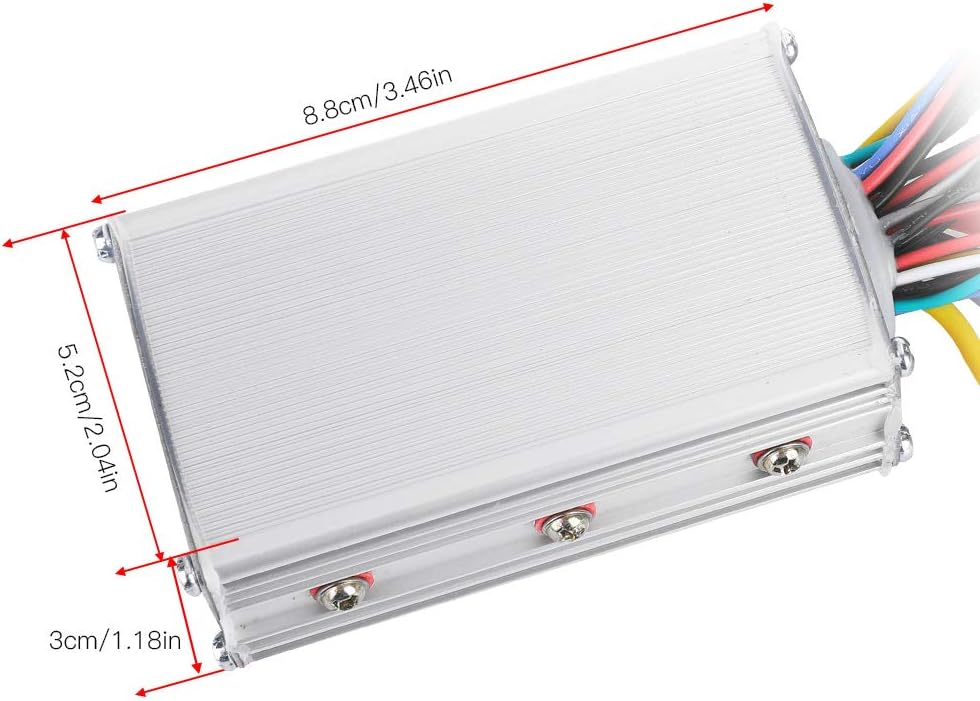
Image: Dimensions of the Yunir Brushless Motor Controller unit.

Image: Dimensions of the Yunir LCD Display unit.
Garantieinformationen
This product is covered by a standard manufacturer's warranty. Please refer to your purchase documentation or contact the retailer for specific warranty terms and conditions. Keep your proof of purchase for any warranty claims.
Kundenservice
For technical assistance, troubleshooting, or inquiries regarding your Yunir Brushless Motor Controller Kit, please contact Yunir customer support through the retailer where the product was purchased. Provide your model number (Yunirfq7a8cnm1g7609-02) and a detailed description of the issue for efficient service.