
Einführung
Welcome to the Easyfone Prime-A1 Pro 4G Flip Phone user manual. This guide provides essential information for setting up, operating, and maintaining your new device. Designed for ease of use, the Prime-A1 Pro features large buttons, clear sound, and dedicated functions for convenience and safety.
Lieferumfang
- Easyfone Prime-A1 Pro Handset
- Charger Suit (Adapter and USB Cable)
- Akku (1500mAh)
- Ladestation
- Bedienungsanleitung
- SpeedTalk SIM Card
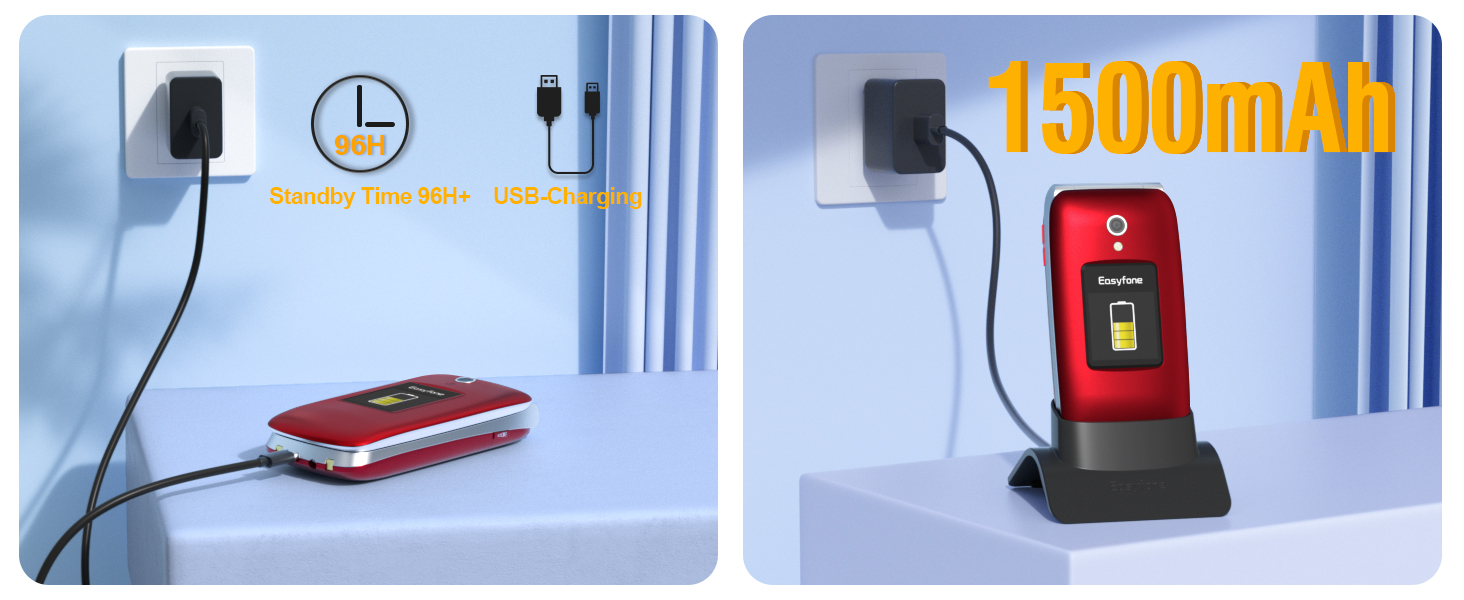
Image: All items included in the Easyfone Prime-A1 Pro package, neatly laid out on a surface.
Aufstellen
1. Einlegen der Batterie
- Entfernen Sie vorsichtig die Rückseite des Telefons.
- Insert the 1500mAh Lithium Ion battery into its compartment, ensuring the gold contacts align.
- Bringen Sie die Rückseite wieder an und drücken Sie sie fest, bis sie einrastet.
2. SIM-Karteninstallation
- Nachdem die Rückseite und der Akku entfernt wurden, suchen Sie den/die SIM-Kartensteckplatz/-steckplätze.
- Insert the SpeedTalk SIM card (or your preferred compatible SIM card) into the designated slot. Ensure the card is correctly oriented as indicated by the diagram near the slot.
- Setzen Sie den Akku und die hintere Abdeckung wieder ein.
Netzwerkkompatibilität: This phone works with Speedtalk Mobile, Tello Mobile, and T-Mobile Prepaid Plan. Other SIM cards may not be compatible. Ensure your SIM card is activated before insertion.
3. Laden Ihres Telefons
The Easyfone Prime-A1 Pro can be charged using the included charging dock or directly via the USB-C cable.
- Verwendung der Ladestation: Place the phone into the charging dock, ensuring it sits securely and the charging indicator appears on the screen.
- Verwendung des USB-C-Kabels: Connect the USB-C cable to the phone's charging port and the other end to the power adapter, then plug into a wall outlet.

Image: The Easyfone Prime-A1 Pro phone is placed in its charging dock, connected to a wall charger. Text indicates 1500mAh battery and 96+ hours standby time.
Bedienungsanleitung
Grundlegende Anruffunktionen
- Anrufe entgegennehmen: Zum Annehmen eines eingehenden Anrufs klappen Sie einfach das Telefon auf.
- Anrufe beenden: Close the phone to hang up a call, or press the red 'End Call' button.
- Anrufe tätigen: Wählen Sie die Nummer über die große Tastatur und drücken Sie die grüne „Anruf“-Taste.

Image: The Easyfone Prime-A1 Pro phone is open, displaying an incoming call with a contact photo and the name 'Emma'. Options to 'Answer' or 'Silent' are visible.
Large Buttons and Clear Display
The phone features a 2.4" HD main display and a 1.44" external colorful HD screen, both designed with large fonts and icons for easy readability. The silicone keyboard has large, well-spaced buttons for comfortable dialing.

Image: The Easyfone Prime-A1 Pro phone is shown both open and closed, with callouts indicating the 2.4-inch main HD IPS LCD and 1.44-inch external HD IPS displays.

Bild: Eine Nahaufnahme view of the Easyfone Prime-A1 Pro's silicone keyboard, emphasizing the large, clearly labeled buttons for easy use.
SOS-Notruftaste
For emergencies, press and hold the dedicated SOS button. The phone will automatically dial pre-set SOS contacts in a loop until an answer is received. It also sends SOS alerts and messages to these contacts.

Image: A hand holds the Easyfone Prime-A1 Pro, with the SOS button highlighted. The background shows a map with pins indicating emergency contacts, illustrating the SOS function.
Foto-Schnellwahl
The Photo Speed Dial feature allows you to assign contacts with photos to specific speed dial buttons, making it easier to identify and call frequently contacted individuals.

Image: The Easyfone Prime-A1 Pro phone is open, showing the main display with a speed dial contact. A photo of 'Mom' is displayed along with her name and the speed dial number.
Block Button
The specially designed red 'BLOCK' button allows you to add harassing numbers to your blacklist with a single press, preventing further unwanted calls.
UKW-Radio
Enjoy listening to your favorite FM radio stations directly on your phone.

Image: The Easyfone Prime-A1 Pro phone is open, showing the main display with the FM radio application interface.
Taschenlampe
Aktivieren Sie die eingebaute Taschenlampe für mehr Komfort bei schlechten Lichtverhältnissen.
Clear Sound and HAC Compatibility
The phone features a powerful speaker with clear sound for easy hearing and is HAC (Hearing Aid Compatible) for users with hearing aid devices.

Image: The Easyfone Prime-A1 Pro phone is open, displaying a call screen with a speaker icon. A diagram next to it illustrates the loud and clear receiver and powerful loud speaker, emphasizing hearing aid compatibility.
Wartung
- Reinigung: Reinigen Sie die Außenseite des Telefons mit einem weichen, trockenen Tuch. Vermeiden Sie flüssige Reinigungsmittel.
- Batteriepflege: Um die Lebensdauer des Akkus zu verlängern, vermeiden Sie extreme Temperaturen und entladen und laden Sie den Akku regelmäßig vollständig auf.
- Lagerung: Bewahren Sie das Telefon an einem kühlen, trockenen Ort auf, wenn Sie es längere Zeit nicht benutzen.
Fehlerbehebung
- Telefon lässt sich nicht einschalten: Stellen Sie sicher, dass die Batterie richtig eingesetzt und geladen ist.
- Kein Netzsignal: Check if the SIM card is properly inserted and activated. Verify network compatibility with your carrier.
- Schlechte Anrufqualität: Ensure you are in an area with good network coverage. Check speaker and microphone for obstructions.
- Probleme beim Aufladen: Verify the charger and cable are securely connected. Try charging directly with the USB-C cable if the dock is not working.
Technische Daten
| Besonderheit | Detail |
|---|---|
| Modellname | Prime-A1 Pro |
| Betriebssystem | Easyfone OS |
| Zellulartechnologie | 4G |
| Bildschirmgröße | 2.4 Zoll (Hauptdisplay) |
| Externes Display | 1.44 Zoll |
| Batteriekapazität | 1500 Milliamp Std |
| Telefongesprächszeit | 6 Stunden |
| Telefon-Standby-Zeit | 178 Stunden |
| Speicherkapazität | 16 GB |
| Besondere Merkmale | Basic Phone, Bluetooth, Charging Dock, FM Radio, Hearing Aid Compatible, External Display, Photo Speed Dial |
| Technische Daten | 4.09 x 2.05 x 0.91 Zoll |
| Artikelgewicht | 9.1 Unzen |
Garantie und Support
Informationen zur Garantie und zum Kundendienst finden Sie in der Ihrem Produkt beiliegenden Dokumentation oder auf der offiziellen Easyfone-Website. webBewahren Sie Ihren Kaufbeleg für eventuelle Garantieansprüche auf.