
Doss X1
Asimom X1 Wireless Bluetooth Speaker User Manual
Model: X1 | Brand: Doss
1. Einleitung
Vielen Dank für Ihren Einkauf.asing the Asimom X1 Wireless Bluetooth Speaker. This X-shaped speaker combines high-fidelity audio with dynamic multi-color LED lighting and a unique fan feature designed to enhance your audio experience. This manual provides essential information for setup, operation, maintenance, and troubleshooting to ensure optimal performance of your device.
2. Packungsinhalt
Bitte überprüfen Sie, ob alle Artikel in Ihrem Paket vorhanden sind:
- Asimom X1 Wireless Bluetooth Speaker
- USB-Ladekabel
- AUX-Audiokabel
- Bedienungsanleitung

Image: The Asimom X1 speaker shown alongside its included USB charging cable and AUX audio cable.
3. Einrichtung
3.1 Aufladen des Lautsprechers
Laden Sie den Lautsprecher vor der ersten Benutzung vollständig auf. Verbinden Sie das mitgelieferte USB-Ladekabel mit dem Ladeanschluss des Lautsprechers und das andere Ende mit einem USB-Netzteil (nicht im Lieferumfang enthalten) oder einem USB-Anschluss Ihres Computers. Die LED-Anzeige signalisiert den Ladestatus.
3.2 Ein-/Ausschalten
- To Power On: Press and hold the Power button for 3 seconds.
- To Power Off: Press and hold the Power button for 3 seconds.
4. Bedienungsanleitung
4.1 Bluetooth-Kopplung
- Stellen Sie sicher, dass der Lautsprecher eingeschaltet und im Bluetooth-Kopplungsmodus ist (normalerweise durch eine blinkende LED angezeigt).
- Aktivieren Sie auf Ihrem Gerät (Smartphone, Tablet, Laptop) Bluetooth und suchen Sie nach verfügbaren Geräten.
- Select "Asimom X1" from the list of devices.
- Sobald die Verbindung hergestellt ist, gibt der Lautsprecher eine hörbare Bestätigung aus, und die LED-Anzeige leuchtet dauerhaft.
4.2 Kabelverbindung (AUX)
For devices without Bluetooth, use the provided AUX audio cable. Connect one end to the speaker's AUX input port and the other end to your audio source's headphone jack.
4.3 LED-Beleuchtungssteuerung
The Asimom X1 features 48 multi-color RGB lighting systems and 5 levels of intensity control. Use the dedicated lighting control buttons on the speaker to cycle through modes and adjust brightness.

Image: The Asimom X1 speaker illuminated with a vibrant rainbow LED display.

Image: The Asimom X1 speaker illuminated with a striking red LED display.

Image: The Asimom X1 speaker illuminated with a dynamic purple and blue LED display.
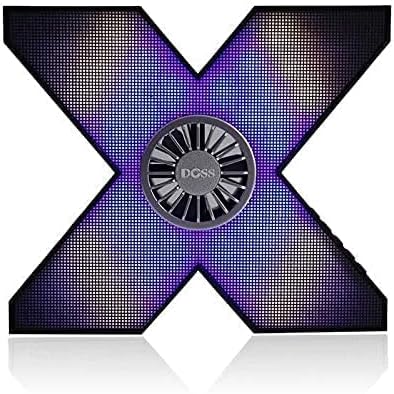
Image: The Asimom X1 speaker illuminated with a nuanced purple and blue LED display.
4.4 Fan Feature for Sound Simulation
The integrated fan in the center of the speaker is designed to create a vibration effect, simulating enhanced audio presence and bass. This feature operates automatically with audio playback.
4.5 Audiowiedergabe
The Asimom X1 delivers very loud and professional pure stereo sound. Adjust volume using your connected device or the speaker's volume controls.
5. Wartung
- Reinigen Sie den Lautsprecher mit einem weichen, trockenen Tuch. Verwenden Sie keine Scheuermittel oder Lösungsmittel.
- Vermeiden Sie es, den Lautsprecher extremen Temperaturen, direkter Sonneneinstrahlung oder Feuchtigkeit auszusetzen.
- Bewahren Sie den Lautsprecher an einem kühlen, trockenen Ort auf, wenn er längere Zeit nicht benutzt wird.
- The speaker features a full metal body and a metal base with rubber supports for durability and stability.
6. Fehlerbehebung
| Problem | Mögliche Ursache | Lösung |
|---|---|---|
| Der Lautsprecher lässt sich nicht einschalten. | Schwache Batterie. | Laden Sie den Lautsprecher vollständig auf. |
| Kein Ton. | Volume too low; not paired correctly; AUX cable loose. | Increase volume; re-pair Bluetooth; check AUX cable connection. |
| Die Bluetooth-Kopplung schlägt fehl. | Speaker too far from device; speaker not in pairing mode; interference. | Move speaker closer; ensure speaker is in pairing mode; turn off other Bluetooth devices. |
7. Spezifikationen
| Besonderheit | Detail |
|---|---|
| Modellnummer | X1 |
| Markenname | Doss |
| Konnektivitätstechnologie | Kabelgebunden/Kabellos (Bluetooth) |
| Lautsprechertyp | Bluetooth-Lautsprecher |
| Kompatible Geräte | All devices (iPhone, iPad, Laptops, Smartphones, TVs) |
| Eingabetyp | AUX |
| Stückzahl | 1 |
| External Product ID Type | EAN-13 |
| External Product ID | 6938546511985 |
| Ausgangsleistung | 10 - 20 Watt |
| Artikelgewicht | 1 Kilogramm |
| Form | X-shaped |
| Audioausgabemodus | Stereo |
| Montagetyp | Tischplatte |
| Besondere Merkmale | Wireless, Bluetooth, Multi-color RGB LED Lighting (48 systems, 5 intensity levels), Fan for sound simulation, Full metal body, Metal base with rubber supports |
| Datum der ersten Verfügbarkeit | 7. Juli 2021 |
8. Garantie und Support
For warranty information and technical support, please refer to the documentation provided with your purchase or contact the manufacturer, Doss, directly. Keep your proof of purchase for any warranty claims.
Ask a question about this manual
Ask about setup, troubleshooting, compatibility, parts, safety, or missing instructions. Manuals+ will review the question and use this page’s manual context to help answer it.