
Einführung
This manual provides detailed instructions for the GLIDiC SB-WS91-MRTW/BK TW-9000 Fully Wireless Earphones. Please read this guide thoroughly before using your device to ensure proper operation and to maximize its lifespan. Keep this manual for future reference.

Image: The GLIDiC SB-WS91-MRTW/BK TW-9000 fully wireless earphones, shown with their charging case. The earphones are black and feature the GLIDiC logo. The charging case is also black and has an open lid, revealing the earbud compartments.
Aufstellen
Packungsinhalt
Stellen Sie sicher, dass alle Artikel im Paket vorhanden sind:
- GLIDiC SB-WS91-MRTW/BK TW-9000 Earphones (Left and Right)
- Kabelloses Ladecase
- USB-Ladekabel
- Benutzerhandbuch (dieses Dokument)
Aufladen der Kopfhörer und des Gehäuses
Before first use, fully charge the earphones and the charging case. The case can be charged via the included USB cable or wirelessly.
- Legen Sie die Ohrhörer in das Ladecase und achten Sie darauf, dass sie richtig sitzen.
- Kabelgebundenes Laden: Connect the USB charging cable to the charging port on the case and to a USB power adapter (not included) or a computer's USB port.
- Kabelloses Laden: Place the charging case on a compatible Qi-certified wireless charging pad.
- The indicator lights on the case will show the charging status. Refer to the LED indicator section for details.

Image: The GLIDiC SB-WS91-MRTW/BK TW-9000 charging case with earphones inside, placed on a wireless charging pad. A USB cable is connected to the pad. The setup is on a table with breakfast items in the background, illustrating everyday use.
Erstes Bluetooth-Pairing
Follow these steps to pair your earphones with a new device for the first time:
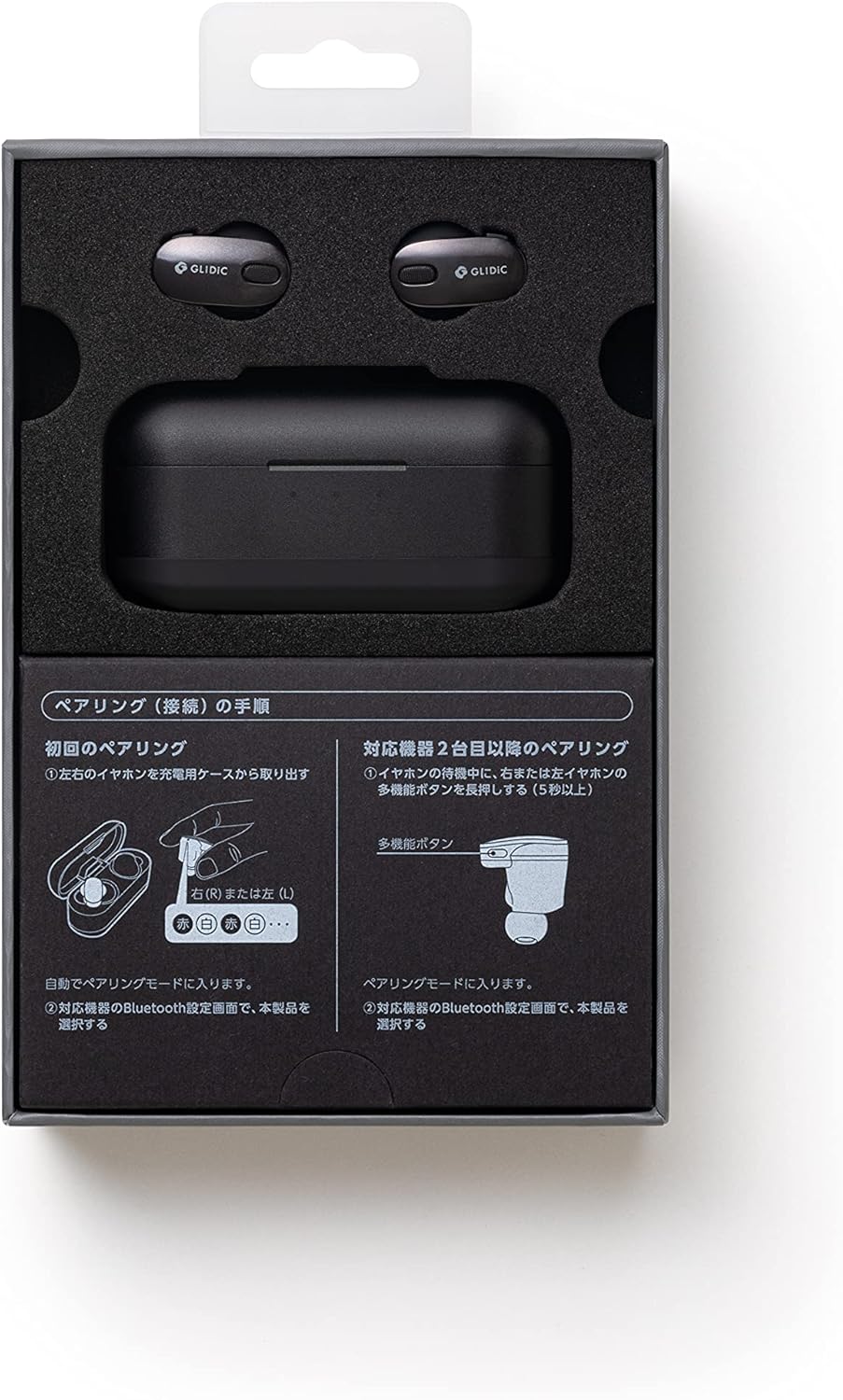
Image: A diagram illustrating the pairing procedure for the GLIDiC SB-WS91-MRTW/BK TW-9000 earphones. It shows two main sections: "First Pairing" and "Pairing with a second device or later". For first pairing, it depicts taking the earphones out of the case, which automatically enters pairing mode. For subsequent pairings, it shows pressing and holding the multi-function button on either the left or right earphone for 5 seconds while in standby mode to enter pairing mode.
- Open the charging case and remove both the left and right earphones. They will automatically enter pairing mode.
- Gehen Sie auf Ihrem Gerät (Smartphone, Tablet, Laptop) zu den Bluetooth-Einstellungen.
- Suchen nach verfügbare Geräte auswählenGLIDiC TW-9000" von der Liste.
- Nach erfolgreicher Verbindung wird durch einen Bestätigungston oder eine entsprechende Meldung die erfolgreiche Kopplung signalisiert.
Pairing with a Second Device or Later
To pair with another device or re-pair after initial setup:
- Ensure the earphones are in standby mode (not connected to another device).
- Press and hold the multi-function button on either the left (L) or right (R) earphone for approximately 5 seconds until the indicator light flashes, indicating pairing mode.
- On your device, go to Bluetooth settings and select "GLIDiC TW-9000" to connect.
Bedienung der Kopfhörer
Ein-/Ausschalten
- Einschalten: Nehmen Sie die Ohrhörer aus dem Ladecase. Sie schalten sich automatisch ein.
- Ausschalten: Place the earphones back into the charging case. They will power off automatically and begin charging.
Tragen der Kopfhörer
Insert the earphones gently into your ears, ensuring a comfortable and secure fit. Adjust them until the sound quality is optimal and external noise is minimized. The correct fit is crucial for effective Active Noise Cancellation.
Bedienelemente
The GLIDiC TW-9000 earphones feature touch controls and support voice control for various functions. Specific touch gestures and voice commands may vary. Refer to the quick start guide or manufacturer's website for detailed control mappings.
- Abspielen/Pause: Normalerweise genügt ein kurzes Antippen eines der Ohrhörer.
- Nächster Titel: Often a double tap on the right earphone.
- Vorheriges Lied: Often a double tap on the left earphone.
- Anruf annehmen/beenden: Einmaliges Tippen während eines eingehenden Anrufs.
- Sprachassistenten aktivieren: Long press or specific tap sequence.
Aktive Geräuschunterdrückung (ANC)
The earphones are equipped with Active Noise Cancellation to reduce ambient noise. This feature can be toggled on or off, or switched to an ambient sound mode, typically through a specific touch control gesture. Consult the detailed control instructions for your model.
Wartung
Reinigung
Regelmäßige Reinigung trägt zur Erhaltung der Klangqualität und Hygiene bei.
- Verwenden Sie ein weiches, trockenes, fusselfreies Tuch, um die Ohrhörer und das Ladecase abzuwischen.
- Bei hartnäckigen Verschmutzungen leicht dampBefeuchten Sie das Tuch mit Wasser oder einem milden, nicht scheuernden Reinigungsmittel. Achten Sie darauf, dass keine Feuchtigkeit in die Öffnungen gelangt.
- Clean the ear tips regularly. If removable, they can be washed with mild soap and water, then thoroughly dried before reattaching.
- Verwenden Sie keine aggressiven Chemikalien, Alkohol oder Scheuermittel.
Lagerung
Bewahren Sie die Ohrhörer bei Nichtgebrauch im Ladecase auf, um sie vor Staub und Beschädigungen zu schützen und sie geladen zu halten.
Batteriepflege
So verlängern Sie die Akkulaufzeit:
- Vermeiden Sie es, die Batterien häufig vollständig zu entladen.
- Lagern Sie das Gerät an einem kühlen, trockenen Ort, fern von extremen Temperaturen.
- If storing for an extended period, charge the case and earphones to about 50% capacity.
Fehlerbehebung
Wenn Sie auf Probleme stoßen, versuchen Sie die folgenden Lösungen:
Kein Ton oder zeitweise unterbrochene Verbindung
- Stellen Sie sicher, dass die Kopfhörer aufgeladen sind.
- Prüfen Sie, ob Bluetooth auf Ihrem Gerät aktiviert ist und die Kopfhörer angeschlossen sind.
- Move the earphones closer to your device and away from potential interference sources (e.g., Wi-Fi routers, other Bluetooth devices).
- Versuchen Sie, die Kopfhörer von Ihrem Gerät zu entkoppeln und anschließend erneut zu koppeln.
- Starten Sie Ihr Audiogerät neu.
Kopfhörer werden nicht aufgeladen
- Stellen Sie sicher, dass das Ladekabel sowohl mit dem Gehäuse als auch mit der Stromquelle fest verbunden ist.
- Wenn Sie kabelloses Laden verwenden, stellen Sie sicher, dass die Hülle richtig auf dem Ladepad positioniert ist.
- Prüfen Sie, ob sich Fremdkörper im Ladeanschluss des Ladecase oder an den Ladekontakten der Ohrhörer befinden.
- Versuchen Sie es mit einem anderen Ladekabel oder Netzteil.
One Earphone Not Working
- Place both earphones back into the charging case, close the lid, wait a few seconds, then remove them.
- Stellen Sie sicher, dass beide Ohrhörer aufgeladen sind.
- Perform a factory reset if the issue persists (refer to manufacturer's web(siehe Website für genaue Anweisungen).
Technische Daten
| Modellname | SB-WS91-MRTW/BK (TW-9000) |
| Marke | GLIDiC |
| Konnektivitätstechnologie | Kabellos (Bluetooth) |
| Drahtlose Kommunikationstechnologien | Bluetooth |
| Platzierung des Ohrs | Im Ohr |
| Formfaktor | Im Ohr |
| Lärmschutz | Aktive Geräuschunterdrückung |
| Steuerungstyp | Sprachsteuerung |
| Kompatible Geräte | Laptops, Smart Speakers, Smartphones |
| Batterien | 3 Lithium-Polymer-Batterie (im Lieferumfang enthalten) |
| Artikelgewicht | 0.24 Kilogramm (240 g) |
| Technische Daten | 3 x 8 x 4 cm |
| Materialtyp | Metallic (Material not specified) |
| Im Lieferumfang enthaltene Komponenten | Kabel, kabelloses Ladecase |
Garantie und Support
For warranty information and technical support, please refer to the warranty card included with your product or visit the official GLIDiC webBewahren Sie Ihren Kaufbeleg für Garantieansprüche auf.
If you require further assistance, please contact GLIDiC customer service through their official channels.