
SKYRC SK100174-02
SKYRC B6 Nex AC/DC Smart Charger User Manual
Model: SK100174-02
Einführung
The SKYRC B6 Nex AC/DC Smart Charger is a versatile and powerful charging solution designed for various battery types, including Lithium (LiPo, LiFe, LiIon, LiHV), Nickel (NiMH, NiCd), and Lead-Acid (Pb) batteries. With both AC and DC input capabilities, it offers flexibility for use at home or in the field. This charger features a high-quality 2.4-inch VA display for clear information, a maximum charge power of 200W, and a maximum charge current of 10A. Its compact design, efficient heat dissipation, and user-friendly interface make it an ideal choice for hobbyists and professionals alike.
Key features include the "Scan to Go" function for quick charging via QR codes, Bluetooth connectivity for control via the SkyCharger app, and a memory cache that retains the last used settings for convenience.
Installationshandbuch
Follow these steps to set up your SKYRC B6 Nex charger for the first time:
- Stromanschluss: Schließen Sie das Ladegerät an eine Stromquelle an.
- For AC power, use the provided AC power cable and plug it into the AC 100-240V input port on the side of the charger and then into a wall outlet.
- For DC power, connect a DC power source (10-30V) to the DC IN port using an appropriate cable.
- Batterieanschluss: Connect your battery to the charger.
- Connect the main discharge lead of your battery to the XT60 output connector on the charger.
- For balance charging, connect the battery's balance lead to the XH Balance connection port on the charger. Ensure the balance lead is correctly oriented.
- Erstes Einschalten: Once connected, the charger's 2.4-inch VA display will illuminate, indicating it is ready for operation.
- App-Verbindung (optional): For advanced control and monitoring, download the SkyCharger app on your smartphone. Enable Bluetooth on your device and pair it with the B6 Nex charger.
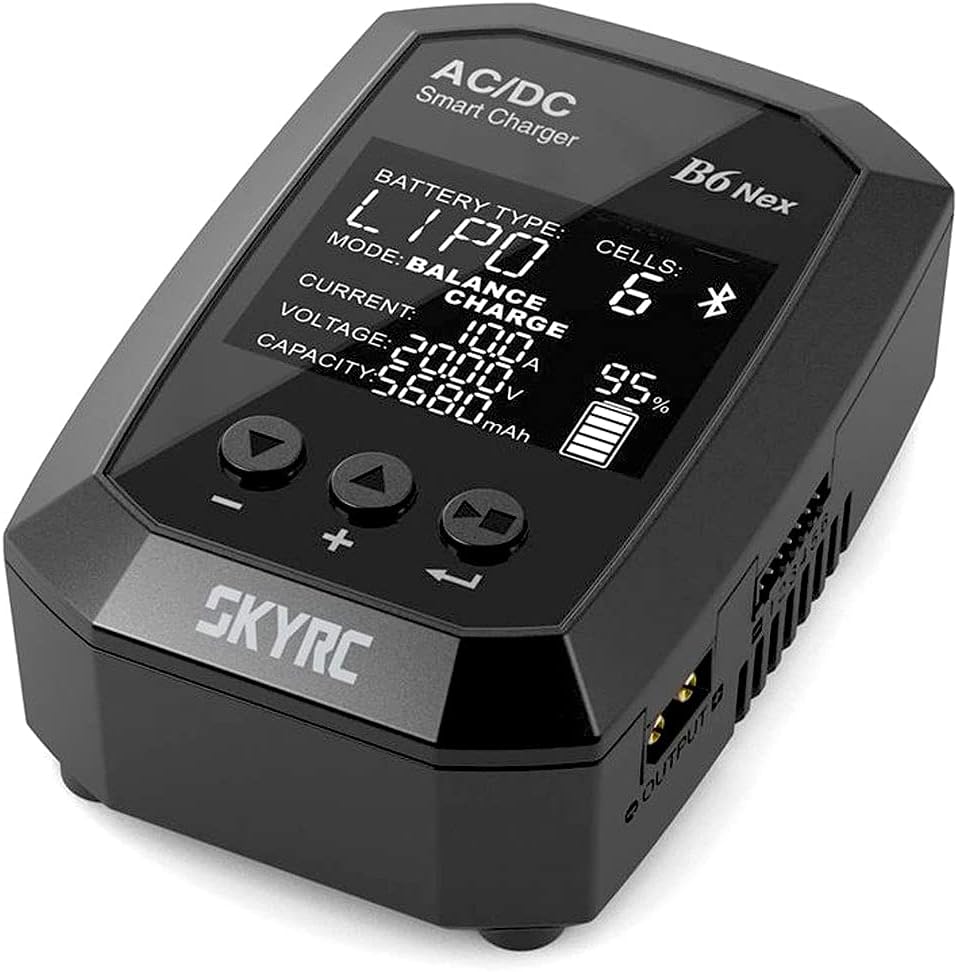
Abbildung 1: This image shows the front of the SKYRC B6 Nex charger, highlighting its 2.4-inch VA display. The display indicates battery type (LiPo), mode (Balance Charge), current (10.0A), voltage (20.00V), capacity (5680mAh), and charge percentage (95%). Below the screen are three control buttons for navigation and adjustment.

Abbildung 2: Dieses Bild zeigt eine Seite view of the SKYRC B6 Nex charger, illustrating the AC 100-240V input port on one side and the DC IN 10-30V port on the other. The XT60 output connector and XH Balance connection are also visible, emphasizing the charger's versatile power input and output options.
Bedienungsanleitung
The B6 Nex charger is operated using three intuitive buttons below the display. The VA display provides clear, high-contrast information.
Grundlegende Bedienung:
- Navigation: Use the left and right buttons to navigate through menus and adjust values.
- Auswahl/Bestätigung: Use the center button to select an option or confirm a setting.
- Auswahl des Batterietyps: From the main menu, select the appropriate battery type (LiPo, LiFe, LiIon, LiHV, NiMH, NiCd, Pb) for the battery you are charging.
- Lademodus: Choose your desired charging mode (e.g., Balance Charge, Fast Charge, Storage, Discharge).
- Parameteranpassung: Set the charge current (up to 10A) and voltage according to your battery's specifications. The charger remembers the last set value for convenience.
- Ladevorgang starten: Once all parameters are set, confirm to start the charging process. The display will show real-time charging status.
Erweiterte Funktionen:
- Scan to Go Function: This feature allows for quick and automatic charging. If your battery has a QR code with basic data stored, simply scan it using the SkyCharger app. The B6 Nex will automatically initiate the charging or discharging process based on the QR code data.
- Adjustable Cut-off Voltage: For experienced users, the charger allows manual adjustment of the battery cut-off voltage, providing more control over the charging process.
- Bluetooth-Konnektivität: Control and monitor your charging tasks remotely via the SkyCharger app on your smartphone. This provides a more detailed view of charging parameters and allows for easy setting adjustments.
Wartung
Proper maintenance ensures the longevity and optimal performance of your SKYRC B6 Nex charger:
- Reinigung: Regularly wipe the charger's exterior with a soft, dry cloth. Do not use abrasive cleaners or solvents. Ensure no dust or debris accumulates in the ventilation openings.
- Lagerung: Store the charger in a cool, dry place away from direct sunlight, moisture, and extreme temperatures.
- Handhabung: Avoid dropping the charger or subjecting it to strong impacts. Handle all cables and connectors with care to prevent damage.
- Belüftung: Ensure the charger has adequate ventilation during operation to prevent overheating. Do not block the cooling fan or vents.
Fehlerbehebung
If you encounter issues with your SKYRC B6 Nex charger, refer to the following common problems and solutions:
- Charger Does Not Power On:
- Check if the AC or DC power cable is securely connected to both the charger and the power source.
- Verify that the power outlet or DC power source is functional.
- Ladefehlermeldung:
- Ensure the correct battery type and cell count are selected on the charger.
- Check all battery connections (main lead and balance lead) for proper contact and polarity.
- Prüfen Sie den Akku auf sichtbare Schäden oder Aufblähungen. Beschädigte Akkus dürfen nicht geladen werden.
- Überhitzung des Ladegeräts:
- Ensure the charger is placed in a well-ventilated area and its cooling vents are not obstructed.
- Reduce the charge current if the charger consistently overheats.
- Probleme mit der App-Konnektivität:
- Ensure Bluetooth is enabled on your smartphone and the SkyCharger app is up to date.
- Restart both the charger and your smartphone, then attempt to pair again.
For persistent issues, please contact SKYRC customer support or refer to the official SKYRC website for detailed FAQs and support resources.
Technische Spezifikationen
| Besonderheit | Spezifikation |
|---|---|
| Modellnummer | SK100174-02 |
| Eingangslautstärketage (Wechselstrom) | 100 V - 240 V |
| Eingangslautstärketage (Gleichstrom) | 10 V - 30 V |
| Maximale Ladeleistung | 200 W |
| Maximaler Ladestrom | 10 A |
| Anzeigetyp | 2.4" VA LCD |
| Unterstützte Batterietypen | LiPo, LiFe, LiIon, LiHV, NiMH, NiCd, Pb |
| Gewicht | 160 g |
| Ausgangsanschluss | XT60 |
| Balance-Port | XH |
Garantieinformationen
Warranty details for the SKYRC B6 Nex AC/DC Smart Charger are typically provided with your purchase documentation or can be found on the official SKYRC webBitte bewahren Sie Ihren Kaufbeleg für eventuelle Garantieansprüche auf. Die Garantie deckt im Allgemeinen Herstellungsfehler bei normalem Gebrauch ab.
For specific terms and conditions, including warranty period and coverage, please refer to the warranty card included in the product packaging or visit the manufacturer's official support page.
Kundenservice
For technical assistance, troubleshooting beyond this manual, or inquiries regarding your SKYRC B6 Nex charger, please contact SKYRC customer support. You can usually find contact information on the official SKYRC webWebsite oder über Ihren Händler.
When contacting support, please have your product model number (SK100174-02) and a detailed description of the issue ready to facilitate a quicker resolution.
Ask a question about this manual
Ask about setup, troubleshooting, compatibility, parts, safety, or missing instructions. Manuals+ will review the question and use this page’s manual context to help answer it.