
1. Einleitung
Vielen Dank für Ihren Einkauf.asing the Kimwood Bluetooth Headset. This manual provides detailed instructions on how to set up, operate, and maintain your headset. Please read this manual carefully before use to ensure optimal performance and longevity of your device.

Figure 1.1: Kimwood Bluetooth Headset with its charging case.
2. Sicherheitshinweise
- Setzen Sie das Headset keinen extremen Temperaturen, hoher Luftfeuchtigkeit oder korrosiven Substanzen aus.
- Vermeiden Sie es, das Headset fallen zu lassen oder starken Stößen auszusetzen.
- Das Headset darf nicht auseinandergenommen oder verändert werden. Dadurch erlischt die Garantie und es können Schäden entstehen.
- Halten Sie das Headset von Kindern und Haustieren fern.
- Verwenden Sie ausschließlich das mitgelieferte Ladekabel und ein kompatibles Netzteil.
3. Packungsinhalt
Bitte prüfen Sie das Paket auf folgende Artikel:
- Kimwood Bluetooth Headset
- Ladeetui
- USB-Kabel Typ C.
- Bedienungsanleitung

Abbildung 3.1: Im Paket enthaltene Artikel.
4. Produktüberschreitungview
Familiarize yourself with the components of your Kimwood Bluetooth Headset:
| NEIN. | Komponente | Funktion |
|---|---|---|
| 1 | Power/Multifunktionstaste | Power On/Off, Play/Pause, Answer/End Call, Voice Assistant |
| 2 | Lauter/Nächster Titel | Increase volume, skip to next track (long press) |
| 3 | Lautstärke verringern/vorheriger Titel | Decrease volume, go to previous track (long press) |
| 4 | Mikrofon | Picks up your voice for calls |
| 5 | Ladeanschluss (Typ-C) | Connects to charging cable |
| 6 | LED-Anzeige | Zeigt den Strom-, Kopplungs- und Ladestatus an |
5. Einrichtung
5.1 Aufladen von Headset und Ladecase
Vor dem ersten Gebrauch müssen Headset und Ladecase vollständig aufgeladen werden.
- Connect the USB Type-C cable to the charging port on the case.
- Verbinden Sie das andere Ende des Kabels mit einer USB-Stromquelle (z. B. Computer, Wandadapter).
- Das digitale Display am Ladecase zeigt den Akkustand in Prozent an.tage. Im voll aufgeladenen Zustand wird „100“ angezeigt.
- Place the headset into the charging case. The headset will automatically begin charging.
The charging case has a 500mAh battery, and the earphone has a 100mAh battery. A full charge takes approximately 1.5 hours.

Figure 5.1: Charging the headset and case.
5.2 Koppeln mit einem Bluetooth-Gerät
The headset supports Bluetooth 5.1 for stable and automatic connections.
- Take the headset out of the charging case. It will automatically power on and enter pairing mode (LED indicator will flash blue).
- Aktivieren Sie Bluetooth auf Ihrem Gerät (Smartphone, Tablet, PC).
- Suchen nach available Bluetooth devices and select "VYK-B26" from the list.
- Once connected, the LED indicator on the headset will stop flashing and remain solid blue. A voice prompt will confirm the connection.
After the initial pairing, the headset will automatically connect to the last paired device when taken out of the case.

Abbildung 5.2: Automatischer Kopplungsprozess.
5.3 Tragen des Headsets
The ear-hook design allows for comfortable wear on either the left or right ear. The microphone and ear hook can be rotated to fit your preference.
- Adjust the ear hook to fit securely around your ear.
- Rotate the microphone arm up to 180 degrees and the ear hook up to 360 degrees to find the optimal position for comfort and clear voice pickup.

Figure 5.3: Adjusting the headset for left or right ear use.
6. Bedienungsanleitung
6.1 Ein-/Ausschalten
- Einschalten: Take the headset out of the charging case, or long-press the Multi-function Button for 3 seconds.
- Ausschalten: Place the headset back into the charging case, or long-press the Multi-function Button for 5 seconds.
6.2 Anruffunktionen
- Anruf annehmen/beenden: Drücken Sie kurz die Multifunktionstaste.
- Anruf ablehnen: Die Multifunktionstaste 2 Sekunden lang gedrückt halten.
- Mikrofon stummschalten/Stummschaltung aufheben: During a call, long press the Volume Up or Volume Down button for approximately 3 seconds.

Figure 6.1: Mute function and unidirectional microphone for clear calls.
6.3 Musikwiedergabe
- Abspielen/Pause: Drücken Sie kurz die Multifunktionstaste.
- Nächster Titel: Drücken Sie kurz die Lauter-Taste.
- Vorheriges Lied: Drücken Sie kurz die Leiser-Taste.
6.4 Lautstärkeregelung
- Lautstärke erhöhen: Drücken Sie kurz die Lauter-Taste.
- Lautstärke verringern: Drücken Sie kurz die Leiser-Taste.
6.5 Sprachassistent
Activate your device's voice assistant (Siri, Google Assistant, etc.) directly from the headset.
- Sprachassistenten aktivieren: While the headset is connected and in standby mode, long press the Multi-function Button for 2 seconds.
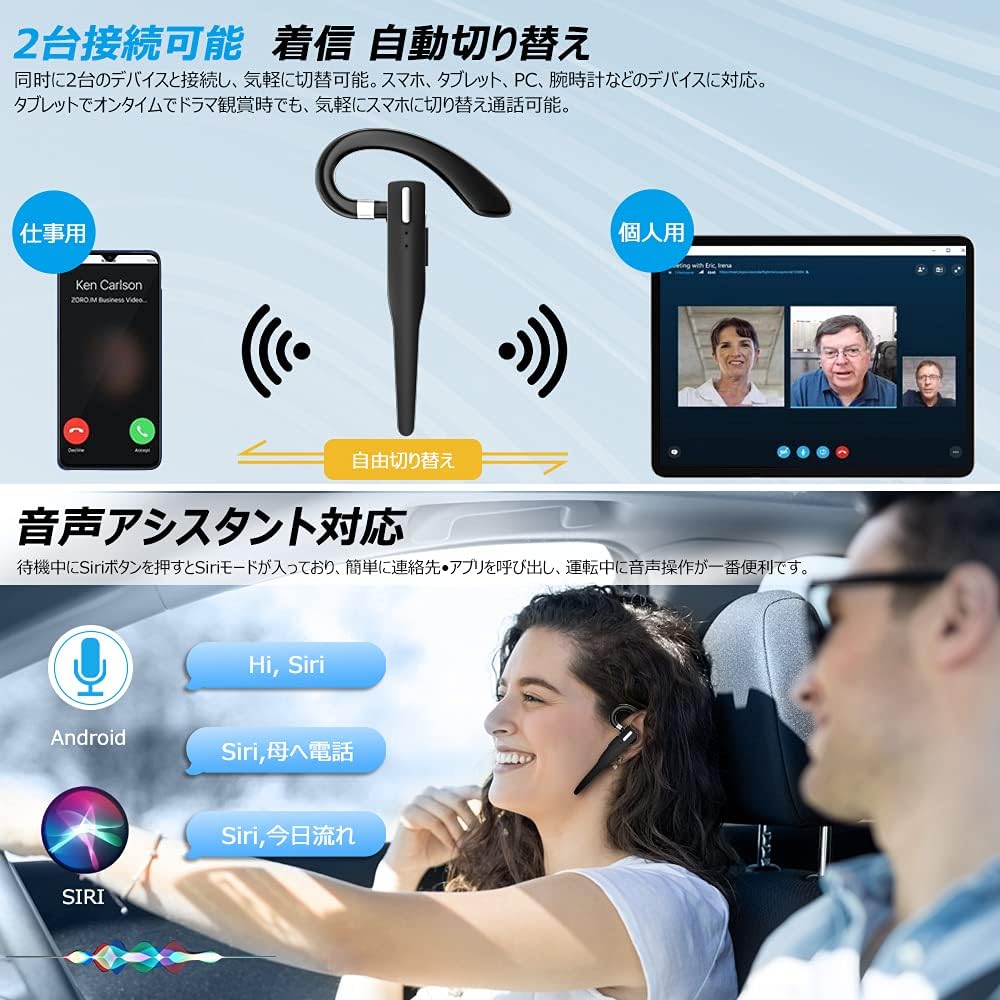
Figure 6.2: Multi-device connectivity and voice assistant features.
6.6 Verbindung mehrerer Geräte
The headset can connect to two Bluetooth devices simultaneously, allowing for seamless switching between them.
- Koppeln Sie das Headset mit dem ersten Gerät wie in Abschnitt 5.2 beschrieben.
- Turn off Bluetooth on the first device. The headset will re-enter pairing mode.
- Koppeln Sie das Headset mit dem zweiten Gerät.
- Turn on Bluetooth on the first device. The headset should now be connected to both devices.
- The headset will automatically switch audio output to the device that is actively playing media or receiving a call.
7. Wartung
7.1 Reinigung
- Wipe the headset and charging case with a soft, dry, lint-free cloth.
- Verwenden Sie keine aggressiven Chemikalien, Reinigungslösungen oder starken Reinigungsmittel.
7.2 Speicherung
- Bewahren Sie das Headset bei Nichtgebrauch im Ladeetui auf, um es vor Staub und Beschädigungen zu schützen.
- Bewahren Sie das Gerät an einem kühlen, trockenen Ort auf, schützen Sie es vor direkter Sonneneinstrahlung und extremen Temperaturen.

Figure 7.1: The compact charging case provides convenient storage.
8. Fehlerbehebung
Sollten Sie Probleme mit Ihrem Headset haben, beachten Sie bitte die folgenden häufig auftretenden Probleme und Lösungen:
| Problem | Mögliche Ursache | Lösung |
|---|---|---|
| Das Headset lässt sich nicht einschalten. | Schwache Batterie. | Charge the headset and charging case. |
| Kopplung mit dem Gerät nicht möglich. | Bluetooth ist am Gerät deaktiviert; Headset befindet sich nicht im Kopplungsmodus; zu weit vom Gerät entfernt. | Ensure Bluetooth is on; take headset out of case to enter pairing mode; keep within 10 meters. |
| Kein Ton oder geringe Lautstärke. | Volume too low; headset not connected; sound output set to another device. | Increase volume on headset and device; re-pair headset; check device's audio output settings. |
| Mikrofon funktioniert nicht. | Microphone muted; incorrect audio input settings on device. | Unmute microphone (long press Volume Up/Down); check device's audio input settings. |
| Connection unstable or drops. | Störungen; zu große Entfernung zum Gerät; schwacher Akku. | Move closer to device; avoid strong electromagnetic interference; charge headset. |
9. Spezifikationen
| Besonderheit | Detail |
|---|---|
| Modell | VYK-B26 |
| Bluetooth-Version | 5.1 |
| Geräuschunterdrückung | CVC8.0 |
| Akkukapazität des Headsets | 100 mAh |
| Akkukapazität des Ladegehäuses | 500 mAh |
| Gesprächszeit | Bis zu 12 Stunden |
| Musikwiedergabezeit | Bis zu 12 Stunden |
| Gesamtnutzungszeit (mit Hülle) | Bis zu 72 Stunden |
| Standby-Zeit | Bis zu 400 Stunden |
| Ladezeit | Ca. 1.5 Stunden |
| Ladeanschluss | USB Typ C |
| Wasserdichtigkeit | IPX7 (schweißfest) |
| Kompatibilität | iOS, Android, Windows (Bluetooth-enabled devices) |

Figure 9.1: Advanced Bluetooth 5.1 and CVC8.0 Noise Cancelling features.
10. Garantie und Support
Kimwood products are designed for reliability and performance. For warranty information and technical support, please refer to the contact details provided on the product packaging or visit the official Kimwood webBitte bewahren Sie Ihren Kaufbeleg für Garantieansprüche auf.