
Einführung
The Macally BTBLZKEYSG is a full-size backlit Bluetooth keyboard designed specifically for Mac and iOS devices. It features a MacOS-specific layout with 107 scissor-switch keys and 14 convenient shortcuts, enhancing workflow and productivity. This keyboard allows seamless pairing and switching between up to three Bluetooth-enabled devices, including MacBooks, iMacs, iPhones, and iPads. The integrated white LED backlighting offers three adjustable brightness levels for comfortable typing in various lighting conditions. Powered by a built-in 1500mAh rechargeable battery, it provides extended usage time between charges.
Packungsinhalt
- Macally BTBLZKEYSG Backlit Bluetooth Keyboard
- USB-C-Ladekabel
- Bedienungsanleitung
Produkteigenschaften
- Von hinten beleuchtete Tasten: Crisp white LEDs with 3 brightness levels for typing in low-light environments. Backlight can be turned off.
- MacOS Specific Layout: 107 scissor-switch keys with 14 macOS shortcuts for familiar and efficient use.
- Bluetooth für mehrere Geräte: Easily pair and switch between up to 3 Bluetooth-enabled devices (Mac, iPhone, iPad) within a 30 ft wireless range.
- Wiederaufladbarer Akku: Built-in 1500mAh battery provides 1 to 4 weeks of runtime with backlighting on. USB-C charging cable included.
- Schlankes und komfortables Design: Only 0.87 inches thin with an integrated kickstand for ergonomic typing.
Aufstellen
1. Aufladen der Tastatur
Before initial use, fully charge the keyboard. Connect the supplied USB-C charging cable to the keyboard's USB-C port and the other end to a USB power source (e.g., computer USB port, USB wall adapter). The LED indicator will show charging status.
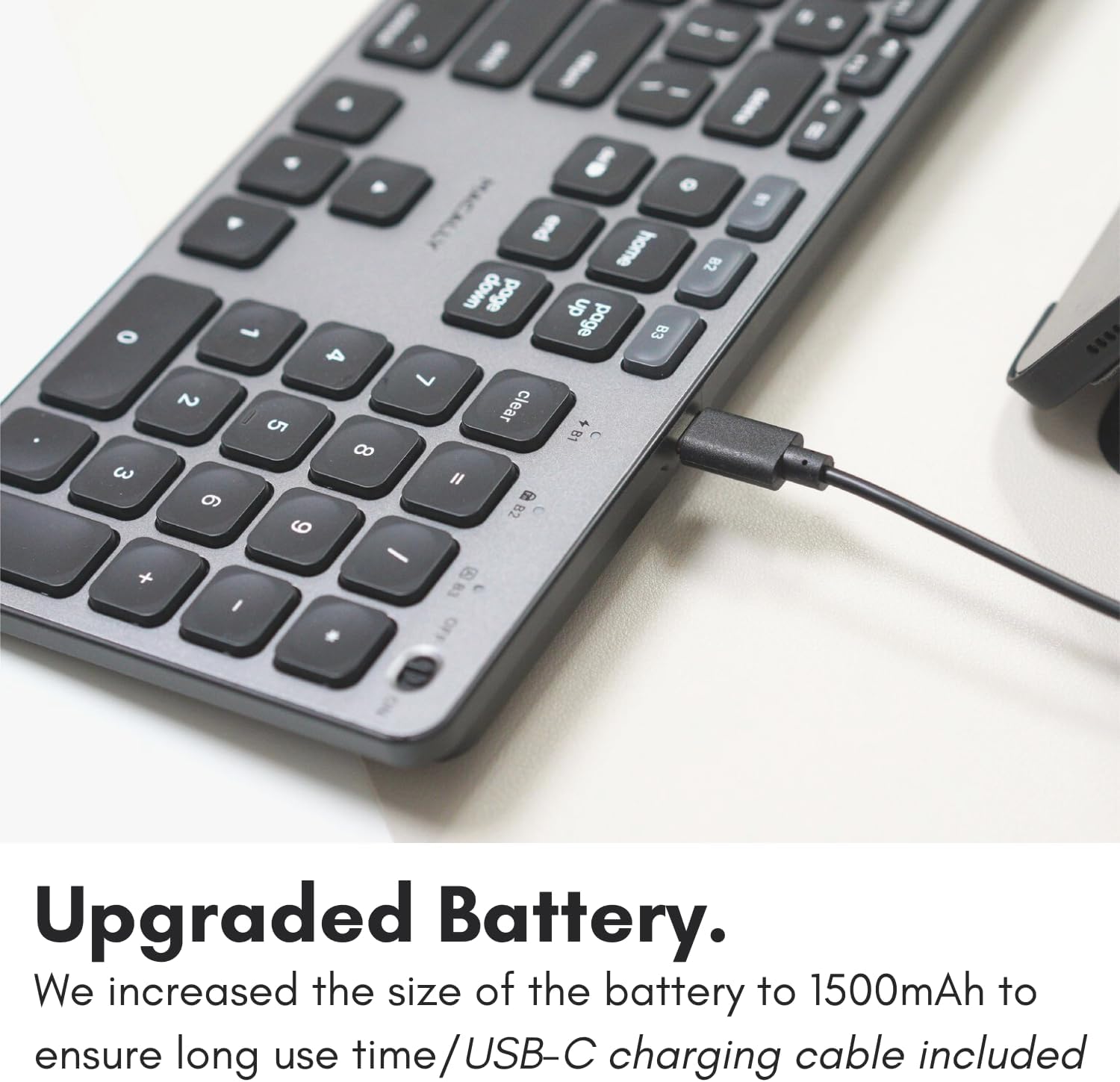
Image: The USB-C charging port on the side of the Macally BTBLZKEYSG keyboard, with the charging cable inserted.
2. Einschalten
Locate the power switch on the keyboard, usually on the top right edge. Slide the switch to the 'ON' position.
3. Koppeln mit einem Gerät
- Stellen Sie sicher, dass die Tastatur eingeschaltet ist.
- Press and hold one of the Bluetooth pairing keys (B1, B2, or B3) for 3-5 seconds until the corresponding LED indicator above the key starts blinking rapidly. This indicates the keyboard is in pairing mode.
- On your Mac or iOS device, go to Systemeinstellungen (oder Systemeinstellungen) > Bluetooth.
- Look for "Macally BTBLZKEYSG" (or similar name) in the list of available devices and click/tap to connect.
- Geben Sie bei Aufforderung den auf Ihrem Bildschirm angezeigten Kopplungscode über die Tastatur ein und drücken Sie die Taste. Eingeben.
- Once connected, the LED indicator for the selected Bluetooth channel will stop blinking and remain solid for a few seconds before turning off.

Image: The Macally BTBLZKEYSG keyboard shown with a MacBook and an iPad, illustrating its multi-device capability.
Bedienungsanleitung
MacOS Specific Keys and Shortcuts
The keyboard features a standard MacOS layout, including function keys (F1-F12) that double as media and system control shortcuts. Use the Fn key in combination with these keys to access their secondary functions.
- Fn+F1: Verringern Sie die Bildschirmhelligkeit
- Fn+F2: Erhöhen Sie die Bildschirmhelligkeit
- Fn+F3: Missionskontrolle
- Fn+F4: Launchpad
- Fn+F7: Vorheriger Titel
- Fn+F8: Abspielen/Pause
- Fn+F9: Nächster Titel
- Fn+F10: Lautstärke stumm schalten
- Fn+F11: Lautstärke verringern
- Fn+F12: Lautstärke erhöhen
Steuerung der Hintergrundbeleuchtung
The keyboard's backlight can be adjusted to three brightness levels or turned off completely. Use the dedicated backlight control keys, typically located near the function keys or arrow keys, to cycle through the brightness settings.

Image: The Macally BTBLZKEYSG keyboard with its white LED backlighting illuminated at different intensity levels.
Umschalten zwischen gekoppelten Geräten
To switch between your paired Bluetooth devices, simply press the corresponding Bluetooth pairing key (B1, B2, or B3) that your device is connected to. The keyboard will automatically connect to the selected device.
Wartung
Um die Langlebigkeit und optimale Leistung Ihrer Tastatur zu gewährleisten, beachten Sie bitte folgende Wartungshinweise:
- Reinigung: Mit einem weichen, fusselfreien Tuch leichtampened with water or a mild cleaning solution to wipe the keyboard surface. Avoid harsh chemicals or abrasive materials.
- Staubentfernung: Verwenden Sie Druckluft, um Staub und Schmutz zwischen den Tasten zu entfernen.
- Lagerung: Bei längerer Nichtbenutzung sollte die Tastatur an einem trockenen, kühlen Ort aufbewahrt werden.
- Vermeiden Sie Flüssigkeiten: Setzen Sie die Tastatur keiner übermäßigen Feuchtigkeit aus und verschütten Sie keine Flüssigkeiten darauf.
Fehlerbehebung
| Problem | Lösung |
|---|---|
| Die Tastatur lässt sich nicht einschalten. | Ensure the power switch is in the 'ON' position. Charge the keyboard using the supplied USB-C cable. |
| Die Tastatur lässt sich nicht mit dem Gerät koppeln. | Ensure the keyboard is in pairing mode (LED blinking). Check your device's Bluetooth settings to ensure Bluetooth is enabled and the keyboard is visible. Try restarting both the keyboard and your device. |
| Die Tastatur trennt häufig die Verbindung. | Ensure the keyboard is within the 30 ft wireless range of your device. Check for interference from other wireless devices. Ensure the keyboard battery is sufficiently charged. |
| Die Hintergrundbeleuchtung funktioniert nicht. | Press the backlight control keys to cycle through brightness levels. Ensure the keyboard battery is charged, as low battery may disable backlighting. |
| Tasten reagieren nicht. | Check the Bluetooth connection. If connected, try restarting the keyboard. Ensure no debris is lodged under the keys. |
Technische Daten
| Besonderheit | Detail |
|---|---|
| Modellnummer | BTBLZKEYSG |
| Konnektivität | Bluetooth, kabellos |
| Kompatible Geräte | Mac Mini / Pro Studio, iMac, Macbook Air, MacBook Pro, iPhone, iPad |
| Tastaturbeschreibung | Backlit Keyboard for Mac |
| Besondere Merkmale | Backlit, Multi-Device Bluetooth, Rechargeable |
| Farbe | Grau |
| Tastatur Hintergrundbeleuchtung | Single Color (White), 3 Brightness Levels |
| Technische Daten | 16.8 Zoll L x 4.6 Zoll B x 0.87 Zoll H |
| Anzahl der Schlüssel | 107 |
| Stromquelle | Batteriebetrieben (1500 mAh wiederaufladbar) |
| Schaltertyp | Tactile Scissor Keys |
| Tastaturlayout | QWERTY (MacOS) |
| Material | Aluminium |
| UPC | 701107500362 |
Offizielles Produktvideo
Video: Ein überview of the Macally Backlit Bluetooth Keyboard for Mac & iOS, highlighting its features and compatibility.
Garantie und Support
The Macally BTBLZKEYSG Backlit Bluetooth Keyboard comes with a warranty of up to two years. For technical support, warranty claims, or further assistance, please visit the official Macally webWebsite oder wenden Sie sich an die Kundendienstabteilung.