
1. Einleitung
The Sonoro Easy is a compact and portable digital radio designed to provide powerful sound for various occasions. It features FM, DAB+, and Bluetooth connectivity, along with an AUX input for external devices. Its small footprint allows for easy placement in any room, and the intuitive controls ensure straightforward operation. The integrated LED night light and USB charging port add to its versatility, making it an ideal companion for your bedroom, kitchen, or on the go.
2. Einrichtung
2.1 Auspacken
Carefully remove the Sonoro Easy radio from its packaging. Ensure all components are present:
- Sonoro Easy Digital Radio
- Netzteil
- Benutzerhandbuch (dieses Dokument)
2.2 Einschalten
The Sonoro Easy can be powered via the included mains adapter or by batteries for portable use.
Netzstrom:
- Connect the power adapter to the "12V - 2.5A" DC input port on the rear of the radio.
- Stecken Sie das Netzteil in eine geeignete Steckdose.
- Drücken Sie die Leistung button on the front panel to turn on the device.
Batterieleistung:
The radio supports alkaline or NiMH rechargeable batteries (not included). The battery compartment is located on the bottom of the unit.
- Öffnen Sie die Abdeckung des Batteriefachs.
- Legen Sie die benötigten Batterien ein und achten Sie dabei auf die richtige Polarität.
- Schließen Sie den Batteriefachdeckel fest.
- Drücken Sie die Leistung Taste, um das Gerät einzuschalten.

Figure 1: Rear panel connections including power input and antenna.
2.3 Initial Setup and Antenna
Upon first power-on, the radio may perform an initial scan for DAB+ stations. Extend the telescopic antenna for optimal reception for both FM and DAB+ radio.

Figure 2: Front display and controls of the Sonoro Easy radio.
3. Bedienungsanleitung
3.1 Grundlegende Bedienelemente
The Sonoro Easy features intuitive controls located on the top and front panels.
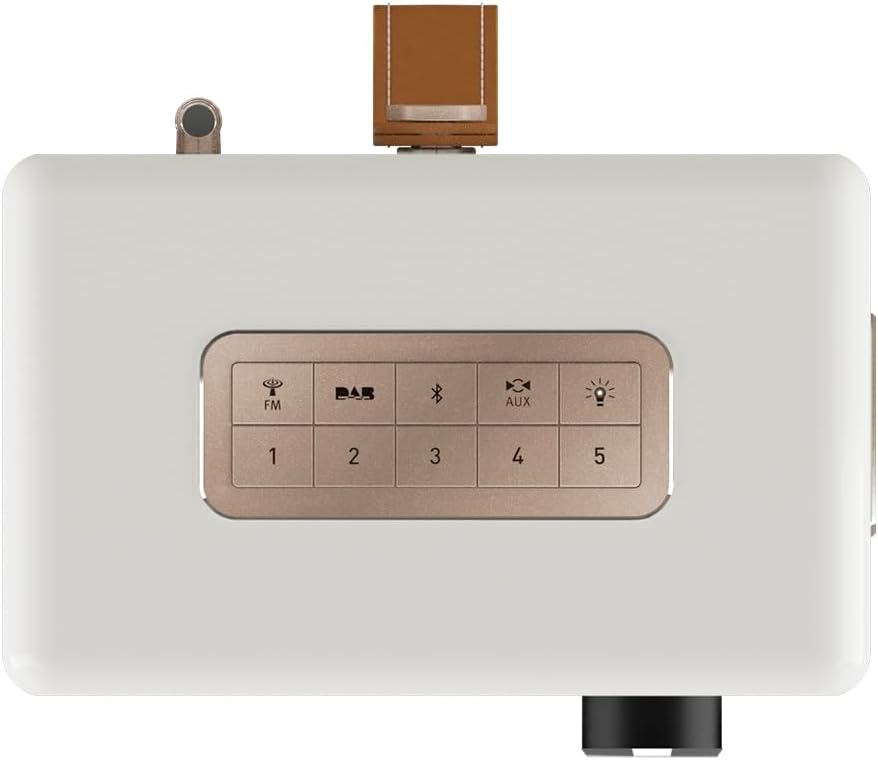
Figure 3: Top panel controls including preset and function buttons.
- Netzschalter: Schaltet das Radio ein oder aus.
- Drehknopf: Used for volume control, menu navigation, and selection.
- Voreingestellte Tasten (1-5): Speichern und rufen Sie Ihre Lieblingsradiosender ab.
- Function Buttons (FM, DAB, Bluetooth, AUX, Night Light): Wählen Sie die gewünschte Betriebsart aus.
3.2 Radio Modes (DAB+ / FM)
DAB+ Radio:
- Drücken Sie die TUPFEN button to enter DAB+ mode.
- Das Radio sucht automatisch nach verfügbaren Sendern.
- Use the rotary knob to scroll through the station list and press to select.
- Um einen Sender als Voreinstellung zu speichern, halten Sie eine der folgenden Tasten gedrückt: Voreingestellte Tasten (1-5) until the display confirms.
FM Radio:
- Drücken Sie die FM Taste, um in den FM-Modus zu wechseln.
- Use the rotary knob to manually tune to a frequency or press and hold to auto-scan for the next available station.
- Um einen Sender als Voreinstellung zu speichern, halten Sie eine der folgenden Tasten gedrückt: Voreingestellte Tasten (1-5) until the display confirms.
3.3 Bluetooth-Konnektivität
- Drücken Sie die Bluetooth button to activate Bluetooth pairing mode. The display will show "Pairing".
- On your mobile device, enable Bluetooth and search for "Sonoro Easy".
- Select "Sonoro Easy" from the list of available devices to connect.
- Sobald die Verbindung hergestellt ist, können Sie Audio von Ihrem Gerät an das Radio streamen.
3.4 AUX-Eingang
- Connect an external audio device (e.g., MP3 player) to the "AUX IN" port on the rear of the radio using a 3.5mm audio cable (not included).
- Drücken Sie die AUX button to select AUX input mode.
- Steuern Sie die Wiedergabe von Ihrem externen Gerät.
3.5 Wecker und Schlaftimer
The Sonoro Easy features a dual alarm function and a sleep timer.
- Alarme einstellen: Access the alarm settings through the menu (usually by pressing the rotary knob and navigating). Follow on-screen prompts to set alarm time, source (buzzer, FM, DAB+), and volume.
- Schlaf-Timer: The sleep timer allows the radio to turn off automatically after a set period. This function is typically accessed via the menu.
- Schlummerfunktion: When an alarm sounds, pressing the rotary knob or a designated snooze button will temporarily pause the alarm.
3.6 Night Light and USB Charging
- Nachtlicht: Drücken Sie die Nachtlicht button (often represented by a light bulb icon) to activate the integrated LED night light on the rear of the unit. This provides subtle background illumination.
- USB-Aufladung: The USB port (5V - 2.1A) on the side of the radio can be used to charge compatible smartphones or other small devices. Connect your device using its charging cable.
4. Wartung
4.1 Reinigung
To maintain the appearance of your Sonoro Easy radio:
- Stellen Sie vor der Reinigung sicher, dass das Gerät ausgeschaltet und vom Stromnetz getrennt ist.
- Verwenden Sie ein weiches, trockenes, fusselfreies Tuch, um die Oberflächen abzuwischen.
- Bei hartnäckigen Flecken leicht dampen the cloth with water. Avoid abrasive cleaners, solvents, or chemical sprays.
4.2 Speicherung
When not in use for extended periods, store the radio in a cool, dry place away from direct sunlight and extreme temperatures. If using batteries, remove them to prevent leakage.
5. Fehlerbehebung
| Problem | Mögliche Ursache | Lösung |
|---|---|---|
| Kein Strom / Radio lässt sich nicht einschalten. | Power adapter not connected or faulty. Batteries depleted or incorrectly inserted. | Check power adapter connection and wall outlet. Replace or recharge batteries, ensuring correct polarity. |
| Poor radio reception (DAB+ / FM). | Antenna not extended. Weak signal in the area. Interference from other electronics. | Fully extend the telescopic antenna. Try repositioning the radio. Move away from other electronic devices. |
| Es kann keine Bluetooth-Verbindung hergestellt werden. | Radio not in pairing mode. Device too far away. Bluetooth disabled on source device. | Ensure radio is in Bluetooth pairing mode. Move device closer to the radio. Enable Bluetooth on your source device. |
| Kein Ton vom AUX-Eingang. | AUX cable not connected properly. Radio not in AUX mode. Volume too low on radio or source device. | Check AUX cable connection. Select AUX mode on the radio. Increase volume on both the radio and the external device. |
| Das Display ist entweder zu hell oder zu dunkel. | Die Helligkeitseinstellung des Displays muss angepasst werden. | Adjust display brightness through the radio's menu settings. |
6. Spezifikationen
| Besonderheit | Detail |
|---|---|
| Marke | Sonoro |
| Modellnummer | 88f59bc4-6f28-4e95-95de-ba49a597f237 |
| Farbe | Weiß matt |
| Tuning-Technologie | DAB+, UKW |
| Konnektivität | Bluetooth, AUX In, USB (charging) |
| Besondere Merkmale | Portable, Dual Alarm, Sleep Timer, Snooze, Dimmable Display, LED Night Light, USB Charging Port |
| Stromquelle | Mains (12V - 2.5A), Battery (Alkaline or NiMH, not included) |
| USB-Ausgang | 5V - 2.1A (for charging external devices) |
| Abmessungen (L x B x H) | 18.6 cm x 15.6 cm x 11.8 cm |
| Lautsprecher | 3" Full-range speaker with Bass Reflex tube |
| Material | Hand-polished wooden cabinet |
7. Garantie und Support
7.1 Produktgarantie
The Sonoro Easy Digital Radio comes with a 2 Jahr Herstellergarantie Diese Garantie gilt ab Kaufdatum und deckt Material- und Verarbeitungsfehler bei normalem Gebrauch ab. Bitte bewahren Sie Ihren Kaufbeleg für Garantieansprüche auf.
Von der Garantie ausgeschlossen sind:
- Schäden, die durch Unfall, Missbrauch, Missbrauch, Überschwemmung, Feuer, Erdbeben oder andere äußere Ursachen verursacht wurden.
- Schäden, die durch den Betrieb des Produkts außerhalb der in diesem Handbuch beschriebenen zulässigen oder vorgesehenen Verwendungszwecke verursacht werden.
- Damage caused by service performed by anyone who is not an authorized representative of Sonoro.
- Products or parts that have been modified to alter functionality or capability without the written permission of Sonoro.
7.2 Kundendienst
For technical assistance, warranty claims, or further information, please contact Sonoro customer support. Contact details can typically be found on the official Sonoro webauf der Website oder auf der Produktverpackung.
Please visit the official Sonoro website for the most up-to-date support information and contact options.