
JOYING 6GB+128GB
JOYING 10.1 Inch Android Car Stereo User Manual
Modell: 6 GB + 128 GB
Einführung
This manual provides comprehensive instructions for the installation, operation, maintenance, and troubleshooting of your JOYING 10.1 Inch Android Car Stereo. Please read this manual thoroughly before using the device to ensure proper functionality and safety.
The JOYING Android Car Stereo is an advanced in-dash navigation and entertainment system designed to enhance your driving experience. It features a high-resolution display, powerful processing capabilities, and seamless smartphone integration.

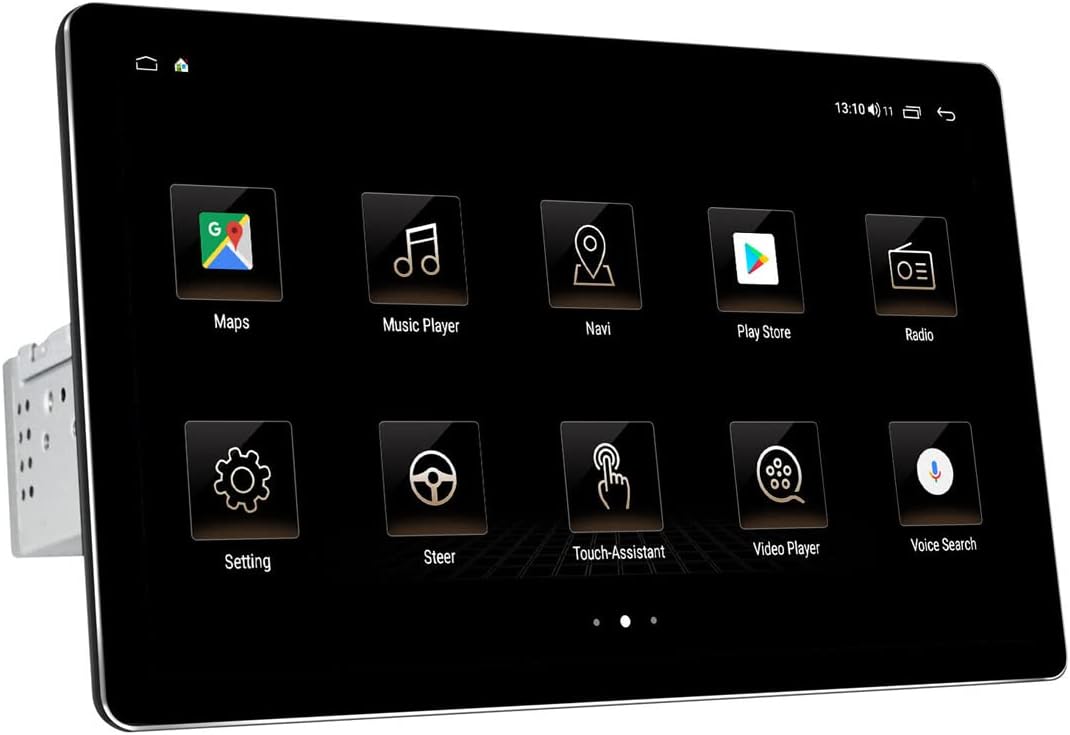
Front view of the JOYING 10.1 Inch Android Car Stereo.
Setup und Installation
Eine fachgerechte Installation ist entscheidend für die optimale Leistung Ihres Autoradios. Wenn Sie mit der Verkabelung von Autoradios nicht vertraut sind, empfiehlt es sich, das Gerät von einem Fachmann einbauen zu lassen.
1. Packungsinhalt und Abmessungen
Before beginning, verify all components are present as listed in the package contents. Familiarize yourself with the unit's dimensions to ensure compatibility with your vehicle's dashboard.

Dimensions and included accessories for the JOYING car stereo.
2. Detachable Screen and Adjustable Mount
The unit features a detachable screen and an adjustable fixed mount. This design allows for flexible positioning to avoid obstructing air-conditioning vents or control switches during installation.

Illustration of the detachable screen and adjustable mounting system.
3. Verkabelung und Anschlüsse
Connect the main power harness, speaker wires, and other necessary cables to the corresponding ports on the back of the unit. Ensure all connections are secure. If your car has a CANbus system, an additional CANbus decoder harness may be required (sold separately).

Detaillierte view of the rear connections and ports on the car stereo.

Example of the wiring harness for connecting the stereo to the vehicle's electrical system.
4. SIM Card and WiFi Setup
The unit supports a built-in 4G module. Insert a SIM card for internet access. It also supports dual-band WiFi (2.4GHz and 5GHz) for stable network connectivity.

Instructions for inserting a SIM card into the unit's 4G module.
5. Initial Power-Up and Screen Attachment
After all connections are made, power on the unit. The first boot-up may take longer (approx. 30-40 seconds). Once the main unit is powered, attach the display screen to the main unit using the provided connectors.
Video demonstrating the physical dimensions, screen attachment, and initial setup of the JOYING 10.1 Inch Car Radio.
Bedienungsanleitung
Your JOYING car stereo runs on Android 10 OS, providing a familiar and intuitive user interface.
1. Benutzeroberflächennavigation
The 10.1-inch touchscreen allows for easy navigation through various applications and settings. The home screen provides quick access to frequently used functions like Maps, Music Player, and Radio.

Examples of the JOYING car stereo's user interface screens.
2. CarLink (Android Auto / CarPlay)
The unit features built-in Carlink, supporting both wired/wireless CarPlay (iOS 10.1 or later) and wired Android Auto (Android 7.0 or later). This allows for seamless integration of your smartphone for navigation, calls, and music, minimizing distractions while driving.

CarPlay interface displaying navigation and music simultaneously.

Explanation of Car-Smartphone Connectivity features.
3. Bluetooth 5.1
With Bluetooth 5.1, the stereo supports audio streaming, automatic phone book transfer, and hands-free calling. Note that it primarily supports phone and OBD dongle connections.
4. Built-in DSP and Audio Settings
The unit features a built-in Digital Signal Processor (DSP) with a 32-band equalizer, allowing independent adjustment for front and rear speakers. This provides enhanced sound quality and customizable audio experiences, including bass reinforcement and filtering.
DSP interface for advanced audio customization.

Visual representation of the Built-in DSP capabilities.
5. Video Playback and Display Quality
The 1920x1200 resolution screen offers a high-definition viewing experience for videos and other media. The brightness adjusts to ensure clear visibility even in daylight.

Resolution comparison illustrating the superior clarity of the 1920x1200 display.
6. Lenkradsteuerung
The unit supports factory steering wheel controls, allowing you to easily switch songs, radio channels, and adjust volume for a safer and more enjoyable journey.

Lenkradsteuerung für komfortable Bedienung.
Wartung
To ensure the longevity and optimal performance of your JOYING car stereo, follow these maintenance guidelines:
- Bildschirmreinigung: Verwenden Sie ein weiches, fusselfreies Tuch, um den Touchscreen vorsichtig abzuwischen. Bei hartnäckigen Flecken etwas nachhelfen.ampReinigen Sie das Tuch mit Wasser oder einem für Bildschirme geeigneten Reiniger. Vermeiden Sie scheuernde Materialien oder aggressive Chemikalien.
- Staubentfernung: Regularly use a soft brush or compressed air to remove dust from vents and connection ports to prevent overheating and maintain proper airflow.
- Software-Updates: Überprüfen Sie regelmäßig die Herstellerangaben. webSuchen Sie auf der Website oder in den Geräteeinstellungen nach verfügbaren Software-Updates. Durch regelmäßige Software-Aktualisierungen können die Leistung verbessert, neue Funktionen hinzugefügt und Fehler behoben werden.
- Umgebungsbedingungen: Vermeiden Sie es, das Gerät extremen Temperaturen, direkter Sonneneinstrahlung über längere Zeiträume oder übermäßiger Feuchtigkeit auszusetzen.
Fehlerbehebung
If you encounter issues with your JOYING car stereo, refer to the following common problems and their solutions:
| Problem | Mögliche Ursache | Lösung |
|---|---|---|
| Gerät lässt sich nicht einschalten. | Falsche Verkabelung; durchgebrannte Sicherung; Problem mit der Stromversorgung. | Check all power connections (yellow and red wires may need to be swapped if not powering on correctly). Inspect the fuse on the unit's wiring harness. Ensure stable power supply from the vehicle. |
| Poor sound quality or crackling microphone. | Improper audio settings; Loose speaker connections; External microphone interference. | Adjust DSP and equalizer settings. Ensure all speaker wires are securely connected. Check external microphone placement and connection; consider relocating it if experiencing excessive noise. |
| Main screen/launcher cannot be changed or font is too small. | Default software limitations; Display scaling settings. | While direct font size adjustment may be limited, some users report success by enabling Developer Options (Settings > About device > Build number, tap 7 times) and adjusting 'Smallest width' (DPI) settings. Installing an alternative launcher from the Play Store may also provide more customization. |
| CarPlay/Android Auto not connecting or unstable. | Incorrect cable; Software incompatibility; Phone settings. | Ensure you are using a high-quality USB cable. Verify your phone's operating system is compatible (Android 7.0+ for Android Auto, iOS 10.1+ for CarPlay). Check phone settings for CarLink permissions. Try restarting both the phone and the car stereo. |
| Die Lenkradbedienelemente funktionieren nicht. | Incorrect wiring; Missing CANbus decoder. | Ensure the steering wheel control wires are correctly connected. If your car has a CANbus system, an additional CANbus decoder harness may be required for full functionality. |
Technische Daten
- Produktabmessungen: 9.65 x 5.08 x 6.34 Zoll
- Artikelgewicht: 5.99 Pfund
- ASIN: B09CM17SZ2
- Datum der Erstveröffentlichung: 14. August 2021
- Hersteller: FREUDE
- Marke: FREUDE
- Konnektivitätstechnologie: Bluetooth, WLAN, USB
- Controller-Typ: iOS, Android
- Besonderheit: TUPFEN
- Kompatible Geräte: Smartphone, Lautsprecher
- HDMI-Anschlüsse insgesamt: 4
- Steckertyp: USB
- Audiocodierung: Stereo
- Audioausgabemodus: Stereo
- Konfiguration der Surround-Sound-Kanäle: 4 Kanäle
Garantie und Support
For warranty information and technical support, please refer to the official JOYING webBesuchen Sie die Website oder kontaktieren Sie direkt den Kundenservice. Bewahren Sie Ihren Kaufbeleg als Kaufnachweis für eventuelle Garantieansprüche auf.
Zugehörige Dokumente - 6 GB + 128 GB
 |
JOYING Double Din Car Stereo Installation Guide Comprehensive installation instructions for JOYING Double Din Car Stereos with floating screens. This guide covers package contents and step-by-step assembly for universal head units. |
 |
Joying JY-UZS11N8 Autoradio Benutzerhandbuch und Anleitung Umfassendes Benutzerhandbuch für das Autoradiosystem Joying JY-UZS11N8 mit detaillierten Informationen zu Sicherheitsvorkehrungen, Bildschirmeinstellungen, grundlegenden Bedienvorgängen, Radio, Bluetooth, Videowiedergabe und erweiterten Audioeinstellungen. |
 |
Single Din Car Stereo Installation Guide Step-by-step installation instructions for a single DIN car stereo, covering unit assembly and dashboard integration. Includes a list of included components and detailed visual guidance. |
 |
JOYING Qualcomm Head Unit: Front and Rear Camera Installation Guide Connect and configure front and rear cameras for your JOYING Qualcomm Head Unit. This guide details wiring connections and essential settings for seamless switching between camera viewn während der Fahrt. |
 |
CHUWI SurPad User Manual: Features, Specifications, and Troubleshooting Guide Comprehensive user manual for the CHUWI SurPad tablet, providing detailed information on its features, technical specifications, safety precautions, product overview, and troubleshooting solutions. Learn how to operate your device effectively. |
 |
Azeyou 14.1" U-Serie Laptop AL141U Benutzerhandbuch Benutzerhandbuch für den Azeyou 14.1" U Series Laptop (6GB RAM, 128GB Speicher), Modell AL141U. Umfasst Sicherheit, Einrichtung, überview, Fehlerbehebung und FCC-Konformität. |
Ask a question about this manual
Ask about setup, troubleshooting, compatibility, parts, safety, or missing instructions. Manuals+ will review the question and use this page’s manual context to help answer it.