
1. Produktüberschreitungview
The SOCOTRAN T82 is a rechargeable two-way radio designed for reliable communication. It features Bluetooth earpiece connectivity, NOAA weather alerts (US version), SOS function, vibration alerts, and a built-in flashlight. This manual provides instructions for proper setup, operation, and maintenance of your walkie talkies.

Image: SOCOTRAN T82 walkie talkie highlighting features like weather warning, super vibration, wireless earpiece, flashlight, long standby time, charging cable, CTCSS/DCS, and dual channel monitor.
2. Lieferumfang
Prüfen Sie nach dem Öffnen der Verpackung, ob alle folgenden Artikel enthalten sind:
- Rechargeable Walkie Talkies (2 units)
- Bluetooth Earpieces and Mic (2 units)
- Wiederaufladbare Batterien (2 Stück)
- Charging Docks (2 units)
- USB-Ladekabel (2 Stück)
- Gürtelclips (2 Stück)

Image: The package contents of the SOCOTRAN T82 walkie talkies, including two radios, two charging docks, two Bluetooth earpieces, and charging cables.
3. Einrichtung
3.1 Einlegen der Batterie
- Stellen Sie sicher, dass das Funkgerät ausgeschaltet ist.
- Suchen Sie die Abdeckung des Batteriefachs auf der Rückseite des Geräts.
- Schieben Sie die Abdeckung nach unten oder lösen Sie sie, um sie zu öffnen.
- Insert the rechargeable Lithium Ion battery, ensuring the contacts align correctly.
- Setzen Sie den Batteriefachdeckel wieder auf und befestigen Sie ihn.

Image: Diagram showing multiple charging modes for the walkie talkie, including AA battery use and USB charging, with a focus on battery installation.
3.2 Erstaufladung
Before first use, fully charge the walkie talkies and Bluetooth earpieces.
- Connect the USB charging cable to the charging dock and a power source.
- Place the walkie talkie into the charging dock. The charging indicator will illuminate.
- For Bluetooth earpieces, connect the micro-USB cable directly to the earpiece charging port.
- Der Ladevorgang ist abgeschlossen, wenn die Kontrollleuchte sich ändert oder ausgeht.
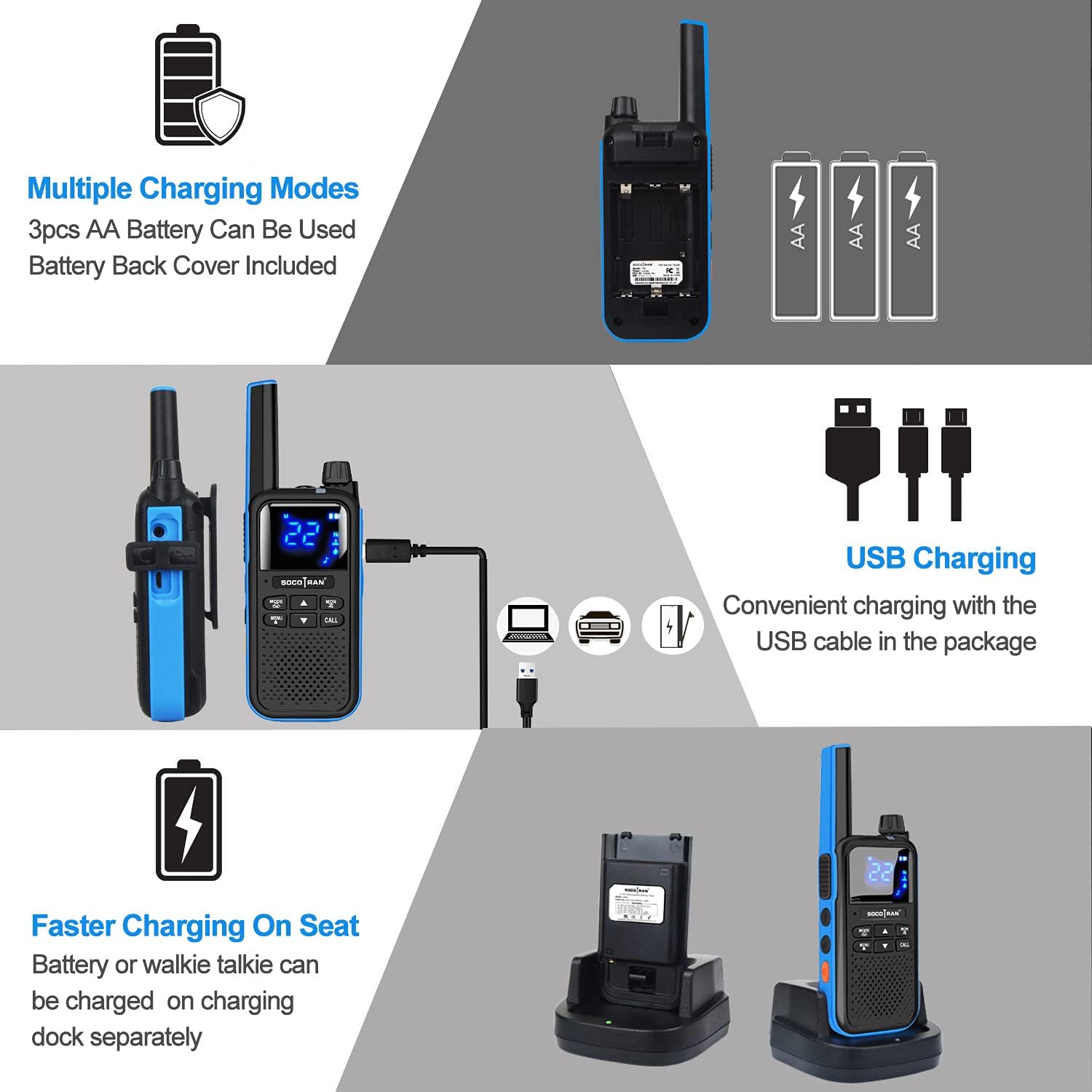
Image: Two SOCOTRAN T82 walkie talkies being charged via USB cables, with two Bluetooth earpieces shown nearby.
3.3 Ein-/Ausschalten
To power on or off the walkie talkie, rotate the upper knob clockwise to turn on and counter-clockwise to turn off. A voice prompt will confirm the action.
3.4 Bluetooth Earpiece Pairing
The walkie talkie comes with two wireless Bluetooth earpieces that can be paired for hands-free operation. The Bluetooth headset supports a 10-meter call range.
- Ensure both the walkie talkie and the Bluetooth earpiece are charged.
- Turn on the walkie talkie.
- Activate pairing mode on the Bluetooth earpiece (refer to earpiece specific instructions, usually by holding a multi-function button).
- On the walkie talkie, navigate to the Bluetooth pairing menu (consult the on-screen display and menu buttons).
- Select the earpiece from the list of available devices to pair.
- A confirmation tone or indicator light will show successful pairing.

Image: Close-up of the Bluetooth earpiece with labels for hanging ear hook, silicone ear caps, USB charging port, multi-function button, and volume controls.
Video: This video demonstrates the unboxing and basic setup of the SOCOTRAN T82 walkie talkies, including powering on, battery installation, and pairing with the Bluetooth earpieces. It also highlights features like call tones and privacy codes.
4. Bedienungsanleitung
4.1 Kanalauswahl
The SOCOTRAN T82 supports 22 FRS channels (US version) or 16 channels (EU version). To change channels:
- Drücken Sie die SPEISEKARTE , um das Menü aufzurufen.
- Verwenden Sie die Hoch/Runter arrow buttons to navigate to the channel selection option.
- Drücken SPEISEKARTE again to confirm, then use Hoch/Runter to select your desired channel.
- Drücken SPEISEKARTE to save the selection or ANRUF ohne zu speichern verlassen.
4.2 Senden und Empfangen
- Zum Senden die Taste gedrückt halten PTT (Push-to-Talk) button on the side of the walkie talkie. Speak clearly into the microphone.
- Lassen Sie den PTT Taste zum Empfangen.
- Ensure all walkie talkies are on the same channel and privacy code for communication.
4.3 Datenschutzbestimmungen (CTCSS/DCS)
The T82 offers 155 sets of CTCSS (Continuous Tone-Coded Squelch System) and DCS (Digitally Coded Squelch) privacy codes to minimize interference from other users on the same channel.
- Drücken Sie die SPEISEKARTE Taste.
- Navigate to the CTCSS or DCS setting using the Hoch/Runter Pfeiltasten.
- Drücken SPEISEKARTE again, then use Hoch/Runter to select a privacy code.
- Drücken SPEISEKARTE to save. All radios in your group must use the same channel and privacy code.
4.4 NOAA Weather Alert (US Version)
The US version of the T82 includes NOAA weather warnings to keep you informed of severe weather conditions.
- To activate NOAA weather alerts, access the menu and locate the NOAA feature.
- Enable the weather alert function. The radio will monitor NOAA weather channels and alert you to broadcasts.

Image: A red SOCOTRAN T82 walkie talkie in an outdoor setting, illustrating its NOAA Weather Radio feature with a cloud and rain icon.
4.5 Sonstige Funktionen
- Vibrationsalarm: The walkie talkie can be set to vibrate for incoming calls, useful in noisy environments or when discretion is required.
- Taschenlampe: A built-in LED flashlight provides illumination in low-light conditions. Activate it via a dedicated button or menu option.
- SOS-Funktion: For emergencies, the SOS function can transmit an alert signal. Refer to the menu for activation.
- VOX (Sprachgesteuerte Vermittlungsstelle): Allows hands-free transmission when using a compatible headset, activating the microphone when you speak.
- Dual Channel Monitor: Enables monitoring of two channels simultaneously.
5. Wartung
5.1 Allgemeine Pflege
- Halten Sie das Walkie-Talkie trocken. Vermeiden Sie den Kontakt mit Regen, Feuchtigkeit oder Flüssigkeiten.
- Reinigen Sie das Gerät mit einem weichen, damp Tuch. Verwenden Sie keine scharfen Chemikalien oder Scheuermittel.
- Avoid extreme temperatures. Do not store in hot or cold environments.
- Handle with care. Do not drop or subject the unit to strong impacts.
5.2 Batteriepflege
- Use only the specified rechargeable Lithium Ion batteries.
- Wenn das Gerät längere Zeit nicht verwendet wird, entfernen Sie die Batterien.
- Batterien sind gemäß den örtlichen Vorschriften zu entsorgen. Nicht verbrennen.
6. Fehlerbehebung
| Problem | Mögliche Ursache | Lösung |
|---|---|---|
| Kein Strom | Batterie schwach oder nicht richtig eingesetzt. | Laden Sie den Akku auf oder setzen Sie ihn korrekt wieder ein. |
| Kann nicht mit anderen Funkgeräten kommunizieren. | Unterschiedliche Kanäle oder Datenschutzcodes. Außerhalb der Reichweite. | Stellen Sie sicher, dass alle Funkgeräte auf demselben Kanal und mit demselben Datenschutzcode eingestellt sind. Gehen Sie näher an andere Funkgeräte heran. |
| Bluetooth earpiece not pairing | Earpiece not in pairing mode. Out of range. Interference. | Ensure earpiece is in pairing mode. Move earpiece closer to radio. Try re-pairing in a different location. |
| Schlechte Tonqualität / Rauschen | Weak signal. Interference. VOX sensitivity too high (for earpiece). | Move to an area with better signal. Adjust VOX sensitivity if using earpiece. Check for obstructions. |
| Kurze Akkulaufzeit | Battery not fully charged. Old battery. Frequent transmission. | Ensure full charge. Consider replacing old batteries. Reduce transmission time. |
7. Spezifikationen
| Besonderheit | Detail |
|---|---|
| Marke | SOCOTRAN |
| Modellnummer | T82 (based on video title, original model number is placeholder) |
| Artikelgewicht | 1.56 Pfund |
| Technische Daten | 4.33 x 2.2 x 1.2 Zoll |
| Batterien | 2 Lithium-Ionen-Akku erforderlich (im Lieferumfang enthalten) |
| Anzahl der Kanäle | 22 (FRS) |
| Besonderheit | Wiederaufladbar |
| Frequenzbereich | 300 MHz - 3 GHz (UHF range) |
| Maximale Sprechreichweite | 5 Meilen |
| Wasserbeständigkeit | Wasserdicht |
| Kompatible Geräte | Other FRS two-way radios, Bluetooth devices |
8. Garantie und Support
For warranty information and customer support, please refer to the documentation included with your purchase or contact SOCOTRAN customer service directly. Protection plans may be available for extended coverage.
- 2-Jahres-Schutzplan: Erhältlich zum Kauf.
- 3-Jahres-Schutzplan: Erhältlich zum Kauf.
- Rundumschutz: Monatlicher Plan, der berechtigte vergangene und zukünftige Käufe abdeckt.


