
Einführung
Welcome to the user manual for your Naztech NXT-700 Trucker Headset. This guide provides detailed instructions on how to set up, operate, maintain, and troubleshoot your new wireless headset. Please read this manual thoroughly to ensure optimal performance and longevity of your device.
Produkt überview
Im Lieferumfang enthaltene Komponenten
- Naztech NXT-700 Headset
- USB-C-Ladekabel
- 2x Mikrofon-Windschutz
- Headset Hanging Hook
Hauptmerkmale
- Crystal-Clear Calls & Music: Features HD Sound and patented NoiseHush technology for 96% background noise cancellation.
- Drahtloser Komfort: Bluetooth 5.0 for untethered movement, ideal for hands-free communication.
- Ganztägiger Komfort: Designed with an extra-wide adjustable headband and ultra-soft memory foam ear cups.
- Verlängerte Akkulaufzeit: Up to 32 hours of talk time and 550 hours of standby time.
- Nahtlose Multi-Geräte-Konnektivität: Multipoint connectivity with an impressive 300 ft Bluetooth range.
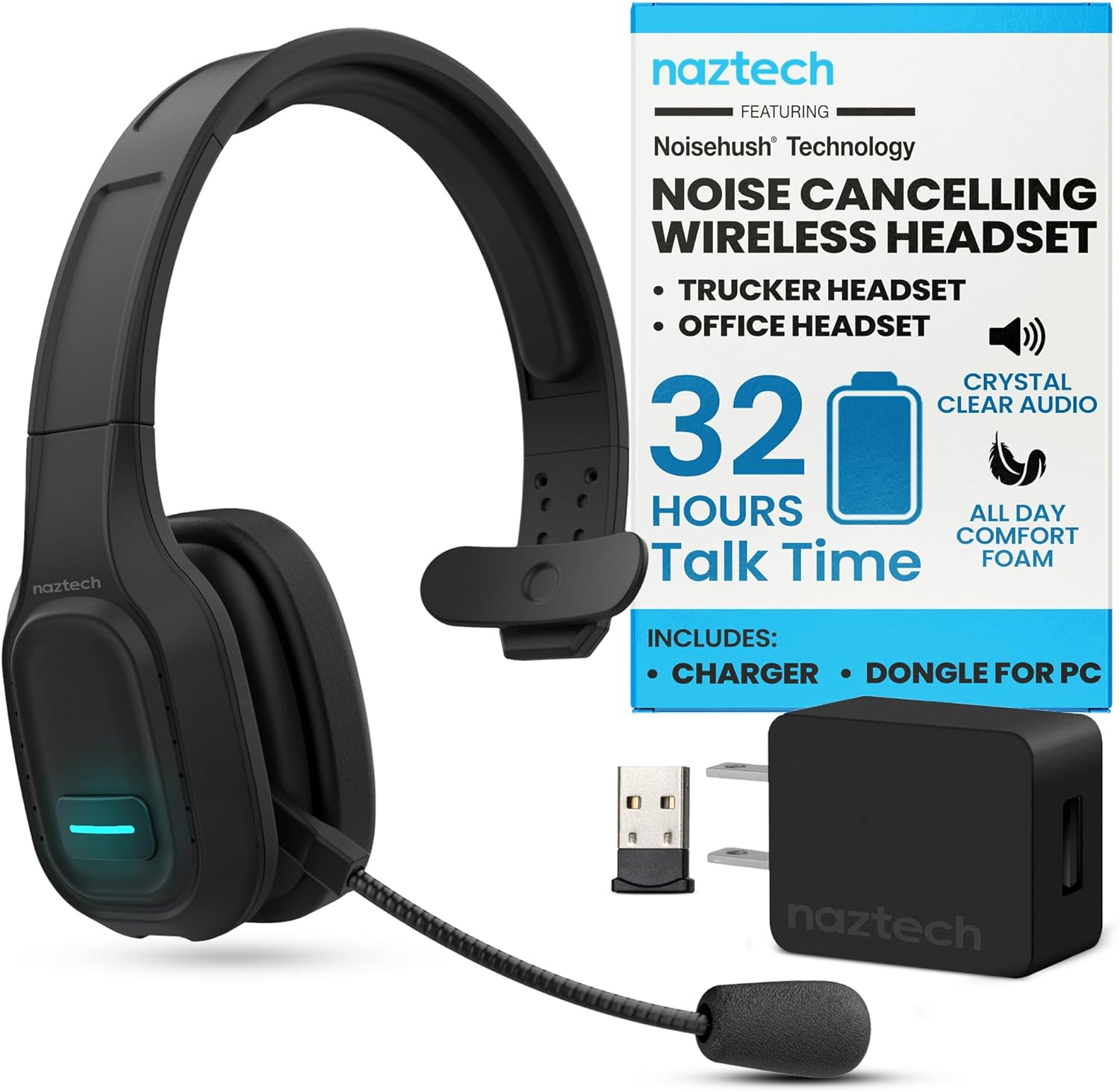
Image: The Naztech NXT-700 headset shown with its included accessories: a USB-C charging cable, a USB wall adapter, and a USB dongle for PC connectivity. This image highlights the complete package for the user.

Image: The Naztech NXT-700 headset displayed alongside icons representing its key features: HD Definition Audio, Voice Assistant, lightweight design (4.8 oz), GPS Navigation, Caller ID Announcement, and Extreme Comfort. This visual summary helps users quickly grasp the headset's capabilities.
Aufstellen
Aufladen des Headsets
- Schließen Sie das USB-C-Ladekabel an den Ladeanschluss des Headsets an.
- Verbinden Sie das andere Ende des Kabels mit einer kompatiblen USB-Stromquelle (z. B. Netzteil, USB-Anschluss am Computer).
- The LED indicator on the headset will show charging status. A full charge takes approximately 90 minutes.
- Once fully charged, the headset provides up to 32 hours of talk time and 550 hours of standby time.
Kopplung mit einem Gerät
- Stellen Sie sicher, dass das Headset ausgeschaltet ist.
- Halten Sie die Multifunktionstaste gedrückt, bis die LED-Anzeige abwechselnd blau und rot blinkt und damit den Kopplungsmodus signalisiert.
- Aktivieren Sie auf Ihrem Gerät (Smartphone, Tablet, Laptop) Bluetooth und suchen Sie nach verfügbaren Geräten.
- Select "NXT-700" from the list of found devices.
- Sobald die Verbindung hergestellt ist, leuchtet die LED-Anzeige entweder durchgehend blau oder blinkt langsam blau.
- For multipoint connectivity, repeat the pairing process with a second device. The headset can maintain a connection with two devices simultaneously.
Anpassen des Headsets
- Passen Sie das Kopfband so an, dass es bequem und sicher auf Ihrem Kopf sitzt.
- Position the flexible, rotatable microphone boom close to your mouth for optimal voice pickup.
- Attach one of the included microphone windscreens to reduce breath noise and environmental sounds.
Bedienungsanleitung
Ein-/Ausschalten
- Zum Einschalten: Halten Sie den Netzschalter gedrückt, bis die LED-Anzeige aufleuchtet.
- Zum Ausschalten: Halten Sie den Netzschalter gedrückt, bis die LED-Anzeige erlischt.
Anruf-Management
- Answer/End Call: Press the Multi-function button once.
- Reject Call: Press and hold the Multi-function button for 2 seconds.
- Redial Last Number: Double-press the Multi-function button.
- Mute/Unmute Microphone: Press the Mute button on the microphone boom.
Audiowiedergabe
- Wiedergabe/Pause: Drücken Sie einmal die Multifunktionstaste.
- Next Track: Press and hold the Volume Up button.
- Previous Track: Press and hold the Volume Down button.
- Volume Up: Press the Volume Up button.
- Volume Down: Press the Volume Down button.
Sprachassistent
- Activate Voice Assistant: Press the dedicated Voice Control button (if available) or double-press the Multi-function button (refer to specific model instructions).

Image: A woman wearing the Naztech NXT-700 headset while driving a truck, demonstrating its use for crystal-clear audio during extended journeys. The image emphasizes the headset's design for eliminating road noise.

Image: A woman wearing the Naztech NXT-700 headset while working on a laptop in an office environment, illustrating its suitability for clear calls and productive meetings.
Wartung
Reinigung
- Wischen Sie das Headset mit einem weichen, trockenen Tuch ab.
- For the ear cups, use a slightly damp Bei Bedarf mit einem Tuch abwischen und vor Gebrauch vollständig an der Luft trocknen lassen.
- Regularly replace the microphone windscreen to maintain optimal sound quality and hygiene.
- Vermeiden Sie die Verwendung scharfer Chemikalien oder scheuernder Materialien zum Reinigen.
Lagerung
- Bewahren Sie das Headset an einem kühlen, trockenen Ort fern von direkter Sonneneinstrahlung und extremen Temperaturen auf.
- Use the included headset hanging hook for convenient and safe storage when not in use.
Fehlerbehebung
| Problem | Mögliche Ursache | Lösung |
|---|---|---|
| Das Headset lässt sich nicht einschalten. | Schwache Batterie. | Laden Sie das Headset vollständig mit dem mitgelieferten USB-C-Kabel auf. |
| Kopplung mit dem Gerät nicht möglich. | Headset nicht im Kopplungsmodus; Bluetooth am Gerät deaktiviert; Gerät zu weit entfernt. | Ensure headset is in pairing mode (flashing blue/red). Turn on Bluetooth on your device. Move headset closer to the device. |
| Schlechte Audioqualität oder Verbindungsabbrüche. | Außerhalb der Bluetooth-Reichweite; Störungen; niedriger Batteriestand. | Stay within the recommended 300 ft Bluetooth range. Avoid strong electromagnetic interference. Charge the headset. |
| Das Mikrofon nimmt die Stimme nicht klar auf. | Microphone muted; improper positioning; worn windscreen. | Ensure microphone is unmuted. Adjust microphone boom closer to your mouth. Replace the microphone windscreen. |
| Kein Ton vom Headset. | Volume too low; headset not selected as audio output. | Increase headset volume. Check your device's audio settings to ensure NXT-700 is selected as the output device. |
If you continue to experience issues, please refer to the support section or visit the Naztech webWebsite für weitere Unterstützung.
Technische Daten
| Besonderheit | Detail |
|---|---|
| Modellname | NXT-700 |
| Artikelmodellnummer | 15443 |
| Konnektivitätstechnologie | Kabellos (Bluetooth) |
| Bluetooth-Version | 5.0 |
| Bluetooth-Reichweite | Bis zu 300 Fuß (100 Meter) |
| Akkulaufzeit (Sprechzeit) | Bis zu 32 Stunden |
| Akkulaufzeit (Standby-Zeit) | Bis zu 550 Stunden |
| Ladezeit | Ca. 90 Minuten |
| Lärmschutz | Active Noise Cancellation (NoiseHush Technology) |
| Platzierung des Ohrs | Über dem Ohr |
| Formfaktor | Über dem Ohr |
| Farbe | Schwarz |
| Artikelgewicht | 14.4 Unzen |
| Technische Daten | 8.08 x 9.45 x 2.76 Zoll |
| Hersteller | NAZTECH |
| UPC | 633755154430, 633755155048 |
Garantie und Support
Naztech products are backed by warranties, ensuring quality and performance. For specific warranty details regarding your NXT-700 headset, please refer to the warranty card included in your product packaging or visit the official Naztech webWebsite.
For technical support, troubleshooting assistance beyond this manual, or to inquire about replacement parts, please contact Naztech customer service through their official webWebsite oder die mit Ihrem Produkt gelieferten Kontaktinformationen.
Official Naztech WebWebsite: www.naztech.com
Wichtige Sicherheitsinformationen
- Setzen Sie das Headset keinen extremen Temperaturen, hoher Luftfeuchtigkeit oder Flüssigkeiten aus.
- Vermeiden Sie es, das Headset fallen zu lassen oder starken Stößen auszusetzen.
- Versuchen Sie nicht, das Headset zu zerlegen oder zu verändern. Dadurch erlischt die Garantie.
- Außerhalb der Reichweite von Kindern aufbewahren.
- Dispose of the headset and its components responsibly according to local regulations.
No Official Product Videos Available
Auf Grundlage der bereitgestellten Produktdaten sind keine offiziellen Produktvideos des Verkäufers verfügbar, die in dieses Handbuch eingebettet werden könnten.