
Einführung
This manual provides detailed instructions for the assembly, operation, and maintenance of your FLEXISPOT EC5 Pro Electric Standing Desk Frame. Please read this manual thoroughly before use to ensure proper function and safety. The EC5 Pro is designed to offer a robust and stable height-adjustable solution for your workspace, promoting a healthier work-life balance.
Sicherheitswarnungen
- This product features safety mechanisms such as collision protection and overload protection.
- Überschreiten Sie nicht die maximale Tragfähigkeit von 160 kg.
- Ensure the desk is correctly installed and used in an appropriate environment.
- Halten Sie Kinder und Haustiere während des Betriebs vom Schreibtisch fern.
- Stellen Sie sicher, dass sich keine Hindernisse im Bewegungsbereich des Schreibtisches (nach oben oder unten) befinden, um Kollisionen zu vermeiden.
- Do not open or attempt to repair the motor or control box. Contact qualified service personnel for assistance.
- Trennen Sie die Stromversorgung vor der Reinigung oder Wartung.
Produkt überview
The FLEXISPOT EC5 Pro is an electric height-adjustable desk frame designed for durability and smooth operation. It features a dual-motor system for powerful and stable lifting.

Image: The FLEXISPOT EC5 Pro Electric Standing Desk Frame in white, showcasing its robust structure without a tabletop.
Hauptmerkmale:
- Leistungsstarkes Doppelmotorsystem: Equipped with two motors for enhanced stability and a maximum load capacity of 160 kg.
- Fast and Smooth Adjustment: Lifting speed up to 3.5 cm/s.
- Großer Höhenbereich: Adjustable from 62 cm to 127 cm, suitable for various user heights.
- Advanced Control Panel: Features 3 memory height presets, a time reminder function, and an anti-collision system.
- Energieeffizient: Consumes less than 0.5 watts in standby mode.
- Robuste und stabile Konstruktion: Designed for long-term reliability with over 20,000 fatigue tests.

Image: The FLEXISPOT EC5 desk frame, available in white, black, and grey, highlighting its robust and stable construction. Certifications like CE, TUV, GS, and UKCA are visible.

Image: An illustration detailing the benefits of the dual motor system, including a maximum load capacity of 160 kg, energy consumption below 0.5 W, a speed of 35 mm/s, and low noise operation under 50 dB.

Image: This diagram highlights the stability and durability of the desk frame, featuring 3 lifting columns, a height adjustment range of 62-127 cm, validation through over 20,000 fatigue tests, and removable foot caps for optional casters.
Aufbau- und Montageanleitung
The FLEXISPOT EC5 Pro desk frame is designed for easy assembly, typically taking 20-25 minutes. All necessary assembly tools are included in the package. Follow the detailed instructions provided in the separate assembly guide for step-by-step installation.
Schritte der Generalversammlung:
- Packen Sie alle Komponenten aus und überprüfen Sie sie anhand der Stückliste.
- Attach the lifting columns to the foot bases.
- Connect the crossbars between the lifting columns.
- Install the control box and connect the motor cables.
- Mount the control panel to a convenient location.
- Secure your chosen tabletop to the assembled frame using the provided screws.
- Plug in the power cord and test the desk's functionality.
Ensure all connections are secure before operating the desk. The frame is suitable for tabletops with a length of 120-180 cm and a width of 60-80 cm.

Image: An exploded diagram illustrating the various components of the EC5 Pro desk frame, including the legs, crossbars, control box, control panel, and assembly tools, emphasizing ease of assembly.
Bedienungsanleitung
The EC5 Pro features an advanced control panel for easy height adjustment and personalized settings.

Bild: Eine detaillierte view of the advanced control panel, showing the digital height display, up/down adjustment buttons, three memory preset buttons (1, 2, 3), and a reminder function button (A).
Funktionen des Bedienfelds:
- Aufwärts-/Abwärtspfeile (▲ / ▼): Zum manuellen Einstellen der Schreibtischhöhe gedrückt halten. Loslassen, um die gewünschte Höhe zu erreichen.
- Speichervoreinstellungen (1, 2, 3): Store and recall preferred desk heights.
- Reminder Function (A): Set a timer to remind you to switch between sitting and standing positions.
Voreinstellungen für Speicherplätze festlegen:
- Stellen Sie den Schreibtisch mithilfe der Auf-/Ab-Pfeile auf die gewünschte Höhe ein.
- Press the "M" button (or similar 'Set' button if present). The display will show "S-".
- Immediately press one of the number buttons (1, 2, or 3) to save the current height to that preset. The display will confirm with "S-1", "S-2", or "S-3".
Voreinstellungen im Speicher verwenden:
Simply press the corresponding number button (1, 2, or 3) to automatically move the desk to the saved height.
Erinnerungsfunktion:
Press the "A" button to activate or deactivate the reminder function. This feature helps you maintain a healthy work routine by prompting you to change positions at regular intervals.
Antikollisionssystem:
The desk is equipped with an anti-collision system. If the desk encounters an obstacle during movement, it will automatically stop and reverse slightly to prevent damage. Ensure the area around the desk is clear to allow this feature to function effectively.
Wartung
- Reinigung: Vor der Reinigung die Stromversorgung trennen. Verwenden Sie ein weiches, fusselfreies Tuch.amp cloth to wipe down the desk frame. Avoid abrasive cleaners or solvents.
- Inspektion: Überprüfen Sie regelmäßig alle Schrauben und Verbindungen auf festen Sitz. Ziehen Sie sie gegebenenfalls nach.
- Kabelmanagement: Achten Sie darauf, dass alle Kabel ordentlich verlegt sind und nicht eingeklemmt oder verheddert werden, insbesondere bei Höhenverstellungen.
- Schmierung: The lifting columns are designed for maintenance-free operation and do not require lubrication.
Fehlerbehebung
| Problem | Mögliche Ursache | Lösung |
|---|---|---|
| Der Schreibtisch bewegt sich nicht. | Power cord disconnected; control box or motor cable loose; overload. | Check power connection; ensure all cables are securely plugged in; reduce weight on the desk. |
| Der Schreibtisch wackelt ungleichmäßig oder macht ungewöhnliche Geräusche. | Uneven load; loose connections; damaged component. | Distribute weight evenly; check and tighten all screws; contact support if problem persists. |
| Das Antikollisionssystem löst zu oft aus. | Obstacles in the path; sensitivity setting too high (if adjustable). | Clear the area around the desk; refer to the full manual for anti-collision sensitivity adjustment if available. |
| Speichervoreinstellungen funktionieren nicht. | Voreinstellungen wurden nicht korrekt gespeichert. | Re-save the desired heights following the "Setting Memory Presets" instructions. |
Technische Daten
| Modellnummer | E5-1 |
| Marke | FLEXISPOT |
| Farbe | Weiß |
| Material | Stahl |
| Höhenverstellbereich | 62 cm - 127 cm |
| Hubsäulen | 3 Sekundentage |
| Motortyp | Doppelmotor |
| Maximale Tragfähigkeit | 160 kg |
| Hubgeschwindigkeit | 3.5 cm/s |
| Geräuschpegel | < 50 dB |
| Standby-Stromverbrauch | < 0.5 W |
| Recommended Tabletop Dimensions | Length: 120-180 cm, Width: 60-80 cm |
| Besondere Merkmale | Advanced control panel with memory and reminder function, anti-collision system. |

Image: An illustration demonstrating the adjustable frame width (110-170 cm) and the recommended tabletop dimensions (120-200 cm length x 60-80 cm depth) for compatibility.
Garantie und Support
FLEXISPOT products are designed with a focus on ergonomics and durability, backed by extensive testing and certifications.
- The EC5 Pro desk frame has passed over 20,000 fatigue tests, ensuring long-term reliability.
- It holds various European certifications, including IGR, CE, and TÜV, confirming its quality and safety standards.
- The constant current power system prevents motor overheating and spontaneous combustion, enhancing safety and lifespan.
For specific warranty details, claims, or technical support, please refer to the official FLEXISPOT webBesuchen Sie die Website oder kontaktieren Sie direkt den Kundenservice. Bewahren Sie Ihren Kaufbeleg zur Überprüfung der Garantie auf.
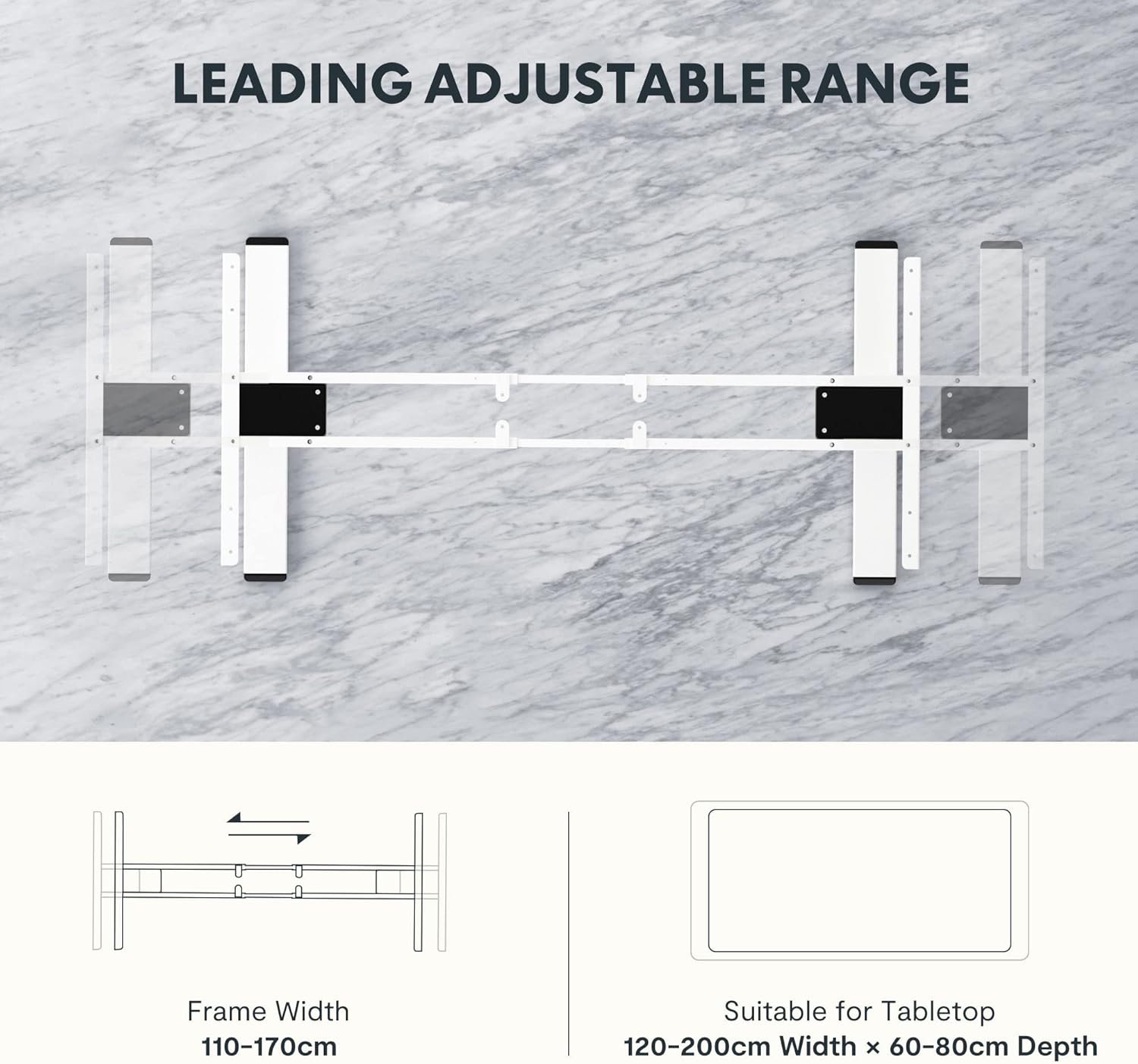
Image: Certificates from the IGR Institute and the Deutscher Gesundheitspreis (German Health Award), demonstrating FLEXISPOT's commitment to ergonomic design and product quality.