
1. Einleitung
Thank you for choosing the Sanag A5S Open Ear Headphones. These headphones utilize advanced air conduction technology to deliver sound while keeping your ears open to ambient surroundings, ensuring safety during outdoor activities. Designed for comfort and durability, the A5S features Bluetooth 5.0 connectivity, IP67 water resistance, and a lightweight design, making them ideal for sports, work, and daily use.
2. Packungsinhalt
Bitte prüfen Sie das Paket auf folgende Artikel:
- Sanag A5S Sports Headset x1
- Micro-USB-Ladekabel x1
- Benutzerhandbuch x1
3. Produktüberschreitungview
Familiarize yourself with the various parts and controls of your Sanag A5S headphones.
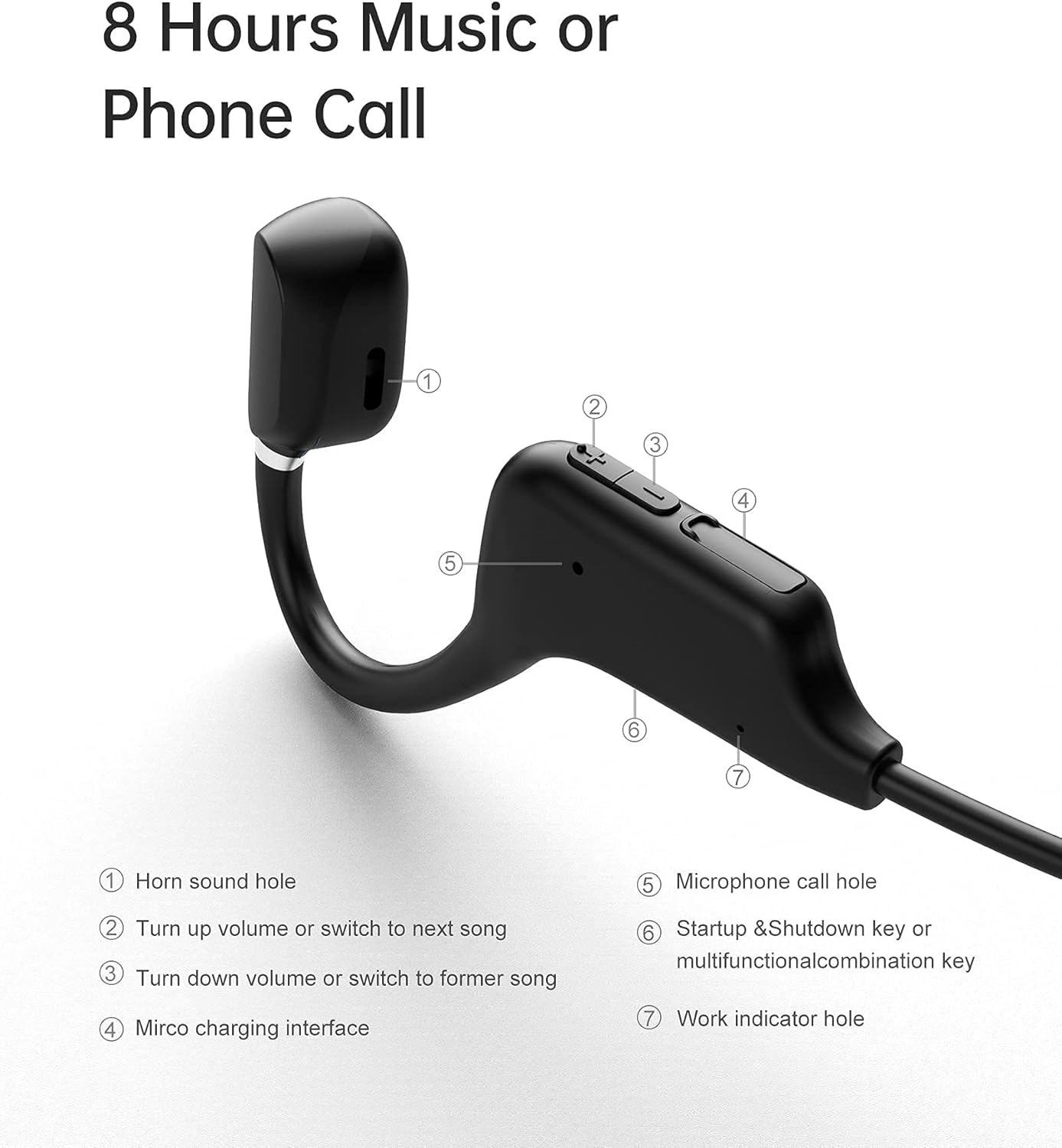
Abbildung 3.1: Sanag A5S Headset Components
- Horn sound hole
- Volume Up / Next Song button
- Volume Down / Previous Song button
- Micro-USB-Ladeschnittstelle
- Microphone call hole
- Power On/Off / Multifunction button
- Work indicator hole

Abbildung 3.2: Key Features of Sanag A5S Headphones
4. Einrichtung
4.1 Aufladen der Kopfhörer
Before first use, fully charge your Sanag A5S headphones.
- Connect the Micro USB charging cable to the charging interface (4) on the headphones.
- Verbinden Sie das andere Ende des Kabels mit einer USB-Stromquelle (z. B. Computer, Wandadapter).
- The indicator light (7) will show charging status. A full charge takes approximately 2 hours.
A fully charged battery provides up to 8 hours of continuous use or 300 hours of standby time.

Abbildung 4.1: Charging the Sanag A5S Headphones
4.2 Koppeln mit einem Bluetooth-Gerät
Follow these steps to connect your headphones to your smartphone, tablet, or other Bluetooth-enabled device:
- Einschalten: Press and hold the Multifunction button (6) for 3 seconds until the indicator light (7) flashes, indicating the headphones are in pairing mode.
- Bluetooth aktivieren: Gehen Sie auf Ihrem Gerät zu den Bluetooth-Einstellungen und vergewissern Sie sich, dass Bluetooth aktiviert ist.
- Verbinden: In the list of available devices, select "A5S". Once connected, the indicator light will stop flashing or change color (refer to specific light patterns in troubleshooting if needed).
Die Kopfhörer versuchen beim Einschalten automatisch, sich wieder mit dem zuletzt gekoppelten Gerät zu verbinden.

Abbildung 4.2: Bluetooth 5.0-Konnektivität
5. Bedienungsanleitung
5.1 Ein-/Ausschalten
- Einschalten: Halten Sie die Multifunktionstaste (6) 3 Sekunden lang gedrückt.
- Ausschalten: Halten Sie die Multifunktionstaste (6) 3 Sekunden lang gedrückt.
5.2 Musikwiedergabe
- Abspielen/Pause: Short press the Multifunction button (6).
- Nächstes Lied: Drücken Sie kurz die Lauter-Taste (2).
- Vorheriges Lied: Drücken Sie kurz die Leiser-Taste (3).
5.3 Lautstärkeregelung
- Lautstärke erhöhen: Long press the Volume Up button (2).
- Lautstärke verringern: Long press the Volume Down button (3).
5.4 Anrufmanagement
- Anruf annehmen: Short press the Multifunction button (6) when a call comes in.
- Anruf beenden: Short press the Multifunction button (6) during a call.
- Anruf ablehnen: Long press the Multifunction button (6) when a call comes in.
- Sprachassistent: Double-press the Multifunction button (6) to activate your device's voice assistant (if supported).
6. Wartung
6.1 Reinigung
Regularly clean your headphones to ensure optimal performance and hygiene.
- Reinigen Sie die Kopfhörer mit einem weichen, trockenen oder leicht feuchten Tuch.amp Tuch.
- Verwenden Sie keine aggressiven Chemikalien, Reinigungslösungen oder starken Reinigungsmittel.
- Stellen Sie vor dem Aufladen sicher, dass der Ladeanschluss trocken ist.
6.2 Speicherung
Bewahren Sie die Kopfhörer bei Nichtgebrauch an einem kühlen, trockenen Ort fern von direkter Sonneneinstrahlung und extremen Temperaturen auf.
6.3 Wasserbeständigkeit
The Sanag A5S headphones are IP67 rated, meaning they are resistant to dust and can withstand immersion in water up to 1 meter for 30 minutes. While they are sweat and light rain resistant, avoid prolonged exposure to water or using them during swimming.

Abbildung 6.1: Open Ear Design for Awareness

Abbildung 6.2: Flexible and Durable Design
7. Fehlerbehebung
Sollten Sie Probleme mit Ihren Kopfhörern haben, beachten Sie bitte die folgenden häufig auftretenden Probleme und Lösungen:
- Die Kopfhörer lassen sich nicht einschalten:
Stellen Sie sicher, dass die Kopfhörer vollständig aufgeladen sind. Verbinden Sie sie mit dem Micro-USB-Kabel mit einer Stromquelle. - Kopplung mit dem Gerät nicht möglich:
Make sure Bluetooth is enabled on your device. Ensure the headphones are in pairing mode (indicator light flashing). Move the headphones closer to your device (within 10 meters). Turn off and on both the headphones and your device's Bluetooth. - Kein Ton oder geringe Lautstärke:
Check the volume levels on both the headphones and your connected device. Ensure the headphones are properly paired. Try playing different audio sources. - Unterbrechungsverbindung:
Stellen Sie sicher, dass sich keine Hindernisse zwischen den Kopfhörern und Ihrem Gerät befinden. Halten Sie Abstand zu anderen drahtlosen Geräten, die Störungen verursachen könnten. - Mikrofon funktioniert nicht:
Ensure the headphones are properly connected and selected as the audio input device on your phone/computer. Check for any mute settings on your device.
Sollte das Problem weiterhin bestehen, wenden Sie sich bitte an den Kundendienst.
8. Spezifikationen
| Besonderheit | Spezifikation |
|---|---|
| Modellname | A5S Sports Headset |
| Konnektivitätstechnologie | Kabellos (Bluetooth) |
| Drahtlose Kommunikationstechnologie | Bluetooth 5.0 |
| Bluetooth-Reichweite | Bis zu 10 m (30 Fuß) |
| Wasserbeständigkeit | IP67 (Waterproof and Sweat-proof) |
| Akkulaufzeit | Up to 8 Hours (continuous use) |
| Standby-Zeit | Bis zu 300 Stunden |
| Ladezeit | Ca. 2 Stunden |
| Batteriekapazität | 120 mAh |
| Artikelgewicht | 18 g (0.63 Unzen) |
| Material | Silikon |
| Audiotreibertyp | Luftleitungstreiber |
| Steuerungstyp | Volume Control, Multifunction Button |
| Kompatible Geräte | Smartphones, Laptops, Tablets, Smart Speaker |
9. Garantie und Support
9.1 Garantieinformationen
Sanag products are designed and manufactured to the highest quality standards. This product is covered by a limited warranty from the date of purchase. Please refer to the warranty card included in your package or visit the official Sanag webAuf der Webseite finden Sie die detaillierten Garantiebedingungen.
9.2 Kundendienst
If you have any questions, require technical assistance, or need to report an issue with your Sanag A5S headphones, please contact our customer support team. Contact information can typically be found on the Sanag official webWebsite oder über Ihren Händler.