
FLEXISPOT E4 Classic
FLEXISPOT E4 Classic Electric Standing Desk User Manual
Model: E4 Classic | Brand: FLEXISPOT
Einführung
This manual provides detailed instructions for the assembly, operation, and maintenance of your FLEXISPOT E4 Classic Electric Standing Desk. Please read this manual thoroughly before use to ensure proper function and longevity of your product.

Figure 1: The FLEXISPOT E4 Classic Electric Standing Desk, featuring a bamboo contour desktop and silver frame, set up with dual monitors in an office environment.
Sicherheitshinweise
- Vergewissern Sie sich vor der Verwendung, dass alle Komponenten sicher befestigt sind.
- Halten Sie Kinder und Haustiere während des Betriebs vom Schreibtisch fern.
- Do not overload the desk beyond its specified weight capacity (220 lbs).
- Vermeiden Sie es, Flüssigkeiten direkt auf das Bedienfeld oder die Motorkomponenten zu bringen.
- Trennen Sie die Stromversorgung vor der Reinigung oder Wartung.
- Verwenden Sie nur das mitgelieferte Netzteil.
Packungsinhalt
Bitte prüfen Sie vor Beginn der Montage, ob alle Teile vorhanden sind. Sollten Teile fehlen oder beschädigt sein, wenden Sie sich bitte an den Kundendienst.
- Bamboo Contour Whole-Piece Desktop (55"x28")
- Silver Frame Legs (Dual Motor)
- Bedienfeld
- Netzteil und Kabel
- Montagezubehör (Schrauben, Werkzeuge usw.)
- Bedienungsanleitung (dieses Dokument)
Einrichtung und Montage
Dieses Produkt muss montiert werden. Bitte befolgen Sie diese Schritte sorgfältig.
- Komponenten auspacken: Nehmen Sie alle Teile vorsichtig aus der Verpackung und legen Sie sie auf eine saubere, weiche Unterlage, um Kratzer zu vermeiden.
- Beine am Schreibtisch befestigen: Position the desktop upside down. Align the leg frames with the pre-drilled holes on the underside of the desktop. Secure them using the provided screws and tools.
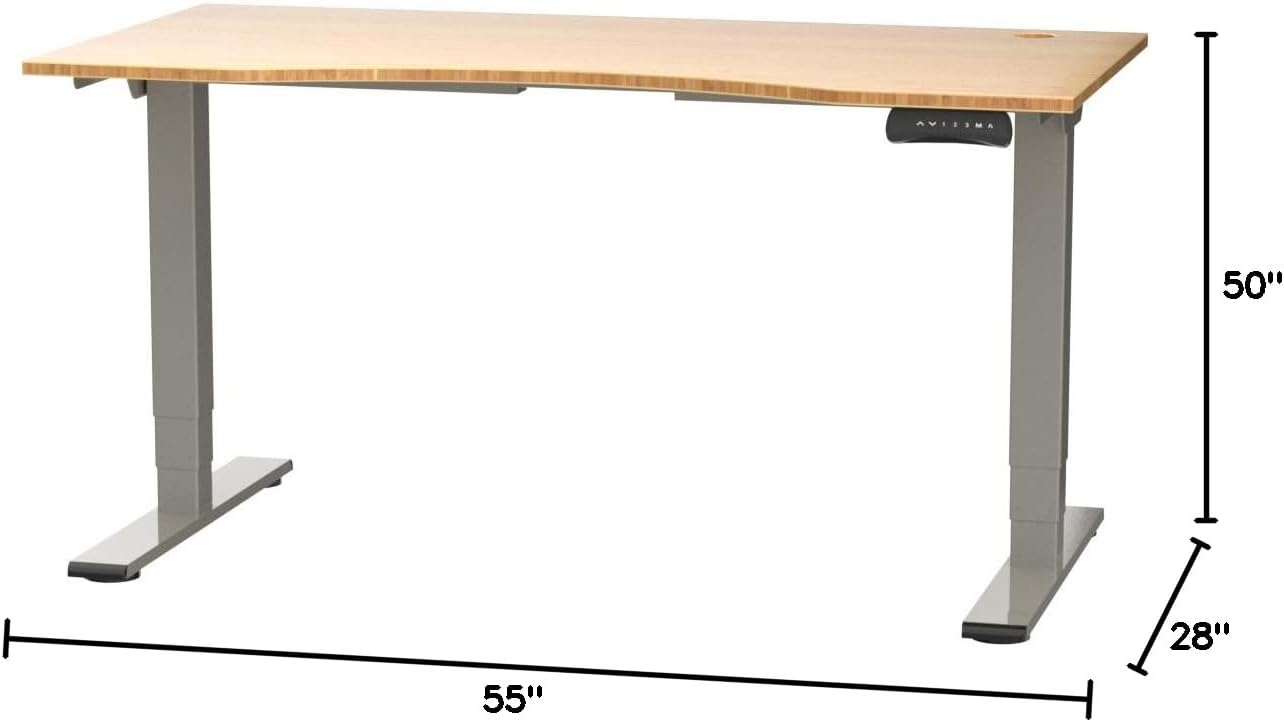
Figure 2: Desk dimensions indicating 55 inches width, 28 inches depth, and adjustable height up to 50 inches.
- Systemsteuerung installieren: Mount the control panel to the desired location on the underside of the desktop, typically on the front edge for easy access. Connect the control panel cable to the motor control box.

Figure 3: The programmable control panel with LED display, up/down buttons, and memory presets (1, 2, 3, M, A).
- Strom anschließen: Plug the power adapter into the control box, and then plug the power cable into a standard electrical outlet.
- Kabelmanagement: Utilize the two cable management holes on the desktop to route and organize your cables, preventing clutter.

Figure 4: Detail showing the integrated cable management holes and the water-resistant surface of the bamboo desktop.
- Erstkalibrierung: After assembly and power connection, the desk may require an initial calibration. Refer to the "Operating Instructions" section for details on resetting or calibrating the desk.
Bedienungsanleitung
Höhenverstellung
The FLEXISPOT E4 Classic desk features a dual-motor lift system for smooth and quiet height adjustments.
- Schreibtisch erhöhen: Halten Sie die Pfeil nach oben button (▲) on the control panel. The desk will move upwards.
- Unterer Schreibtisch: Halten Sie die Pfeil nach unten button (▼) on the control panel. The desk will move downwards.
- Release the button at your desired height. The desk can adjust from 24.4 inches to 50 inches.
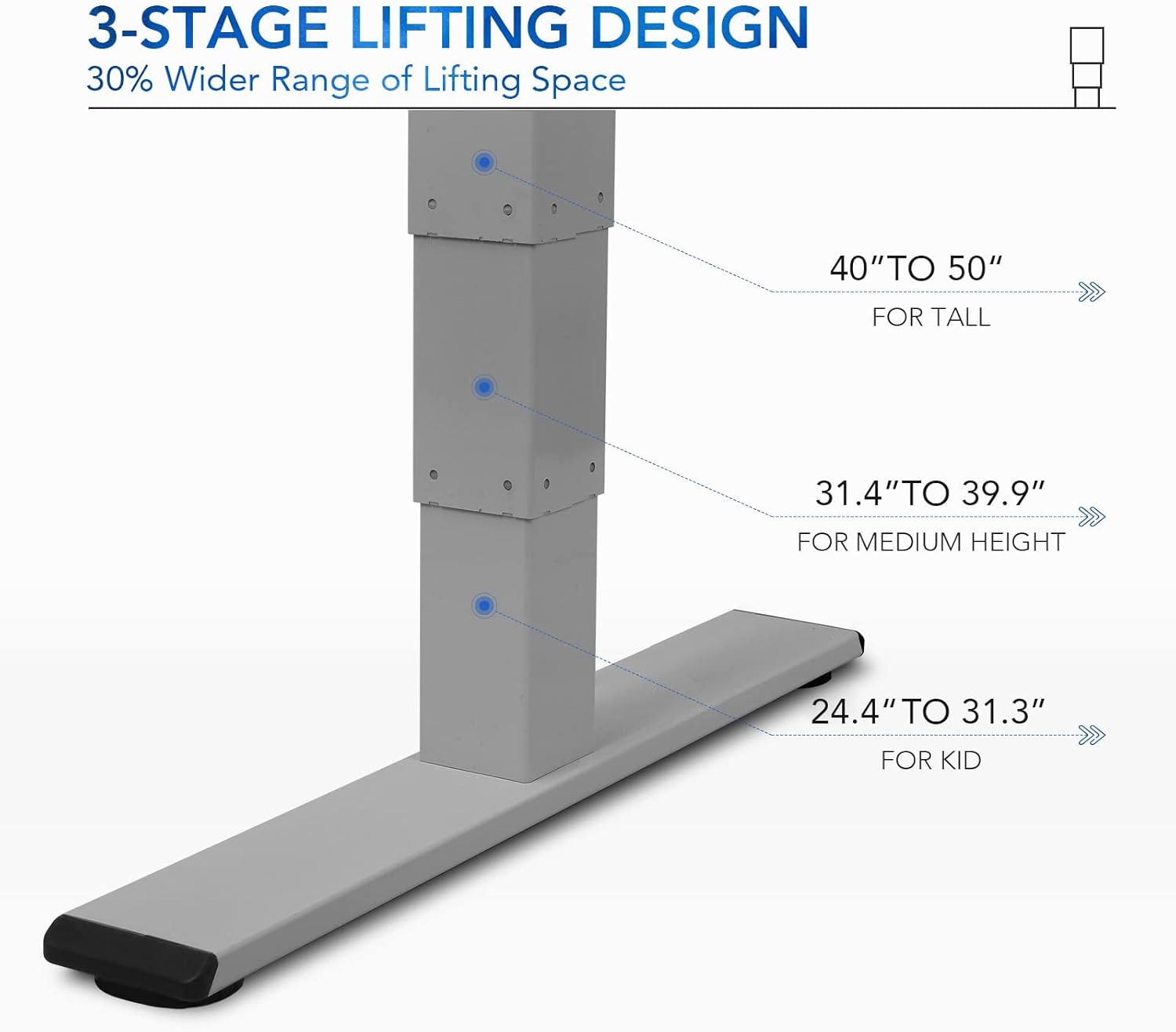
Abbildung 5: Die 3er-Reihetage lifting design provides a wide range of height adjustments, suitable for various user heights, from 24.4" (kid) to 50" (tall).
Programmable Memory Presets
The control panel allows you to save up to three preferred height settings for quick adjustments.
- Speicherposition festlegen:
- Stellen Sie den Schreibtisch mithilfe der Auf-/Ab-Tasten auf die gewünschte Höhe ein.
- Drücken Sie die "M" Drücken Sie diese Taste. Das LED-Display zeigt „S-“ an.
- Drücken Sie innerhalb von 3 Sekunden eine der Zifferntasten ("1", "2", oder "3") to save the current height to that preset. The display will show "S-1", "S-2", or "S-3" to confirm.
- Eine Speicherposition abrufen: Drücken Sie einfach die entsprechende Zifferntaste ("1", "2", oder "3"Der Schreibtisch fährt automatisch auf die gespeicherte Höhe.
Sit/Stand Reminder
The "A" button can be used to set a reminder to switch between sitting and standing positions.
- Consult the full manual for detailed instructions on setting and customizing the sit/stand reminder function.
Ergonomic Curved Design
The 55"x28" desktop features an ergonomic curved design for enhanced comfort and efficiency during work or study.

Figure 6: The ergonomic curved edge of the desktop, designed to provide a more comfortable and natural working posture.
Wartung
- Reinigung: Wischen Sie die Schreibtischoberfläche und den Rahmen mit einem weichen, fusselfreien Tuch ab.amp cloth. Avoid abrasive cleaners or harsh chemicals. The bamboo surface is designed to be water-resistant, making it easy to clean.
- Motorpflege: The dual-motor system is designed for low noise and durability. No specific user maintenance is required for the motors.
- Kabelmanagement: Periodically check that all cables are neatly routed through the cable management holes and are not pinched or tangled.
- Überprüfung der Befestigungselemente: Überprüfen Sie gelegentlich alle Schrauben und Befestigungselemente, um sicherzustellen, dass sie fest sitzen. Ziehen Sie sie gegebenenfalls nach.
Fehlerbehebung
| Problem | Mögliche Ursache | Lösung |
|---|---|---|
| Der Schreibtisch bewegt sich nicht. | Power cable disconnected; overload protection activated; motor error. | Check power connections. Reduce weight on desk. Unplug and replug power after 10 minutes. Perform a reset (see below). |
| Der Schreibtisch wackelt ungleichmäßig oder macht ungewöhnliche Geräusche. | Loose fasteners; obstruction; motor synchronization issue. | Check and tighten all assembly screws. Ensure no obstructions under the desk. Perform a reset. |
| LED display shows an error code (e.g., "E01", "RST"). | System error; need for reset. | Vorgehensweise zum Zurücksetzen: Press and hold the Down Arrow button until the desk reaches its lowest position and then slightly rises. Release the button. If the error persists, unplug the desk for 10 minutes and try again. |
| Speichervoreinstellungen funktionieren nicht. | Voreinstellungen wurden nicht korrekt gespeichert. | Re-save your desired memory positions following the "Programmable Memory Presets" instructions. |
If the issue persists after attempting these solutions, please contact FLEXISPOT customer support.
Technische Daten
| Besonderheit | Detail |
|---|---|
| Modell | E4 Classic |
| Marke | FLEXISPOT |
| Desktop-Material | Bamboo Contour Whole-Piece Board |
| Rahmenmaterial | Alloy Steel (Silver Frame) |
| Produktabmessungen (T x B x H) | 28"T x 55"B x 50"H (Maximale Höhe) |
| Höhenverstellbereich | 24.4" bis 50" |
| Hebesystem | Dual Motor, 3-Stage Lifting |
| Gewichtskapazität | Bis zu 220 Pfund |
| Besondere Merkmale | Electric Height Adjustment, Programmable Memory Presets, Sit/Stand Reminder, Curved Ergonomic Design, Cable Management Holes, Waterproof Surface |
| Montage erforderlich | Ja |
Garantie und Support
FLEXISPOT products are designed for durability and performance. For specific warranty details regarding your E4 Classic Electric Standing Desk, please refer to the warranty card included with your purchase or visit the official FLEXISPOT webWebsite.
For technical support, troubleshooting assistance, or to inquire about replacement parts, please contact FLEXISPOT customer service:
- WebWebsite: www.flexispot.com
- E-Mail: support@flexispot.com
- Telefon: Wenden Sie sich an den Beamten webWebsite für regionale Kontaktnummern.
When contacting support, please have your product model (E4 Classic) and purchase information ready.
Ask a question about this manual
Ask about setup, troubleshooting, compatibility, parts, safety, or missing instructions. Manuals+ will review the question and use this page’s manual context to help answer it.