
1. Einleitung
Thank you for choosing the Andoer W200RGB LED Video Light. This manual provides detailed instructions for the proper setup, operation, and maintenance of your device. Please read this manual thoroughly before use to ensure optimal performance and longevity of the product. Keep this manual for future reference.
2. Produktüberschreitungview
2.1 Packungsinhalt
Bitte überprüfen Sie nach dem Öffnen des Pakets, ob alle unten aufgeführten Artikel vorhanden und in einwandfreiem Zustand sind:
- Andoer W200RGB LED Video Light
- USB-Kabel Typ C.
- Mini-Stativ
- Handschlaufe
- User Manual (English and Chinese)

Image: Contents of the Andoer W200RGB LED Video Light package, showing the light, USB cable, mini tripod, and wrist strap.
2.2 Hauptmerkmale
- Kompaktes und tragbares Design: Rod-shaped design, 20cm in length, lightweight for easy transport.
- Hohe Helligkeit: Equipped with 184 high-quality LED beads (69 white, 69 yellow, 46 RGB) with 7W output and CRI 95+.
- RGB Colored Light Mode: 360° adjustable HUE and 0%-100% adjustable brightness for diverse colorful lighting effects.
- CCT Cold & Warm Light Mode: Wide adjustable color temperature range from 2500K to 9000K.
- 20 Special Lighting Effects: Includes ambulance, fireworks, TV, candle, party, strobe, RGB strobe, red flash, green flash, blue flash, slow HSI, fast HSI, and more.
- Eingebauter Akku: Integrated 3.7V 3000mAh lithium battery for extended working time, rechargeable via Type-C port.
- Magnetische Rückseite: Built-in magnets at both ends allow for easy attachment to magnetic surfaces.
2.3 Bedienelemente und Anzeige
The Andoer W200RGB features intuitive controls and an LCD screen for easy operation.

Image: The control panel of the Andoer W200RGB LED Video Light, showing the power button, mode button, adjustment buttons, and LCD screen.
- Netzschalter: Press and hold to turn the light on or off. Short press to switch between modes.
- Modus-Taste (M): Short press to cycle through CCT, HSI (RGB), and Scene modes.
- Auf-/Ab-Tasten (▲/▼): Adjust parameters such as brightness, color temperature, HUE, or saturation depending on the selected mode.
- LCD Bildschirm: Displays current settings including mode, brightness, color temperature, HUE, and battery level.
- Typ-C-Ladeanschluss: Located at one end for charging the internal battery.
3. Einrichtung
3.1 Laden des Akkus
The Andoer W200RGB LED Video Light comes with a built-in rechargeable lithium battery. Before first use, it is recommended to fully charge the device.
- Connect the supplied USB Type-C cable to the charging port on the light.
- Verbinden Sie das andere Ende des USB-Kabels mit einem Standard-USB-Netzteil (nicht im Lieferumfang enthalten) oder einem USB-Anschluss Ihres Computers.
- The LCD screen will indicate the charging status. A full charge typically takes a few hours.

Image: The Andoer W200RGB LED Video Light highlighting its internal 3.7V 3000mAh battery and Type-C charging capability.
3.2 Anbringen des Mini-Stativs
The included mini tripod can be attached to the 1/4-inch screw hole at the bottom of the light for stable placement.
- Locate the 1/4-inch screw hole on the bottom of the LED light.
- Screw the mini tripod securely into the screw hole.
- Adjust the tripod legs for desired height and stability.
4. Bedienungsanleitung
4.1 Ein-/Ausschalten
- To turn on the light, press and hold the Power button (labeled with a circle and vertical line) for a few seconds.
- To turn off the light, press and hold the Power button again for a few seconds.
4.2 Schaltmodi
After powering on, short press the Mode button (M) to cycle through the available lighting modes:
- CCT Mode (Color Correlated Temperature): For adjusting white light from warm to cool.
- HSI-Modus (Farbton, Sättigung, Intensität): For adjusting RGB colored light.
- Szenenmodus: For selecting special lighting effects.
4.3 CCT Mode Operation
In CCT mode, you can adjust the color temperature and brightness.
- Use the Up/Down buttons (▲/▼) to adjust the brightness from 0% to 100%.
- Short press the Power button to switch to color temperature adjustment. Use the Up/Down buttons (▲/▼) to adjust the color temperature from 2500K (warm) to 9000K (cool).

Image: Visual representation of brightness adjustments (0%, 50%, 100%) and color temperature settings (6000K, 5000K, 2800K) in CCT mode.
4.4 HSI Mode (RGB) Operation
In HSI mode, you can adjust the HUE (color), saturation, and brightness.
- Use the Up/Down buttons (▲/▼) to adjust the HUE (360° color spectrum).
- Short press the Power button to switch to saturation adjustment. Use the Up/Down buttons (▲/▼) to adjust saturation.
- Short press the Power button again to switch to brightness adjustment. Use the Up/Down buttons (▲/▼) to adjust brightness from 0% to 100%.
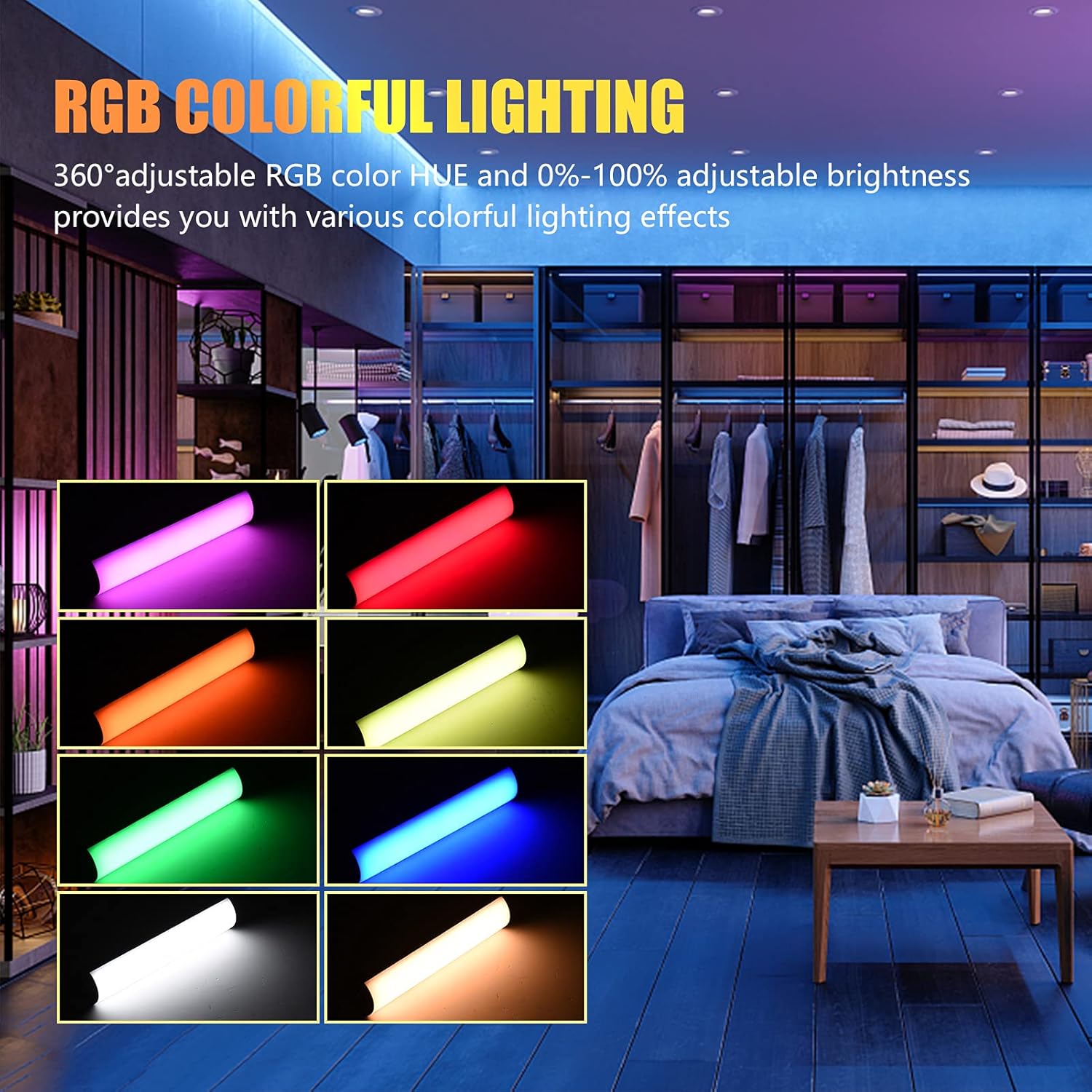
Image: The Andoer W200RGB LED Video Light demonstrating its RGB colorful lighting capabilities, showing different hues and brightness levels.

Image: Several Andoer W200RGB LED Video Lights illuminated in various solid RGB colors, showcasing the rod-shaped design.
4.5 Scene Mode Operation (Special Effects)
In Scene mode, you can select from 20 pre-programmed special lighting effects.
- Use the Up/Down buttons (▲/▼) to cycle through the 20 special effects.
- Some effects may have adjustable parameters (e.g., speed or intensity), which can be adjusted by short pressing the Power button and then using the Up/Down buttons.

Image: A visual guide to the 20 dynamic scene light effects, such as police car, ambulance, fireworks, TV, candle, party, strobe, and various color flashes.
4.6 Using the Magnetic Back
The Andoer W200RGB LED Video Light features built-in magnets at both ends, allowing it to be easily attached to metallic surfaces for flexible lighting setups.
- Simply place either end of the light onto a suitable magnetic surface.
- Ensure the surface is stable and can support the weight of the light.

Image: The Andoer W200RGB LED Video Light highlighting its magnetic ends, demonstrating how it can be attached to metal surfaces.
4.7 Praktische Anwendungen

Image: A comparison of scenes before and after using the Andoer W200RGB LED Video Light, illustrating its effectiveness in enhancing illumination for various activities.
5. Wartung
5.1 Reinigung
- Vor der Reinigung muss sichergestellt sein, dass das Gerät ausgeschaltet und von jeglicher Stromquelle getrennt ist.
- Use a soft, dry cloth to wipe the surface of the light.
- Bei hartnäckigen Verschmutzungen leicht dampBefeuchten Sie das Tuch mit Wasser. Vermeiden Sie die Verwendung von scharfen Chemikalien, Lösungsmitteln oder Scheuermitteln.
- Do not allow water or liquids to enter the device.
5.2 Speicherung
- Bewahren Sie die Lampe an einem kühlen, trockenen Ort fern von direkter Sonneneinstrahlung und extremen Temperaturen auf.
- Bei längerer Lagerung sollte der Akku alle drei Monate auf etwa 50 % aufgeladen werden, um seine Funktionstüchtigkeit zu erhalten.
5.3 Batteriepflege
- Vermeiden Sie häufiges vollständiges Entladen des Akkus.
- Setzen Sie den Akku keinen hohen Temperaturen aus und beschädigen Sie ihn nicht.
- If the battery shows signs of swelling or leakage, discontinue use immediately and dispose of it properly according to local regulations.
6. Fehlerbehebung
If you encounter any issues with your Andoer W200RGB LED Video Light, please refer to the following common problems and solutions:
- Licht geht nicht an:
- Stellen Sie sicher, dass der Akku geladen ist. Verbinden Sie die Lampe mit dem USB-Typ-C-Kabel mit einer Stromquelle.
- Press and hold the Power button for a few seconds to ensure it's not just a short press.
- Light flickers or output is unstable:
- Check the battery level; low battery can cause unstable performance. Recharge if necessary.
- Stellen Sie sicher, dass die Lampe keinen extremen Temperaturen ausgesetzt ist.
- Cannot change modes or adjust parameters:
- Ensure you are pressing the correct buttons (Mode button for mode changes, Power button to cycle through adjustable parameters within a mode, Up/Down buttons for value adjustment).
- Starten Sie das Gerät neu, indem Sie es aus- und wieder einschalten.
- Akku wird nicht aufgeladen:
- Vergewissern Sie sich, dass das USB-Typ-C-Kabel sowohl mit der Lampe als auch mit der Stromquelle fest verbunden ist.
- Um defekte Zubehörteile auszuschließen, versuchen Sie es mit einem anderen USB-Kabel oder Netzteil.
- Stellen Sie sicher, dass die Stromversorgung funktionsfähig ist.
Sollte das Problem nach dem Ausprobieren dieser Lösungsansätze weiterhin bestehen, wenden Sie sich bitte an den Kundendienst, um weitere Unterstützung zu erhalten.
7. Spezifikationen
| Besonderheit | Spezifikation |
|---|---|
| Marke | Andoer |
| Modell | W200RGB |
| LED Perlen | 69pcs White + 69pcs Yellow + 46pcs RGB |
| Farbtemperatur | 2500K bis 9000K |
| CRI (Farbwiedergabeindex) | 95+ |
| Maximale Ausgangsleistung | 7W |
| Lichtstrom | 800Lux / 0.3m |
| Abstrahlwinkel | 120° |
| Akku-Typ | Eingebauter 3.7 V 3000 mAh Lithium-Akku |
| Ladeanschluss | USB Typ C |
| Artikelgröße | 20 x 4 x 3.5 cm (7.9 x 1.6 x 1.4 Zoll) |
| Artikelgewicht | 11.3 Unzen (ca. 320 g) |
| Tripod (folded length) | 7.5cm (use height 4.5cm) |
| Modellnummer (ASIN) | QEX6686347803069PL (B09F8RLMSY) |
8. Sicherheitshinweise
Warnung:
Sollten Sie feststellen, dass das Produkt beschädigt oder verformt ist oder eine anormale Leistung aufweist, stellen Sie die Nutzung bitte sofort ein und kontaktieren Sie uns.
Always handle the device with care. Do not disassemble or modify the product. Keep out of reach of children.
9. Garantie und Support
Andoer products are designed for reliability and performance. This product is covered by a standard manufacturer's warranty against defects in materials and workmanship. For specific warranty terms and conditions, please refer to the documentation provided at the time of purchase or contact your retailer.
For technical support, troubleshooting assistance, or warranty claims, please contact Andoer customer service through the retailer's platform or the official Andoer webBitte halten Sie Ihre Produktmodell- und Kaufinformationen bereit, wenn Sie den Support kontaktieren.
Besuchen Sie die Andoer Store auf Amazon Für weitere Informationen und Produkte.