
1. Einleitung
This manual provides detailed instructions for the setup, operation, maintenance, and troubleshooting of your uRage Exodus 700 Semi-Mechanical Gaming Keyboard. Please read this manual thoroughly before using the product to ensure optimal performance and longevity.
2. Packungsinhalt
Überprüfen Sie, ob alle Artikel im Paket vorhanden sind:
- uRage Exodus 700 Semi-Mechanical Gaming Keyboard
- Benutzerhandbuch (dieses Dokument)
- Garantiekarte
3. Einrichtung
3.1 Anschließen der Tastatur
The uRage Exodus 700 keyboard connects via a wired USB-A connection. Follow these steps to connect your keyboard:
- Suchen Sie einen verfügbaren USB-A-Anschluss an Ihrem Computer.
- Plug the USB-A connector of the keyboard cable into the USB-A port on your computer.
- The operating system (Windows 11/10/8/7) will automatically detect and install the necessary drivers.
3.2 Softwareinstallation (optional)
For advanced customization, including macro programming and lighting effects, dedicated gaming software is available. Refer to the official uRage webWebsite mit den neuesten Software-Downloads und Installationsanweisungen.

Image 1: uRage Exodus 700 Semi-Mechanical Gaming Keyboard connected and ready for use.
4. Bedienung der Tastatur
4.1 Hauptmerkmale
- Semi-Mechanical Keys: Provides a tactile typing experience with fast response times (1 ms) and a key travel of 2.5 mm.
- Anti-Ghosting: Ensures that multiple key presses are registered simultaneously, crucial for gaming. Up to 24 keys can be registered at once.
- RGB-Beleuchtung: Customizable backlighting with various effects and colors.
- WIN Lock-Function: Disables the Windows key to prevent accidental interruptions during gameplay.
- Integrierte Handgelenkauflage: Designed for enhanced comfort during extended use.
4.2 RGB-Beleuchtungssteuerung
The keyboard features integrated RGB lighting. Specific key combinations (often involving the 'Fn' key) or the dedicated gaming software can be used to:
- Turn the lighting on or off.
- Cycle through different lighting modes and effects.
- Passen Sie die Helligkeitsstufen an.
Refer to the keyboard's function key legends for specific lighting control shortcuts.

Image 2: Keyboard in use, demonstrating RGB lighting.
4.3 Macro and Multimedia Functions
The keyboard includes 4 dedicated macro buttons (G1-G4) and additional multimedia functions. These can be programmed and controlled:
- Makroprogrammierung: Use the dedicated gaming software to record and assign complex key sequences to the macro buttons.
- Multimedia-Steuerelemente: Access functions like volume control, play/pause, and track skipping via function key combinations.
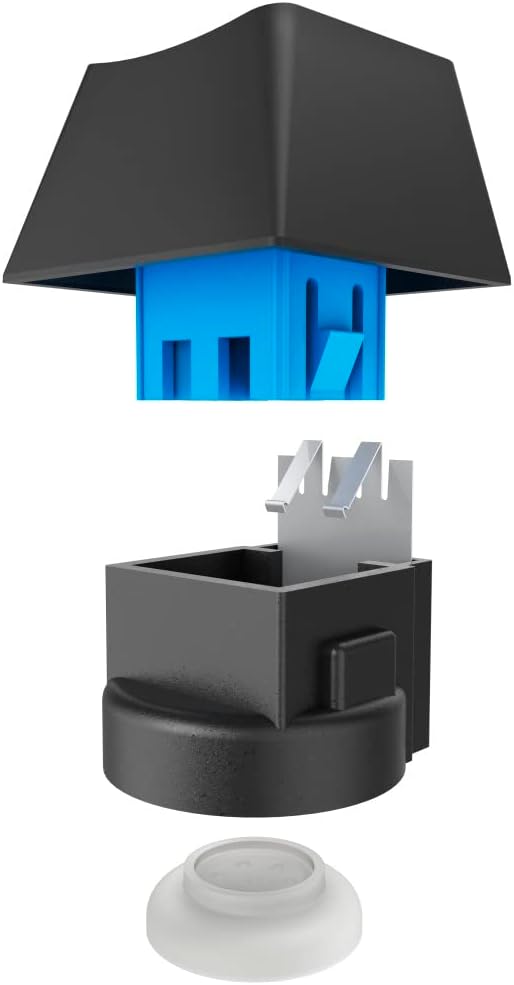
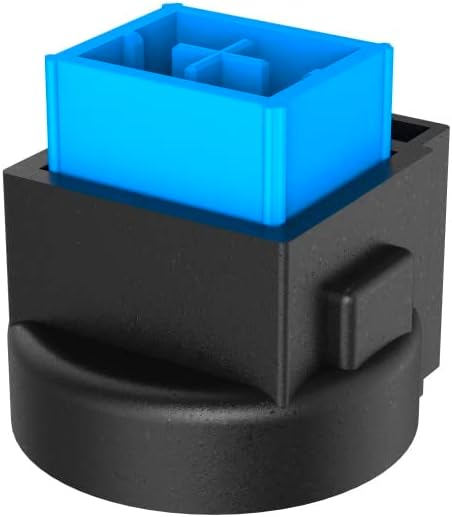
Image 3: Exploded and assembled views of the semi-mechanical key structure.
5. Wartung
Durch sachgemäße Wartung wird die Langlebigkeit und Leistungsfähigkeit Ihrer Tastatur sichergestellt.
5.1 Reinigung
- Trennen Sie die Tastatur vor der Reinigung vom Computer.
- Verwenden Sie ein weiches, trockenes Tuch, um die Oberfläche der Tastatur abzuwischen.
- Für Staub und Schmutz zwischen den Tasten verwenden Sie Druckluft.
- Vermeiden Sie die Verwendung von aggressiven Chemikalien, Scheuermitteln oder übermäßiger Feuchtigkeit.
5.2 Speicherung
Bewahren Sie die Tastatur bei Nichtgebrauch an einem sauberen, trockenen Ort fern von direkter Sonneneinstrahlung und extremen Temperaturen auf.
6. Fehlerbehebung
If you encounter issues with your uRage Exodus 700 keyboard, refer to the following common solutions:
- Tastatur reagiert nicht:
- Stellen Sie sicher, dass das USB-Kabel sowohl an die Tastatur als auch an den Computer fest angeschlossen ist.
- Versuchen Sie, die Tastatur an einen anderen USB-Anschluss anzuschließen.
- Starten Sie Ihren Computer neu.
- Schlüssel werden nicht registriert:
- Prüfen Sie, ob sich unter den Tastenkappen physische Hindernisse befinden.
- Ensure the keyboard drivers are correctly installed (check Device Manager on Windows).
- RGB-Beleuchtung funktioniert nicht:
- Verify that the lighting is not turned off via keyboard shortcuts.
- Check the gaming software settings if installed.
- Makrofunktionen funktionieren nicht:
- Ensure the gaming software is running and macros are correctly configured.
- Update the gaming software to the latest version.
If problems persist, contact uRage customer support for further assistance.
7. Spezifikationen
| Besonderheit | Spezifikation |
|---|---|
| Modellname | Exodus 700 |
| Modellnummer | ham_n8_U8186011 |
| Tastaturlayout | QWERTY (Englisch) |
| Schlüsseltechnologie | Semi-Mechanical |
| Anzahl der Schlüssel | 114 |
| Rollover Buttons | Bis zu 24 |
| Ansprechzeit | 1 ms |
| Schlüssellebensdauer | 10 Million Attacks |
| Work Travel | 2.5 mm |
| Konnektivität | Kabelgebundenes USB-A |
| Beleuchtung | RGB-Farben |
| Kompatibles Betriebssystem | Windows 11/10/8/7 |
| Number of Macro Buttons | 4 |
| Farbe | Schwarz |
| Material | Plastik |
| Kabellänge | 180 cm |
| Abmessungen (B x H x T) | 47 cm x 3.5 cm x 19 cm |
| Gewicht | 885 g |
8. Garantie und Support
8.1 Herstellergarantie
The uRage Exodus 700 Semi-Mechanical Gaming Keyboard comes with a 5 Jahr HerstellergarantieBitte bewahren Sie Ihren Kaufbeleg für Garantieansprüche auf. Die Garantie deckt Material- und Verarbeitungsfehler bei normalem Gebrauch ab.
8.2 Kundendienst
For technical support, warranty claims, or further inquiries, please visit the official uRage website or contact their customer service department. Contact information can typically be found on the warranty card included in your package or on the brand's official webWebsite.