
FLEXISPOT EN2
FLEXISPOT EN2 Electric Standing Desk User Manual
Modell: EN2
Einführung
Thank you for choosing the FLEXISPOT EN2 Electric Standing Desk. This manual provides essential information for the safe assembly, operation, and maintenance of your new desk. Please read it thoroughly before use to ensure proper functionality and to maximize the lifespan of your product.

Image: The FLEXISPOT EN2 Electric Standing Desk, showcasing its white desktop, black frame, integrated power strip, and cable management system.
Sicherheitshinweise
- Gewichtskapazität: Do not exceed the maximum weight recommendation of 176 pounds (80 kg) on the desktop. Exceeding this limit can cause damage to the desk and potential injury.
- Montage: Stellen Sie sicher, dass alle Komponenten gemäß der Montageanleitung fest befestigt sind.
- Leistung: Use only the provided power adapter. Keep power cords away from heat sources and sharp edges.
- Bewegung: Keep hands, feet, and objects clear of the moving parts (legs, frame) during height adjustment to prevent pinching or damage.
- Umfeld: Do not expose the desk to excessive moisture or extreme temperatures.
- Kinder und Haustiere: Halten Sie Kinder und Haustiere während des Betriebs vom Schreibtisch fern.
Packungsinhalt
Your FLEXISPOT EN2 Standing Desk will arrive in two separate packages, which may be shipped and delivered at different times. Please ensure you have received both packages before beginning assembly.

Image: Illustration showing two distinct packages for the desktop and desk frame, highlighting that they may arrive separately.
Verify that all components listed in the packing list (included in one of the packages) are present and undamaged. If any parts are missing or damaged, please contact customer support.
Montage
Assembly of the FLEXISPOT EN2 desk is designed to be straightforward. An electric drill may be required for certain steps, which is not included in the package. Follow the detailed instructions provided in the separate assembly guide for step-by-step installation.
Wichtige Montagehinweise:
- Desktop Orientation: Ensure the desktop is oriented correctly before attaching the frame.
- Kabelmanagement: Properly route all cables to prevent interference with the desk's movement.
- Installation der Steckdosenleiste: The removable power strip can be clipped to the back or side of the desk.
Bedienungsanleitung
The FLEXISPOT EN2 desk features a user-friendly digital control panel for height adjustment and memory presets.

Image: The multi-function digital control panel, showing the LED display, up/down arrows, and four memory preset buttons.
Höhenverstellung:
- Verwenden Sie die Nach oben (▲) Und Runter (▼) arrow buttons to smoothly adjust the desk height. The motorized system operates quietly (less than 50 dB) and adjusts from 28.1 inches (71.4 cm) to 45.7 inches (116.1 cm).
- The current height is displayed on the digital LED screen.
Speichervoreinstellungen:
The 6-button digital controller features 4 programmable memory presets to save your preferred sitting and standing heights.
- Stellen Sie den Schreibtisch mithilfe der Auf-/Ab-Tasten auf die gewünschte Höhe ein.
- Press one of the memory preset buttons (1, 2, 3, or 4) until the display flashes or a beep is heard, indicating the height has been saved.
- To recall a saved height, simply press the corresponding memory preset button. The desk will automatically move to the stored position.
Power Outlet and USB Ports:
Die integrierte Steckdosenleiste bietet bequemen Zugang zu Strom für Ihre Geräte.
- The power strip includes 3 AC outlets (125V/12A) and 2 USB charging ports (5V/2A).
- Plug your electronic devices directly into the outlets or USB ports for charging.
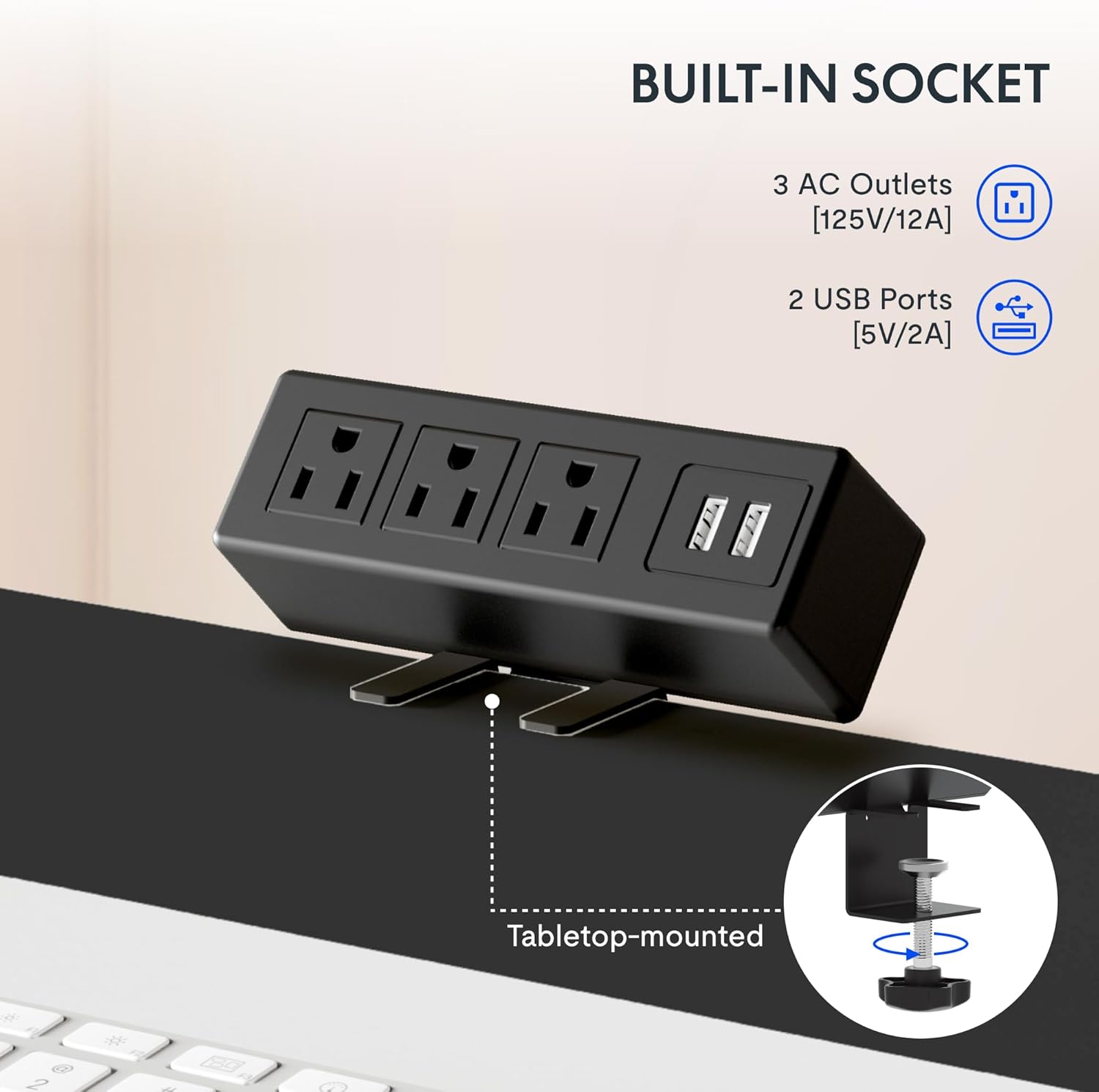
Bild: Eine detaillierte view of the built-in power strip, showing its three AC outlets and two USB charging ports, designed for tabletop mounting.
Merkmale
Ampder ganze Schreibtisch:
The desk features a single, whole-piece 1-inch (2.54 cm) thick eco-friendly desktop, providing a seamless and spacious work surface. This design offers enhanced stability compared to multi-piece desktops.
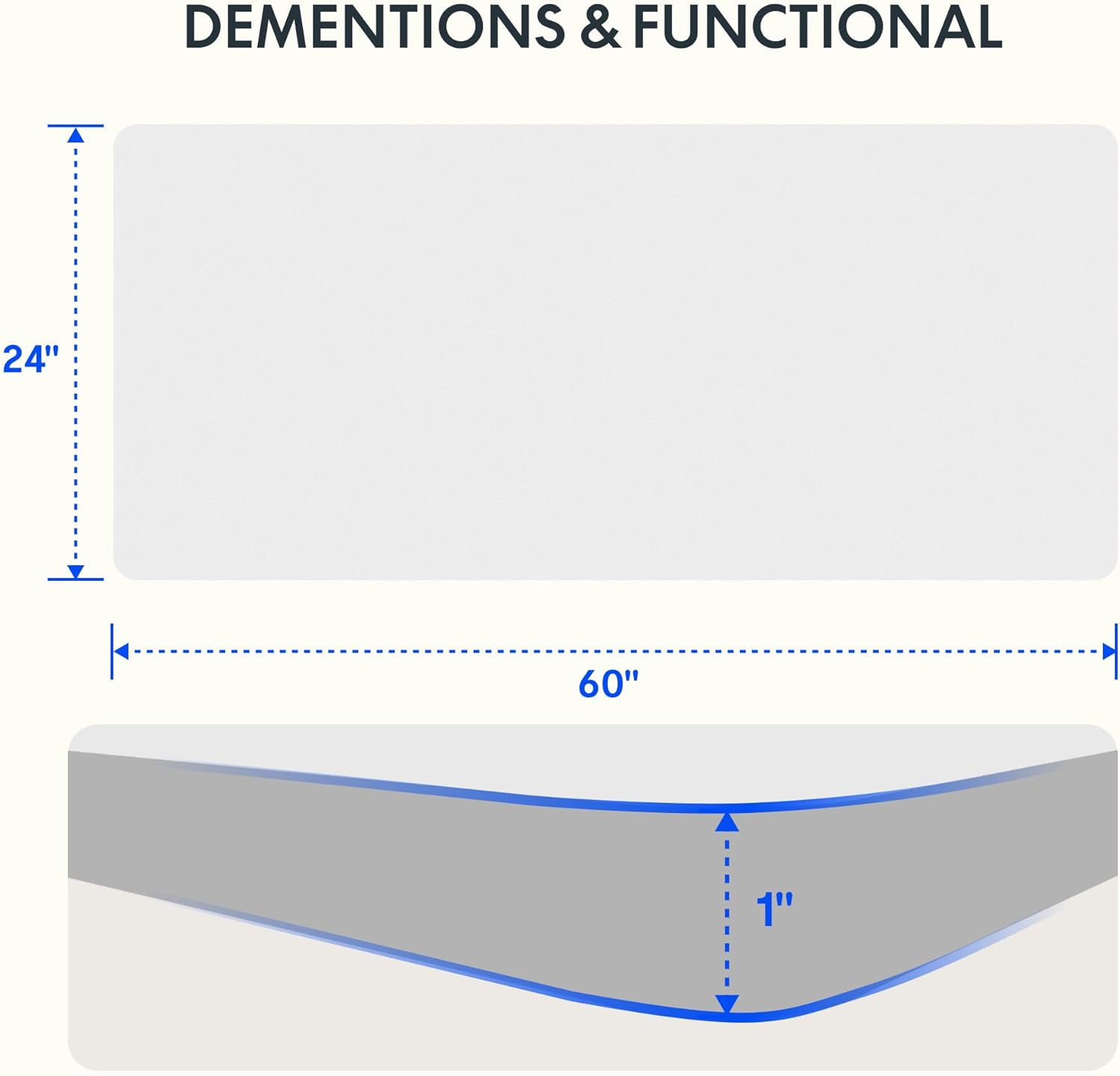
Image: A diagram illustrating the 60-inch width and 24-inch depth of the desktop, along with a cross-section showing its 1-inch thickness.

Image: A visual comparison demonstrating the superior stability of a smooth, single-piece desktop over an uneven two-piece desktop.
Langlebige Konstruktion:
The desk frame is constructed from industrial-grade steel, ensuring durability and stability. It is rigorously tested to support up to 176 pounds (80 kg) safely.
Kabelmanagement:
The desk includes features to help manage cables, contributing to a tidy and organized workspace.
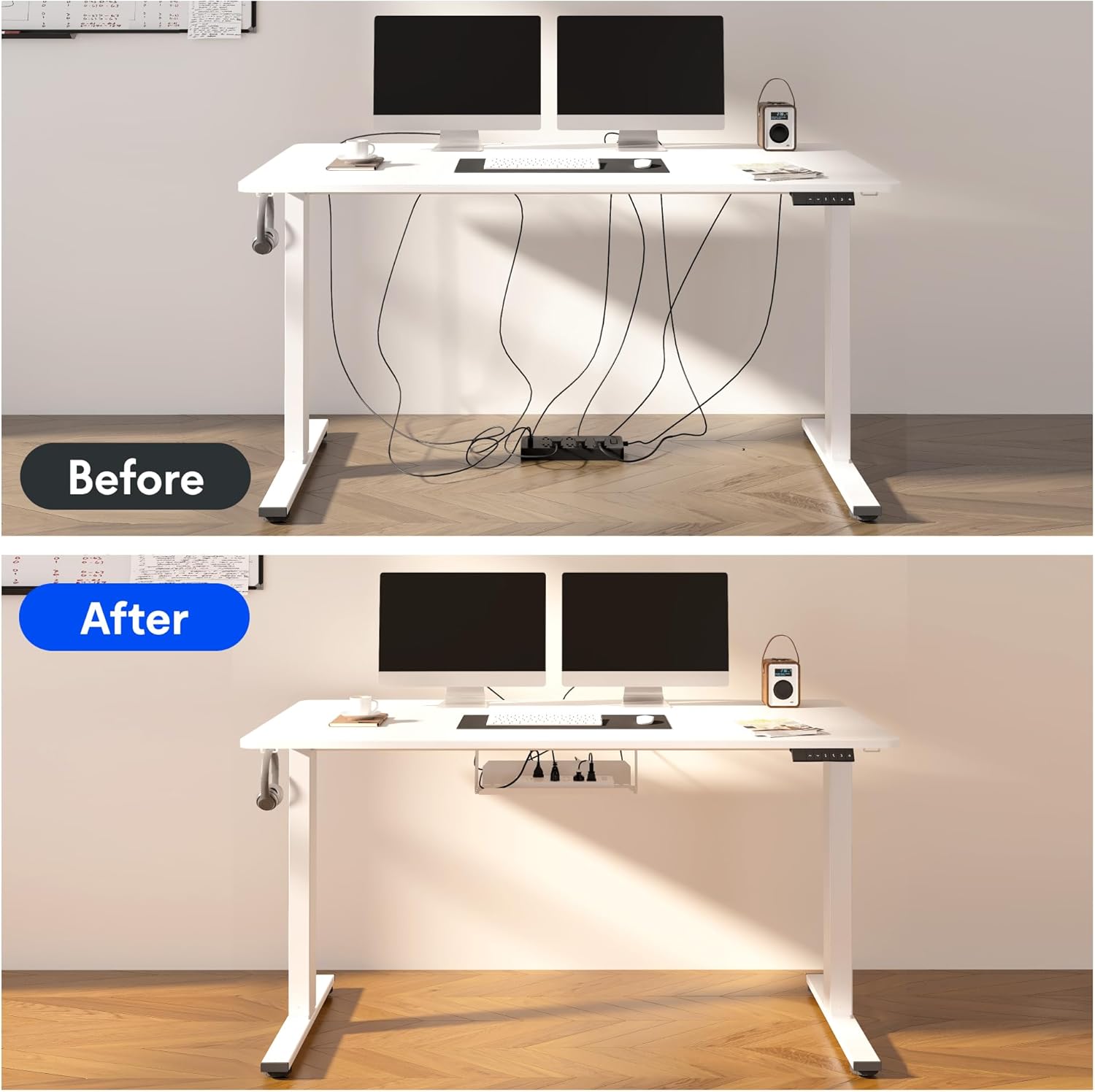
Image: A before-and-after comparison illustrating how the included cable management device transforms a cluttered workspace into an organized one.
Intelligentes Antikollisionssystem:
The desk is equipped with a smart anti-collision system that detects obstacles during height adjustment and stops movement to prevent damage or injury.

Image: Visual representations of the smart anti-collision system, adjustable foot pads for stability, cable ties for organization, and convenient storage hooks.
Zusätzliche Funktionen:
- Verstellbare Fußpolster: For stability on uneven floors.
- Aufbewahrungshaken: Praktische Haken für Kopfhörer oder Taschen.
Wartung
- Reinigung: Wischen Sie die Tischplatte und den Rahmen mit einem weichen, fusselfreien Tuch ab.amp Tuch. Vermeiden Sie aggressive Chemikalien oder Scheuermittel.
- Kabelinspektion: Periodically check all cables for wear or damage. Replace if necessary.
- Überprüfung der Befestigungselemente: Ensure all screws and bolts remain tight. Retighten if any looseness is detected.
- Motorpflege: The motor is maintenance-free. Avoid disassembling the motor or control box.
Fehlerbehebung
If you encounter any issues with your FLEXISPOT EN2 desk, please refer to the following common troubleshooting tips. For more complex problems, contact customer support.
- Schreibtisch bewegt sich nicht:
- Prüfen Sie, ob das Netzkabel sowohl am Schreibtisch als auch an der Wandsteckdose fest eingesteckt ist.
- Stellen Sie sicher, dass keine Hindernisse die Bewegung behindern.
- Ungleichmäßige Bewegung:
- Verify that the desk is assembled correctly and all fasteners are tight.
- Ensure the desk is on a level surface. Adjust the foot pads if necessary.
- Geräusche während des Betriebs:
- A slight hum is normal during movement. If the noise is excessive, check for loose components.
- Speichervoreinstellungen funktionieren nicht:
- Ensure you followed the saving procedure correctly (adjust to height, then press and hold the memory button).
- Try resetting the desk (refer to the full assembly guide for specific reset procedures if available).
Technische Daten
| Marke | FLEXISPOT |
| Modellname | EN 2-Norm |
| Technische Daten | 60"B x 24"T x 28"H (152.4 cm B x 60.96 cm T x 71.12 cm H) |
| Desktop-Dicke | 1 Zoll (2.54 cm) |
| Mindesthöhe | 28.1 Zoll (71.4 cm) |
| Maximale Höhe | 45.7 Zoll (116.1 cm) |
| Maximalgewichtsempfehlung | 176 Pfund (80 kg) |
| Grundmaterial | Legierter Stahl |
| Top-Materialtyp | Holz |
| Hebemechanismus | Elektrisch |
| Steckdosenleisten | 3 Wechselstromsteckdosen (125 V/12 A) |
| Steckdosenleiste mit USB-Anschlüssen | 2 USB-Anschlüsse (5V/2A) |
| Montage erforderlich | Ja |

Image: A comprehensive diagram detailing the dimensions of the desk's table, the adjustable height range of its legs, the power strip's specifications, and the size of the cable manager.
Garantie und Support
FLEXISPOT bietet Ihnen eine umfassende Garantieabdeckung für Ihre Sicherheit:
- 5 Jahr Garantie: Covers the desk frame, motors, and other mechanical devices.
- 2 Jahr Garantie: Covers the electric desk controller, switches, and other electronic components.
For warranty claims, technical support, or any inquiries regarding your FLEXISPOT EN2 desk, please contact FLEXISPOT customer service through their official webWebsite oder die Kontaktinformationen, die Sie bei Ihrem Kauf erhalten haben.
Ask a question about this manual
Ask about setup, troubleshooting, compatibility, parts, safety, or missing instructions. Manuals+ will review the question and use this page’s manual context to help answer it.