
Erste Schritte
Packungsinhalt
Upon opening the MAXTOP Smart Watch T5 package, you should find the following items:
- MAXTOP Smart Watch T5 device
- Silicone watch strap (black)
- USB-Ladekabel
- Bedienungsanleitung

Image: MAXTOP Smart Watch T5 package contents, showing the watch, a black silicone strap, a USB charging cable, and the user manual.
Aufladen des Geräts
Laden Sie Ihre Smartwatch vor der ersten Verwendung vollständig auf. Verbinden Sie das magnetische Ladekabel mit den Ladekontakten auf der Rückseite der Uhr und stecken Sie das USB-Ende in ein Standard-USB-Netzteil (nicht im Lieferumfang enthalten) oder einen USB-Anschluss Ihres Computers. Der Ladestatus wird auf dem Display der Uhr angezeigt.
Notiz:
- Stellen Sie sicher, dass die Ladekontakte sauber und trocken sind.
- Use a 5V/1A charger for optimal charging.
Ein-/Ausschalten
- So schalten Sie das Gerät ein: Press and hold the side button for a few seconds until the MAXTOP logo appears.
- So schalten Sie das Gerät aus: From the watch face, swipe down to access quick settings, or navigate to the "Settings" menu. Select the power icon and confirm to shut down the device.
App-Installation und Kopplung
To unlock the full functionality of your MAXTOP Smart Watch T5, you need to install the companion app on your smartphone.
- Laden Sie die App herunter: Suchen nach the "MAXTOP" app (or specified companion app in the included manual) in the Apple App Store (for iOS) or Google Play Store (for Android).
- Benutzerkonto erstellen: Öffnen Sie die App und folgen Sie den Anweisungen auf dem Bildschirm, um ein Konto zu erstellen und Ihr Pro-Konto einzurichten.file.
- Koppeln Sie die Uhr:
- Stellen Sie sicher, dass Bluetooth auf Ihrem Smartphone aktiviert ist.
- Open the app and navigate to the device pairing section.
- Select "Add Device" or similar option. The app will search for nearby devices.
- Select "MAXTOP T5" from the list of found devices.
- Bestätigen Sie die Kopplungsanfrage gegebenenfalls sowohl auf Ihrem Telefon als auch auf der Uhr.
Wichtig:
- Keep the watch close to your phone during the pairing process.
- Allow all requested permissions for the app to function correctly.
Funktionen und Bedienung
Navigieren in der Benutzeroberfläche
The MAXTOP Smart Watch T5 features a 1.54-inch full touch screen for easy navigation.
- Nach oben/unten wischen: Durch Menüs oder Benachrichtigungen scrollen.
- Nach links/rechts wischen: Access different feature screens or quick views.
- Klopfen: Wählen Sie ein Element aus oder bestätigen Sie eine Aktion.
- Seitentaste: Drücken Sie diese Taste, um zum Hauptzifferblatt zurückzukehren oder den Bildschirm zu aktivieren.

Image: The MAXTOP Smart Watch T5 display showcasing multiple functions including heart rate, blood pressure, music control, and various sports modes.
Daily Activity Tracking
Your smart watch automatically tracks your daily activities, including steps, distance, and calories burned. You can view detailed summaries in the companion app.

Image: The MAXTOP Smart Watch T5 tracking daily activities such as steps, calories, and distance, alongside icons representing various sports modes like hiking, cycling, and running.
Sportarten
The watch supports 10 different sport modes to accurately track your workouts. To start a sport mode:
- Swipe on the watch face to find the "Sport" icon or menu.
- Tap to select your desired activity (e.g., Outdoor Run, Indoor Walk, Cycling).
- The watch will begin tracking your activity. Tap to pause or end the workout.

Image: The MAXTOP Smart Watch T5 interface showing 10 distinct sport modes, such as hiking, outdoor cycling, indoor running, and elliptical training.
Heart Rate and Blood Pressure Monitoring
The watch can monitor your heart rate (HR) and blood pressure (BP). For accurate readings:
- Wear the watch snugly on your wrist, about one finger's width from your wrist bone.
- Bleiben Sie während der Messung ruhig.
- To measure: Navigate to the HR or BP icon on the watch and tap to start.

Image: The MAXTOP Smart Watch T5 displaying heart rate in beats per minute (BPM) and illustrating different sleep stages (awake, light, deep sleep).
Schlafüberwachung
The watch automatically tracks your sleep patterns, including awake time, light sleep, and deep sleep. View your sleep quality report in the companion app.

Image: The MAXTOP Smart Watch T5's sleep monitoring feature, displaying sleep duration and a detailed sleep quality analysis within the companion application.
Nachrichtenbenachrichtigungen
Receive notifications from your smartphone directly on your watch. Ensure the watch is paired and app notifications are enabled in your phone's settings and the companion app.
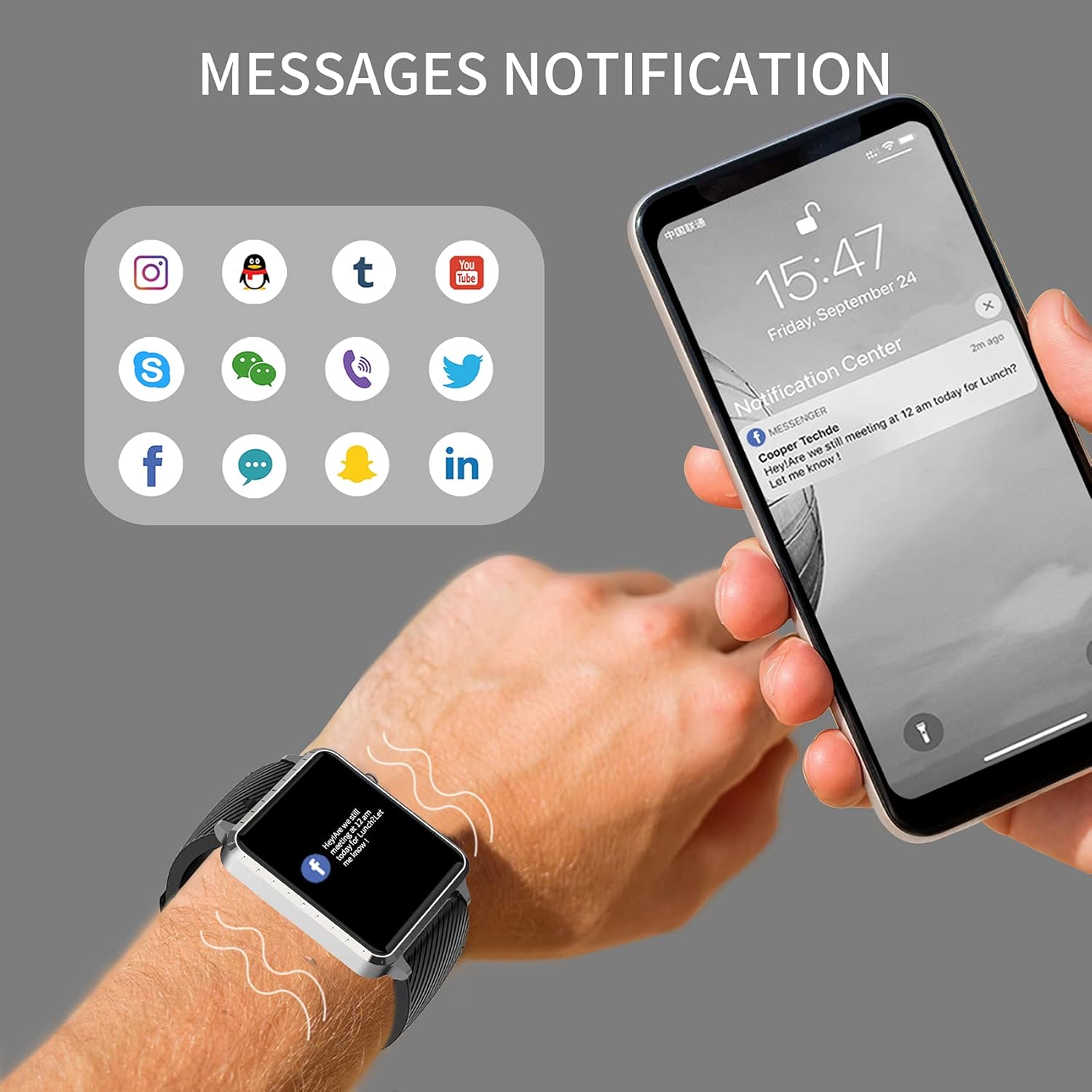
Image: The MAXTOP Smart Watch T5 showing incoming message notifications from popular social media and communication applications on its screen.
Musiksteuerung
Control music playback on your smartphone directly from your watch. This feature allows you to play, pause, skip tracks, and adjust volume without taking out your phone.

Image: The MAXTOP Smart Watch T5 demonstrating various features including music control, message notifications, sedentary reminders, and the 'find phone' function.
Andere Funktionen
- Bewegungsmangel-Erinnerungen: Stelle in der App Erinnerungen ein, um nach Phasen der Inaktivität zur Bewegung anzuregen.
- Telefon finden: Use this feature on your watch to make your paired phone ring, helping you locate it.
- Stoppuhr & Countdown: Access these tools from the watch's menu for timing activities.
Wartung und Pflege
Wasserbeständigkeit
The MAXTOP Smart Watch T5 is rated IP67 waterproof. This means it is resistant to splashes, rain, and brief immersion in water. It is suitable for daily use and can withstand hand washing or light rain.
Vorsicht:
- Do not use the watch for swimming, diving, or showering with hot water.
- Setzen Sie die Uhr keinem Hochdruckwasser oder Dampf aus.
- Die Wasserbeständigkeit ist kein dauerhafter Zustand und kann sich mit der Zeit durch normale Abnutzung verringern.
Reinigung
Regularly clean your watch and strap to maintain hygiene and prevent skin irritation.
- Wischen Sie den Bildschirm und das Gehäuse der Uhr mit einem weichen, fusselfreien Tuch ab.amp, fusselfreies Tuch.
- For the silicone strap, you can wash it with mild soap and water, then rinse thoroughly and dry completely before reattaching to your wrist.
- Vermeiden Sie die Verwendung aggressiver Chemikalien oder Scheuermittel.
Batteriepflege
So verlängern Sie die Akkulaufzeit:
- Laden Sie die Uhr vor dem ersten Gebrauch vollständig auf.
- Vermeiden Sie extreme Temperaturen.
- If not using the watch for an extended period, charge it to about 50% before storing.
Fehlerbehebung
Uhr lässt sich nicht einschalten
- Stellen Sie sicher, dass die Uhr vollständig aufgeladen ist. Schließen Sie sie für mindestens 30 Minuten an das Ladegerät an.
- Drücken und halten Sie die Seitentaste 10-15 Sekunden lang, um einen Neustart zu erzwingen.
Kopplung mit dem Telefon nicht möglich
- Stellen Sie sicher, dass Bluetooth auf Ihrem Telefon aktiviert ist und sich die Uhr in Reichweite befindet.
- Starten Sie sowohl Ihr Telefon als auch die Uhr neu.
- Ensure the companion app is installed and updated to the latest version.
- Forget the device from your phone's Bluetooth settings and try pairing again through the app.
- Prüfen Sie, ob die Uhr bereits mit einem anderen Gerät gekoppelt ist.
Inaccurate Readings (HR/BP/Sleep)
- Ensure the watch is worn correctly: snug on the wrist, not too tight or too loose.
- Bleiben Sie während der Messungen ruhig.
- Bitte beachten Sie, dass die Messwerte der Smartwatch nur zu Referenzzwecken dienen und nicht für medizinische Diagnosen verwendet werden sollten.
Benachrichtigungen werden nicht angezeigt
- Vergewissern Sie sich, dass die Uhr erfolgreich mit Ihrem Telefon gekoppelt wurde.
- Überprüfen Sie die App-Benachrichtigungseinstellungen auf Ihrem Telefon und in der zugehörigen App.
- Stellen Sie sicher, dass die App im Hintergrund läuft und nicht von den Energiesparfunktionen Ihres Telefons beendet wird.
Technische Daten
| Besonderheit | Detail |
|---|---|
| Marke | MAXTOP |
| Modell | T5 |
| Bildschirmgröße | 1.54 Zoll |
| Technische Daten | 1.46 x 1.57 x 0.28 Zoll |
| Artikelgewicht | 1.87 Unzen (53 Gramm) |
| Betriebssystem | Android- und iOS-kompatibel |
| Drahtlose Kommunikation | Bluetooth |
| Akku-Typ | Lithium-Polymer (1 enthalten) |
| Akkulaufzeit | Bis zu 10 Tage |
| Wasserbeständigkeit | Wasserdicht (IP67) |
| Erstes verfügbares Datum | 6. Juli 2022 |

Image: Detailed physical dimensions of the MAXTOP Smart Watch T5, including the watch face width, height, and the adjustable strap length.
Garantie und Support
For warranty information and customer support, please refer to the official MAXTOP webSie können die Website besuchen oder sich direkt an den Kundenservice wenden. Einzelheiten finden sich in der Regel auf der Verpackung oder auf der Herstellerseite. webWebsite.
Bewahren Sie Ihren Kaufbeleg als Kaufnachweis für eventuelle Garantieansprüche auf.