
Einführung
Thank you for choosing the Audizio SB85 Soundbar with Subwoofer. This manual provides essential information for the safe and correct operation of your new audio system. Please read it thoroughly before use and retain it for future reference. The SB85 is designed to enhance your television's audio, providing a rich, immersive sound experience for movies, games, and music, complete with a dedicated subwoofer for powerful bass.
Sicherheitshinweise
- Lesen Sie alle Anweisungen sorgfältig durch, bevor Sie das Gerät in Betrieb nehmen.
- Keep the unit away from water, moisture, and heat sources.
- Blockieren Sie keine Belüftungsöffnungen.
- Verwenden Sie nur vom Hersteller angegebene Anbaugeräte/Zubehör.
- Bei Gewitter oder längerer Nichtbenutzung des Geräts den Stecker ziehen.
- Überlassen Sie sämtliche Wartungsarbeiten qualifiziertem Servicepersonal.
- Do not expose the battery (if applicable) to excessive heat such as sunshine, fire, or the like.
Packungsinhalt
Stellen Sie sicher, dass alle Artikel in der Box vorhanden sind:
- Audizio SB85 Soundbar
- Kabelgebundener Subwoofer
- Fernbedienung
- Optical Cable (Toslink)
- AUX-Kabel
- Netzteil
- Bedienungsanleitung
Produkt überview
The Audizio SB85 system consists of a soundbar and a separate wired subwoofer, designed to deliver a powerful and clear audio experience.
Soundbar-Funktionen
- Integrated 150W speaker system with 4 speakers (2x 2cm range, 2x 2cm tweeter).
- Front LED display for status indication.
- Control buttons on the side panel.
- Multiple input options: HDMI (ARC), USB, Line In (AUX), Coaxial, Optical.
- Bluetooth 5.0 für kabelloses Audio-Streaming.

Image: Close-up of the Audizio SB85 Soundbar's control panel and its remote control, highlighting Bluetooth 5.0 and ease of use.

Bild: Intern view of the Audizio SB85 Soundbar's full-range speaker, emphasizing its 150W speaker system for an immersive audio experience.
Subwoofer-Funktionen
- 5.25-inch wired subwoofer for enhanced bass response.

Image: Close-up of the Audizio SB85 wired subwoofer, designed to amplify bass frequencies.
Aufstellen
1. Platzierung
Place the soundbar centrally below your television. The subwoofer can be placed on the floor near the soundbar, ideally in a corner for optimal bass reflection, but ensure it is not obstructed.

Image: Audizio SB85 Soundbar and Subwoofer setup in a living room, demonstrating room-filling sound and clean design.

Image: Audizio SB85 Soundbar placed below a television, illustrating its universal compatibility with any TV.
2. An die Stromversorgung anschließen
Connect the power adapter to the DC IN port on the soundbar and then plug it into a wall outlet (230 Vac/50 Hz).
3. Anschluss des Subwoofers
Connect the wired subwoofer to the dedicated subwoofer output port on the soundbar.
4. Anschluss von Audioquellen
The SB85 offers several connection options:
- HDMI (ARC): For the best audio quality and control, connect an HDMI cable from the HDMI (ARC) port on the soundbar to the HDMI ARC port on your TV. This allows the TV to send audio to the soundbar and often enables TV remote control of the soundbar's volume.
- Optisch (Toslink): Connect the included optical cable from the OPTICAL port on the soundbar to the Optical Digital Audio Out port on your TV or other audio source.
- Line-In (AUX): Use the included AUX cable to connect the LINE IN port on the soundbar to the headphone jack or audio output of your device (e.g., smartphone, MP3 player).
- Koaxial: Connect a coaxial cable (not included) from the COAXIAL port on the soundbar to the Coaxial Digital Audio Out port on your TV or other audio source.
- USB: Stecken Sie einen USB-Stick in den USB-Anschluss, um MP3-Dateien abzuspielen.
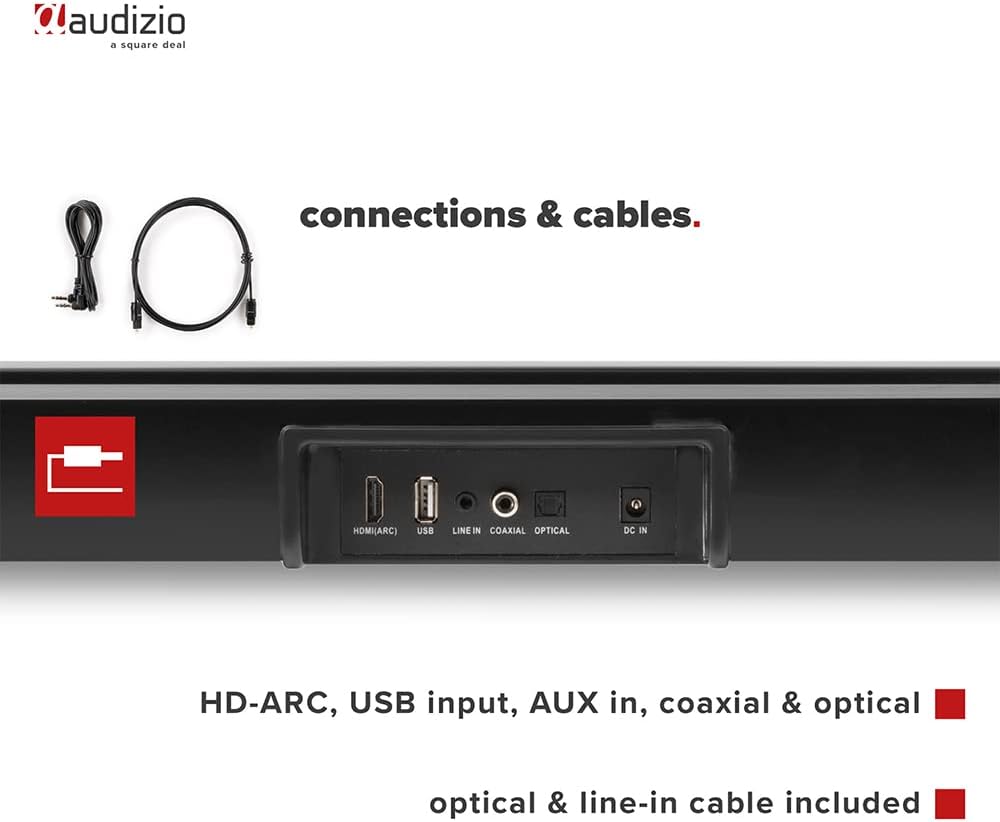
Bild: Rückseite view of the Audizio SB85 Soundbar showing various connection ports: HDMI (ARC), USB, Line In, Coaxial, and Optical. Includes optical and line-in cables.
Bedienungsanleitung
1. Ein-/Ausschalten
Drücken Sie den Ein-/Ausschalter an der Soundbar oder an der Fernbedienung, um das Gerät ein- oder auszuschalten.
2. Auswahl der Eingangsquelle
Press the 'MODE' button on the soundbar or the remote control repeatedly to cycle through the available input sources: HDMI (ARC), Optical, Coaxial, AUX, USB, and Bluetooth. The selected input will be shown on the front LED display.
3. Lautstärkeregelung
Use the 'VOL+' and 'VOL-' buttons on the soundbar or the remote control to adjust the volume. The 'MUTE' button on the remote control will temporarily silence the audio.
4. Bluetooth-Kopplung
- Switch the soundbar to Bluetooth mode using the 'MODE' button. The LED display will show 'BT'.
- Aktivieren Sie auf Ihrem Smartphone oder Tablet Bluetooth und suchen Sie nach verfügbaren Geräten.
- Select 'Audizio SB85' from the list of devices.
- Once paired, the soundbar will indicate a successful connection, and you can stream audio wirelessly.
5. USB-Wiedergabe
Stecken Sie einen USB-Stick mit MP3-Audiodateien ein. files into the USB port. The soundbar will automatically switch to USB mode and begin playing the music. Use the remote control to navigate tracks (play/pause, next/previous).
6. Fernbedienungsfunktionen
The remote control provides full functionality for the soundbar, including power, mode selection, volume, mute, and playback controls for USB and Bluetooth modes.
Wartung
Reinigung
Wipe the soundbar and subwoofer surfaces with a soft, dry cloth. Do not use abrasive cleaners, waxes, or solvents as they may damage the finish. Ensure the device is unplugged before cleaning.
Lagerung
Wenn Sie das Gerät über einen längeren Zeitraum lagern, ziehen Sie den Netzstecker und bewahren Sie es an einem kühlen, trockenen Ort, fern von direkter Sonneneinstrahlung und extremen Temperaturen, auf.
Fehlerbehebung
| Problem | Mögliche Ursache | Lösung |
|---|---|---|
| Kein Strom | Stromkabel nicht angeschlossen; Steckdose defekt | Überprüfen Sie den Netzanschluss; versuchen Sie eine andere Steckdose. |
| Kein Ton | Incorrect input selected; Volume too low; Mute activated; Cable connection loose | Select correct input source; Increase volume; Deactivate mute; Check all audio cable connections. |
| Bluetooth stellt keine Verbindung her | Soundbar not in Bluetooth mode; Device too far; Device already connected to another unit | Switch soundbar to BT mode; Move device closer; Disconnect from other devices and try again. |
| Fernbedienung funktioniert nicht | Batterien leer; Blockade zwischen Fernbedienung und Soundbar | Batterien austauschen; Hindernisse beseitigen. |
Technische Daten
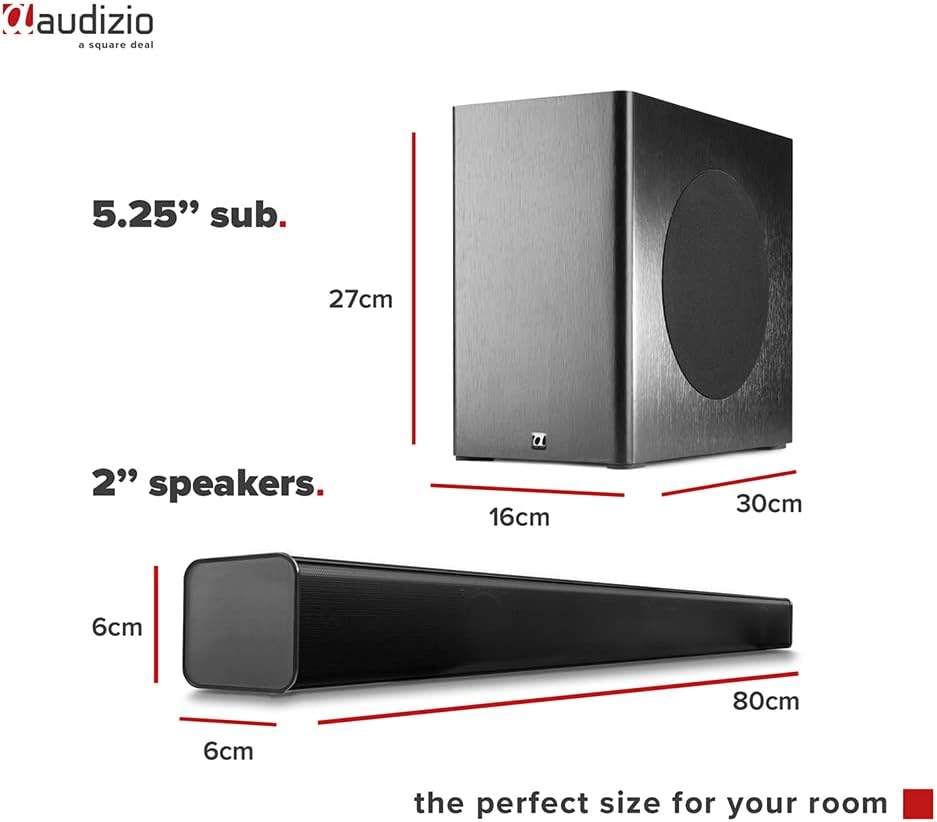
Image: Diagram showing the dimensions of the Audizio SB85 Soundbar and its subwoofer.
- Leistungsabgabe: 150 W (max.)
- Lautsprecherkonfiguration: 4 speakers (2x 2cm range, 2x 2cm tweeter)
- Subwoofer-Größe: 5.25 Zoll
- Frequenzbereich: 50 Hz – 16,000 Hz
- Maximaler Schalldruck: 125 dB
- Konnektivität: Bluetooth 5.0, HDMI (ARC), USB, Line In (AUX), Coaxial, Optical
- Audioausgabemodus: Stereo
- Kompatible Geräte: MP3 Player, Smartphone, TV
- Energiequelle: 230 Vac/50 Hz (via electric cable)
- Abmessungen der Soundbar (L x B x H): 80 x 6 x 6 cm
- Subwoofer-Abmessungen (L x B x H): 16 x 30 x 27 cm
- Gesamtgewicht: 3.9 kg
- Modellnummer: 100.292
Garantie und Support
Informationen zur Garantie und technische Unterstützung finden Sie in der Ihnen beim Kauf ausgehändigten Dokumentation oder wenden Sie sich an Ihren Händler. Bewahren Sie Ihren Kaufbeleg für eventuelle Garantieansprüche auf.